Home » Posts tagged 'Windows Azure'
Tag Archives: Windows Azure
A year of healthy progress along Microsoft strategic ambitions
Microsoft Stock Price for the last 5 years — July 22, 2016: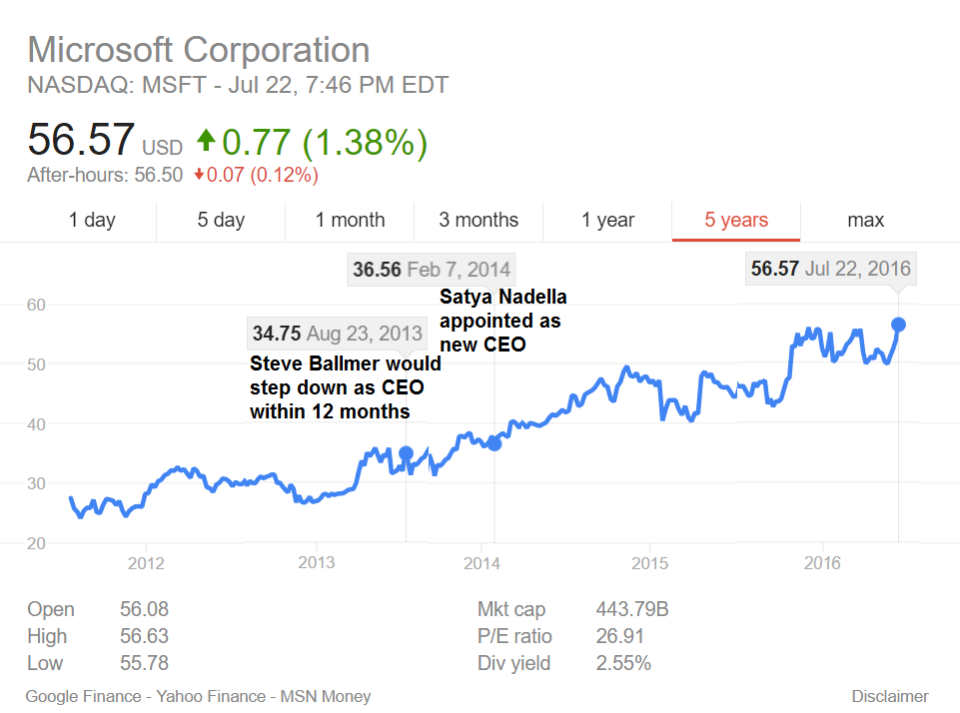 My earlier posts related specifically to this 3 years overall transition history:
– Microsoft partners empowered with ‘cloud first’, high-value and next-gen experiences for big data, enterprise social, and mobility on wide variety of Windows devices and Windows Server + Windows Azure + Visual Studio as the platform as of July 10, 2013
– Microsoft reorg for delivering/supporting high-value experiences/activities as of July 11, 2013
– An ARM-focussed Microsoft spin-off could be the only solution to save Microsoft in the crucial next 3-years period as of August 24, 2013
– Opinion Leaders and Lead Opinions: Reflections on Steven Sinofsky’s “Era of Continuous Productivity” vision as of September 1, 2013
– The question mark over Wintel’s future will hang in the air for two more years as of September 15, 2013
– Microsoft could be acquired in years to come by Amazon? The joke of the day, or a certain possibility (among other ones)? as of September 16, 2013
– Sinofsky’s ‘continuous productivity’ idea to be realised first in Box Notes as of September 21, 2013
 – Microsoft is transitioning to a world with more usage and more software driven value add (rather than the old device driven world) in mobility and the cloud, the latter also helping to grow the server business well above its peers as of April 25, 2014
– Satya Nadella on “Digital Work and Life Experiences” supported by “Cloud OS” and “Device OS and Hardware” platforms–all from Microsoft as of July 23, 2014
– Steve Ballmer on leaving Microsoft, relationship with Bill Gates: “We’ve dusted-up many times”, on His Biggest Regret: “doing hardware earlier [for being] more effective in phone business” AND on Amazon: “They Make No Money.” as October 25, 2014
– The Empire Reboots — Can C.E.O. Satya Nadella Save Microsoft? | Vanity Fair, Oct 27, 2014

WPC Day 1: The Digital Transformation Opportunity from Microsoft Partner Network UK Blog as of July 11, 2016:
“Empower every person and every
organisation on the planet to achieve more”
The Microsoft MissionAt the core of today’s opening Worldwide Partner Conference keynote was ‘Digital Transformation’ aka the desire of CEO’s to use technology to change business outcomes – whether it be how they:
- Engage their customers,
- Empower employees to make better decisions,
- Optimise their operations,
- Build up the predictive power within their organisations so that every operation is intelligent,
- Transform their products and services.
Digital Transformation = An Unprecedented Partner Opportunity
Every customer of every size business (startup to Enterprise) is not only looking to use digital technology, but to build digital technology for their own.
Businesses are looking to drive greater efficiency – automating processes and enhancing productivity, particularly in those areas where there are operating expenses. This poses an unprecedented opportunity for you no matter what partner type you are.
Microsoft Ambitions to Drive Digital Transformation
Microsoft has three core ambitions which play a fundamental part in digitally transforming businesses:
- Re-inventing Productivity and Business process
- Building the Intelligent Cloud
- Create more Personal Computing
These will be covered in more detail over the next two days keynotes, however, Satya provided some great examples of what these 3 ambitions entail.
1) Re-inventing Productivity and Business Process
This is all about removing the barriers between productivity tools and business applications. Satya focused on two key areas:
Connected Cloud & Data: In essence striving for connected cloud data SaaS solutions such as Office 365 and Dynamics 365 to simplify information/data sharing, removing what he terms the productivity friction in businesses. See how EcoLab are transforming their business. (Watch the demo 36 minutes into the Day 1 Keynote). Also read Satya’s LinkedIn post on Reinventing Business Processes.
- ‘Conversations as a Platform’: Using human language understanding personal assistants and Bots (conversational interfaces) which augment our connection with technologies. (Watch the demo 48 minutes into Day 1 Keynote)
2) Building out the intelligent Cloud
To showcase how intelligent cloud is helping transformation, Satya invited General Electric CEO, Jeff Immelt, on stage to discuss how he has digitally transformed the GE business.
Considering GE is over 140 years old, it’s a company that has embraced transformation and digital transformation. You can read more about their story and find out about Microsoft’s new partnership with GE to bring Predix to Azure, accelerating digital transformation for industrial customers.
Satya then went on to talk about ‘The next phase of building the Intelligent cloud’ with ‘Cognitive services’. We’re seeing the beginnings of a new platform for cognitive services. Microsoft has taken decades of research from Microsoft Research encapsulating speech, computer vision, natural language text understanding, and made these available as API’s. These API’s are being used to infuse perception into apps – the ability for Apps/Bots to understand speech and see i.e. computer vision. These cognitive capabilities are capable of transforming business by bringing productivity gains. A great example of this is how Macdonalds are creating efficiency in their Drive Thru’s with speech/order recognition (Watch the demo 1 hour 10 minutes into the Day 1 keynote).
3) Create More Personal Computing
Create more personal computing was the third and final ambition covered. Satya discussed Windows 10 – an OS system spanning multiple devices from Raspberry PI to Hololens and bringing centralised infrastructure benefits and cost savings to business.
It was on the topic of Hololens, he discussed how personal computing is shaped by category creation moments. Moments where input and output change. ‘Mixed Reality’ is that moment. With Hololens its created an interface changing moment – Mixing real with virtual, enabling us to be anywhere and everywhere – fully untethered and mobile.
What followed was a great demo showcasing how Japan Airlines are using Microsoft HoloLens to change how they train flight crews and mechanics (Watch the demo 1 hour 17 minutes into the Day 1 keynote)
Mixed reality offers huge opportunities for partners with so many applications across so many sectors.
Expect more details on Digital Transformation and Microsoft’s three ambitions in WPC Day 2 and 3 keynotes.
News From WPC2016 Day 1
![Digital-transformatoin-all-partner-types1-1024x530[1]](https://lazure2.wordpress.com/wp-content/uploads/2016/07/digital-transformatoin-all-partner-types1-1024x5301.png)

![Cn3vy4QXEAAMQO_[1]](https://lazure2.wordpress.com/wp-content/uploads/2016/07/cn3vy4qxeaamqo_1.jpg)
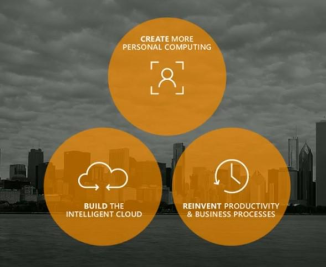
The three ambitions announced a year ago and the proof-points of healthy progress along them in FY16:
- Office 365, Dynamics 365, AppSource, and LinkedIn as all being part of one overarching strategy in Productivity and Business Process:
– core part of an overarching strategy
– digital transformation both for us and our partnerships with customers - Significant differentiation vs. Amazon AWS in Intelligent Cloud:
– enterprise cloud leadership
– every customer is also an ISV
– hyperscale-plus-hybrid approach with annuity focus enabling cloud lead conversation with customers
– meeting cloud needs of customers where they are - Windows strategy to achieve progress in More Personal Computing:
– deliver more value and innovation, particularly for enterprise customers
– grow new monetization through services across our unified Windows platform
– innovate in new device categories in partnership with our OEMs
The Q1FY16 progress was presented in my Microsoft is ready to become a dominant force in cloud computing with superior cloud offerings, a Windows ecosystem under complete renewal, first signs of Surface-Lumia-Xbox successes on the market, and strong interest in technology partnerships by other industry leaders as of October 24, 2015.
“Reinvent Productivity and Business Processes“, “Build the Intelligent Cloud” and “Create More Personal Computing” were the original 3 “interlocking ambitions” the Microsoft CEO talked about at Microsoft Iginite held on May 4-8, 2015 in Chicago. The proof-points of FY16 progress are shown along that list, and explained in detail by remarks from Microsoft (MSFT) Satya Nadella on Q4 2016 Results – Earnings Call Transcript as of July 18, 2016.
For more information see also: Q4 2015 Earning Call Transcript, the 2015 Annual Report or—even better—my earlier posts indicated here under each ambition. For a deeper strategic intent underlying these ambilitions see my earlier post Julia Liuson: “Microsoft must transform from a company that throws a box with software into the market … into a company that offers pure services” published on October 25, 2015. These ambitions also became reporting segments in FY16. See Earnings Release FY16 Q1 as of October 22, 2015. The major corporate groups were also organised along these line: ASG = Application & Services Group for “Reinvent productivity and business processes” ambition, C&E = Cloud & Enterprise for “Build the intelligent cloud platform” ambition, and OSG= Operating Systems Group for “Create more personal computing” ambition.
Note that the overall strategic approach was developed 2 years ago and it was described in my post Satya Nadella on “Digital Work and Life Experiences” supported by “Cloud OS” and “Device OS and Hardware” platforms–all from Microsoft of July 23, 2014:

Here are the remarks from Microsoft (MSFT) Satya Nadella on Q4 2016 Results – Earnings Call Transcript as of July 18, 2016. for details
1. Office 365, Dynamics 365, AppSource, and LinkedIn as all being part of one overarching strategy in Productivity and Business Process:
For initial and additional details available earlier see my earlier posts:
– The first “post-Ballmer” offering launched: with Power BI for Office 365 everyone can analyze, visualize and share data in the cloud as of February 10, 2014
– OneNote is available now on every platform (+free!!) and supported by cloud services API for application and device builders as of March 18, 2014
– An upcoming new era: personalised, pro-active search and discovery experiences for Office 365 (Oslo) as of April 2, 2014
– Microsoft Azure: Marketable machine learning components capability for “a new data science economy”, and real-time analytics for Azure HDInsight service as of October 22, 2014
In fact, this last quarter, some of the most strategic announcements were all around our application platform. At our partner conference, there was a significant amount of excitement with the tools that we announced like PowerApps and Power BI, Azure functions and Flow. These are tools that our developers and system integrators and solution partners will use in order to be able to customize applications around Azure. And so to me that’s another huge advantage and a competitive differentiation for us.
1.1 Core part of an overarching strategy
The move to the cloud for our customers and for us is not just about a new way of delivering the same value just as a SaaS service. It’s really the transformation from having applications that are silos to becoming more services in the cloud where you can reason about the activity and the data underneath these services to benefit the customers who are using these services. So that’s what this notion of a graph [by Microsoft Graph] represents.
So when somebody moves to Office 365, their graph [by Microsoft Graph], their people, their relationships with other people inside the organization, their work artifacts all move to the cloud. You can connect them with all the business process data that’s in Dynamics 365, but not just in Dynamics 365 but all the applications in AppSource because business process will always be a much more fragmented market as opposed to just one market share leader by industry, by vertical, by country. And so that’s our strategy there.
And now the professional cloud or the professional network helps usage across all of that professional usage. Whether it’s in Office 365 or whether you’re a salesperson using any application related to sales, you want your professional network there. Of course, it’s relevant in recruiting, it’s relevant in training, it’s relevant in marketing. So that’s really our strategy with LinkedIn as the professional network meeting the professional cloud. And these are all part of one overarching strategy, and ultimately it’s about adding value to customers.
1.2 Digital transformation both for us and our partnerships with customers
This past year was a pivotal one in both our transformation and in our partnerships with customers who are also driving their own digital transformation. Our progress is best captured in the results of our three ambitions, starting with Productivity and Business Process. In a world of infinite information but finite attention and time, we aim to change the nature of work with digital technology. In pursuit of this ambition, we continue to add value to our products, grow usage, and increase our addressable market. Along these lines, let me start with Office 365 and then move to Dynamics 365.
In the last quarter, we advanced our collaboration tools. We launched Microsoft Planner, which helps teams manage operations, as well as Skype Meetings, which is aimed at helping small businesses collaborate. In June, we further strengthened our security value proposition with the release of Advanced Security Management.
Lastly, we continue to add intelligence in machine learning to Office to help people automate their tasks and glean insights from data. These advancements helped to drive increased usage across enterprises, small and medium businesses, and consumers. In the enterprise, Office 365 Commercial seats grew 45% year over year, and revenue grew 59% in constant currency. Also 70% of our Office Enterprise agreement renewals are in the cloud. Innovative companies like Facebook, Hershey’s, Discovery Communications, Cushman Wakefield all adopted Office 365 and now see how transformative this service can be for their own business.
We are enthusiastic about the early feedback and growth opportunity from companies using our newly released Office 365 E5, which includes powerful security controls, advanced analytics, and cloud voice. These customers tell us that they love the simplification that comes with standardizing across all of our productivity workloads.
We will continue to grow our install base and drive premium mix through offers like Office 365 E5, but they’re very, very early days of E5. And E5 value proposition across all three of the areas, whether it’s cloud voice or analytics or security are all three massive areas for us. And I would say if anything, the initial data from our customers around security is gaining a lot of traction. But at the same time, one of the things that customers are looking for is making an enterprise-wide architectural decision across all of the workloads.
We see momentum in small and medium businesses, with a growing number of partners selling Office 365, now up to nearly 90,000, a 25% increase year over year. We continue to grab share and adding over 50,000 customers each month for 28 consecutive months.
We also see momentum amongst consumers, with now more than 23 million Office 365 subscribers. Across segments, customers increasingly experience the power of Office on their iOS and Android mobile devices. In fact, we now have more than 50 million iOS and Android monthly active devices, up more than four times over last year.
Now let’s talk about progress with the other pillar of this ambition, Dynamics 365. We are removing any impedance that exists between productivity, collaboration, and business process. This month we took a major step forward with the introduction of Microsoft Dynamics 365 and Microsoft AppSource. Dynamics 365 provides business users with purpose-built SaaS applications. These applications have intelligence built in. They integrate deeply with communications and collaboration capabilities of Office 365.
Dynamics 365 along with AppSource and our rich application platform introduces a disruptive and customer-centric business model so customers can build what they want and use just the capabilities they need. The launch of Dynamics 365 builds on the momentum we’re already seeing in this business. Customers around the globe are harnessing the power of Dynamics in their own transformation, including 24 Hour Fitness and AccuWeather. Overall, Dynamics now has nearly 10 million monthly paid seats, up more than 20% year over year, and Q4 billings grew more than 20% year over year.
Overall, Business Processes represent an enormous addressable market, projected to be more than $100 billion by 2020. It’s a market we are increasingly focused on, and I believe we are poised with both Dynamics 365 and Microsoft AppSource to grow and drive opportunity for our partners.
Across Office 365 and Dynamics 365, developers increasingly see the opportunity to build innovative apps and experiences with the Microsoft Graph, and we now have over 27,000 apps connected to it. Microsoft AppSource will be a new way for developers to offer their services and reach customers worldwide.
Lastly, with Office 365 and Dynamics 365, we have the opportunity to connect the world’s professional cloud and the world’s professional network with our pending LinkedIn deal. Overall, the Microsoft Cloud is winning significant customer support. With more than $12 billion in Commercial Cloud annualized revenue run rate, we are on track to achieve our goal of $20 billion in fiscal year 2018. Also, nearly 60% of the Fortune 500 companies have at least three of our cloud offerings. And we continue to grow our annuity mix of our business. In fact, commercial annuity mix increased year over year to 83%.
2. Significant differentiation vs. Amazon AWS in Intelligent Cloud
For initial and additional details available earlier see my earlier posts:
– Windows Azure becoming an unbeatable offering on the cloud computing market as of June 28, 2013
– Microsoft partners empowered with ‘cloud first’, high-value and next-gen experiences for big data, enterprise social, and mobility on wide variety of Windows devices and Windows Server + Windows Azure + Visual Studio as the platform as of July 10, 2013

– 4. Microsoft products for the Cloud OS [‘Experiencing the Cloud’, as of Dec 18, 2013, but published only on Feb 14, 2014] (was separated from the next “half bakedness” post because of its length)
– 4.5. Microsoft talking about Cloud OS and private clouds: starting with Ray Ozzie in November, 2009[‘Experiencing the Cloud’, as of Dec 18, 2013, but published only on Feb 14, 2014] (was separated from the next “half bakedness” post because of its length)
– Microsoft’s half-baked cloud computing strategy (H1’FY14) as of February 17, 2014 Note that this “half bakedness” ended by the facts published in Microsoft is ready to become a dominant force in cloud computing with superior cloud offerings, a Windows ecosystem under complete renewal, first signs of Surface-Lumia-Xbox successes on the market, and strong interest in technology partnerships by other industry leaders as of October 24, 2014
– Microsoft is transitioning to a world with more usage and more software driven value add (rather than the old device driven world) in mobility and the cloud, the latter also helping to grow the server business well above its peers as of April 25, 2014
– Microsoft BUILD 2014 Day 2: “rebranding” to Microsoft Azure and moving toward a comprehensive set of fully-integrated backend services as of April 27, 2014
– Scott Guthrie about changes under Nadella, the competition with Amazon, and what differentiates Microsoft’s cloud products as of October 2, 2014
– Sam Guckenheimer on Microsoft Developer Division’s Journey to Cloud Cadence as of October 19, 2014
– Microsoft Azure: Marketable machine learning components capability for “a new data science economy”, and real-time analytics for Azure HDInsight service as of October 22, 2014
– Microsoft Cloud state-of-the-art: Hyper-scale Azure with host SDN — IaaS 2.0 — Hybrid flexibility and freedom as of July 11, 2015
– Microsoft’s first quarter proving its ability to become a dominant force in cloud computing with superior cloud offerings as of Januar 27, 2015
– DataStax: a fully distributed and highly secure transactional database platform that is “always on” as of February 3, 2016
– Microsoft chairman: The transition to a subscription-based cloud business isn’t fast enough. Revamp the sales force for cloud-based selling as of June 6, 2016
Cloud Growth Helps Microsoft Beat Street in Q4 from TheStreet as of July 19, 2016
… [0:34] and Microsoft’s Enterprise Mobility [Suite]
customers nearly doubled YoY to 33,000. [0:40] …
Note that the Q1FY16 report was that “Enterprise Mobility [Suite] customers more than doubled year-over-year to over 20,000, and the installed base grew nearly 6x year-over-year“. Enterprise Mobility Suite (EMS) is a service available in the CSP (Cloud Solution Partner program) along with Windows Intune, Office 365, Azure and CRM Online. The reason for that very impressive growth was given by Satya Nadella in the much earlier Q2FY15 report as:
Microsoft Enterprise Mobility Suite is one key of product innovation that I would like to highlight given the growth and uniqueness of our offering. Microsoft offers a comprehensive solution that brings together mobile device management, mobile application management, hybrid identity management and data protection into a unified offering via EMS.
Office 365 now includes new app experiences on all phones and tablets for mobile productivity. Further, we have released completely new scenarios. This includes Office Sway for visualizing and sharing ideas; Delve, to help search and discover content; Office 365 Groups to make it easier to collaborate; andOffice 365 Video for secure media streaming for businesses.
Finally, we continue to invest in enterprise value by integrating MDM and the Enterprise Mobility Suite into Office 365; new encryption technologies and compliance certifications; and new eDiscovery capabilities in Exchange.
…
Overall at the highest level, our strategy here is to make sure that the Microsoft Services i.e. cloud services be it Azure, Office 365, CRM Online or Enterprise Mobility Suite are covering all the devices out there in the marketplace. So that, that way we maximize the opportunity we have for each of these subscription and capacity based services.
2.1 Enterprise cloud leadership
Now let’s get into the specifics of the Intelligent Cloud, an area of massive opportunity, as we are clearly one of the two enterprise cloud leaders. Companies looking to digitally transform need a trusted cloud partner and turn to Microsoft. As a result, Azure revenue and usage again grew by more than 100% this quarter. We see customers choose Microsoft for three reasons. They want a cloud provider that offers solutions that reflect the realities of today’s world and their enterprise-grade needs. They want higher level services to drive digital transformation, and they want a cloud open to developers of all types. Let me expand on each.
To start, a wide variety of customers turn to Azure because of their specific real-world needs. Multinationals choose us because we are the only hybrid and hyperscale cloud spanning multiple jurisdictions. We cover more countries and regions than any other cloud provider, from North America to Asia to Europe to Latin America. Our cloud respects data sovereignty and makes it possible for an enterprise application to work across these regions and jurisdictions. More than 80% of the world’s largest banks are Azure customers because of our leadership support for regulatory requirements, advanced security, and commitment to privacy. Large ISVs like SAP and Citrix as well as startups like Sprinklr also choose Azure because of our global reach and a broad set of platform services. Last week GE announced it will adopt our cloud for its IoT approach.
Next, Azure customers also value our unique higher-level services. Now at 33,000, we nearly doubled in one year the number of companies worldwide that have selected our Enterprise Mobility Solutions. The Dow Chemical Company leverages EMS along with Azure, Office 365, and Dynamics to give its thousands of employees secure real-time access to data and apps from anywhere.
Just yesterday, we announced Boeing will use Azure, our IoT suite, and Cortana Intelligence to drive digital transformation in commercial aviation, with connected airline systems optimization, predictive maintenance, and much more. This builds on great momentum in IoT, including our work with Rolls-Royce, Schneider Electric, and others.
This is great progress, but our ambitions are set even higher. Our Intelligent Cloud also enables cognitive services. Cortana Intelligence Suite offers machine learning capabilities and advanced predictive analytics. Customers like Jabil Circuit, Fruit of the Loom, Land O’Lakes, LIBER already realize the benefits of these new capabilities.
Lastly, central to our Intelligent Cloud ambition is providing developers with the tools and capabilities they need to build apps and services for the platforms and devices of their choice. We have the best support for what I would say is the most open platform for all developers. Not only is .NET first class but Linux is first class, Java is first class. The new Azure Container service cuts across both containers running on Windows, running across Linux. So again, it speaks to the enterprise reality. .NET Core 1.0 for open source and our ongoing work with companies such as Red Hat, Docker, and Mesosphere also reflects significant progress on this front. We continue to see traction from open source, with nearly a third of customer virtual machines on Azure running Linux.
So those would be the places where we are fairly differentiated, and that’s what you see us gaining both for enterprise customers and ISVs.
On the server side, premium server revenue grew double digits in constant currency year over year. New SQL Server 2016 helps us expand into new markets with built-in advanced analytics and unparalleled performance. More than 15,000 customers, including over 50% of the Fortune 500, have registered for the private preview of SQL Server for Linux. And we’re not slowing down. We will launch Windows Server 2016 and System Server 2016 later this year.
2.2 Every customer is also an ISV
One of the phenomena now is that pretty much anyone who is a customer of Azure is also in some form an ISV, and that’s no longer just limited to people who are “in the classic tech industry” or the software business. So every customer who starts off consuming Azure is also turning what is their IP in most cases into an ISV solution, which ultimately will even participate in AppSource. So at least the vision that we have is that every customer is a digital company that will have a digital IP component to it, and that we want to be able to partner with them in pretty unique ways.
That’s the same case with GE. It’s the same case with Boeing. It’s the same case with Schneider Electric or ABB or any one of the customers we are working with because they all are taking some of their assets and converting them into SaaS applications on Azure. And that’s something that we will in fact have distribution agreements with.
And AppSource is a pretty major announcement for us because we essentially created for SaaS applications and infrastructure applications a way to distribute their applications through us and our channel. And I think it makes in fact our cloud more attractive to many of them because of that. So we look – I think going forward, you’ll look to see – or you’ll see us do much more of this with many other customers of ours.
2.3 Hyperscale-plus-hybrid approach with annuity focus enabling cloud lead conversation with customers
The focus for us is in what I describe as this hyperscale-plus-hybrid approach when you think about the current approach, which is pretty unique to us. Overall, I believe this hyperscale plus hybrid architecturally helps us a lot with enterprise customers because we meet them where their realities are today and also the digital transformation needs going forward, so that’s one massive advantage we have.
And the way we track progress is to see how is our annuity growth of our server business, and how is our cloud growth. And if you look at this last quarter, our annuity grew double digits and our cloud grew triple digits. And that’s a pretty healthy growth rate, and that’s something that by design both in terms of the technical architecture as well as the traction we have in the marketplace and our sales efforts and so on are playing out well, and we are very bullish about that going forward.
The Transactional business is much more volatile because of the macro environment, IT budgets, and also the secular shift to the cloud. The question again that gets asked is about the cannibalization. But if you look at Boeing or you look at any of the other examples that I talk about when it comes to the cloud, our servers never did what these customers are now doing in our cloud. So at a fundamental long-term secular basis, we have new growth, new workloads, and that’s what we are focused on, and that’s a much bigger addressable market than anything our Transactional Server business had in the past.
[Amy E. Hood – Chief Financial Officer & Executive Vice President:]
The first thing really that I think Satya and I both focus on every quarter, every month, is how much of our business are we continuing to shift to annuity and specifically to the cloud. We structure all of our motions at this company, from how we engineer to how we do our go-to-markets to how we think about sales engagement to how we do our investments, fundamentally toward that long-term structural transition in the market.In terms of server products and services, I tend to think of it as the all-up growth. It’s really about growing the cloud, growing the hybrid, and then whatever happens in the Transactional business happens.
And so to your question on Transactional performance, there were some deals that didn’t get done in Q3 that got done in Q4, and there were some deals done in Q4 on the Office side with large companies that I’m thrilled by. But at the same time, we still will focus on those deals moving to the cloud over time. And so this volatility that we are going to see because of macro and because of budget constraints, especially on Transactional, we will focus on because we expect excellent execution and have accountability to do that in the field. But our first priority, every time, is to make sure we are focused on annuity growth and digital transformation at our company, which is best done through that motion.
In terms of the sales motion they are absolutely incented more towards cloud versus Transactional going into this year.
I do believe that every conversation that we’re having with customers is cloud-led. That cloud-led conversation and making a plan for customers to best change and transform their own business certainly is a far more in-depth one than on occasion is required by long-time Transactional purchasers, especially in Office, as an example, because what we’re talking about now is really pivoting your business for the long term.
And so I’m sure there are examples where that has elongated the sales cycle, for good reason. But I would generally point back and say most of these are driven at the structural level, which is – structurally over time, on-premises Transactional business will move to the cloud or to a hybrid structure through an annuity revenue stream.
[END BY Amy E. Hood]
2.4 Meeting cloud needs of customers where they are
The position that we have taken is that we want to serve customers where they are and not assume very simplistically that the digital sovereignty needs of customers can be met out of a fewer data center approach. Because right now, given the secular trend to move to the cloud across all of the regulated industries across the globe, we think it’s wiser for us and our investors long term to be able to meet them where they are. And that’s what you see us. We are the only cloud that operates in China under Chinese law, the only cloud that operates in Germany under German law. And these are very critical competitive advantages to us.
And so we will track that, and we will be very demand driven. So in this case we’re not taking these positions of which regions to open and where to open them well in advance of our demand. If anything, I think our cycle times have significantly come down. So it will be demand-driven, but I don’t want to essentially put a cap because if the opportunity arises, and for us it’s a high ROI decision to open a new region, we will do so.
3. Windows strategy to achieve progress in More Personal Computing
For initial and additional details available earlier see my earlier posts:
– Windows Embedded is an enterprise business now, like the whole Windows business, with Handheld and Compact versions to lead in the overall Internet of Things market as well as of June 8, 2013
– How the device play will unfold in the new Microsoft organization? as of July 14, 2013
– With Android and forked Android smartphones as the industry standard Nokia relegated to a niche market status while Apple should radically alter its previous premium strategy for long term as of August 17, 2013
– Windows [inc. Phone] 8.x chances of becoming the alternative platform to iOS and Android: VERY SLIM as it is even more difficult for Microsoft now than any time before as of August 20, 2013
– Leading PC vendors of the past: Go enterprise or die! as of November 7, 2013
– Xamarin: C# developers of native “business” and “mobile workforce” applications now can easily work cross-platform, for Android and iOS clients as well as of November 15, 2013
– Microsoft is transitioning to a world with more usage and more software driven value add (rather than the old device driven world) in mobility and the cloud, the latter also helping to grow the server business well above its peers as of April 25, 2014
– Microsoft Surface Pro 3 is the ultimate tablet product from Microsoft. What the market response will be? as of May 21, 2014
– Windows 10 Technical Preview: Terry Myerson and Joe Belfiore on the future of Windows as of October 1, 2014
– The Era Of Sub-$90 Windows 8.1 Phones in U.S. as of October 3, 2014
– Windows 10 is here to help regain Microsoft’s leading position in ICT as of July 31, 2015
– Microsoft and partners to capitalize on Continuum for Phones instead of the exited Microsoft phone business as of June 5, 2016
We have increased Windows 10 monthly active devices and are now at more than 350 million. This is the fastest adoption rate of any prior Windows release. While we are proud of these results, given changes to our phone plan, we changed how we will assess progress. Going forward, we will track progress by regularly reporting the growth of Windows 10 monthly active devices in addition to progress on three aspects of our Windows strategy:
3.1 Deliver more value and innovation, particularly for enterprise customers
We continue to pursue our goal of moving people from needing Windows to choosing Windows to loving Windows. In two weeks, we will launch Windows 10 Anniversary Update, which takes a significant step forward in security. We are also extending Windows Hello to support apps and websites and delivering a range of new features like Windows Ink and updates to Microsoft Edge. We expect these advances will drive increased adoption of Windows 10, particularly in the enterprise, in the coming year. We already have strong traction, with over 96% of our enterprise customers piloting Windows 10.
3.2 Grow new monetization through services across our unified Windows platform
As we grow our install base and engagement, we generate more opportunity for Microsoft and our ecosystem. Bing profitability continues to grow, with greater than 40% of the search revenue in June from Windows 10 devices. Bing PC query share in the United States approached 22% this quarter, not including volume from AOL and Yahoo!. The Cortana search box has over 100 million monthly active users, with 8 billion questions asked to date.
We continue to drive growth in gaming by connecting fans on Xbox Live across Windows 10, iOS, and Android. Just this quarter we launched our Minecraft Realm subscription on Android and iOS. Overall engagement on Xbox Live is at record levels, with more than 49 million monthly active users, up 33% year over year. At E3 we announced our biggest lineup of exclusive games ever for Xbox One and Windows 10 PCs. And we announced Xbox Play Anywhere titles, where gamers can buy a game once and play it on both their Windows 10 PC and Xbox One. We also announced two new members of the Xbox One console family, the Xbox One S and Project Scorpio.
The Windows Store continues to grow, with new universal Windows apps like Bank of America, Roku, SiriusXM, Instagram, Facebook, Wine, Hulu, and popular PC games like Quantum Break.
3.3 Innovate in new device categories in partnership with our OEMs
Our hardware partners are embracing the new personal computing vision, with over 1,500 new devices designed to take advantage of Windows 10 innovations like Touch, Pen, Hello, and better performance and power efficiency.
Microsoft’s family of Surface devices continues to drive category growth, and we are reaching more commercial customers of all sizes with the support of our channel partners. We recently announced new Surface enterprise initiatives with IBM and Booz Allen Hamilton to enable more customer segments. Also in the past year, we grew our commercial Surface partner channel from over 150 to over 10,000.
Lastly this quarter, more and more developers and enterprise customers got to experience two entirely new device categories from Microsoft Surface Hub and Microsoft HoloLens. While we are still in the early days of both of these devices, we are seeing great traction with both enterprise customers and developers, making us optimistic about future growth.
Microsoft BUILD 2014 Day 2: “rebranding” to Microsoft Azure and moving toward a comprehensive set of fully-integrated backend services
- “Rebranding” into Microsoft Azure from the previous Windows Azure
- Microsoft Azure Momentum on the Market
- The new Azure Management Portal (preview)
- New Azure features: IaaS, web, mobile and data announcements
Microsoft Announces New Features for Cloud Computing Service [CCTV America YouTube channel, April 3, 2014]
Day two of the Microsoft Build developer conference in San Francisco wrapped up with the company announcing 44 new services. Most of those are based on Microsoft Azure – it’s cloud computing platform that manages applications across data centers. CCTV’s Mark Niu reports from San Francisco.
Watch the first 10 minutes of this presentation for a brief summary of the latest state of Microsoft Azure: #ChefConf 2014: Mark Russinovich, “Microsoft Azure Group” [Chef YouTube channel, April 16, 2014]
Then here is a fast talk and Q&A on Azure with Scott Guthrie after his keynote preseantation at BUILD 2014:
Cloud Cover Live – Ask the Gu! [jlongo62 YouTube channel, published on April 21, 2014]
The original: Cloud Cover Live – Ask the Gu! [Channel 9, April 3, 2014]
Details:
- “Rebranding” into Microsoft Azure from the previous Windows Azure
- Microsoft Azure Momentum on the Market
- The new Azure Management Portal (preview)
- New Azure features: IaaS, web, mobile and data announcements
[2:45:47] long video record of the Microsoft Build Conference 2014 Day 2 Keynote [MSFT Technology News YouTube channel, recorded on April 3, published on April 7, 2014]
The original video record on Channel 9
Day 2 Keynote transcript by Microsoft
1. “Rebranding” into Microsoft Azure from the previous Windows Azure
Yes, you’ve noticed right: the Windows prefix has gone, and the full name is now only Microsoft Azure! The change happened on April 3 as evidenced by change of the cover photo on the Facebook site, now also called Microsoft Azure:

from this cover photo used from July 23, 2013 on:

And it happened without any announcement or explanation as even the last, April 1 Microsoft video carried the Windows prefix: Tuesdays with Corey //build Edition
as well as the last, March 14 video ad: Get Your Big Bad Wolf On (Extended)
2. Microsoft Azure Momentum on the Market
The day began with Scott Guthrie, Executive Vice President, Microsoft Cloud and Enterprise group, touting Microsoft progress with Azure for the last 18 months when:
… we talked about our new strategy with Azure and our new approach, a strategy that enables me to use both infrastructure as a service and platform as a service capabilities together, a strategy that enables developers to use the best of the Windows ecosystem and the best of the Linux ecosystem together, and one that delivers unparalleled developer productivity and enables you to build great applications and services that work with every device …
- Last year … shipped more than 300 significant new features and releases
- … we’ve also been hard at work expanding the footprint of Azure around the world. The green circles you see on the slide here represent Azure regions, which are clusters of datacenters close together, and where you can go ahead and run your application code. Just last week, we opened two new regions, one in Shanghai and one in Beijing. Today, we’re the only global, major cloud provider that operates in mainland China. And by the end of the year, we’ll have more than 16 public regions available around the world, enabling you to run your applications closer to your customers than ever before.
- More than 57 percent of the Fortune 500 companies are now deployed on Azure.
- Customers run more than 250,000 public-facing websites on Azure, and we now host more than 1 million SQL databases on Azure.
- More than 20 trillion objects are now stored in the Azure storage system. We have more than 300 million users, many of them — most of them, actually, enterprise users, registered with Azure Active Directory, and we process now more than 13 billion authentications per week.
- We have now more than 1 million developers registered with our Visual Studio Online service, which is a new service we launched just last November.
Let’s go beyond the big numbers, though, and look at some of the great experiences that have recently launched and are using the full power of Azure and the cloud.
“Titanfall” was one of the most eagerly anticipated games of the year, and had a very successful launch a few weeks ago. “Titanfall” delivers an unparalleled multiplayer gaming experience, powered using Azure.
Let’s see a video of it in action, and hear what the developers who built it have to say.
[Titanfall and the Power of the Cloud [xbox YouTube channel, April 3, 2014]]
One of the key bets the developers of “Titanfall” made was for all game sessions on the cloud. In fact, you can’t play the game without the cloud, and that bet really paid off.
As you heard in the video, it enables much, much richer gaming experiences. Much richer AI experiences. And the ability to tune and adapt the game as more users use it.
To give you a taste of the scale, “Titanfall” had more than 100,000 virtual machines deployed and running on Azure on launch day. Which is sort of an unparalleled size in terms of a game launch experience, and the reviews of the game have been absolutely phenomenal.
Another amazing experience that recently launched and was powered using Azure was the Sochi Olympics delivered by NBC Sports.
NBC used Azure to stream all of the games both live and on demand to both Web and mobile devices. This was the first large-scale live event that was delivered entirely in the cloud with all of the streaming and encoding happening using Azure.
Traditionally, with live encoding, you typically run in an on-premises environment because it’s so latency dependent. With the Sochi Olympics, Azure enabled NBC to not only live encode in the cloud, but also do it across multiple Azure regions to deliver high-availability redundancy.
More than 100 million people watched the online experience, and more than 2.1 million viewers alone watched it concurrently during the U.S. versus Canada men’s hockey match, a new world record for online HD streaming.
…
RICK CORDELLA [Senior Vice President and General Manager of NBC Sports Digital]: The company bets about $1 billion on the Olympics each time it goes off. And we have 17 days to recoup that investment. Needless to say, there is no safety net when it comes to putting this content out there for America to enjoy. We need to make sure that content is out there, that it’s quality, that our advertisers and advertisements are being delivered to it. There really is no going back if something goes wrong.
…
The decision for that was taken more than a year ago: Windows Azure Teams Up With NBC Sports Group [Microsoft Azure YouTube channel, April 9, 2013]
3. The new Azure Management Portal (preview)
But in fact a new way of providing a comprehensive set of fully-integrated backend services had significantly bigger impact on the audience of developers. According to Microsoft announces new cloud experience and tools to deliver the cloud without complexity [The Official Microsoft Blog, April 3, 2014]
The following post is from Scott Guthrie, Executive Vice President, Cloud and Enterprise Group, Microsoft.
On Thursday at Build in San Francisco, we took an important step by unveiling a first-of-its kind cloud environment within Microsoft Azure that provides a fully integrated cloud experience – bringing together cross-platform technologies, services and tools that enable developers and businesses to innovate with enterprise-grade scalability at startup speed. Announced today, our new Microsoft Azure Preview [Management]Portal is an important step forward in delivering our promise of the cloud without complexity.
When cloud computing was born, it was hailed as the solution that developers and business had been waiting for – the promise of a quick and easy way to get more from your business-critical apps without the hassle and cost of infrastructure. But as the industry transitions toward mobile-first, cloud-first business models and scenarios, the promise of “quick and easy” is now at stake. There’s no question that developing for a world that is both mobile-first and cloud-first is complicated. Developers are managing thousands of virtual machines, cobbling together management and automation solutions, and working in unfamiliar environments just to make their apps work in the cloud – driving down productivity as a result.
Many cloud vendors tout the ease and cost savings of the cloud, but they leave customers without the tools or capabilities to navigate the complex realities of cloud computing. That’s why today we are continuing down a path of rapid innovation. In addition to our groundbreaking new Microsoft Azure Preview [Management] Portal, we announced several enhancements our customers need to fully tap into the power of the cloud. These include:
- Dozens of enhancements to our Azure services across Web, mobile, data and our infrastructure services
- Further commitment to building the most open and flexible cloud with Azure support for automation software from Puppet Labs and Chef.
- We’ve removed the throttle off our Application Insights preview, making it easier for all developers to build, manage and iterate on their apps in the cloud with seamless integration into the IDE

<For details see the separate section 4. New Azure features: IaaS, web, mobile and data announcements>
Here is a brief presentation by a Brazilian specialist: Microsoft Azure [Management] Portal First Touch [Bruno Vieira YouTube channel, April 3, 2014]
From Microsoft evolves the cloud experience for customers [press release, April 3, 2014]
… Thursday at Build 2014, Microsoft Corp. announced a first-of-its-kind cloud experience that brings together cross-platform technologies, services and tools, enabling developers and businesses to innovate at startup speed via a new Microsoft Azure Preview [Management] Portal.
In addition, the company announced several new milestones in Visual Studio Online and .NET that give developers access to the most complete platform and tools for building in the cloud. Thursday’s announcements are part of Microsoft’s broader vision to erase the boundaries of cloud development and operational management for customers.
“Developing for a mobile-first, cloud-first world is complicated, and Microsoft is working to simplify this world without sacrificing speed, choice, cost or quality,” said Scott Guthrie, executive vice president at Microsoft. “Imagine a world where infrastructure and platform services blend together in one seamless experience, so developers and IT professionals no longer have to work in disparate environments in the cloud. Microsoft has been rapidly innovating to solve this problem, and we have taken a big step toward that vision today.”
One simplified cloud experience
The new Microsoft Azure Preview [Management] Portal provides a fully integrated experience that will enable customers to develop and manage an application in one place, using the platform and tools of their choice. The new portal combines all the components of a cloud application into a single development and management experience. New components include the following:
Simplified Resource Management. Rather than managing standalone resources such as Microsoft Azure Web Sites, Visual Studio Projects or databases, customers can now create, manage and analyze their entire application as a single resource group in a unified, customized experience, greatly reducing complexity while enabling scale. Today, the new Azure Manager is also being released through the latest Azure SDK for customers to automate their deployment and management from any client or device.
Integrated billing. A new integrated billing experience enables developers and IT pros to take control of their costs and optimize their resources for maximum business advantage.
Gallery. A rich gallery of application and services from Microsoft and the open source community, this integrated marketplace of free and paid services enables customers to leverage the ecosystem to be more agile and productive.
Visual Studio Online. Microsoft announced key enhancements through the Microsoft Azure Preview [Management] Portal, available Thursday. This includes Team Projects supporting greater agility for application lifecycle management and the lightweight editor code-named “Monaco” for modifying and committing Web project code changes without leaving Azure. Also included is Application Insights, an analytics solution that collects telemetry data such as availability, performance and usage information to track an application’s health. Visual Studio integration enables developers to surface this data from new applications with a single click.
…
Building an open cloud ecosystem
Showcasing Microsoft’s commitment to choice and flexibility, the company announced new open source partnerships with Chef and Puppet Labs to run configuration management technologies in Azure Virtual Machines. Using these community-driven technologies, customers will now be able to more easily deploy and configure in the cloud. In addition, today Microsoft announced the release of Java Applications to Microsoft Azure Web Sites, giving Microsoft even broader support for Web applications.
…
From BUILD Day 2: Keynote Summary [by Steve Fox – DPE (MSFT) on MSDN Blogs, April 3, 2014]
….
Bill Staples then came on stage to show off the new Azure [management] portal design and features. Bill walked through a number of the new innovations in the portal, such as improved UX, app insights, “blade” views [the “blade” term is used for the dropdown that allows a drilldown], etc. A screen shot of the new portal is shown below.


Bill also walked through the comprehensive analytics (such as compute and billing) that are now available on the portal. He also walked through “Application Insights,” which is a great way to instrument your code in both the portal and in your code with easy-to-use, pre-defined code snippets. He completed his demo walkthrough by showing the Azure [management] portal as a “NOC” [Network Operations Center] view on a big-screen TV.

…
The above image is at the [1:44:24] point in time of the keynote video record on Channel 9 and it is giving more information if we provide here the part of transcript around it:
BILL STAPLES at [1:43:39]: Now, to conclude the operations part of this demo, I wanted to show you an experience for how the new Azure Portal works on a different device. You’ve seen it on the desktop, but it works equally well on a tablet device, that is really touch friendly. Check it out on your Surface or your iPad, it works great on both devices.
But we’re thinking as well if you’ve got a big-screen TV or a projector lying around your team room, you might want to think about putting the Microsoft Azure portal as your own personal NOC.
In this case, I’ve asked the Office developer team if we could have access to their live site log. So they made me promise, do not hit the stop button or the delete button, which I promised to do.
[1:44:24] This is actually the Office developer log site. And you can see it’s got almost 10 million hits already today running on Azure Websites. So very high traffic.
They’ve customized it to show off the browser usage on their website. Imagine we’re in a team Scrum with the Office developer guys and we check out, you know, how is the website doing? We’ve got some interesting trends here.
In fact, there was a spike of sessions it looks like going on about a week ago. And page views, that’s kind of a small part. It would be nice to know which page it was that spiked a week ago. Let’s go ahead and customize that.
This screen is kind of special because it has touch screen. So I can go ahead and let’s make that automatically expand there. Now we see a bigger view. Wow, that was a really big spike last week. What page was that? We can click into it. We get the full navigation experience, same on the desktop, as well as, oh, look at that. There’s a really popular blog post that happened about a week ago. What was that? Something about announcing Office on the iPad you love. Makes sense, huh? So we can see the Azure Portal in action here as the Office developer team might imagine it. [1:45:44]
The last thing I want to show is the Azure Gallery.

We populated the gallery with all of the first-party Microsoft Azure services, as well as the [services from] great partners that we’ve worked with so far in creating this gallery.

And what you’re seeing right here is just the beginning. We’ve got the core set of DevOps experiences built out, as well as websites, SQL, and MySQL support. But over the coming months, we’ll be integrating all of the developer and IT services in Microsoft as well as the partner services into this experience.
Let me just conclude by reminding us what we’ve seen. We’ve seen a first-of-its-kind experience from Microsoft that fuses our world-class developer services together with Azure to provide an amazing dev-ops experience where you can enjoy the entire lifecycle from development, deployment, operations, gathering analytics, and iterating right here in one experience.
We’ve seen an application-centric experience that brings together all the dev platform and infrastructure services you know and love into one common shell. And we’ve seen a new application model that you can describe declaratively. And through the command line or programmatically, build out services in the cloud with tremendous ease. [1:47:12]
More information on the new Azure [Management] Portal:
- From Visual Studio Online Integration in the Azure [management] portal [by Brian Harry (MSFT) on MSDN Blogs, April 3, 2014]
Today, at Build, we unveiled a new Azure [Management] Portal experience we are building. I want to give you some insights into the work that VS Online team is doing to help with it. I’m not on the Azure team and am no expert on how they’d like to describe to the world, so please take any comments I make here about the new Azure portal as my perspective on it and not necessarily an official one.
Bill Staples first presented to me almost a year ago an idea of creating a new portal experience for Azure designed to be an optimal experience for DevOps. It would provide everything a DevOps team needs to do modern cloud based development. Capabilities to provision dev and test resources, development and collaboration capabilities, build, release and deployment capabilities, application telemetry and management capabilities and more. Pretty quickly it became clear to me that if we could do it, it would be awesome. An incredibly productive and easy way for devs to do soup to nuts app development.
What we demoed today (and made available via http://portal.azure.com”) is the first incarnation of that. My team (the VS Online Team) has worked very hard over the past many months with the Azure team to build the beginnings of the experience we hope to bring to you. It’s very early and it’s nowhere near done but it’s definitely something we’d love to start getting some feedback on.
For now, it’s limited to Azure websites, SQL databases and a subset of the VS Online capabilities. If you are a VS Online/TFS user, think of this as a companion to Visual Studio, Visual Studio Online and all of the tools you are used to. When you create a team project in the Azure portal, it’s a VS Online Team Project like any other and is accessible from the Azure portal, the VS Online web UI, Visual Studio, Eclipse and all the other ways your Visual Studio Online assets are available. For now, though, there are a few limitations – which we are working hard to address. We are in the middle of adding Azure Active Directory support to Visual Studio Online and, for a variety of reasons, chose to limit the new portal to only work with VS Online accounts linked to Azure Active Directory.
The best way to ensure this is just to create a new Team Project and a new VS Online account from within the new Azure portal. You will need to be logged in to the Azure portal with an identity known to your Azure Active Directory tenant and to add new users, rather than add them directly in Visual Studio Online, you will add them through Azure Active directory. One of the ramifications of this, for now, is that you can’t use an existing VS Online account in the new portal – you must create a new one. Clearly that’s a big limitation and one we are working hard to remove. We will enable you to link existing VS Online accounts to Active Directory we just don’t have it yet – stay tuned.
I’ll do a very simple tour. You can also watch Brian Keller’s Channel9 video.
…
- Enabling DevOps with Azure and Visual Studio Online [jlongo62 YouTube channel, published on April 21, 2014]
Further information:
- Building your Dream DevOps Dashboard with the new Azure Preview Portal [by Brian Keller [MSFT] on MSDN Blogs, April 10, 2014]
- Azure [Management] Portal Preview and Visual Studio Online: Adding a user [by Buck Hodges (MSFT) on MSDN Blogs, April 3, 2014]
4. New Azure features: IaaS, web, mobile and data announcements
According to Scott Guthrie, Executive Vice President, Microsoft Cloud and Enterprise group:

[IaaS] First up, let’s look at some of the improvements we’re making with our infrastructure features and some of the great things we’re enabling with virtual machines.
Azure enables you to run both Windows and Linux virtual machines in the cloud. You can run them as stand-alone servers, or join them together to a virtual network, including one that you can optionally bridge to an on-premises networking environment.
This week, we’re making it even easier for developers to create and manage virtual machines in Visual Studio without having to leave the VS IDE: You can now create, destroy, manage and debug any number of VMs in the cloud. (Applause.)
Prior to today, it was possible to create reusable VM image templates, but you had to write scripts and manually attach things like storage drives to them. Today, we’re releasing support that makes it super-easy to capture images that can contain any number of storage drives. Once you have this image, you can then very easily take it and create any number of VM instances from it, really fast, and really easy. (Applause.)
Starting today, you can also now easily configure VM images using popular frameworks like Puppet, Chef, and our own PowerShell and VSD tools. These tools enable you to avoid having to create and manage lots of separate VM images. Instead, you can define common settings and functionality using modules that can cut across every type of VM you use.
You can also create modules that define role-specific behavior, and all these modules can be checked into source control and they can also then be deployed to a Puppet Master or Chef server.
And one of the things we’re doing this week is making it incredibly easy within Azure to basically spin up a server farm and be able to automatically deploy, provision and manage all of these machines using these popular tools.
…
We’re also excited to announce the general availability of our auto-scale service, as well as a bunch of great virtual networking capabilities including point-to-site VPN support going GA, new dynamic routing, subnet migration, as well as static internal IP address. And we think the combination of this really gives you a very flexible environment, as you saw, a very open environment, and lets you run pretty much any Windows or Linux workload in the cloud.
So we think infrastructure as a service is super-flexible, and it really kind of enables you to manage your environments however you want.
We also, though, provide prebuilt services and runtime environments that you can use to assemble your applications as well, and we call these platform as a service [PaaS] capabilities.
One of the benefits of these prebuilt services is that they enable you to focus on your application and not have to worry about the infrastructure underneath it.
We handle patching, load balancing, high availability and auto scale for you. And this enables you to work faster and do more.
What I want to do is just spend a little bit of time talking through some of these platform as a service capabilities, so we’re going to start talking about our Web functionality here today.

[Web] One of the most popular PaaS services that we now have on Windows Azure is something we call the Azure Website Service. This enables you to very easily deploy Web applications written in a variety of different languages and host them in the cloud. We support .NET, NOJS, PHP, Python, and we’re excited this week to also announce that we’re adding Java language support as well.

This enables you as a developer to basically push any type of application into Azure into our runtime environment, and basically host it to any number of users in the cloud.
Couple of the great features we have with Azure include auto-scale capability. What this means is you can start off running your application, for example, in a single VM. As more load increases to it, we can then automatically scale up multiple VMs for you without you having to write any script or take any action yourself. And if you get a lot of load, we can scale up even more.
You can basically configure how many VMs you maximally want to use, as well as what the burn-down rate is. And as your traffic — and this is great because it enables you to not only handle large traffic spikes and make sure that your apps are always responsive, but the nice thing about auto scale is that when the traffic drops off, or maybe during the night when it’s a little bit less, we can automatically scale down the number of machines that you need, which means that you end up saving money and not having to pay as much.
One of the really cool features that we’ve recently introduced with websites is something we call our staging support. This solves kind of a pretty common problem with any Web app today, which is there’s always someone hitting it. And how do you stage the deployments of new code that you roll out so that you don’t ever have a site in an intermediate state and that you can actually deploy with confidence at any point in the day?
And what staging support enables inside of Azure is for you to create a new staging version of your Web app with a private URL that you can access and use to test. And this allows you to basically deploy your application to the staging environment, get it ready, test it out before you finally send users to it, and then basically you can push one button or send a single command called swap where we’ll basically rotate the incoming traffic from the old production site to the new staged version.
What’s nice is we still keep your old version around. So if you discover once you go live you still have a bug that you missed, you can always swap back to the previous state. Again, this allows you to deploy with a lot of confidence and make sure that your users are always seeing a consistent experience when they hit your app.
Another cool feature that we’ve recently introduced is a feature we call Web Jobs. And this enables you to run background tasks that are non-HTTP responsive that you can actually run in the background. So if it takes a while to run it, this is a great way you can offload that work so that you’re not stalling your actual request response thread pool.
Basically, you know, common scenario we see for a lot of people is if they want to process something in the background, when someone submits something, for example, to the website, they can go ahead and simply drop an item into a queue or into the storage account, respond back down to the user, and then with one of these Web jobs, you can very easily run background code that can pull that queue message and actually process it in an offline way.
And what’s nice about Web jobs is you can run them now in the same virtual machines that host your websites. What that means is you don’t have to spin up your own separate set of virtual machines, and again, enables you to save money and provides a really nice management experience for it.
The last cool feature that we’ve recently introduced is something we call traffic manager support. With Traffic Manager, you can take advantage of the fact that Azure runs around the world, and you can spin up multiple instances of your website in multiple different regions around the world with Azure.
What you can then do is use Traffic Manager so you can have a single DNS entry that you then map to the different instances around the world. And what Traffic Manager does is gives you a really nice way that you can actually automatically, for example, route all your North America users to one of the North American versions of your app, while people in Europe will go routed to the European version of your app. That gives you better performance, response and latency.
Traffic Manager is also smart enough so that if you ever have an issue with one of the instances of your app, it can automatically remove it from those rotations and send users to one of the other active apps within the system. So this gives you also a nice way you can fail over in the event of an outage.
And the great thing about Traffic Manager, now, is you can use it not just for virtual machines and cloud services, but we’ve also now enabled it to work fully with websites.
…
[From BUILD Day 2: Keynote Summary [by Steve Fox [MSFT] on MSDN Blogs, April 3, 2014]]
Scott then invited Mads Kristensen on stage to walk through a few of the features that Scott discussed at a higher level. Specifically, he walked through the new ASP.NET templates emphasizing the creation of the DB layer and then showing PowerShell integration to manage your web site. He then showed Angular integration with Azure Web sites, emphasizing easy and dynamic ways to update your site showing deep browser and Visual Studio integration (Browser Link), showing updates that are made in the browser show up in the code in Visual Studio. Very cool!!
He also showed how you can manage staging and production sites by using the “swap” functionality built into the Azure Web sites service. He also showed Web Jobs to show how you can also run background jobs and Traffic Manager functionality to ensure your customers have the best performing web site in their regions.
So as Mads showed, there are a lot of great features that we’re kind of unveiling this week. A lot of great announcements that go with it.
These include the general availability release of auto-scale support for websites, as well as the general availability release of our new Traffic Manager support for websites as well. As you saw there, we also have Web Job support, and one of the things that we didn’t get to demo which is also very cool is backup support so that automatically we can have both your content as well as your databases backed up when you run them in our Websites environment as well.
Lots of great improvements also coming in terms of from an offer perspective. One thing a lot of people have asked us for with Websites is the ability not only to use SSL, but to use SSL without having to pay for it. So one of the cool things that we’re adding with Websites and it goes live today is we’re including one IP address-based SSL certificate and five SNI-based SSL certificates at no additional cost to every Website instance. (Applause.)
Throughout the event here, you’re also going to hear a bunch of great sessions on some of the improvements we’re making to ASP.NET. In terms of from a Web framework perspective, we’ve got general availability release of ASP.NET MVC 5.1, Web API 2.1, Identity 2.0, as well as Web Pages 3.1 So a lot of great, new features to take advantage of.
As you saw Mads demo, a lot of great features inside Visual Studio including the ability every time you create an ASP.NET project now to automatically create an Azure Website as part of that flow. Remember, every Azure customer gets 10 free Azure Websites that you can use forever. So even if you’re not an MSDN customer, you can take advantage of that feature in order to set up a Web environment literally every time you create a new project. So pretty exciting stuff.
So that was one example of some of the PaaS capabilities that we have inside Azure.
[Mobile] I’m going to move now into the mobile space and talk about some of the great improvements that we’re making there as well.
One of the great things about Azure is the fact that it makes it really easy for you to build back ends for your mobile applications and devices. And one of the cool things you can do now is you can develop those back ends with both .NET as well as NOJS, and you can use Visual Studio or any other text editor on any other operating system to actually deploy those applications into Azure.
And once they’re deployed, we make it really easy for you to go ahead and connect them to any type of device out there in the world.


Now, some of the great things you can do with this is take advantage of some of the features that we have, which provide very flexible data handling. So we have built-in support for Azure storage, as well as our SQL database, which is our PaaS database offering for relational databases, as well as take advantage of things like MongoDB and other popular NoSQL solutions.

We support the ability not only to reply to messages that come to us, but also to push messages to devices as well. One of the cool features that Mobile Services can take advantage of — and it’s also available as a stand-alone feature — is something we call notification hubs. And this basically allows you to send a single message to a notification hub and then broadcast it to, in some cases, devices that might be registered to it.
We also support with Mobile Services a variety of flexible authentication options. So when we first launched mobile services, we added support for things like Facebook login, Google ID, Twitter ID, as well as Microsoft Accounts.
One of the things we’re excited to demo here today is Active Directory support as well. So this enables you to build new applications that you can target, for example, your employees or partners, to enable them to sign in using the same enterprise credentials that they use in an on-premises Active Directory environment.
What’s great is we’re using standard OAuth tokens as part of that. So once you authenticate, you can take that token, you can use it to also provide authorization access to your own custom back-end logic or data stores that you host inside Azure.
We’re also making it really easy so that you can also take that same token and you can use it to access Office 365 APIs and be able to integrate that user’s data as well as functionality inside your application as well.
The beauty about all of this is it works with any device. So whether it’s a Windows device or an iOS device or an Android device, you can go ahead and take advantage of this capability.
…
[From BUILD Day 2: Keynote Summary [by Steve Fox [MSFT] on MSDN Blogs, April 3, 2014]]
Yavor Georgiev then came on stage to walk through a Mobile Services demo. He showed off a new Mobile Services Visual Studio template, test pages with API docs, local and remote debugging capabilities, and a LOB app that enables Facilities departments to manage service requests—this showed off a lot of the core ASP.NET/MVC features along with a quick publish service to your Mobile Services service in Azure. Through this app, he showed how to use Active Directory to build the app—which prompts you to log into the app with your corp/AD credentials to use the app. He then showed how the app integrates with SharePoint/O365 such that the request leverages the SharePoint REST APIs to publish a doc to a Facilities doc repository. He also showed how you can re-use the core code through Xamarin to repurpose the code for iOS.The app is shown here native in Visual Studio.
This app view is the cross-platform build using Xamarin.
Kudos to Yavor! This was an awesome demo that showcases how far Mobile Services has come in a short period of time—love the extensibility and the cross-platform capabilities. Very nice!
One of the things that kind of Yavor showed there is just sort of how easy it is now to build enterprise-grade mobile applications using Azure and Visual Studio.
And one of the key kind of lynchpins in terms of from a technology standpoint that really makes this possible is our Azure Active Directory Service. This basically provides an Active Directory in the cloud that you can use to authenticate any device. What makes it powerful is the fact that you can synchronize it with your existing on-premises Active Directory. And we support both synch options, including back to Windows Server 2003 instances, so it doesn’t even require a relatively new Windows Server, it works with anything you’ve got.
We also support a federate option as well if you want to use ADFS. Once you set that environment up, then all your users are available to be authenticated in the cloud and what’s great is we ship SDKs that work with all different types of devices, and enables you to integrate authentication into those applications. And so you don’t everyone have to have your back end hosted on Azure, you can take advantage of this capability to enable single sign-on with any enterprise credential.
And what’s great is once you get that token, that same token can then be used to program against Office 365 APIs as well as the other services across Microsoft. So this provides a really great opportunity not only for building enterprise line-of-business apps, but also for ISVs that want to be able to build SaaS solutions as well as mobile device apps that integrate and target enterprise customers as well.
…
[From BUILD Day 2: Keynote Summary [by Steve Fox [MSFT] on MSDN Blogs, April 3, 2014]]
Scott then invited Grant Peterson from DocuSign on stage to discuss how they are using Azure, who demoed AD integration with DocuSign’s iOS app. Nice!
This is really huge for those of you building apps that are cross-platform but have big investments in AD and also provides you as developers a way to reach enterprise audiences.
So I think one of the things that’s pretty cool about that scenario is both the opportunity it offers every developer that wants to reach an enterprise audience. The great thing is all of those 300 million users that are in Azure Active Directory today and the millions of enterprises that have already federated with it are now available for you to build both mobile and Web applications against and be able to offer to them an enterprise-grade solution to all of your ISV-based applications.
That really kind of changes one of the biggest concerns that people end up having with enterprise apps with SaaS into a real asset where you can make it super-easy for them to go ahead and integrate and be able to do it from any device.
And one of the things you might have noticed there in the code that Grant showed was that it was actually all done on the client using Objective-C, and that’s because we have a new Azure Active Directory iOS SDK as well as an Android SDK in addition to our Windows SDK. And so you can use and integrate with Azure Active Directory from any device, any language, any tool.
Here’s a quick summary of some of the great mobile announcements that we’re making today. Yavor showed we now have .NET backend support, single sign-on with Active Directory.
One of the features we didn’t get a chance to show, but you can learn more about in the breakout talk is offline data sync. So we also now have built into Mobile Services the ability to sync and handle disconnected states with data. And then, obviously, the Visual Studio and remote debugging capabilities as well.
We’ve got not only the Azure SDKs for Azure Active Directory, but we also now have Office 365 API integration. We’re also really excited to announce the general availability or our Azure AD Premium release. This provides enterprises management capabilities that they can actually also use and integrate with your applications, and enables IT to also feel like they can trust the applications and the SaaS solutions that their users are using.
And then we have a bunch of great improvements with notification hubs including Kindle support as well as Visual Studio integration.
So a lot of great features. You can learn about all of them in the breakout talks this week.
So we’ve talked about Web, we’ve talked about mobile when we talk about PaaS.
[Data] I want to switch gears now and talk a little bit about data, which is pretty fundamental and integral to building any type of application.


And with Azure, we support a variety of rich ways to handle data ranging from unstructured, semistructured, to relational. One of the most popular services you heard me talk about at the beginning of the talk is our SQL database story. We’ve got over a million SQL databases now hosted on Azure. And it’s a really easy way for you to spin up a database, and better yet, it’s a way that we then manage for you. So we do handle things like high availability and patching.
You don’t have to worry about that. Instead, you can focus on your application and really be productive.
We’ve got a whole bunch of great SQL improvements that we’re excited to announce this week. I’m going to walk through a couple of them real quickly.
One of them is we’re increasing the database size that we support with SQL databases. Previously, we only supported up to 150 gigs. We’re excited to announce that we’re increasing that to support 500 gigabytes going forward. And we’re also delivering a new 99.95 percent SLA as part of that. So this now enables you to run even bigger applications and be able to do it with high confidence in the cloud. (Applause.)
Another cool feature we’re adding is something we call Self-Service Restore. I don’t know if you ever worked on a database application where you’ve written code like this, hit go, and then suddenly had a very bad feeling because you realized you omitted the where clause and you just deleted your entire table. (Laughter.)
And sometimes you can go and hopefully you have backups. This is usually the point when you discover when you don’t have backups.
And one of the things that we built in as part of the Self-Service Restore feature is automatic backups for you. And we actually let you literally roll back the clock, and you can choose what time of the day you want to roll it back to. We save up to I think 31 days of backups. And you can basically rehydrate a new database based on whatever time of the day you wanted to actually restore from. And then, hopefully, your life ends up being a lot better than it started out.
This is just a built-in feature. You don’t have to turn it on. It’s just sort of built in, something you can take advantage of. (Applause.)
Another great feature that we’re building in is something we call active geo-replication. What this lets you do now is you can actually go ahead and run SQL databases in multiple Azure regions around the world. And you can set it up to automatically replicate your databases for you.
And this is basically an asynchronous replication. You can basically have your primary in rewrite mode, and then you can actually have your secondary and you can have multiple secondaries in read-only mode. So you can still actually be accessing the data in read-only mode elsewhere.
In the event that you have a catastrophic issue in, say, one region, say a natural disaster hits, you can go ahead and you can initiate the failover automatically to one of your secondary regions. This basically allows you to continue moving on without having to worry about data loss and gives you kind of a really nice, high-availability solution that you can take advantage of.
One of the things that’s nice about Azure’s regions is we try to make sure we have multiple regions in each geography. So, for example, we have two regions that are at least 500 miles away in Europe, and in North America, and similarly with Australia, Japan and China. And what that means is that you know if you do need to fail over, your data is never leaving the geo-political area that it’s based in. And if you’re hosted in Europe, you don’t have to worry about your data ever leaving Europe, similarly for the other geo-political entities that are out there.
So this gives you a way now with high confidence that you can store your data and know that you can fail over at any point in time.
In addition to some of these improvements with SQL databases, we also have a host of great improvements coming with HDInsight, which is our big data analytics engine. This runs standard Hadoop instance and runs it as a managed service, so we do all the patching and management for you.
We’re excited to announce the GA of Hadoop 2.2 support. We also have now .NET 4.5 installed and APIs available so you can now write your MapReduce jobs using .NET 4.5.
We’re also adding audit and operation history support, a bunch of great improvements with Hive, and we’re now Yarn-enabling the cluster so you can actually run more software on it as well.
And we’re also excited to announce a bunch of improvements in the storage space, including the general availability of our read-access geo-redundant storage option.
So we’ve kind of done a whole bunch of kind of deep dives into a whole bunch of the Azure features.
More information:
- Announcing release of Visual Studio 2013 Update 2 RC and Azure SDK 2.3 [Windows Azure Blog, April 4, 2014]
- Deep dive: Visual Studio 2013 Update 2 RC and Azure SDK 2.3 [Windows Azure Blog, April 9, 2014]
- Azure Updates: Web Sites, VMs, Mobile Services, Notification Hubs, Storage, VNets, Scheduler, AutoScale and More [ScottGu’s Blog, April 14, 2014] [Data]
It has been a really busy last 10 days for the Azure team. This blog post quickly recaps a few of the significant enhancements we’ve made. These include:
- [Web] Web Sites: SSL included, Traffic Manager, Java Support, Basic Tier
- [IaaS] Virtual Machines: Support for Chef and Puppet extensions, Basic Pricing tier for Compute Instances
- [IaaS] Virtual Network: General Availability of DynamicRouting VPN Gateways and Point-to-Site VPN
- [Mobile] Mobile Services: Preview of Visual Studio support for .NET, Azure Active Directory integration and Offline support;
- [Mobile] Notification Hubs: Support for Kindle Fire devices and Visual Studio Server Explorer integration
- [IaaS] [Web] Autoscale: General Availability release
- [Data] Storage: General Availability release of Read Access Geo Redundant Storage
- [Mobile] Active Directory Premium: General Availability release
- Scheduler service: General Availability release
- Automation: Preview release of new Azure Automation service
All of these improvements are now available to use immediately (note that some features are still in preview). Below are more details about them:
…
- [Web] Azure Web Sites New Basic Pricing Tier [Windows Azure Blog, April 21, 2014]
… With the April updates to Microsoft Azure, Azure Web Sites offers a new pricing tier called Basic. The Basic pricing tier is designated for production sites, supporting smaller sites, as well as development and testing scenarios. … Which pricing tier is right for me? … The new pricing tier is a great benefit to many customers, offering some high-end features at a reasonable cost. We hope this new offering will enable a better deployment for all of you.
- [Web] Java on Azure Web Sites [Windows Azure Blog, April 4, 2014]
Microsoft is launching support for Java-based web sites on Azure Web Sites. This capability is intended to satisfy many common Java scenarios combined with the manageability and easy scaling options from Azure Web Sites.
…
The addition of Java is available immediately on all tiers for no additional cost. It offers new possibilities to host your pre-existing Java web applications. New Java web site development on Azure is easy using the Java Azure SDK which provides integration with Azure services.
- [Web] Introducing Web Hosting Plans for Azure Web Sites [Windows Azure Blog, April 4, 2014]
With the latest release of Azure Web Sites and the new Azure Portal Preview we are introducing a new concept: Web Hosting Plans. A Web Hosting Plan (WHP) allows you to group and scale sites independently within a subscription.
…
- Microsoft Azure Load Balancing Services [Windows Azure Blog, April 8, 2014]
Microsoft Azure offers load balancing services for [IaaS] virtual machines (IaaS) and [Web] cloud services (PaaS) hosted in the Microsoft Azure cloud. Load balancing allows your application to scale and provides resiliency to application failures among other benefits.
The load balancing services can be accessed by specifying input endpoints on your services either via the Microsoft Azure Portal or via the service model of your application. Once a hosted service with one or more input endpoints is deployed in Microsoft Azure, it automatically configures the load balancing services offered by Microsoft Azure platform. To get the benefit of resiliency / redundancy of your services, you need to have at least two virtual machines serving the same endpoint.
…
- [Web] What’s New for ASP.NET and Web in Visual Studio 2013 Update 2 and Beyond [jlongo62 YouTube channel, published on April 22, 2014]
- [Mobile] Push Notifications Using Notification Hub and .NET Backend [Azure Mobile Services Team Blog, April 8, 2014]
When creating a Azure Mobile Service, a Notification Hub is automatically created as well enabling large scale push notifications to devices across any mobile platform (Android, iOS, Windows Store apps, and Windows Phone). For a background on Notification Hubs, see this overview as well as these tutorials and guides, and Scott Guthrie’s blog Broadcast push notifications to millions of mobile devices using Windows Azure Notification Hubs.
Let’s look at how devices register for notification and how to send notifications to registered devices using the .NET backend.
…
- [Mobile] How to create Universal applications with Azure Mobile Services that leverage push notifications and database insertion and data retrieval [by Bruno Terkalay on MSDN Blogs, April 13, 2014]
- Azure SQL Database introduces new service tiers [Windows Azure Blog, April 24, 2014]
New tiers improve customer experience and provide more business continuity options
To better serve your needs for more flexibility, Microsoft Azure SQL Database is adding new service tiers, Basic and Standard, to work alongside its Premium tier, which is currently in preview. Together these service tiers will help you more easily support the needs of database workloads and application patterns built on Microsoft Azure. … Previews for all three tiers are available today.
The Basic, Standard, and Premium tiers are designed to deliver more predictable performance for light-weight to heavy-weight transactional application demands. Additionally, the new tiers offer a spectrum of business continuity features, a [Data] stronger uptime SLA at 99.95%, and larger database sizes up to 500 GB for less cost. The new tiers will also help remove costly workarounds and offer an improved billing experience for you.
…
- SQL Database updates coming soon to the Premium preview [Windows Azure Blog, April 4, 2014]
… [Data] Active Geo-Replication: …
… [Data] Self-service Restore: …
Stay tuned to the Azure blog for more details on SQL Database later this month!
Also, if you haven’t tried Azure SQL Database yet, it’s a great time to start and try the Premium tier! Learn more today!
- What’s new in the cluster versions provided by HDInsight? [Azure article, April 3, 2014]
Azure HDInsight now supports [Data] Hadoop 2.2 with HDInsight cluster version 3.0 and takes full advantage of these platform to provide a range of significant benefits to customers. These include, most notably:
- Microsoft Avro Library: …
[Data] YARN: A new, general-purpose, distributed, application management framework that has replaced the classic Apache Hadoop MapReduce framework for processing data in Hadoop clusters. It effectively serves as the Hadoop operating system, and takes Hadoop from a single-use data platform for batch processing to a multi-use platform that enables batch, interactive, online and stream processing. This new management framework improves scalability and cluster utilization according to criteria such as capacity guarantees, fairness, and service-level agreements.
High Availability: …
[Data] Hive performance: Order of magnitude improvements to Hive query response times (up to 40x) and to data compression (up to 80%) using the Optimized Row Columnar (ORC) format.
Pig, Sqoop, Qozie, Ambari: …
…
The first “post-Ballmer” offering launched: with Power BI for Office 365 everyone can analyze, visualize and share data in the cloud
… and everything you could know about Satya Nadella’s solution strategy so far (from Microsoft’s Cloud & Enterprise organization):
- Power BI as the lead business solution and the Microsoft’s visionary Data Platform solution built for it
- Microsoft’s vision of the unified platform for modern businesses
Keep in mind as well: Susan Hauser [CVP, EPG Group of Microsoft] interviews Microsoft CEO Satya Nadella [Microsoft, Feb 4, 2014; published on Microsoft Youtube channel, Feb 5, 2014]: [Microsoft, Feb 4, 2014: “Satya Nadella is a strong advocate for customers and partners, and a proven leader with strong technical and engineering expertise. Nadella addressed customers and partners for the first time as CEO during a Customer and Partner Webcast event.”]
[Contributor Profile: Susan Hauser, Corporate Vice President,
Enterprise and Partner Group, Microsoft]
As a teaser Q: [6:43] How do you think about consumer and business, and how do you see them benefiting each other?
A: You know, one of the things that when we think about our product innovation, we necessarily don’t compartementalize by consumer and business, we think about the user. In many of these cases, what needs to happen is experiences. That’s for sure have to have a strong notion of identity and security, so I.T. control, where it’s needed, still matters a lot, and that’s something that, again, we will uniquely bring to market. But it starts with the user. The user obviously is going to have a life at home and a life at work. So how do we bridge that as there more and more of what they do is digitally mediated? I want to be able to connect with my friends and family. I also want to be able to participate in the social network at work, and I don’t want the two things to be confused, but I don’t want to pick three different tools for doing the one thing I want to do seamlessly across my work and life. That’s what we are centered on. When we think about what we are doing in communications, what we are doing in productivity or social communications, those are all the places where we really want to bridge the consumer and business market, because that’s how we believe end-users actually work. [8:01]
More information:
– Satya Nadella’s (?the next Microsoft CEO?) next ten years’ vision of “digitizing everything”, Microsoft opportunities and challenges seen by him with that, and the case of Big Data [‘Experiencing the Cloud’, Dec 13, 2013, 2013] … as one of the crucial issues for that (in addition to the cloud, mobility and Internet-of-Things), via the current tipping point as per Microsoft, and the upcoming revolution in that as per Intel … IMHO exactly in Big Data Microsoft’s innovations came to a point at which its technology has the best chances to become dominant and subsequently define the standard for the IT industry—resulting in “winner-take-all” economies of scale and scope. Whatever Intel is going to add to that in terms of “technologies for the next Big Data revolution” is going only to help Microsoft with its currently achieved innovative position even more. But for this reason I will include here the upcoming Intel innovations for Big Data as well.
– Microsoft reorg for delivering/supporting high-value experiences/activities [‘Experiencing the Cloud’, July 11, 2013]
– Microsoft partners empowered with ‘cloud first’, high-value and next-gen experiences for big data, enterprise social, and mobility on wide variety of Windows devices and Windows Server + Windows Azure + Visual Studio as the platform [‘Experiencing the Cloud’, July 11, 2013]
– Will, with disappearing old guard, Satya Nadella break up the Microsoft behemoth soon enough, if any? [‘Experiencing the Cloud’, Feb 5, 2014]
– John W. Thompson, Chairman of the Board of Microsoft: the least recognized person in the radical two-men shakeup of the uppermost leadership [‘Experiencing the Cloud’, Feb 6, 2014]
– Modern Applications: The People Story for Business [MSCloudOS YouTube channel, Feb 11, 2014]
– THE BIG PICTURE: Microsoft Cloud OS Overview [MSCloudOS YouTube channel, Jan 21, 2014]
Hello!
My name is Gavriella Schuster and I’m the general manager at the US server and cloud business. Today I’d like to talk to you about Microsoft’s vision of the unified platform for modern businesses and how—what we call the Cloud OS—can help you transform your business as you shift in a world demanding continuous, always on services at broad-scale accessed by a multitude of devices.

You are in the center of one of the largest IT transformations this industry have ever seen. No question what the big shifts are happening in IT today due to the strength mobility and devices, applications, Big Data and Cloud.
The proliferation of devices and the integration of technology has changed the way people live and work, and it opened the door for a multitude of new applications designed to meet every need. These applications are social, their mobile and they need to be scaleable which means many will have a cloud back-end.
These devices and applications produce a huge amount of data. In fact, the world of data is doubling every two to three years. More than ninety percent of the world’s data was developed just in the last couple of years. These trends are forcing IT to answer new and different question.
How can you enable a mobile workforce work from anywhere on any device? How can you involve your applications to meet these new demand? How can you help businesses make faster and better decision? And, how do you ensure your infrastructure can and will scale to meet the demand?
Microsoft answer is the Cloud OS. The Cloud OS is Microsoft hybrid cloud solution comprised of Windows Server, Windows Azure, System Center, Windows Intune, and SQL Server. With shared planning, development, engineering and support across these technologies we’re bringing a comprehensive solution to support your business across a number of fronts—from infrastructure to data, to applications and devices.

When it comes to mobility and devices we empower people centric IT. Our solutions enable you to deliver a consistent and great user experience from anywhere, no matter the device, with the way to manage and protect it all.
Nearly every customer echoes the importance of enabling a bring-your-own-device environment as a direct driver of productivity.
Aston Martin, for instance, the luxury car manufacturer was challenged managing over 700 remote devices—laptops, desktops, smartphones—
across 145 dealerships in 41 countries. With Windows Intune in System Center Configuration Manager Aston Martin can now proactively manage these devices via a single cloud-based console, before employee productivity is affected. In any case where an employee’s device is stolen I can remotely wipe that device to protect your corporate data.At the application level we enable modern business applications, so that you can quickly extend your applications with new capabilities and deploy on multiple devices, where your applications live, and move wherever you want.
In regards to data its all about Big Data, small data, and all data. The Cloud OS will help you unlock insights on any data, make it easier for everyone to access and perform analytics with tools they already use, like SharePoint an Excel, on any data, any size, from anywhere.
We have democratized access to this data so that the many not the few can uncover insights to power your business.
And lastly, at the core of the Cloud OS powering mobility applications and data is your infrastructure. Our goal is to help you transform your datacenter, to enable you to go from managing each server individually to enabling a single well-managed elastic and scaleable environment to power all your application compute, networking and storage needs.
We call this concept a datacenter without boundaries, where you get a consistent experience that takes you from the data center to the cloud and back if you wish, so that you have access to resources on-demand and the ability to move workloads around with maximum flexibility. This provides you with easy on, easy off with no cloud lock in.

What makes our Cloud OS vision different is this hybrid design at the core. You benefit from a common and consistent approach to development, management, identity, security, virtualization and data. Spending on premises to the cloud, your private cloud, a service provider cloud, and Windows Azure—Microsoft enterprise public cloud.
This is powerful for a number of reasons.
- One, we deliver a flexible development environment to developers [that they] can code and deploy anywhere across Ruby, Java, PHP, Python or .NET. And, you get complete workload mobility to move these applications across cloud.
- With System Center you get a single unified management solution to manage all your physical and virtual infrastructure resources across cloud in a single pane of glass.
- Common identity is a third element of our consistent platform. With a federated Active Directory and multi-factor authentication you get a common identity across cloud, so your employees can enjoy a seamless, single sign-on experience.
- Integrated virtualization is the fourth area. We go beyond traditional server virtualization where compute is virtualized and extended to other areas like storage and networking that are costly in your environment today.
- Lasty being able to have a complete data platform, where your data can reside anywhere across these three clouds, is a value proposition that is huge as well. You can tap into it and all that data wherever you need, anytime.
Well I shared the core benefits Microsoft can deliver in this hybrid cloud approach.
One question I hear frequently from customers is: Oh, this is great. Can you tell me the best use case to get started with Azure?
Well, Azure can support a number of your infrastructure as a service [IaaS], and platform as a service [PaaS] needs. There are few simple areas I encourage you to look at first.
Let’s start with storage.
With today’s enormous growth in data everyone is looking for smarter, more cost-effective ways to manage and store their data. Windows Azure provides scaleable cloud storage and backup for any data big and small. Azure’s very cost-effective because you only pay for what you use at a cost that is lower than many on-premise solutions, SAN or NAS. Additionally we offer hybrid cloud storage option with our Store Simple appliance through Azure allowing you to access frequently use data locally and [put] tiered, less use data to the cloud. Your data is deduplicated, compressed and encrypted which means the data is smaller and therefore more cost effective to store and protect.
One customer example is Steelcase Corporation. There’re an office furniture supplier. They’ve backed up their SharePoint data with Store Simple on Azure, reducing their storage costs by 46 percent, and their restore times by 87 percent.
Another area to consider for Azure is your development and testing environment. You can easily and quickly self provision as many virtual machines as you need for your application development and testing in the cloud, without waiting for hardware procurement or internal processes. We offer complete virtual machine mobility so you can decide whether to deploy that application in production on Windows Azure, on-premises in your data center, or with a hosting provider. The choice is yours to deploy easily in whichever location with a few keystrokes.
And, if you’re looking to upgrade to the latest version of SharePoint or SQL [Server] Azure is a perfect option for testing in the cloud, with no impact to your production environment. You can roll out on-premises or in the cloud when you are ready.
On the topic of SQL [Server], backing up your on-premises SQL [Server] or Oracle databases is a must-have to help reduce your down time and minimize data loss. With Azure you can create a low-cost SQL Server 2012 or 2014 database replica without having to manage at separate data center or use expensive co-location facilities, offering you geo-redundancy and encryption.
Backing up your data base using Windows Azure Storage can save you up to 60 percent compared to on-premise SAN or tape solutions due to our compression technology.
And, our last scenario here for you to consider is identity. Managing identity across both the public cloud an on-premises applications provides you with the security you want in a great user experience. With Windows Azure Active Directory you can create new identities in the cloud or connect to an existing on-premises Active Directory to federate and manage access to your cloud application. More importantly you can synchronize on-premises identities with Windows Azure Active Directory and enable single sign-on for your users to access [your] cloud application.
I hope I provided you with a good overview of Microsoft hybrid cloud approach with the Cloud OS
In delivering global services at scale—like Bing, Skype and Xbox from our data centers—you can trust that our solutions are battle tested to meet the needs of your business.
And it’s not just battle tested by us but also by our customers. You heard a number of examples today of enterprises and organizations already benefiting from the Cloud OS vision. There are many-many more. This is a look at a small sampling.

We’re excited to see how each of you will transform IT and your businesses by taking advantage of our investments and solutions that are bringing the Cloud OS to life. So whether you’re testing the cloud for the first time, or going along with it, we have the platform and tools to help you every step of the way. Windows Azure in Windows Server support hybrid IT scenarios so you can flex to the cloud when you want, but still using your existing IT assets.

To get started today visit our Microsoft Cloud OS home page [Jan 20, 2014] to learn more and try out our solution.
Thank you for joining me.


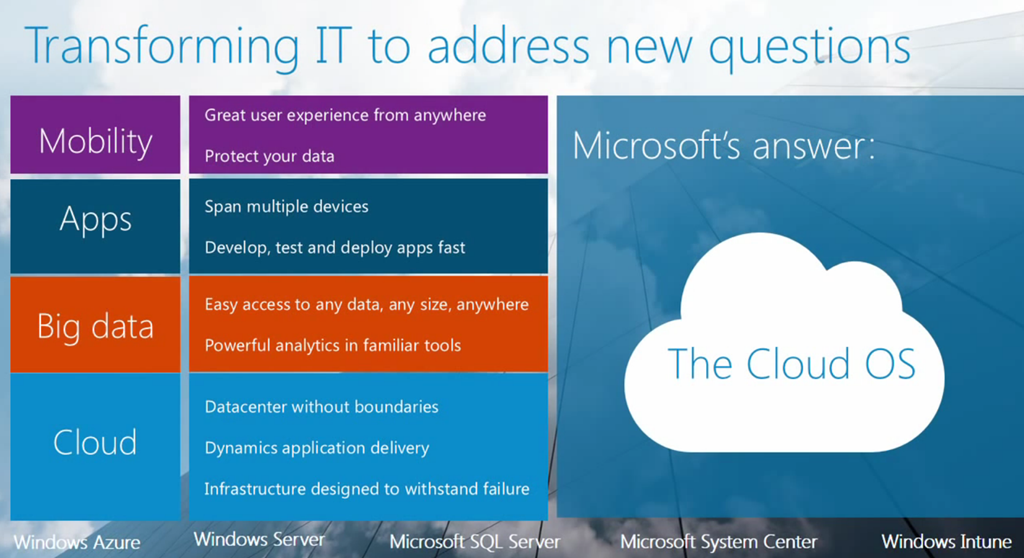


Descriptors/tags:
Power BI as the lead business solution, Microsoft’s visionary Data Platform solution, unified platform for modern businesses, Microsoft Cloud OS, Cloud OS, mobility, apps, Big Data, cloud, Microsoft hybrid cloud solution, Windows Server, Windows Azure, System Center, Windows Intune, SQL Server, datacenter without boundaries, hybrid design, Microsoft Cloud OS vision, flexible development, unified management, common identity, integrated virtualization, complete data platform, storage, SharePoint, SQL, identity, self-service business intelligence solution, self-service analytics, self-service BI, analysis, visualization, collaboration, business intelligence models, Power BI for Office 365, Office 365, insights from data, data insights, Data Management Gateway, Power BI Sites, Power BI Mobile App, Mobile BI, natural language query, Q&A of Power BI, Microsoft Cloud & Enterprise Group, Microsoft’s Data Platform Vision, Power BI Jumpstart, autonomous marketing, Aston Martin, Microsoft’s Cloud OS home on YouTube, mobile device management, cloud computing, innovation, hybrid cloud, midmarket, datacenter modernization, consumerization of IT, hybrid cloud strategy, Business Intelligence, innovations, Microsoft Excel, Q&A, high-value activities, high-value experiences, high-value focus, MicrosoftMicrosoft strategy, value focus, Active Directory, application development, Azure AD, Cloud first, cloud infrastructure, cloud solutions, enterprise opportunities, PaaS, IaaS, Windows devices, Windows Phone
1. Power BI as the lead business solution and the Microsoft’s visionary Data Platform solution built for it
 Self-service business intelligence solution enables all kinds of business users to find relevant information, pull data from Windows Azure and other sources, and prepare business intelligence models for analysis, visualization and collaboration.
February 10: the top message on the Microsoft News Center
Although it is just linking to this blog entry (no press release or anything like a big splash):
Power BI for Office 365 empowers everyone to analyze, visualize and share data in the cloud [The Official Microsoft Blog, Feb 10, 2014]
The following post is from Quentin Clark, Corporate Vice President, Data Platform Group.
On Monday we announced that Power BI for Office 365 – our self-service business intelligence solution designed for everyone – is generally available. Power BI empowers all kinds of business users to find relevant information, pull data from Windows Azure and other sources, and prepare compelling business intelligence models for analysis, visualization, and collaboration.
Modernizing business intelligence
Today business intelligence is only used by a fraction of the people that could derive value from it. What we all need is modernized business intelligence which will help everyone get the information they need to understand their job or personal life better. Not just the type of information gained from an Internet search, but also information from expert sources. Now imagine you could bring together these different information sources, discover relationships between facets of information, create new insights and understand your world better. And that you could get others to see what you see, and enable them to collaborate and build on one another’s ideas. And imagine that available on any scale of data and any kinds of computation you might need. Now imagine it’s not just you – but that anyone can access this kind of data-driven discovery and learning.
Power BI brings together many key aspects of the modernization of business intelligence: a public and corporate catalog of data sets and BI models, a way to search for data, a modern app and a Web-first experience, rich interactive visualizations, collaboration capabilities, tools for IT to govern data and models, and a groundbreaking natural language experience for exploring insights. Together, these capabilities will not just change the kinds of insights we can gain from data, but change the reach of those insights as well.
Bringing big data to a billion users
With Power BI, we have the opportunity to bring these types of data insights to a billion people. Office 365 is broadly adopted and growing – one in four of our enterprise customers now has Office 365. By making our business intelligence features part of Office, we ensure the tools are accessible, and through Office 365, we make the tools easy to adopt – not just the ease of using Web applications, but making things like collaboration, security, data discovery and exploration integrated and turnkey.
I talked earlier about the importance of reach, and one of the ultimate forms of reach we discovered over the course of developing Power BI has been a feature we named Q&A, which allows anyone to type in search terms – just as they would in Bing – and get instantaneous, visual results in the form of interactive charts or graphs.
Power BI for Office 365 Overview [MSCloudOS YouTube channel, Jan 22, 2014]
Realizing value from data
I personally know how significant this all is – as you can imagine, at Microsoft we run our business on our own data platform and on Power BI. In my role as head of our data platform group, I don’t create a lot of models, but I consume a lot of them – everything from the business financials of the SQL Server business and team management to our engineering and services datasets. My mobile business intelligence application for Windows 8 allows me to interact with our daily engineering data. The ability to visualize and interact with data on my large PPI screen allows me and my finance and marketing partners to meet in my office and have a deep conversation about the business. Collaboration through Office 365 and SharePoint Online allows me to share perspective with my peers around the company.
Power BI for Office 365 has empowered me to realize deeper value from data. I’m excited to share this power with everyone.
Get Insights from Data [MSCloudOS YouTube channel, Jan 24, 2014]
Big insights from big data at the World Economic Forum 2014 [Next at Microsoft Blog, Jan 22, 2014]
I’m at the World Economic Forum in Davos this week – where the world’s leaders, thought leaders and innovators gather to discuss the political, social and economic forces that are transforming the world and our lives. The other force that the World Economic Forum calls out in their program (above all else) are the technological forces.
WEF 2014 education data with Power BI for Office 365 [Microsoft YouTube channel, Jan 21, 2014]
Microsoft’s Vision Center sits directly across from the congress hall where all of these forces are being discussed and inside the center we’re showing how our technologies are helping turn data in to insight. As part of their work, the World Economic Forum produces a large volume of data and indices covering 148 countries. When I saw this data set in an Excel spreadsheet I knew it was ripe for transformation using Power BI for Office 365. As you can see in the video above, we’ve taken all of that data and are helping to deliver insight from it using Power View, Power Map and our Q&A technology. When you see health data below over a time period mapped country by country it really bring the data alive. When you can compare educational data across regions, countries and by type of education, once again the data comes alive. The real treat for me has been using Q&A to ask questions of the data much as you would ask questions of a data scientist.
WEF 2014 healthcare data with Power BI for Office 365 [Microsoft YouTube channel, Jan 21, 2014]
If you’ve not had a chance to see Power BI in action I’d encourage you to take up a trial of Office 365 and download the Power BI tools from PowerBI.com – it puts the decision making from data in the hands of anyone and I believe will help to deliver insights that answer some of the big questions at Davos this week and in the future.
Source: World Economic Forum, Global Competitiveness Report series (various editions)
Find and Combine Data [MSCloudOS YouTube channel, Jan 24, 2014]
Microsoft Releases Power BI for Office 365 [C&E News Bytes Blog*, Feb 10, 2014]
Today, Microsoft announced the general availability of Power BI for Office 365, a cloud-based business intelligence service that gives people a powerful new way to work with data in the tools they use every day, Excel and Office 365. Power BI for Office 365 brings together Microsoft’s strengths in cloud, productivity and business intelligence to enable people to easily analyze and visualize data in Excel, discover valuable insights, and share and collaborate on those insights from anywhere with Office 365.
Power BI for Office 365 with Excel allows business users to easily create reports and discover insights in Excel and share and collaborate on those insights in Office 365. Excel includes powerful data modeling and visualization capabilities which enables customer to easily discover, access, and combine their data. Customers also have the ability to create rich 3D geospatial visualizations in Excel.
With Office 365, customers have access to cloud-based capabilities to share visualizations and reports with their colleagues in real time and on mobile devices, interact with their data in new ways to gain faster insights and manage their work more effectively. These key cloud-based capabilities include:
- A Data Management Gateway which enables IT to build connections to on-premise data sources and schedule refreshes. Business users always have the most up to date reports, whether on their desktop or over their device.
[From the preview in Oct’13 here:] Through the Data Management Gateway, IT can enable on-premises data access for all reports published into Power BI so that users have the latest data. IT can also enable enterprise data search across their organization, making it easier for users to discover the data they need. The system also monitors data usage across the organization, providing IT with the information they need to understand manage the system overall.
- [Power] BI Sites, dedicated workspaces optimized for BI projects, which allow business users to quickly find and share data and reports with colleagues and collaborate over BI results.
[From the preview in Oct’13 here:] Power BI for Office 365 enables users to quickly create Power BI Sites, BI workspaces for users to share and view larger workbooks of up to 250MB, refresh report data, maintain data views for others and track who is accessing them, and easily find the answers they need with natural language query. Users can also stay connected to their reports in Office 365 from any device with HTML5 support for Power View reports and through a new Power BI mobile app for Windows.
- Real-time access to BI Sites and data no matter where a user is located via mobile devices. Customers can access their data through the browser in HTML5 or through touch-optimized mobile application, available on the Windows Store.
[From the preview in Oct’13 here:] The Power BI Mobile App is a new visualization app for Office that helps visualize graphs and data residing in an Excel workbook available in the Windows Store. The user is able to navigate through the data with multiple views and ability to zoom in and out at different levels. This app was first available for Windows 8, Windows RT, and Surface devices through the Windows Store and specifically for those customers using the Power BI for Office 365 Preview. It provides touch optimized access to BI reports and models stored in Office 365.
– Power BI App for Windows 8 and Windows RT now available in Store [“Welcome to the US SMB&D TS2 Team Blog”, Aug 21, 2013]
– Microsoft mobile app helps citizens report crimes more quickly to police in Delhi, India [The Fire Hose Blog, Jan 29, 2014]- A natural language query experienced called Q&A which allows users to ask questions of their data and receive immediate answers in the form of an interactive table, chart or graph.
Power BI for Office 365 provides an easy on-ramp for organizations who have bet on Office 365 to begin doing self-service BI today. Several customers have already started realizing the benefits of the service, including Revlon, MediaCom, Carnegie Mellon University and Trek.
For more information, read Quentin Clark, Corporate Vice President of the Data Platform Group’s, post [here you’ve already seen/read above] on the Official Microsoft Blog. Customers can find out more about how to purchase Power BI for Office 365 at powerbi.com.
[*About C&E News Bytes Blog: Here you will find a quick synopsis of all news from Microsoft’s Cloud & Enterprise organization as it is released with links to additional information.]
Share Data Insights [MSCloudOS YouTube channel, Jan 24, 2014]
Broncos Road to the Big Game [MSCloudOS YouTube channel, Jan 31, 2014]
Seahawks Road to the Big Game [MSCloudOS YouTube channel, Jan 31, 2014]
What Drives Microsoft’s Data Platform Vision? [SQL Server Blog, Jan 29, 2014]
FEATURED POST BY: Quentin Clark, Corporate Vice President, The Data Platform Group, Microsoft Corporation
If you follow Microsoft’s data platform work, you have probably observed some changes over the last year or so in our product approach and in how we talk about our products. After the delivery of Microsoft SQL Server 2012 and Office 2013, we ramped-up our energy and sharpened our focus on the opportunities of cloud computing. These opportunities stem from technical innovation, the nature of cloud computing, and from an understanding of our customers.
In my role at Microsoft, I lead the team that is responsible for the engineering direction of our data platform technologies. These technologies help our customers derive important insights from their data and make critical business decisions. I meet with customers regularly to talk about their businesses and about what’s possible with modern data-intensive applications. Here and in later posts, I will share some key points from those discussions to provide you with insight into our data platform approach, roadmap, and key technology releases.
Microsoft has made significant investments on the opportunities of cloud computing. In today’s IT landscape, it’s clear that the enterprise platform business is shifting to embrace the benefits of cloud computing—accessibility to scale, increased agility, diversity of data, lowered TCO and more. This shift will be as significant as the move from the mainframe/mini era to the microprocessor era. And, due to this shift, the shape and role of data in the enterprise will change as applications evolve to new environments.
Today’s economy is built on the data platform that emerged with the microprocessor era—effectively, transactional SQL databases, relational data warehousing and operational BI. An entire cycle of business growth was led by the emergence of patterns around Systems of Record, everything from ERP applications to Point of Sale systems. The shift to cloud computing is bringing with it a new set of application patterns, which I sometimes refer to as Systems of Observation (SoO). There are several forms of these new application patterns: the Internet of Things (IoT), generally; solutions being built around application and customer analytics; and, consumer personalization scenarios. And, we are just beginning this journey!
These new application patterns stem from the power of cloud computing—nearly infinite scale, more powerful data analytics and machine learning, new techniques on more kinds of data, a whole host of new information that impacts modern business, and ubiquitous infrastructure that allows the flow of information like never before. What is being done today by a small number of large-scale Internet companies to harness the power of available information will become possible to apply to any business problem.
To provide a framework for how we think applications and the information they generate or manage will change—and how that might affect those of us who develop and use those applications—consider these characteristics:
Data types are diverse. Applications will generate, consume and manipulate data in many forms: transactional records, structured streamed data, truly unstructured data, etc. Examples include the rise of JSON, the embracing of Hadoop by enterprises, and the new kinds of information generated by a wide variety of newly connected devices (IoT).
Relevant data is not just from inside the enterprise. Cross-enterprise data, data from other industries and institutions, and information from the Web are all starting to factor into how businesses and the economy function in a big way. Consider the small business loan extension that accounts for package shipping information as a criteria; or, companies that now embrace the use of social media signals.
Analytics usage is broadening. Customer behavior, application telemetry, and business trends are just a few examples of the kinds of data that are being analyzed differently than before. Deep analytics and automated techniques, like machine learning, are being used more often. And, modern architectures (cloud-scale, in-memory) are enabling new value in real-time, highly-interactive data analysis.
Data by-products are being turned into value. Data that were once considered as by-products of a core business are now valuable across (and outside of) the industries that generate this data; for example, consider the expanding uses of search term data. Perhaps uniquely, Microsoft has very promising data sets that could impact many different businesses.
With these characteristics in mind, our vision is to provide a great platform and solutions for our customers to realize the new value of information and to empower new experiences with data. This platform needs to span across the cloud and the enterprise – where so much key information and business processes exist. We want to deliver Big Data solutions to the masses through the power of SQL Server and related products, Windows Azure data services, and the BI capabilities of Microsoft Office. To do this, we are taking steps to ensure our data platform meets the demands of today’s modern business.
Modern Transaction Processing—The data services that modern applications need are broader now than traditional RDBMS. Yes, this too needs to become a cloud asset, and our investments in Windows Azure SQL Database reflect that effort. We recognize that other forms of data storage are essential, including Windows Azure Storage and Tables, and we need to think about new capabilities as we develop applications in cloud-first patterns. These cloud platform services need to be low friction, easy to incorporate, and operate seamlessly at scale—and have built-in fundamental features like high availability and regulatory compliance. We also need to incorporate technical shifts like large memory and high-speed low latency networking—in our on-premises and cloud products.
Modern Data Warehousing—Hadoop brought flexibility to what is typically done with data warehousing: storing and performing operational and ad-hoc analysis across large datasets. Traditional data warehousing products are scaling up, and the worlds of Hadoop and relational data models are coming together. Importantly, enterprise data needs broad availability so that business can find and leverage information from everywhere and for every purpose—and this data will live both in the cloud and in the enterprise datacenter. We are hearing about customers who now compose meaningful insights from data across Windows Azure SQL Database and Windows Azure Storage processed with Windows Azure HDInsight, our Hadoop-based big data solution. Customers are leveraging the same pattern of relational + Hadoop in our Parallel Data Warehouse appliance product in the enterprise.
Modern Business Intelligence—Making sense of data signals to gain strategic insight for business will become commonplace. Information will be more discoverable; not just raw datasets, but those facets of the data that can be most relevant—and the kinds of analytics, including machine learning, that can be applied—will be more readily available. Power BI for Office 365, our new BI solution, enables balance between self-service BI and IT operations—which is a key accelerant for adoption. With Power BI for Office 365, data from Windows Azure, Office, and on-premises data sources comes together in modern, accessible BI experiences.
Over the coming months, we are going to publish regular posts to encourage discussions about data and insights and the world of modernized data. We will talk more about the trends, the patterns, the technology, and our products, and we’ll explore together how the new world of data is taking shape. I hope you will engage in this conversation with us; tell us what you think; tell us whether you agree with the trends we think we see—and with the implications of those trends for the modern data platform.
If you’d like more information about our data platform technologies, visit www.microsoft.com/bigdata and follow@SQLServer on Twitter for the latest updates.

Getting Trained on Microsoft’s Expanding Data Platform [SQL Server Blog, Feb 6, 2014]
With data volumes exploding, having the right technology to find insights from your data is critical to long term success. Leading organizations are adjusting their strategies to focus on data management and analytics, and we are seeing a consistent increase in organizations adopting the Microsoft data platform to address their growing needs around data. The trend is clear: CIOs named business intelligence (BI) and analytics their top technology priority in 2012, and again in 2013. Gartner expects this focus to continue during 2014. 2
At Microsoft, we have great momentum in the data platform space and we are proud to be recognized by analysts like IDC reporting that Microsoft SQL Server continues to be the unit leader and became the #2 database vendor by revenue.1Microsoft was named a leader in both the Enterprise Data Warehouse and Business Intelligence Waves by Forrester, 3,4and is named a leader in the OPDMS Magic quadrant. 5
The market is growing and Microsoft has great momentum in this space, so this is a great time to dig in and learn more about the technology that makes up our data platform through these great new courses in the Microsoft Virtual Academy.
Microsoft’s data platform products
Quentin Clark recently outlined our data platform vision [here you’ve already seen/read above]. This calendar year we will be delivering an unprecedented lineup of new and updated products and services:
- SQL Server 2014 delivers mission critical analytics and performance by bringing to market new in-memory capabilities built into the core database for OLTP (by 10X and up to 30X) and Data Warehousing (100X). SQL Server 2014 provides the best platform for hybrid cloud scenarios, like cloud backup and cloud disaster recovery, and significantly simplifies the on-ramp process to cloud for our customers with new point-and-click experiences for deploying cloud scenarios in the tools that are already familiar to database administrators (DBAs).
- Power BI for Office 365 is a new self-service BI solution delivered through Excel and Office 365 which provides users with data analysis and visualization capabilities to identify deeper business insights from their on-premises and cloud data.
- Windows Azure SQL Database is a fully managed relational database service that offers massive scale-out with global reach, built-in high availability, options for predictable performance, and flexible manageability. Offered in different service tiers to meet basic and high-end needs, SQL Database enables you to rapidly build, extend, and scale relational cloud applications with familiar tools.
- Windows Azure HDInsight makes Apache Hadoop available as a service in the cloud, and also makes the Map Reduce software framework available in a simpler, more scalable, and cost efficient Windows Azure environment.
- Parallel Data Warehouse (PDW) is a massively parallel processing data warehousing appliance built for any volume of relational data (with up to 100x performance gains) and provides the simplest way to integrate with Hadoop. With PolyBase, PDW can also seamlessly query relational and non-relational data.
In-depth learning through live online technical events
To support the availability of these products, we’re offering live online events that will enable in-depth learning of our data platform offerings. These sessions are available now through the Microsoft Virtual Academy (MVA) and are geared towards IT professionals, developers, database administrators and technical decision makers. In each of these events, you’ll hear the latest information from our engineering and product specialists to help you grow your skills and better understand what differentiates Microsoft’s data offerings.
Here is a brief overview of the sessions that you can register for right now:
Business Intelligence
Faster Insights with Power BI Jumpstart | Register for the live virtual event on February 11
Session Overview: Are you a power Excel user? If you’re trying to make sense of ever-growing piles of data, and you’re into data discovery, visualization, and collaboration, get ready for Power BI. Excel, always great for analyzing data, is now even more powerful with Power BI for Office 365. Join this Jump Start, and learn about the tools you need to provide faster data insights to your organization, including Power Query, Power Map, and natural language querying. This live, demo-rich session provides a full-day drilldown into Power BI features and capabilities, led by the team of Microsoft experts who own them.
Data Management for Modern Business Applications
SQL Server in Windows Azure VM Role Jumpstart | Register for the live virtual event on February 18
Session Overview: If you’re wondering how to use Windows Azure as a hosting environment for your SQL Server virtual machines, join the experts as they walk you through it, with practical, real-world demos. SQL Server in Windows Azure VM is an easy and full-featured way to be up and running in 10 minutes with a database server in the cloud. You use it on demand and pay as you go, and you get the full functionality of your own data center. For short-term test environments, it is a popular choice. SQL Server in Azure VM also includes pre-built data warehouse images and business intelligence features. Don’t miss this chance to learn more about it.
Here’s a snapshot of the great content available to you now, with more to come later on the on the MVA data platform page:
Data Management for Modern Business Applications
- Mission Critical Performance with SQL Server 2014 | Available now
- Platform for Hybrid Cloud with SQL Server 2014 | Available now
- Windows Azure SQL Database | Available now
Modern Data Warehouse
- Getting Started with Microsoft Big Data | Available now
- Big Data Analytics | Available now
- Data Insights Immersion Experience | Available now
For more courses and training, keep tabs on the MVA data platform page and the TechNet virtual labs as well.
Thanks for digging in.
Eron Kelly
General Manager
Data Platform Marketing———–
1Market Analysis: Worldwide Relational Database Management Systems 2013–2017 Forecast and 2012 Vendor Shares, IDC report # 241292 by Carl W. Olofson, May 2013
2Business Intelligence and Analytics Will Remain CIO’s Top Technology Priority G00258063 by W. Roy Schulte | Neil Chandler | Gareth Herschel | Douglas Laney | Rita L. Sallam | Joao Tapadinhas | Dan Sommer 25 November 2013
3The Forrester Wave™: Enterprise Data Warehouse, Q4 2013, Forrester Research, Inc., December 9, 2013
4The Forrester Wave™: Enterprise Business Intelligence Platforms, Q4 2013, Forrester Research, Inc., December 18, 2013
5Gartner, Magic Quadrant for Operational Database Management Systems by Donald Feinberg, Merv Adrian and Nick Heudecker, October 21, 2013.
Disclaimer:
Gartner does not endorse any vendor, product or service depicted in its research publications, and does not advise technology users to select only those vendors with the highest ratings. Gartner research publications consist of the opinions of Gartner’s research organization and should not be construed as statements of fact. Gartner disclaims all warranties, expressed or implied, with respect to this research, including any warranties of merchantability or fitness for a particular purpose.
Free Power BI Training – Microsoft Virtual Academy Jump Start [“A Story of BI, BIG Data and SQL Server in Canada” Blog, Feb 5, 2014]
Whether you’re a power Excel user or you’re just trying to make sense of ever-growing piles of data, we have a great day long, free online training session for you on Power BI for Office 365.
This live, demo rich training will provide sessions covering key Power BI features and capabilities and help you learn about the tools you need to provide faster data insights to your organization.
Course Outline:
- Introduction to Power BI
- Drilldown on Data Discovery Using Power Query
- The Data Stewardship Experience
- Building Stellar Data Visualizations Using Power View
- Building 3D Visualizations Using Power Map
- Understand Power BI Sites and Mobile BI
- Working with Natural Language Querying Using Q&A
- Handling Data Management Gateway
- Get Your Hands on Power BI
Sign Up for this Microsoft Virtual Academy Jump Start led by the team of Microsoft experts who own them.
- February 11, 2014
- 9:00am-5:00pm PST
- What time is this in my time zone?
- What: Fast-paced live virtual session
- Cost: Free
- Audience: IT Pro
- Prerequisites: For data analysts, Excel power users, or anyone looking to turn their data into useful business information.
- Register Now>>
Interview with Marc Reguera, Director of Finance at Microsoft [MSCloudOS YouTube channel, Feb 10, 2014]
Power BI Webinar Series [MSFT for Work Blog, Jan 22, 2014]
Big data scientists and the finance department haven’t always seen eye to eye in most companies. Now is your chance to embrace big data to free your finance department to focus on the ways to add the most value.
You are invited to join Microsoft Finance Director Marc Reguera and members of the Microsoft finance leadership team to find out what they did to become a more empowered and influential finance organization. The powerful new business intelligence tools they will demonstrate have been under wraps for almost two years and have so far only been used within Microsoft.

Now the tools have been road-tested and are ready for you to try. Grab your chance to learn how the Microsoft new BI tools will help your business not only adapt to the world of big data, but actually thrive in it.
Register for any and all of the webinars you are interested in:
1/23/14: Visualization: See how these powerful new tools have improved Microsoft’s ability to consume big data and develop insights by simplifying the data and using visualization tools. Register here.
1/30/14: Definitions: Get the best practices for creating and aligning behind a common set of data definitions and taxonomies. Learn how to get everyone on the same page. Register here.
2/13/14: Outsourcing: Learn how Microsoft worked with partners to optimize and outsource non-strategic finance tasks so the organization could focus on high-value activities. Register here.
2/20/14: Cloud collaboration: Learn how your organization can focus more time on delivering business insights by using Power BI and Microsoft Office 365. Register here.
3/6/14: Making things easy to comprehend without making them simplistic: See how Microsoft finance teams consume and analyze millions of rows of data and present their analysis in a narrative that’s easy to understand for multiple audiences. Register here.
Taken together, this series of webinars will help your company’s finance department adapt to a world of rapidly shifting paradigms and what can be, without the right tools, the overwhelming era of big data.

Business Intelligence: “The Eyes and Ears of Your Business” [Microsoft for Work Blog, Jan 30, 2014]
Businesses are collecting more data than ever before, and technology is making that process increasingly easier and more affordable. The challenge for business owners is 1) how to quickly turn that raw data into actionable business insights, and 2) how to give more people within an organization access to those insights on a self-serve basis.
Organizations must have insight into how their operations are performing in order to stay competitive. Companies who successfully manage their big data assets are more profitable than companies not making this investment, says Jason Baick, Senior Product Marketing Manager at Microsoft. Simply put, “[business intelligence] is the eyes and ears of your business,” Baick says.
Release data from the IT department
Data analysis started off as a highly specialized process. “It was always a barrier to self-service information … the treasure trove of the data was locked up in the IT department,” Baick points out. Today there are easy-to-use data visualization tools that offer anyone within an organization access to real-time business insights.
Take the Microsoft Power BI suite, for example, which gives both businesses and the individual an easy-to-use platform to visualize their data. Given that many businesses already have the infrastructure that Power BI is built on (e.g. Microsoft SharePoint) and a familiarity with its feature set, integration and adoption is simplified. Your users don’t have an intimidation factor because they already know how to use Excel, explains Baick. By equipping your employees with these types of tools, you can enable team members to unearth real-time insights, ranging from targeting a prospect at the exact right time to make the sale, to determining where the company can cut costs, to revealing where they should invest more.
Here’s a rundown of specific Power BI tools and what they can offer your business:
- Discover and Combine
- Search and access all your company’s data and public data from one place using Power Query. Give your team the ability to be more efficient while cutting down on the cost of investing in multiple, disparate data tools.
- Model and Analyze
- Empower your employees to create analytical models using Power Pivot. Since this is built on familiar software like Excel, you won’t have to worry about the cost of training or having to hire new staff for implementation.
- Visualize
- Power View and Power Map enables your team members to quickly translate big data sets and create easy-to-understand visuals without a huge time investment.
- Share and Collaborate
- Seamlessly share and edit workbooks from any device, allowing your employees quick and easy access to important information in real time.
- Get Answers and Insights
- The new Q&A feature gives your employees the ability to ask any question of their data without requiring specialized skills to draw out these insights.
- Access Anywhere
- Give your staff access to the Power BI tool set from any device, any location. This empowers your employees to access data in real time, which could mean the difference between making and not making a sale.
How are people using Power BI?
Companies like MCH Strategic Data are already employing the Power BI suite to get more out of their data. MCH collects an enormous amount of education and healthcare marketing data for their clients. After 85 years in the business, they’re now able to deliver new and unique insights to clients like never before. One application has been to create videos using tools like Power Map to create data visualizations showing the geographic range of socioeconomic status across various school districts. They’ve also made subsets of their data available and searchable by Power BI users, including datasets on hospitals, school systems, and emergency preparedness services throughout the US
Building a data-driven organization
Everyone at your company can contribute to uncovering business insights, and it’s important to give them the tools to do so. Using your data in a smart and strategic way enables you to turn it into actionable business insights and to stay ahead of the competition.
The Autonomy of Marketing with Big Data [Microsoft for Work Blog, Jan 15, 2014]
We spoke to Jeff Marcoux, Senior Product Marketing Manager for Dynamics CRM, about how big data and data insights have changed marketing. He outlined three ways that companies can use big data to reimagine their marketing efforts.
He also outlined an all-encompassing rule when using data insights for marketing efforts: it’s not about how much data you have, it’s what you do with it. “Large data makes graphs, but significant data tells a story,” said Marcoux. Learning how to leverage significant big data into actionable insights is the key to unlocking its potential as an asset to your business. Here are Jeff’s three key ways companies can do smart things with their data:
- Embrace the idea that autonomous marketing, or marketing that is auto-optimized and auto-customized according to customer insights and machine-generated learning, can reinvigorate marketing campaigns. The key being it’s a more responsive marketing campaign that continuously strengthens and adjusts itself.
- Use customer insights to create stronger sales-marketing partnerships by increasing positive brand awareness and generating more accurate information on qualified leads and revenue attribution. In other words, more insight contributing to less finger-pointing and, ultimately, greater partnerships.
- Translate data into business impact by building custom sales kits appropriate for every opportunity and every customer, monitoring the end-to-end customer life cycle, and keeping customers hooked. After all, according to Marcoux, “existing customers are the best sellers.”
Data insights will help drive marketing at the deepest strategic levels, providing actionable insights that can constantly be measured against and refined. Remember, it’s not how much data you’ve got, it’s what you do with it. If your organization has started to use data insights in your marketing efforts, do you have any tips on how to better use data? Sound off in the comments!
Autonomous Marketing: Using data to perfectly personalize marketing efforts [Microsoft for Work Blog, Jan 30, 2014]
Personalization is the gold standard for marketing efforts. If you can connect with a customer on a personal level and demonstrate that you understand your audience, the customer is far more likely to respond to your marketing campaigns. It may seem like a daunting task to crunch that much customer information and automatically adapt it to your marketing efforts, but it doesn’t have to be. Technologies exist that allow you to update campaigns with new data (auto-optimize) and use that updated data to better target your efforts (auto-customize), removing the guesswork you’re your campaigns. Marketing that is auto-optimized and auto-customized based on customer insights and machine generated learning—called “autonomous marketing”—is now a tangible reality for many businesses.
Autonomous marketing and big data will be critical in re-imagining a more personalized approach to marketing—and learning to harness this approach will keep your business ahead of the curve as marketing innovators.
Data, data everywhere…
The amount of data available today is overwhelming. Take, for example, a single business—just between the company’s website, Facebook page, and Twitter, there’s a lot to keep track of. All this information needs to be consolidated and combed to figure out which data is significant and what happens next. For many businesses the question becomes: what do I do with my data?
According to Jeff Marcoux, Senior Product Marketing Manager for Dynamics CRM, that data should be fed to an engine that’s automatically optimizing itself. In practice, this “auto-optimizing” capability translates into the ability to make campaign improvements in real-time. The result is a more responsive marketing campaign that continuously strengthens and adjusts itself to help dial in on more precise market segments and figure out what’s working.
Getting personal
The clincher, once you’ve honed in on those market segments, is auto-customizing marketing campaigns down to the individual level. “Customers are already so far down the buying cycle when they get to you (nearly 57%) and getting personal is the only way to land your message and have it resonate with consumers,” said Marcoux. Once that same engine is automatically tailoring marketing efforts based on data insights, you’ll know you’ve crossed-over into today’s gold standard for marketing—personalization perfection.
“Autonomous marketing is a beast,” said Marcoux, “once it gets going you just have to pay attention and keep feeding it.” The autonomous marketing beast metabolizes content and, so long as it’s fed plenty of “healthy” (significant) data, it will do its job to improve marketing. In turn, you will gain valuable insight into revenue performance and ROI, this way you can pinpoint which marketing maneuvers were converted into real business impact.
A healthy beast, a happy business
The success of autonomous marketing relies on 2 things: the quality of the data it’s fed and whether you take advantage of the insights it offers. A responsive, personalized approach to marketing is where we’re headed—are you doing everything to make sure your business is headed there too?
The Human Side of Autonomous Marketing [Microsoft for Work Blog, Jan 30, 2014]
How do you retain the creative side of marketing when big data and autonomous marketing inevitably change the way marketers work? Data insights enhance the efficacy of your marketing efforts; however, human input is always necessary to decipher big data. Autonomous marketing, used to enable marketers and nail down effective marketing campaigns, is the secret to realizing business impact.
Metrics for the Mind
The application of autonomous marketing is a necessary next step in meeting a new demand, but it doesn’t supplant the need for marketers in the flesh. According to Jeff Marcoux, Senior Product Marketing Manager for Microsoft Dynamics CRM, marketers will never be forced to relinquish their instincts and creativity—their marketing guts—because analytics, data, and insight help fuel creativity.
“The main reason I say that,” said Marcoux, “is because there’s always going to be new channels and marketers have to come up with new ways to use them.” Take for example the exodus of college-age students from Facebook (which Marcoux attributes to the fact that their parents on are on it) to something more like Snapchat. Although data may shed some insight on the shift, it’s up to marketers to take advantage of it in a creative way (e.g., showing loyal fans a secret menu or product announcement before the rest of the world gets to see it).
Take Colorado University’s Online program at their Anschutz Medical Campus, which faced the challenge of how to remain competitive to college students and reach potential students on their own terms. CU used Microsoft Dynamics CRM to identify what their potential students liked, the media they consumed, and the social networks they used—processes that would normally take marketers months of research—and automated it so their marketing team could focus on killer campaigns that would engage the potential students they did find. The result? Increased student retention and recruitment.
Coming up with the emotional content that drives a campaign is where the creativity and experience come in. Marcoux sees autonomous marketing as a way to free up marketers to do what they love—create and innovate—and, today, there’s plenty of opportunity to innovate as campaigns become increasingly personalized.
A Mind-Body Approach to Marketing
Customers don’t want to be just a number; they want to be known. “With social media, everything is personal and everything is online,” said Marcoux. “Hooking” modern consumers is a matter of building those personal, emotional relationships—identifying who they are and what their need is, educating them on a solution, and then ultimately providing that solution.
“We’ve seen that personalization come across in emails and social posts, but that’s all been enabled by big data,” said Marcoux. Customers are already so far down the buying cycle when they get to you (nearly 57%), and getting personal is the only way to land your message and have it resonate with consumers these days.
Autonomous marketing powered by data insights helps marketers gather and combine information from many different sources in order to figure out what content is working. This way, marketers can focus on what is actually selling their product rather than getting petrified by what Marcoux calls “analysis paralysis,” or the misinterpretation and incorrect analysis of data.
Ultimately, autonomous marketing is a way to deal with the deluge of social data and other information to help marketers do their job better. Reimagining marketing, according to Marcoux, is a matter of using big data to narrow in on those granular market segmentations and continuing to fine-tune an effective, personalized marketing approach that will hook and keep hooked customers.
2. Microsoft’s vision of the unified platform for modern businesses
THE BIG PICTURE: Microsoft Cloud OS Overview [MSCloudOS YouTube channel, Jan 21, 2014]
Business Insights Newsletter Article | October 2013
MICROSOFT DEFINES THE CLOUD WITH ONE WORD – VALUE
When conversation turns to cloud computing, there is a lot of noise. Press, vendors, analysts, bloggers and others deliver opinions on what a successful cloud strategy entails.
Converging technologies such as Big Data, Mobility, BYOD and Social are transforming how businesses operate and compete and are relying on cloud as a critical enabler. Cloud itself is considered an emerging megatrend representing a real opportunity for IT to introduce more efficiency across every operational line of business.
The modern workforce isn’t just better connected and more mobile than ever before, it’s also more discerning (and demanding) about the hardware and software used on the job. While company leaders around the world are celebrating the increased productivity and accessibility of their workforce, the exponential increase in devices and platforms that the workforce wants to use can stretch a company’s infrastructure (and IT department!) to its limit.”
Brad Anderson, Corporate Vice President, MicrosoftMicrosoft believes that cloud is quite simply about a single concept – value. In this article we will share how Microsoft helps you realize the value of cloud, why Windows Server is best suited to take you on the journey, and let you hear how luxury car-maker Aston Martin transformed their business and their IT department by using a Windows Server hybrid strategy.
Your Journey to the Cloud
The true value of cloud is the opportunity for IT to get all the benefits of scale, speed, and agility while still protecting existing investments.
Cloud better enables the introduction of the megatrends of Big Data, Social and Mobile by providing answers to help IT manage risk while delivering quality services and applications quickly, efficiently, securely. As organizations start their journey to the cloud, they typically are grappling with a combination of traditional on-premise and cloud-based solutions; however these hybrid scenarios have the potential to introduce new complications. Working with multiple versions of conflicting operating systems, management tools and applications is usually counter-productive and results in staff frustration, departmental inefficiencies and poor productivity. To be successful, teams need a way to consistently manage, support and automate the datacenter. Microsoft Cloud OS Vision Begins with Windows Server 2012 R2
There are multiple ways for customers to think about how they provision their infrastructure, and we aim to enable an ‘and’ philosophy for our customers so they don’t have to think that it’s an either/or decision. We allow them to take servers and other technology they are running on premises and think about how they might want to move some of it into cloud services, while still having a consistent level of management, identity and security.”
Gavriella Schuster, Microsoft GM US Server ToolsOrganizations can begin to realize tremendous value with cloud when they leverage the ability to operate and manage a converged infrastructure that shares a common operating system and set of tools across hybrid environments supporting an assortment of devices, applications and users.
Figure 1: Windows Server Delivers Value with a Unified Hybrid Environment
At the heart of the Microsoft Cloud OS vision is Windows Server 2012 R2. With Windows Server 2012 R2 Microsoft’s experience delivering global-scale cloud services enables organizations of all sizes to take advantage of new features and enhancements across virtualization, storage, networking, virtual desktop infrastructure, access and information protection, and more.
The value of standardizing on Windows 2012 R2 as your Cloud OS strategy includes:
Experience Enterprise-class Performance and Scale
Take advantage of even better performance and more efficient capacity utilization in your datacenter.
Increase the agility of your business with a consistent experience across every environment.
Leverage the proven, enterprise-class virtualization and cloud platform that scales to continuously run your largest workloads while enabling robust recovery options to protect against service outages.
Drive Bottom Line Efficiencies with Cost Savings and Automation
Enjoy resilient, multi-tenant-aware storage and networking capabilities for a wide range of workloads.
Re-deploy your budget to other critical projects with the cost-savings delivered through a Windows 2012 R2 Cloud OS.
Automate a broad set of built-in management tasks.
Simplify the deployment of major workloads and increase operational efficiencies.
Unlock Competitive Advantage with Faster Application Deployment
Build, deploy and scale applications and web sites quickly, and with more flexibility than ever before.
Unlock improved application portability between on-premises environments and public and service provider clouds in concert with Windows Azure VM and System Center 2012 R2 making it simple to rapidly shift your critical applications virtually anywhere, anytime.
Increase flexibility and elasticity of IT services with the Windows Server 2012 R2 platform for mission-critical applications while protecting existing investments with enhanced support for open standards, open source applications and various development languages.
Empower Users with Better Access Anywhere
Windows Server 2012 R2 makes it easier to deploy a virtual desktop infrastructure making it possible for users to access IT from virtually anywhere, providing them a rich Windows experience while ensuring enhanced data security and compliance.
Lower storage costs significantly by supporting a broad range of storage options and VHD de-duplication.
Easily manage your user’s identities across the datacenter and into the cloud to help deliver secure access to corporate resources.
In Summary
The datacenter is the hub for everything IT offers to the business: storage, networking and computing capacity. The right Cloud OS strategy enables IT to transform those resources into a datacenter that is capable of handling changing needs and unexpected opportunities. With Windows Server 2012 R2, Microsoft offers a consistent operating system and set of management tools that acts and behaves in exactly the same manner across every setting. Windows Server 2012 R2 delivers the same experience and requires the same skill-sets and knowledge to manage and operate in any environment. Windows Server 2012 R2 delivers a “future-proof” road-map with a fully seamless and scalable platform, making organizations agile, nimble and ready. Highly scalable, Windows Server 2012 is already powering many of the worlds’ largest datacenters – including Microsoft’s – proving out capabilities at cloud scale and then delivering them for the enterprise. With the latest release of Windows Server 2012 R2, Microsoft is redefining the server category, delivering hundreds of new features and enhancements spanning virtualization, networking, storage, user experience, cloud computing, automation, and more. The goal of Windows Server 2012 R2 is to help organizations transform their IT operations to reduce costs and deliver a whole new level of business value.
Aston Martin Uses Windows Server 2012 to Drive IT Transformation
Behind every luxury sports car produced by Aston Martin is a sophisticated IT infrastructure. The goal of the Aston Martin IT team is to optimize that infrastructure so that it performs as efficiently as the production line it supports. To meet that goal, Aston Martin has standardized on Microsoft technology. The IT team chose the Windows Server 2012 operating system, including Hyper-V technology to virtualize its data center and build four private clouds to dynamically allocate IT resources to the business as needed. For cloud and data center management, Aston Martin uses Microsoft System Center 2012.
“The IT team’s purpose is to enable Aston Martin to build the most beautiful sports cars in the world. So, from servers, to desktops, to production line PCs, Microsoft technology is behind everything we do.”
Daniel Roach-Rooke, IT Infrastructure Manager, Aston MartinWatch this short video to learn how the team at Aston Martin envisioned and executed on their strategy.
Watch the Aston Martin video now
Call to Action
With Windows Server Data Center 2012 R2 set to release in November, now is the time to see your Microsoft licensed solution provider for information about software savings.

MSCloudOS YouTube supersite:
Microsoft’s Cloud OS home on YouTube to find the latest products & solutions news, demos as well as training videos for Windows Server, SQL Server, System Center, Windows Intune, Microsoft BI, and Windows Azure—the technologies that bring Microsoft’s vision of Cloud OS to life.
|
|
|
|
|
MSCloudOS YouTube supersite:
Microsoft’s Cloud OS home on YouTube to find the latest products & solutions news, demos as well as training videos for the technologies that bring Microsoft’s vision of Cloud OS to life. Subsites:
|


A People-centric Approach to Mobile Device Management [In The Cloud Blog, Jan 29, 2014]
The following post is from Brad Anderson, Corporate Vice President, Windows Server & System Center.
It’s been a little while since I wrote about the work we are doing around the BYO and Consumerization trends – but this is an area I will be discussing much more often over the next several months.
Consumerization is an area that is changing and moving quickly, and I believe the industry is also at an important time where we really need to step back and define what our ultimate destination looks like.
I think there is a great deal of agreement across the industry on what we are all trying to accomplish – and this is aligned with Microsoft’s vision. Microsoft’s vision is to enable people to be productive on all the devices they love while helping IT ensure that corporate assets are secure and protected.
One particular principle that I am especially passionate about is the idea that the modern, mobile devices which are built to consume cloud services should get their policy and apps delivered from the cloud. Put another way: Modern mobile devices should be managed from a cloud service.
One of the reasons I am such a big believer in this is the rapid pace at which new devices and updates to the devices are released. Enabling people across all the devices they love brings with it the need to stay abreast of the changes and updates happening across Windows, iOS, and the myriad of Android devices. By delivering this as a service offering, we can stay on top of this for you. Thus, as changes are needed, we simply update the service and the new capabilities are available for you. This means no longer needing to update your on-premises infrastructure – we take care of all of it for you.
System Center Configuration Manager is the undisputed market leader in managing desktops around the world, and now we are delivering many of our MDM/MAM capabilities from the cloud. We have deeply integrated our Intune cloud service with ConfigMgr so organizations can take advantage of managing all of their devices in one familiar control plane using their existing IT skills. Put simply: We are giving organizations the choice of using their current ConfigMgr console extended with the Intune service, or doing everything from the cloud using only Intune if they wish to do management without an on-premises infrastructure.
On a fairly regular basis I encounter the question about whether or not cloud-based management is robust enough for enterprise organizations. My response to this has surprised our partners and customers with just how powerful a cloud-based solution can be. The answer is a resounding, “Heck yes it is robust and secure enough!”
Windows Intune and Windows Azure Active Directory puts IT leadership in the driver’s seat by allowing an organization to define and manage user identities and access, operate a single administrative console to manage devices, deliver apps, and help protect data.
The result is employee satisfaction, a streamlined infrastructure, and a more efficient IT team – all with existing, familiar, on-prem investments extended to the cloud.
This holistic approach is central to Microsoft’s strategy to help organizations solve one of the most complex and difficult tasks facing IT teams today: Mobile device management (MDM).
As I discussed on the GigaOM Mobilize panel back in October (on the topic of “The Future of Mobile and the Enterprise,” recapped here), it wasn’t that long ago that an IT department worked in a pretty homogenous hardware and software environment – essentially everything was a PC. Today, IT teams are responsible for dozens of form factors and multiple platforms that require specific processes, skills, and maintenance.
Helping organizations proactively manage this new generation of IT is what makes me so excited about the advancements and innovation we are delivering as a part of next week’s update to the Windows Intune service. These updates include:
- Support for e-mail profiles that can configure a device with the correct e-mail server information and related policies – and it can also remove that profile and related e-mail via a remote wipe.
- In addition to our unified deployment mode and integration with System Center Configuration Manager, Windows Intune can now stand alone as a cloud-only MDM solution. This is a big win for organizations that want a cloud-only management solutions to manage both their mobile devices and PC’s.
- There is also support for new data protection settings in iOS 7 – including the “managed open in” capability that protects corporate data by controlling the apps and accounts that can open documents and attachments.
- This update also enables broader protection capabilities like remotely locking a lost device, or resetting a device’s PIN if forgotten.
Windows Intune offers simple and comprehensive device management, regardless of the platform, for the devices enterprises are already using, with the IT infrastructure they already own.
Looking ahead to later this year, we will continue to launch additional updates to the service including the ability to allow/deny apps from running (or accessing certain sites), conditional access to e-mail depending upon the status of the device, app-specific restrictions regarding how apps interact and use data, and bulk enrollment of devices.
This functionality is delivered as part of the rapid, easy-to-consume, and ongoing updates that are possible with a cloud-based service.
Today’s announcements are just a small example of the broader set of innovations Microsoft has been developing. Our focus on a people-centric approach to solving consumerization challenges has led to a number of product improvements and updates like:
- Windows Azure Active Directory Premium Preview (for cloud-based identity and access management, including single-sign-on and access management for SaaS apps).
- Microsoft Remote Desktop apps (available now for iOS, Android, and Mac OS X – which I wrote about in late October).
- Company Portals as part of the Windows Intune service (for consistent access to your apps, your data, and your devices across platforms).
The number of factors at work within this Consumerization of IT trend make it clear that to effectively address it we have to think beyond devices and focus on a broader set of challenges and opportunities.
Microsoft is in a unique position to address the holistic needs behind this industry shift with things like public cloud management, private cloud management, identity management, access management, security, and more.
For organizations who haven’t already evaluated Microsoft’s device management solutions – now is the time. With the rapid release and innovation cycle offered by a cloud-based service like Intune, the ability to keep your infrastructure optimized, efficient, and secure has never been easier.
The Virtuous Cycle of Cloud Computing [In The Cloud Blog, Jan 29, 2014]
The following post is from Brad Anderson, Corporate Vice President, Windows Server & System Center.
In the Day 1 keynote at the recent re:Invent conference, there was an interesting point made about the virtuous cycle that can occur for the cloud vendor and for customers. As I listened to the keynote, I kept thinking: “They are missing the biggest benefit for the entire industry; if the public cloud vendor has the right strategy and is thinking about how to benefit the largest population possible, then they are completely missing how this virtuous cycle can grow to benefit every organization in the world – even if they are not using the public cloud.”
Let me explain a bit more about what I mean. (And, before I get too much farther along, I want to note that this post ties into the cool news yesterday about our work with the Open Compute Project.)
The virtuous cycle of a public cloud looks a lot like the image below. As the usage of the public cloud grows, you need more hardware to meet demand – and for sustained growth you will need a lot of hardware. This need for hardware increases your purchasing power and you can then negotiate lower prices as you purchase in bulk. As your purchasing power grows and your costs drop, you then pass those savings on to your customers by dropping your prices. The lower prices increases demand and the virtuous cycle continues.
For customers using the public cloud, they can see the benefits of this virtuous cycle (the lower prices) – but what about organizations that are also using private and hosted clouds? How can they gain benefits from what is happening?
Organizations with multiple clouds can benefit if (and only if!) that public cloud vendor has at the core of its strategy an intention to take everything that it is learning from operating that public cloud and delivering it back for use in datacenters around world – not just in its own.
This is where Microsoft is so unique! Microsoft is the only organization in the world operating a globally available, at-scale public cloud that delivers back everything it is learning for use in datacenters of every customer (and, honestly, every competitor). Our view is the learning that we are getting from the public cloud should be delivered for all the world to benefit.
This innovation can be seen by applying these public cloud learnings in products like Windows Server, System Center, and the Windows Azure Pack – and these products are the only cloud offerings that are consistent across public, hosted and private clouds – ensuring customers avoid cloud lock in and, maximize workload mobility, and have the flexibility to choose the cloud that best meets their needs.
With this in mind, I want to show you how I think the virtuous cycle can and should look – and how it can benefit any organization in the world.
First, at the center of this virtuous cycle is incredible innovation. This means innovation in software, innovation in hardware, and innovation in processes. When you are ordering and deploying 100,000’s of new servers and xx bytes of storage every year – you have to innovate everywhere or you will literally buckle under demands and costs of procuring, deploying, operating, and retiring hardware at this scale.
Microsoft is addressing this challenge in the most direct and complete way possible: Over the last three years, Microsoft has spent more than $15B building datacenters around the world and filling them with the hardware and capacity demanded by customers of Windows Azure and other Microsoft cloud services.
We keep our public cloud costs low by managing our supply chain for this kind of capacity, and, per the cycle, we pass these savings to you. We also carefully track things like the number of days from when we place an order for hardware to the time the order appears on our docks (“order-to-dock”), and then we track the number of hours/days from “dock-to-live” where we literally have customers’ workloads being hosted on that hardware. Throughout this process we set aggressive quarterly targets and we work constantly to consistently drive those numbers down. If we didn’t have a best in class product and performance, it would be impossible to remain profitable at this kind of scale.
As you can imagine, after spending $Billions on hardware every year, we are highly incented (to put it lightly) to find ways to drive our hardware costs down. The single best way we have found to do this is to use software to do things traditionally handled by hardware. For example, in Windows Azure we are able to deliver highly available, globally available storage at incredibly low prices through software innovations like SDN – all of which is based on low-cost, direct-attached storage. This brings storage economics never before seen in the industry.
One example of this is the most common workload hosted in Azure: The “Web” workload. Whether it is Azure acting as the web tier for hybrid application, or the entire workload being hosted in Azure, the web workload is a part of just about every application. This makes it a great place for innovation. In Azure we pioneered high-density web site hosting where we can literally host 5,000+ web sites on a single Windows Server OS instance. This dramatically reduces our costs, which in turn reduces your costs.
At Microsoft, we think the public cloud’s virtuous cycle can actually get a lot bigger, a lot more functional, and a lot more powerful by integrating service providers and hosted clouds.
Not only is this expanded virtuous cycle more practical, I’m sure it also looks familiar to what is already up and running in your organization.
There are some pretty solid examples of innovation that was pioneered in Azure and then brought to the whole industry for use everywhere through Windows Server and System Center:
- For highly available, low-cost direct attached storage, in Windows Server 2012 we shipped a set of capabilities we call Storage Spaces. Storage Spaces delivers the value of a SAN on low-cost, direct-attached storage, and it has been widely recognized as one of the most innovative new capabilities in Windows Server – and it was significantly updated in Windows Server 2012 R2.
- Service Bus provides a messaging queue solution in the public cloud that can be used by developers for things like a queuing system across clouds and building loosely coupled applications. Check this post for an in-depth review of Service Bus. Service Bus also ships as a component of the Windows Azure Pack – providing value pioneered in the public cloud for use in private and hosted clouds.
- Earlier I referenced the ability to host 5,000+ web sites on a single Windows Server OS instance. This has had an obvious economic impact on of costs of Windows Azure where we host millions of web sites. We proved that capability in Windows Azure, battle-hardened it, and now it ships for customers around to world to use in their datacenters as a part of what we call the Windows Azure Pack (WAP).
This is what it looks like when the complete virtuous cycle is in effect.
Our efforts haven’t been limited to software, however. Our innovative work with hardware in our datacenters has driven down costs while at the same time increasing the capacity each core and processor can support.
Our work with hardware was highlighted yesterday when we announced that we are joining the Open Compute Project and contributing the full design of the server hardware we use in Azure. We refer to this design as the “Microsoft cloud server specification.” The Microsoft cloud server specification provides the blueprints for the datacenter servers we have designed to deliver the world’s most diverse portfolio of cloud services at global scale. These servers are optimized for Windows Server software and can efficiently manage the enormous availability, scalability and efficiency requirements of Windows Azure, our global cloud platform.
This design spec offers dramatic improvements over traditional enterprise server designs: We have seen up to 40% server cost savings, 15% power efficiency gains, and a 50% reduction in deployment and service times. We also expect this server design to contribute to our environmental sustainability efforts by reducing network cabling by 1,100 miles and metal by10,000 tons.
This level of contribution is unprecedented in the industry, and it hasn’t gone unnoticed by the media:
- Wired: Microsoft Open Sources Its Internet Servers, Steps Into the Future
- Forbes: The Worm Has Turned – Microsoft Joins The Open Compute Project
These are just a couple examples of innovation that is happening here at Microsoft – innovations in process, hardware and software.
At Microsoft, we recognize that the majority of organizations are going to use multiple clouds and will want to take advantage of Hybrid Cloud scenarios. Every organization is going to have their own unique journey to the cloud – and organizations should make decisions about cloud partners that truly enable them with the flexibility to use multiple clouds, constant innovation, and consistency across clouds.
This is an area that we focus on every day, and you can read more about it as a part of our ongoing, in-depth series, Success with Hybrid Cloud.


Vendor Spotlight: A Microsoft GM On New Midmarket IT Tools [Exchange Events, Vendor Spotlight, April 23, 2013]
Mr. MidmarketCIO had the opportunity to sit down with Gavriella Schuster, Microsoft’s general manager of the company’s U.S. server and tools business unit. In this interview, Schuster shares her views on the challenges midmarket businesses face today and Microsoft’s vision to address those challenges with the Cloud OS.
MES: Can you share with me a little about Microsoft’s vision of the cloud today and how it can address today’s IT challenges for midmarket customers?
Schuster: Customers face many challenges today with the new levels of mobility in their workforce and the new devices that enable mobility. This new level of consumerization has enabled avid use of technology with an always-on connectivity. There are also many more applications available and an explosion of data to manage. All of these things really challenge customers to reconsider how they provision, secure and enable technology within their organization.
There are multiple ways for customers to think about how they provision their infrastructure, and we aim to enable an ‘and’ philosophy for our customers so they don’t have to think that it’s an either/or decision. We allow them to take servers and other technology they are running on premises and think about how they might want to move some of it into cloud services, while still having a consistent level of management, identity and security.
Our vision for the ‘Cloud OS’ is to really have the best of both worlds. It’s an easy-on/easy-off usage of the cloud that meets the needs of midmarket organizations and can be an extension of current server environments.
MES: Is Microsoft’s ‘Cloud OS’ synonymous with Windows Server 2012? Or does it include other Microsoft technologies?
Schuster: Windows Server 2012 is certainly the basis of the Cloud OS because it provides the primary framework for identity, access, security and manageability, and also provides that core virtualization layer. Windows Server 2012 is also the basis of Windows Azure, our public cloud platform, so it gives midmarket CIOs the ability to easily extend their on-premises datacenter to the public cloud using a common set of tools between the two. The other core technology in the Cloud OS is Microsoft System Center 2012 because it gives customers that common level of additional management where they can set policies, provision their workloads, get deep application insights, etc. regardless of where the workload is actually running—on-premises or in the cloud.
MES: Where do you recommend customers start with their data-center modernization initiative? Why?
Schuster: For most customers, they should start with server virtualization. There is potential for them to get a tremendous amount of efficiency and consolidation of their applications through server consolidation. They can virtualize upwards of 80 percent of all of the apps that they are running in their environment onto virtualized server environments, particularly in the midmarket. They may even be able to consolidate down to one to four servers and really take care of all of their workloads. Using Hyper-V as that virtualization framework and then using System Center Virtual Machine Manager to deploy that new virtual machine into their environment should be their first step to this approach.
MES: What are some of the new capabilities of Windows Server 2012 that go beyond virtualization to solve some common challenges?
Schuster: Windows Server 2012 not only helps midmarket organizations virtualize the compute—the virtualized machine itself—but it also helps them to virtualize their network and storage layers, which can be very costly capex investments for customers. It eliminates a lot of the common conflicts involved in managing an on-premise environment like IP and networking address conflicts. It also gives them additional storage so they don’t have to buy expensive SANs.
MES: A key trend challenging CIOs is mobility and the consumerization of IT. How does the Microsoft Cloud OS vision help address the security and management challenges around new devices and the need for increased mobility?
Schuster: I think it goes back to what I said before—we’ve enabled the ‘and’ so they can think about their governance role. There are a number of ways to address the consumerization of IT, and our primary message is that we think customers should embrace it. We enable them through Active Directory, which enables them to have a single sign-on experience and manage the identity of the user regardless of the environment the user is in (Office 365, Windows Azure, their on-premises environment, etc.)—This eliminates multiple pop-ups where the user has to continually sign in to the service.
We also have native functionality in Windows Server 2012 that eliminates the need for a VPN. With Direct Access, they can now easily deliver access to corporate resources based on the user’s identity.
Lastly, they can set policies for the user experience based on the device that they are using—phone, home machine, work machine, etc.—and can manage those mobile devices from the cloud with Windows Intune, without having to do additional on-premises setup.
MES: You briefly talked about Windows Azure as part of the Microsoft Cloud OS. What workloads do you recommend customers think about moving to the public cloud first?
Schuster: I think the easiest thing for most customers to think about moving to the public cloud first is cloud storage—they can use it for backup, archiving and disaster recovery. Especially as a midmarket customer, the last thing they probably have is a separate site with another set of servers that are replicated and ready to do a transfer if something disastrous were to occur. That’s absolutely something that the cloud is available and ready for. And customers only have to pay for what they use— it’s consumption based. The other areas that they would probably want to use it for are application development and test environments and for business and data analytics.
MES: Microsoft has laid out a hybrid cloud strategy, with the same basic underpinnings for both private and public cloud. What’s the benefit to mid-market customers of adopting Microsoft’s hybrid approach and technologies?
Schuster: When we talk about a hybrid environment, there are two ways to think about it: One is that it’s a hybrid enterprise, meaning they have some workloads that are sitting on servers inside their organization while others are using some server capacity within a public cloud like Windows Azure; Second is having hybrid applications. One of the advantages of the cloud today is that it enables even the smallest companies to act and look like very large companies. Unlike in the past with on-premise servers, the cloud gives CIOs the capacity and capability to introduce a new service to the market where they don’t have to have a great forecast of what the demand might be. This has really opened up new doors for midmarket IT organizations.
MES: How can your ecosystem of partners help midmarket customers today?
Schuster: The midmarket IT customer will typically only have a handful of IT pros within their organization, so enabling them to focus on the business and building applications to help power the business vs. managing servers and infrastructure is a real business value to our midmarket customers—and our partner ecosystem is well set up to help them do that.
We have done a lot of work to train our partners on how to deliver both our on-premise Windows Server 2012 virtualization environment as well as our Windows Azure cloud environments, and we have services available that help our customers build new applications.
Satya Nadella’s (?the next Microsoft CEO?) next ten years’ vision of “digitizing everything”, Microsoft opportunities and challenges seen by him with that, and the case of Big Data
… as one of the crucial issues for that (in addition to the cloud, mobility and Internet-of-Things), via the current tipping point as per Microsoft, and the upcoming revolution in that as per Intel
Satya Nadella, Cloud & Enterprise Group, Microsoft and Om Malik, Founder & Senior Writer, GigaOM [LeWeb  YouTube channel, Dec 10, 2013]
And why I will present Big Data after that? For very simple reason: IMHO exactly in Big Data Microsoft’s innovations came to a point at which its technology has the best chances to become dominant and subsequently define the standard for the IT industry—resulting in “winner-take-all” economies of scale and scope. Whatever Intel is going to add to that in terms of “technologies for the next Big Data revolution” is going only to help Microsoft with its currently achieved innovative position even more. But for this reason I will include here the upcoming Intel innovations for Big Data as well.
In this next-gen regard it is highly recommended to read also: Disaggregation in the next-generation datacenter and HP’s Moonshot approach for the upcoming HP CloudSystem “private cloud in-a-box” with the promised HP Cloud OS based on the 4 years old OpenStack effort with others [‘Experiencing the Cloud’. Dec 12, 2013] !
Now the detailed discussion of Big Data:
Microsoft® makes Big Data work for you! [HP Discover YouTube channel, recorded on Dec 11; published on Dec 12, 2013]
The Garage Series: Unleashing Power BI for Office 365 [Office 365 technology blog, Nov 20, 2013]
In this week’s show, host Jeremy Chapman is joined by Michael Tejedor from the SQL Server team to discuss Power BI and show it in action. Power BI for Office 365 is a cloud based solution that reduces the barriers to deploying a self-service Business Intelligence environment for sharing live Excel based reports and data queries as well as new features and services that enable ease of data discover and information access from anywhere. Michael draws up the self-service approach to Power BI as well as how public data can be queried and combined in a unified view within Excel. Then they walk through an end-to-end demo of Excel and Power BI components—Power Query [formerly known as “Data Explorer“], Power Pivot, Power View, Power Map [formerly known as product codename “Geoflow“] and Q&A–as they optimize profitability of a bar and rein in bartenders with data.
Last week Mark Kashman and I went through the administrative controls of managing user access and mobile devices, but this week I’m joined by Michael Tejedor and we shift gears completely to talk data, databases and business intelligence. Back in July we announced Power BI for Office 365 and how this new service along with the using the familiar tools within Excel, enables you can to discover, analyze, visualize and share data in powerful ways. Power BIThe solution includes Power Query, Power Pivot, Power View, Power Map and as well as a host of Power BI features including Q&A. and how using the familiar tools within Excel, you can discover, analyze, visualize and share data in powerful ways. Power BI includes Power Query, Power Pivot, Power View, Power Map and Q&A.
- Power Query [formerly known as “Data Explorer“] is a data search engine allowing you to query data from within your company and from external data sources on the Internet, all within Excel.
- Power Pivot lets you create flexible models within Excel that can process large data sets quickly using SQL Server’s in-memory database.
- Power View allows you to manipulate data and compile it into charts, graphs and other visualizations. It’s great for presentations and reports
- Power Map [formerly known as product codename “Geoflow“] is a 3D data visualization tool for mapping, exploring and interacting with geographic and temporal data.
- Q&A is a natural language query engine that lets users easily query data using common terms and phrases.
In many cases, the process to get custom reports and dashboards from the people running your databases, sales or operations systems is something like submitting a request to your database administrator and a few phone calls or meetings to get what you want. I came from an logistics and operations management background, it could easily take 2 or 3 weeks to even make minor tweaks to an operational dashboard. Now you can use something familiar–Excel—in a self-service way to hook into your local databases, Excel flat files, modern data sources like Hadoop or public data sources via Power Query and the data catalogue. All of these data sources can be combined create powerful insights and data visualizations, all can be easily and securely shared with the people you work with through the Power BI for Office 365 service.
Of course all of this sounds great, but you can’t really get a feel for it until you see it. Michael and team built out a great demo themed after a bar and using data to track alcohol profitability, pour precision per bartender and Q&A to query all of this using normal query terms. You’ll want to watch the show to see how everything turns out and of course to see all of these power tools in action. Of course if you want to kick the tires and try Power BI for Office 365, you can register for the preview now.
Intel: technologies for the next Big Data revolution [HP Discover YouTube channel, recorded on Dec 11; published on Dec 12, 2013]
Related “current tipping point” announcements from Microsoft:
From: Organizations Speed Business Results With New Appliances From HP and Microsoft [joint press release, Jan 18, 2011]
New solutions for business intelligence, data warehouse, messaging and database consolidation help increase employee productivity and reduce IT complexity.
… The HP Business Decision Appliance is available now to run business intelligence services ….
Delivering on the companies’ extended partnership announced a year ago, the new converged application appliances from HP and Microsoft are the industry’s first systems designed for IT, as well as end users. They deliver application services such as business intelligence, data warehousing, online transaction processing and messaging. The jointly engineered appliances, and related consulting and support services, enable IT to deliver critical business applications in as little as one hour, compared with potentially months needed for traditional systems.3 One of the solutions already offered by HP and Microsoft — the HP Enterprise Data Warehouse Appliance — delivers up to 200 times faster queries and 10 times the scalability of traditional Microsoft SQL Server deployments.4
…
With the HP Business Decision Appliance, HP and Microsoft have greatly reduced the time and effort it takes for IT to configure, deploy and manage a comprehensive business intelligence solution, compared with a traditional business intelligence solution where applications, infrastructure and productivity tools are not pre-integrated. This appliance is optimized for Microsoft SQL Server and Microsoft SharePoint and can be installed and configured by IT in less than one hour.
The solution enables end users to share data analyses built with Microsoft’s award-winning5 PowerPivot for Excel 2010 and collaborate with others in SharePoint 2010. It allows IT to centrally audit, monitor and manage solutions created by end users from a single dashboard.
…
Availability and Pricing6
The HP Business Decision Appliance with three years of HP 24×7 hardware and software support services is available today from HP and HP/Microsoft Frontline channel partners for less than $28,000 (ERP). Microsoft SQL Server 2008 R2 and Microsoft SharePoint 2010 are licensed separately.
The HP Enterprise Data Warehouse Appliance with services for site assessment, installation and startup, as well as three years of HP 24×7 hardware and software support services, is available today from HP and HP/Microsoft Frontline channel partners starting at less than $2 million. Microsoft SQL Server 2008 R2 Parallel Data Warehouse is licensed separately.
…
3 Based on HP’s experience with customers using HP Business Decision Appliance.
4 SQL Server Parallel Data Warehouse (PDW) has been evaluated by 16 early adopter customers in six different industries. Customers compared PDW with their existing environments and saw typically 40x and up to 200x improvement in query times.
5 Messaging and Online Collaboration Reviews, Nov. 30, 2010, eWEEK.com.
6 Estimated retail U.S. prices. Actual prices may vary.
From: HP Delivers Enterprise Agility with New Converged Infrastructure Solutions [press release, June 6, 2011]
HP today announced several industry-first Converged Infrastructure solutions that improve enterprise agility by simplifying deployment and speeding IT delivery.
…
Converged Systems accelerate time to application value
HP Converged Systems speed solution deployment by providing a common architecture, management and security model across virtualization, cloud and dedicated application environments. They include:
…
- HP AppSystem maximizes performance while simplifying deployment and application management. These systems offer best practice operations with a standard architecture that lowers total cost of ownership. Among the new systems are HP Vertica Analytics System, as well as HP Database Consolidation Solution and HP Business Data Warehouse Appliance, which are both optimized for Microsoft SQL Server 2008 R2.
…
From: Microsoft Expands Data Platform With SQL Server 2012, New Investments for Managing Any Data, Any Size, Anywhere [press release, Oct 12, 2011]
New technologies will give businesses a universal platform for data management, access and collaboration.
… Kummert described how SQL Server 2012, formerly code-named “Denali,” addresses the growing challenges of data and device proliferation by enabling customers to rapidly unlock and extend business insights, both in traditional datacenters and through public and private clouds. Extending on this foundation, Kummert also announced new investments to help customers manage “big data,” including an Apache Hadoop-based distribution for Windows Server and Windows Azure and a strategic partnership with Hortonworks Inc. …
…
The company also made available final versions of the Hadoop Connectors for SQL Server and Parallel Data Warehouse. Customers can use these connectors to integrate Hadoop with their existing SQL Server environments to better manage data across all types and forms.
…
SQL Server 2012 delivers a powerful new set of capabilities for mission-critical workloads, business intelligence and hybrid IT across traditional datacenters and private and public clouds. Features such as Power View (formerly Project “Crescent,”) and SQL Server Data Tools (formerly “Juneau”) expand the self-service BI capabilities delivered with PowerPivot, and provide an integrated development environment for SQL Server developers.
From: Microsoft Releases SQL Server 2012 to Help Customers Manage “Any Data, Any Size, Anywhere” [press release, March 6, 2012]
Microsoft’s next-generation data platform releases to manufacturing today.
REDMOND, Wash. — March 6, 2012 — Microsoft Corp. today announced that the latest version of the world’s most widely deployed data platform, Microsoft SQL Server 2012, has released to manufacturing. SQL Server 2012 helps address the challenges of increasing data volumes by rapidly turning data into actionable business insights. Expanding on Microsoft’s commitment to help customers manage any data, regardless of size, both on-premises and in the cloud, the company today also disclosed additional details regarding its plans to release an Apache Hadoop-based service for Windows Azure.
…
Tackling Big Data
IT research firm Gartner estimates that the volume of global data is growing at a rate of 59 percent per year, with 70 to 85 percent in unstructured form.* Furthering its commitment to connect SQL Server and rich business intelligence tools, such as Microsoft Excel, PowerPivot for Excel 2010 and Power View, with unstructured data, Microsoft announced plans to release an additional limited preview of an Apache Hadoop-based service for Windows Azure in the first half of 2012.
…
To help customers more cost-effectively manage their enterprise-scale workloads, Microsoft will release several new data warehousing solutions in conjunction with the general availability of SQL Server 2012, slated to begin April 1. This includes a major software update and new half-rack form factors for Microsoft Parallel Data Warehouse appliances, as well as availability of SQL Server Fast Track Data Warehouse reference architectures for SQL Server 2012.
Microsoft Simplifies Big Data for the Enterprise [press release, Oct 24, 2012]
New Apache Hadoop-compatible solutions for Windows Azure and Windows Server enable customers to easily extract insights from big data.
NEW YORK — Oct. 24, 2012 — Today at the O’Reilly Strata Conference + Hadoop World, Microsoft Corp. announced new previews of Windows Azure HDInsight Service and Microsoft HDInsight Server for Windows, the company’s Apache Hadoop-based solutions for Windows Azure and Windows Server. The new previews, available today athttp://www.microsoft.com/bigdata, deliver Apache Hadoop compatibility for the enterprise and simplify deployment of Hadoop-based solutions. In addition, delivering these capabilities on the Windows Server and Azure platforms enables customers to use the familiar tools of Excel, PowerPivot for Excel and Power View to easily extract actionable insights from the data.
“Big data should provide answers for business, not complexity for IT,” said David Campbell, technical fellow, Microsoft. “Providing Hadoop compatibility on Windows Server and Azure dramatically lowers the barriers to setup and deployment and enables customers to pull insights from any data, any size, on-premises or in the cloud.”
The company also announced today an expanded partnership with Hortonworks, a commercial vendor of Hadoop, to give customers access to an enterprise-ready distribution of Hadoop with the newly released solutions.
“Hortonworks is the only provider of Apache Hadoop that ensures a 100 percent open source platform,” said Rob Bearden, CEO of Hortonworks. “Our expanded partnership with Microsoft empowers customers to build and deploy on platforms that are fully compatible with Apache Hadoop.”
More information about today’s news and working with big data can be found at http://www.microsoft.com/bigdata.
Choose the Right Strategy to Reap Big Value From Big Data [feature article for the press, Nov 13, 2012]
From devices to storage to analytics, technologies that work together will be key for business’ next information age.
REDMOND, Wash. — Nov. 13, 2012 — It seems the gigabyte is going the way of the megabyte — another humble unit of computational measurement that is becoming less and less relevant. Long live the terabyte, impossibly large, increasingly common.
Consider this: Of all the data that’s been collected in the world, more than 90 percent has been gathered in the last two years alone. According to a June 2011 report from the McKinsey Global Institute, 15 out of 17 industry sectors of the U.S. have more data stored — per company — than the U.S. Library of Congress.
The explosion in data has been catalyzed by several factors. Social media sites such as Facebook and Twitter are creating huge streams of unstructured data in the form of opinions, comments, trends and demographics arising from a vast and growing worldwide conversation.
And then there’s the emerging world of machine-generated information. The rise of intelligent systems and the Internet of Things means that more and more specialized devices are connected to information technology — think of a national retail chain that is connected to every one of its point-of-sale terminals across thousands of locations or an automotive plant that can centrally monitor hundreds of robots on the shop floor.
Combine it all and some industry observers are predicting that the amount of data stored by organizations across industries will increase ten-fold every five years, much of it coming from new streams that haven’t yet been tapped.
It truly is a new information age, and the opportunity is huge. The McKinsey Global Instituteestimates that the U.S. health care system, for example, could save as much as $300 billion from more effective use of data. In Europe, public sector organizations alone stand to save 250 billion euros.
In the ever-competitive world of business, data strategy is becoming the next big competitive advantage. According to analyst firm Gartner Group,* “By tapping a continual stream of information from internal and external sources, businesses today have an endless array of new opportunities for: transforming decision-making; discovering new insights; optimizing the business; and innovating their industries.”
According to Microsoft’s Ted Kummert, corporate vice president of the Business Platforms Division, companies addressing this challenge today may wonder where to start. How do you know which data to store without knowing what you want to measure? But then again, how do you know what insights the data holds without having it in the first place?
“There is latent value in the data itself,” Kummert says. “The good news is storage costs are making it economical to store the data. But that still leaves the question of how to manage it and gain value from it to move your business forward.”
With new data services in the cloud such as Windows Azure HDInsight Service and Microsoft HDInsight Server for Windows and Microsoft’s Apache Hadoop-based solutions for Windows Azure and Windows Server, organizations can afford to capture valuable data streams now while they develop their strategy — without making a huge financial bet on a six-month, multimillion-dollar datacenter project.
Just having access to the data, says Kummert, can allow companies to start asking much more complicated questions, combining information sources such as geolocation or weather information with internal operational trends such as transaction volume.
“In the end, big data is not just about holding lots of information,” he says. “It’s about how you harness it. It’s about insight, allowing end users to get the answers they need and doing so with the tools they use every day, whether that’s desktop applications, devices at the network edge or something else.”
His point is often overlooked with all the abstract talk of big data. In the end, it’s still about people, so making it easier for information workers to shift to a new world in which data is paramount is just as important as the information itself. Information technology is great at providing answers, but it still doesn’t know how to ask the right questions, and that’s where having the right analytics tools and applications can help companies make the leap from simply storing mountains of data to actually working with it.
That’s why in the Windows 8 world, Kummert says, the platform is designed to extend from devices and phones to servers and services, allowing companies to build a cohesive data strategy from end to end with the ultimate goal of empowering workers.
“When we talk about the Microsoft big data platform, we have all of the components to achieve exactly that,” Kummert says. “From the Windows Embedded platform to the Microsoft SQL Server stack through to the Microsoft Office stack. We have all the components to collect the data, store it securely and make it easier for information workers to find it — and, more importantly, understand what it means.”
For more information on building intelligent systems to get the most out of business data, please visit the Windows Embedded home page.
* Gartner, “Gartner Says Big Data Creates Big Jobs: 4.4 Million IT Jobs Globally to Support Big Data By 2015,” October 2012
Which data management solution delivers against today’s top six requirements? [The HP Blog Hub, March 25, 2013]
By Manoj Suvarna – Director, Product Management, HP AppSystems
In my last post I talked about the six key requirements I believe a data management
solution should deliver against today, namely:
1. High performance
2. Fast time to value
3. Built with Big Data as a priority
4. Low cost
5. Simplified management
6. Proven expertise
Today, 25th March 2013, HP has announced the HP AppSystem for Microsoft SQL Server 2012 Parallel Data Warehouse, a comprehensive data warerehouse solution jointly engineered with Microsoft, with a wide array of complementary tools, to effectively manage, store, and unlock valuable business insights.
Let’s take a look at how the solution delivers against each of the key requirements in turn:
1 High performance
With its MPP (Massively Parallel Processing) engine, and ‘shared nothing’ architecture, to effectively manage, store, and unlock valuable business insights, the HP AppSystem for Parallel Data Warehouse can deliver linear scale starting from a configuration to support small terabyte requirements all the way up to configurations supporting six Petabytes of data.
The solution features the latest HP ProLiant Gen8 servers, with InfiniBand FDR networking, and uses the xVelocity in-memory analytics engine and the xVelocity memory-optimized columnstore index feature in Microsoft SQL Server 2012 to greatly enhance query performance.
The combination of Microsoft software with HP Converged Infrastructure means HP AppSystem for Parallel Data Warehouse offers leading performance for complex workloads, with up to 100x faster query performance and a 30% faster scan rate than previous generations.
2 Fast time to value
HP AppSystem for Parallel Data Warehouse is a factory built, turn-key system, delivered complete from HP’s factory as an integrated set of hardware and software including servers, storage, networking, tools, software, services, and support. Not only is the solution pre-integrated, but it’s backed by unique, collaborative HP and Microsoft support with onsite installation and deployment services to smooth implementation.
3 Built with Big Data as a priority
Designed to integrate with Hadoop, HP AppSystem for Parallel Data Warehouse is ideally suited for “Big Data” environments. This integration allows customers to perform comprehensive analytics on unstructured, semi-structured and structured data, to effectively gain business insights and make better, faster decisions.
4 Simplified management
Providing the optimal management environment has been a critical element of the design, and is delivered through HP Support Pack Utility Suite. This set of tools simplifies updates and several other maintenance tasks across the system to ensure that it is continually running at optimal performance. Unique in the industry, HP Support Pack Utility Suite can deliver up to 2000 firmware updates with the click of a button. In addition, the HP AppSystem for Parallel Data Warehouse is manageable via the Microsoft System Center console, leveraging deep integration with HP Insight Control.
5 Low cost
The HP AppSystem for Parallel Data Warehouse has been designed as part of an end to end stack for data management, integrating data warehousing seamlessly with BI solutions to minimize the cost of ownership.
It has also been re-designed with a new form factor to minimize space and maximize ease of expansion, which means the entry point for a quarter rack system is approximately 35% less expensive than the previous generation solution. It is expandable in modular increments up to 64 nodes, which means no need for the type of fork-lift upgrade that might be needed with a proprietary solution, and is targeted to be approximately half the cost per TB of comparable offerings in the market from Oracle, IBM, and EMC*.
6 Proven expertise
Together HP and Microsoft have over 30 years experience delivering integrated solutions from desktop to datacenter. HP AppSystem for Parallel Data Warehouse completes the portfolio for HP Data Management solutions, which give customers the ability to deliver insights on any data, of any size, combining best in class Microsoft software with HP Converged Infrastructure.
For customers, our ability to deliver on the requirements above ultimately provides agility for faster, lower risk deployment of data management in the enterprise, helping them make key business decisions more quickly and drive more value to the organization.
If you’d like to find out more, please go to www.hp.com/solutions/microsoft/pdw.
* http://www.valueprism.com/resources/resources/Resources/PDW%20Compete%20Pricing%20FINAL.pdf
HP AppSystem for SQL 2012 Parallel Data Warehouse [HP product page, March 25, 2013]
Overview
Rapid time-to-value data warehouse solution
The HP AppSystem for Microsoft SQL Server 2012 Parallel Data Warehouse, jointly engineered, built and supported with Microsoft, is for customers who realize limitations and inefficiencies of their legacy data warehouse infrastructure. This converged system solution delivers significant advances over the previous generation solution including:
Enhanced performance and massive scalability
- Up to 100x faster query performance and a 30% faster scan rate
- Ability to start from small terabyte requirements that can linearly scale out to 6 Petabytes for mission critical needs
Minimize costs and management complexity
- Redesigned form factor minimizes space and allows ease of expansion with significant up-front acquisition savings as well as reduce OPEX heating, cooling and real estate cost requirements
- Appliance solution is pre-built and tested as a complete, end-to-end stack — easy to deploy and minimal technical resources required
- Extensive integration of Microsoft and 3rd party tools allow users to work with familiar tools like Excel as well as within heterogeneous BI environments
- Unique HP Support Pack Utility Suite set of tools significantly simplifies updates and other maintenance tasks to ensure system is running at optimal performance
Reduce risks and manage change
- Services delivered jointly under a unique collaborative support agreement, integrated across hardware and software, to help avoid IT disruptions and deliver faster resolution to issues
- Backed by more than 48,000 Microsoft professionals—with more than 12,000 Microsoft Certified—one of the largest, most specialized forces of consultants and support professionals for Microsoft environments in the world
|
Solution Components HP Products HP Services |
HP Software Partner’s Software HP Support |
[also available with Dell Parallel Data Warehouse Appliance]
Appliance: Parallel Data Warehouse (PDW) [Microsoft PDW Software product page, Feb 27, 2013]
PDW is a massively parallel processing data warehousing appliance built for any volume of relational data (with up to 100x performance gains) and provides the simplest integration to Hadoop.
Unlike other vendors who opt to provide their high-end appliances for a high price or provide a relational data warehouse appliance that is disconnected from their “Big Data” and/or BI offerings, Microsoft SQL Server Parallel Data Warehouse provides both a high-end massively parallel processing appliance that can improve your query response times up to 100x over legacy solutions as well as seamless integration to both Hadoop and with familiar business intelligence solutions. What’s more, it was engineered to lower ongoing costs resulting in a solution that has the lowest price/terabyte in the market.
What’s New in SQL Server 2012 Parallel Data Warehouse
- Up to 50x performance gains with the xVelocity updateable columnstore.
- Up to 100x performance gains over legacy warehouses.
- Seamless integration with “Big Data” using PolyBase.
- Multi-petabyte data capacity.
- 2.5x lower price per terabyte than SQL Server 2008 R2 PDW and lowest price per terabyte in industry.
Key Capabilities
Built For Big Data with PolyBase
SQL Server 2012 Parallel Data Warehouse introduces PolyBase, a fundamental breakthrough in data processing used to enable seamless integration between traditional data warehouses and “Big Data” deployments.
- Use standard SQL queries (instead of MapReduce) to access and join Hadoop data with relational data.
- Query Hadoop data without IT having to pre-load data first into the warehouse.
- Native Microsoft BI Integration allowing analysis of relational and non-relational data with familiar tools like Excel.
Next-Generation Performance at Scale
Scale and perform beyond your traditional SQL Server deployment with PDW’s massively parallel processing (MPP) appliance that can handle the extremes of your largest mission critical requirements of performance and scale.
- Up to 100x faster than legacy warehouses with xVelocity updateable columnstore.
- Massively Parallel Processing (MPP) architecture that parallelizes and distributes computing for high query concurrency and complexity.
- Rest assured with built-in hardware redundancies for fault tolerance.
- Rely on Microsoft as your single point of contact for hardware and software support.
Engineered For Optimal Value
Unlike other vendors in the data warehousing space who deliver a high-end appliance at a high price, Microsoft engineered PDW for optimal value by lowering the cost of the appliance.
- Resilient, scalable, and high performance storage features built into software lowering hardware costs.
- Compress data up to 15x with the xVelocity updateable columnstore saving up to 70% of storage requirements.
- Start small with a quarter rack allowing you to right-size the appliance rather than over-acquiring capacity.
- Use the same tools and knowledge as SQL Server without retaining new tools or knowledge for scale-out DW or Big Data.
- Co-engineered with hardware partners offering highest level of product integration and shipped to your door offering fastest time to value.
- The lowest price/terabyte than overall appliance market (and 2.5x lower than SQL 2008 R2 PDW).
PolyBase [Microsoft page, Feb 26, 2013]
PolyBase is a fundamental breakthrough in data processing used in SQL Server 2012 Parallel Data Warehouse to enable truly integrated query across Hadoop and relational data.
Complementing Microsoft’s overall Big Data strategy, PolyBase is a breakthrough new technology on the data processing engine in SQL Server 2012 Parallel Data Warehouse designed as the simplest way to combine non-relational data and traditional relational data in your analysis. While customers would normally burden IT to pre-populate the warehouse with Hadoop data or undergo an extensive training on MapReduce in order to query non-relational data, PolyBase does this all seamlessly giving you the benefits of “Big Data” without the complexities.
Key Capabilities
Unifies Relational and Non-relational Data
PolyBase is one of the most exciting technologies to emerge in recent times because it unifies the relational and non-relational worlds at the query level. Instead of learning a new query like MapReduce, customers can leverage what they already know (T-SQL)
- Integrated Query: Accepts a standard T-SQL query that joins tables containing a relational source with tables in a Hadoop cluster without needing to learn MapReduce.
- Advanced query options: Apart from simple SELECT queries, users can perform JOINs and GROUP BYs on data in the Hadoop cluster.
Enables In-place Queries with Familiar BI Tools
Microsoft Business Intelligence (BI) integration enables users to connect to PDW with familiar tools such as Microsoft Excel, to create compelling visualizations and make key business decisions from structured or unstructured data quickly.
- Integrated BI tools: End users can connect to both relational or Hadoop data with Excel abstracting the complexities of both.
- Interactive visualizations: Explore data residing in HDFS using Power View for immersive interactivity and visualizations.
- Query in-place: IT doesn’t have to pre-load or pre-move data from Hadoop into the data warehouse and pre-join the data before end users do the analysis.
Part of an Overall Microsoft Big Data Story
PolyBase is part of an overall Microsoft “Big Data” solution that already includes HDInsight (a 100% Apache Hadoop compatible distribution for Windows Server and Windows Azure), Microsoft Business Intelligence, and SQL Server 2012 Parallel Data Warehouse.
- Integrated with HDInsight: PolyBase can source the non-relational analysis from Microsoft’s 100% Apache compatible Hadoop distribution, HD Insights.
- Built into PDW: PolyBase is built into SQL Server 2012 Parallel Data Warehouse to bring “Big Data” benefits within the power of a traditional data warehouse.
- Integrated BI tools: PolyBase has native integration with familiar BI tools like Excel (through Power View and PowerPivot).
Announcing Power BI for Office 365 [Office News, July 8, 2013]
Today, at the Worldwide Partner Conference, we announced a new offering–Power BI for Office 365. Power BI for Office 365 is a cloud-based business intelligence (BI) solution that enables our customers to easily gain insights from their data, working within Excel to analyze and visualize the data in…
Exciting new BI features in Excel [Excel Blog, July 9, 2013]
Yesterday during the Microsoft’s Worldwide Partner Conference we announced some exciting new Business Intelligence (BI) features available for Excel. Specifically, we announced the expansion of the BI offerings available as part of Power BI—a cloud-based BI solution that enables our customers to easily gain insights from their data, working within Excel to analyze and visualize the data in a self-service way.
Power BI for Office 365 now includes:
- Power Query, enabling customers to easily search and access public data and their organization’s data, all within Excel (formerly known as “Data Explorer“). Download details here.
- Power Map, a 3D data visualization tool for mapping, exploring and interacting with geographic and temporal data (formerly known as product codename “Geoflow“). Download details here.
- Power Pivot for creating and customizing flexible data models within Excel.
- Power View for creating interactive charts, graphs and other visual representations of data.
Head on over to the Office 365 Technology Blog, Office News Blog, and Power BI site to learn more.
Clearing up some confusion around the Power BI “Release” [A.J. Mee’s Business Intelligence and Big Data Blog, Aug 13, 2013]
Hey folks. Thanks again for checking out my blog.
Yesterday (8/12/2013), Power BI received some attention from the press. Here’s one of the articles that I had seen talking about the “release” of Power BI:
http://www.neowin.net/news/microsoft-releases-power-bi-office-365-for-windows-8rt
Some of us inside Microsoft had to address all sorts of questions around this one. For the most part, the questions revolved around the *scope* of what was actually released. You have to remember that Power BI is a broad brand name that takes into account:
* Power Pivot/View/Query/Map (which is available now, for the most part)
* The Office 365 hosting of Power BI applications with cloud-to-on-premise data refresh, Natural Language query, data stewardship, etc..
* The Mobile BI app for Windows and iOS devices
Net-net: we announced the availability of the Mobile app (in preview form). At present, it is only available on Windows 8 devices (x86 or ARM) – no iOS just yet. The rest of the O365 / Power BI offering is yet to come. Check out this article to find out how to sign up.
http://blogs.msdn.com/b/ajmee/archive/2013/07/17/how-can-i-check-out-power-bi.aspx
So, the headline story is really all around the Mobile app. You can grab it today from the Store – just search on “Power BI” and it should be the first app that shows up.
From: Power Map for Excel earns new name with significant updates to 3D visualizations and storytelling [Excel Blog, Sept 25, 2013]
We are announcing a significant update to Power Map Preview for Excel (formerly Project codename “GeoFlow” Preview for Excel) on the Microsoft Download Center. Just over five months ago, we launched the preview of Project codename “GeoFlow” amidst a passionately announced “tour” of global song artists through the years by Amir Netz (see 1:17:00 in the keynote) at the first ever PASS Business Analytics conference in April. The 3D visualization add-in has now become a centerpiece visualization (along with Power View) within the business intelligence capabilities of Microsoft Power BI in Excel, earning the new name Power Map to align with other Excel features (Power Query, Power Pivot, and Power View).
Information workers with their data in Excel have realized the potential of Power Map to identify insights in their geospatial and time-based data that traditional 2D charts cannot. Digital marketers can better target and time their campaigns while environmentally-conscious companies can fine-tune energy-saving programs across peak usage times. These are just a few of the examples of how location-based data is coming alive for customers using Power Map and distancing them from their competitors who are still staring blankly at a flat table, chart, or map. Feedback from customers like this lead us to introduce Power Map with some new features across experience of mapping data, discovering insights, and sharing stories.
From: Microsoft unleashes fall wave of enterprise cloud solutions [press release, Oct 7, 2013]
New Windows Server, System Center, Visual Studio, Windows Azure, Windows Intune, SQL Server, and Dynamics solutions will accelerate cloud benefits for customers.
REDMOND, Wash. — Oct. 7, 2013 — Microsoft Corp. on Monday announced a wave of new enterprise products and services to help companies seize the opportunities of cloud computing and overcome today’s top IT challenges. Complementing Office 365 and other services, these new offerings deliver on Microsoft’s enterprise cloud strategy.
…
Data platform and insights
As part of its vision to help more people unlock actionable insights from big data, Microsoft next week will release a second preview of SQL Server 2014. The new version offers industry-leading in-memory technologies at no additional cost, giving customers 10 times to 30 times performance improvements without application rewrites or new hardware. SQL Server 2014 also works with Windows Azure to give customers built-in cloud backup and disaster recovery.
For big data analytics, later this month Microsoft will release Windows Azure HDInsight Service, an Apache Hadoop-based service that works with SQL Server and widely used business intelligence tools, such as Microsoft Excel and Power BI for Office 365. With Power BI, people can combine private and public data in the cloud for rich visualizations and fast insights.
…
How to take full advantage of Power BI in Excel 2013 [News from Microsoft Business UK, Oct 14, 2013]
The launch of Power BI features in Excel 2013 gives users an added range of options for data analysis and gaining business intelligence (BI). Power Query, Power Pivot, Power View, and Power Map work seamlessly together, making it much simpler to discover and visualise data. And for small businesses looking to take advantage of self-service intelligence solutions, this is a major stride forwards.
Power Query
With Power Query, users can search the entire cloud for data – both public and private. With access to multiple data sources, users can filter, shape, merge, and append the information, without the need to physically bring it in to Excel.
Once your query is shaped and filtered how you want it, you can download it into a worksheet in Excel, into the Data Model, or both. When you have the dataset you need, shaped and formed and properly merged, you can save the query that created it, and share it with other users.
Power Pivot
Power Pivot enables users to create their own data models from various sources, structured to meet individual needs. You can customise, extend with calculations and hierarchies, and manage the powerful Data Model that is part of Excel.
The solution works seamlessly and automatically with Power Query, and with other features of Power BI, allowing you to manage and extend your own custom database in the familiar environment of Excel. The entire Data Model in Power Pivot – including tables, columns, calculations and hierarchies – exist as report-ready elements in Power View.
Power View
Power View allows users to create engaging, interactive, and insightful visualisations with just a few clicks of their mouse. The tool brings the Data Model alive, turning queries into visual analysis and answers. Data can be presented in a variety of different forms, with the reports easily shareable and open for interactive analysis.
Power Map
A relatively new addition to Excel – Power Map is a geocentric and temporal mapping feature of Power BI. It brings location data into powerful, engaging 3D map visualisations. This allows users to create location-based reports, visualised over a time continuum, that tour the available data.
Using the features together
Power BI offers a collection of services which are designed to make self-service BI intuitive and collaborative. The solution combines the power and familiarity of Excel with collaboration and cloud-based functionality. This vastly increases users’ capacity to gather, manage and draw insights from data, ensuring they can make the most of business intelligence.
The various feature of BI can add value independently, but the real value is in integration. When used in conjunction with one another – rather than in silo – the services become more than the sum of their parts. They are designed to work seamlessly together in Excel 2013, supporting users as they look to find data, process it and create visualisations which add value to the decision making process.
Posted by Alex Boardman
Related upcoming technology announcements from Intel:
GraphBuilder: Revealing hidden structure within Big Data [Intel Labs blog, Dec 6, 2012]
By Ted Willke, Principal Engineer with Intel and the General Manager of the Graph Analytics Operation in Intel Labs.
Big Data. Big. Data. We hear the term frequently used to describe data of unusual size or generated at spectacular velocity, like the amount of social data that Facebook has amassed on us (30 PB in one cluster) or the rate at which sensors at the Large Hadron Collider collect information on subatomic particles (15 PB/year). And it’s often deemed “unstructured or semi-structured” to describe its lack of apparent, well, structure. What’s meant is that this data isn’t organized in a way that can directly answer questions, like a database can if you ask it how many widgets you sold last week.
But Big Data does have structure; it just needs to be discovered from within the raw text, images, video, sensor data, etc., that comprise it. And, companies, led by pioneers like Google, have been doing this for the better part of a decade, using applications that churn through the information using data-parallel processing and convenient frameworks for it, like Hadoop MapReduce. Their systems chop the incoming data into slices, farm it out to masses of machines, which subsequently filter it, order it, sum it, transform it, and do just about anything you’d want to do with it, within the practical limits of the readily available frameworks.
But until recently, only the wizards of Big Data were able to rapidly extract knowledge from a different type of structure within the data, a type that is best modeled by tree or graph structures. Imagine the pattern of hyperlinks connecting Wikipedia pages or the connections between Tweeters and Followers on Twitter. In these models, a line is drawn between two bits of information if they are related to each other in some way. The nature of the connection can be less obvious than in these examples and made specifically to serve a particular algorithm. For example, a popular form of machine learning called Latent Dirichlet Allocation (a mouthful, I know) can create “word clouds” of topics in a set of documents without being told the topics in advance. All it needs is a graph that connects word occurrences to the filenames. Another algorithm can accurately guess the type of noun (i.e., person, place, or thing) if given a graph that connects noun phrases to surrounding context phrases.
Many of these graphs are very large, with tens of billions of vertices (i.e., things being related) and hundreds of billions of edges (i.e., the relationships). And, many that model natural phenomena possess power-law degree distributions, meaning that many vertices connect to a handful of others, but a few may have edges to a substantial portion of the vertices. For instance, a graph of Twitter relationships would show that many people only have a few dozen followers while only a handful of celebrities have millions. This is all very problematic for parallel computation in general and MapReduce in particular. As a result, Carlos Guestrin and his crack team at the University of Washington in Seattle have developed a new framework, called GraphLab, that is specifically designed for graph-based parallel machine learning. In many cases, GraphLab can process such graphs 20-50X faster than Hadoop MapReduce. Learn more about their exciting work here.
Carlos is a member of the Intel Science and Technology Center for Cloud Computing, and we started working with him on graph-based machine learning and data mining challenges in 2011. Quickly it became clear that no one had a good story about how to construct large-scale graphs that frameworks like GraphLab could digest. His team was constantly writing scripts to construct different graphs from various unstructured data sources. These scripts ran on a single machine and would take a very long time to execute. Essentially, they were using a labor-intensive, low-performance method to feed information to their elegant high-performance GraphLab framework. This simply would not do.
Scanning the environment, we identified a more general hole in the open source ecosystem: A number of systems were out there to process, store, visualize, and mine graphs but, surprisingly, not to construct them from unstructured sources. So, we set out to develop a demo of a scalable graph construction library for Hadoop. Yes, for Hadoop. Hadoop is not good for graph-based machine learning but graph construction is another story. This work became GraphBuilder, which was demonstrated in July at the First GraphLab Workshop on Large-Scale Machine Learning and open sourced this week at 01.org (under Apache 2.0 licensing).
GraphBuilder not only constructs large-scale graphs fast but also offloads many of the complexities of graph construction, including graph formation, cleaning, compression, partitioning, and serialization. This makes it easy for just about anyone to build graphs for interesting research and commercial applications. In fact, GraphBuilder makes it possible for a Java programmer to build an internet-scale graph for PageRank in about 100 lines of code and a Wikipedia-sized graph for LDA in about 130.
This is only the beginning for GraphBuilder but it has already made a lot of connections. We will continually update it with new capabilities, so please try it out and let us know if you’d value something in particular. And, let us know if you’ve got an interesting graph problem for us to grind through. We are always looking for new revelations.
Intel, Facebook Collaborate on Future Data Center Rack Technologies [press release, Jan 16, 2013]
New Photonic Architecture Promises to Dramatically Change Next Decade of Disaggregated, Rack-Scale Server Designs
NEWS HIGHLIGHTS
- Intel and Facebook* are collaborating to define the next generation of rack technologies that enables the disaggregation of compute, network and storage resources.
- Quanta Computer* unveiled a mechanical prototype of the rack architecture to show the total cost, design and reliability improvement potential of disaggregation.
- The mechanical prototype includes Intel Silicon Photonics Technology, distributed input/output using Intel Ethernet switch silicon, and supports the Intel® Xeon® processor and the next-generation system-on-chip Intel® Atom™ processor code named “Avoton.”
- Intel has moved its silicon photonics efforts beyond research and development, and the company has produced engineering samples that run at speeds of up to 100 gigabits per second (Gbps).
OPEN COMPUTE SUMMIT, Santa Clara, Calif., Jan. 16, 2013 – Intel Corporation announced a collaboration with Facebook* to define the next generation of rack technologies used to power the world’s largest data centers. As part of the collaboration, the companies also unveiled a mechanical prototype built by Quanta Computer* that includes Intel’s new, innovative photonic rack architecture to show the total cost, design and reliability improvement potential of a disaggregated rack environment.
“Intel and Facebook are collaborating on a new disaggregated, rack-scale server architecture that enables independent upgrading of compute, network and storage subsystems that will define the future of mega-datacenter designs for the next decade,” said Justin Rattner, Intel’s chief technology officer during his keynote address at Open Computer Summit in Santa Clara, Calif. “The disaggregated rack architecture [since renamed RSA (Rack Scale Architecture)] includes Intel’s new photonic architecture, based on high-bandwidth, 100Gbps Intel® Silicon Photonics Technology, that enables fewer cables, increased bandwidth, farther reach and extreme power efficiency compared to today’s copper based interconnects.”
Rattner explained that the new architecture is based on more than a decade’s worth of research to invent a family of silicon-based photonic devices, including lasers, modulators and detectors using low-cost silicon to fully integrate photonic devices of unprecedented speed and energy efficiency. Silicon photonics is a new approach to using light (photons) to move huge amounts of data at very high speeds with extremely low power over a thin optical fiber rather than using electrical signals over a copper cable. Intel has spent the past two years proving its silicon photonics technology was production-worthy, and has now produced engineering samples.
Silicon photonics made with inexpensive silicon rather than expensive and exotic optical materials provides a distinct cost advantage over older optical technologies in addition to providing greater speed, reliability and scalability benefits. Businesses with server farms or massive data centers could eliminate performance bottlenecks and ensure long-term upgradability while saving significant operational costs in space and energy.
Silicon Photonics and Disaggregation Efficiencies
Businesses with large data centers can significantly reduce capital expenditure by disaggregating or separating compute and storage resources in a server rack. Rack disaggregation refers to the separation of those resources that currently exist in a rack, including compute, storage, networking and power distribution into discrete modules. Traditionally, a server within a rack would each have its own group of resources. When disaggregated, resource types can be grouped together and distributed throughout the rack, improving upgradability, flexibility and reliability while lowering costs.
“We’re excited about the flexibility that these technologies can bring to hardware and how silicon photonics will enable us to interconnect these resources with less concern about their physical placement,” said Frank Frankovsky, chairman of the Open Compute Foundation and vice president of hardware design at supply chain at Facebook. “We’re confident that developing these technologies in the open and contributing them back to the Open Compute Project will yield an unprecedented pace of innovation, ultimately enabling the entire industry to close the utilization gap that exists with today’s systems designs.”
By separating critical components from one another, each computer resource can be upgraded on its own cadence without being coupled to the others. This provides increased lifespan for each resource and enables IT managers to replace just that resource instead of the entire system. This increased serviceability and flexibility drives improved total-cost for infrastructure investments as well as higher levels of resiliency. There are also thermal efficiency opportunities by allowing more optimal component placement within a rack.
The mechanical prototype is a demonstration of Intel’s photonic rack architecture for interconnecting the various resources, showing one of the ways compute, network and storage resources can be disaggregated within a rack. Intel will contribute a design for enabling a photonic receptacle to the Open Compute Project (OCP) and will work with Facebook*, Corning*, and others over time to standardize the design. The mechanical prototype includes distributed input/output (I/O) using Intel Ethernet switch silicon, and will support the Intel® Xeon® processor and the next generation, 22 nanometer system-on-chip (SoC) Intel® Atom™ processor, code named “Avoton” available this year.
The mechanical prototype shown today is the next evolution of rack disaggregation with separate distributed switching functions.
Intel and Facebook: A History of Collaboration and Contributions
Intel and Facebook have long been technology collaboration partners on hardware and software optimizations to drive more efficiency and scale for Facebook data centers. Intel is also a founding board member of the OCP, along with Facebook. Intel has several OCP engagements in flight including working with the industry to design OCP boards for Intel Xeon and Intel Atom based processors, support for cold storage with the Intel Atom processor, and common hardware management as well as future rack definitions including enabling today’s photonics receptacle.
Disruptive technologies to unlock the power of Big Data [Intel Labs blog, Feb 26, 2013]
By Ted Willke, Principal Engineer with Intel and the General Manager of the Graph Analytics Operation in Intel Labs.
This week’s announcement by Intel that it’s expanding the availability of the Intel® Distribution for Apache Hadoop* software to the US market is seriously exciting for the employees of this semiconductor giant, especially researchers like me. Why? Why would I say this given the amount of overexposure that Hadoop has received? I mean, isn’t this technology nearly 10 years old already??!! Well, because the only thing I hear more than people touting Hadoop’s promise are people venting frustration in implementing it. Rest assured that Intel is listening. We get that users don’t want to make a career out of configuring Hadoop… debugging it… managing it… and trying to figure out why the “insight” it’s supposed to be delivering often looks like meaningless noise.
Which brings me back to why this is a seriously exciting event for me. With our product teams doing the heavy lifting of making the Hadoop framework less rigid and easier to use while keeping it inexpensive, Intel Labs gets a landing zone for some cool disruptive technologies. In December, I blogged about the launch of our open source scalable graph construction library for Hadoop, called Intel® Graph Builder for Apache Hadoop software (f.k.a. GraphBuilder), and explained how it makes it easy to construct large scale graphs for machine learning and data mining. These structures can yield insights from relationships hidden within a wide range of big data sources, from social media and business analytics to medicine and e-science. Today I’ll delve a bit more into Graph Builder technology and introduce the Intel® Active Tuner for Apache Hadoop software, an auto-tuner that uses Artificial Intelligence (AI) to configure Hadoop for optimal performance. Both technologies will be available in the Intel Distribution.
So, Intel® Graph Builder leverages Hadoop MapReduce to turn large unstructured (or semi-structured) datasets into structured output in graph form. This kind of graph may be mined using graph search of the sort that Facebook recently announced. Many companies would like construct such graphs out of unstructured datasets and Graph Builder makes it possible. Beyond search, analysis may be applied to an entire graph to answer questions of the type shown in the figure below. The analysis may be performed using distributed algorithms implemented in frameworks like GraphLab, which I also discussed in my previous post.

Intel® Graph Builder performs extract, transform, and load operations, terms borrowed from databases and data warehousing. And, it does so at Hadoop MapReduce scale. Text is parsed and tokenized to extract interesting features. These operations are described in a short map-reduce program written by the data scientist. This program also defines when two vertices (i.e., features) in the graph are related by an edge. The rule is applied repeatedly to form the graph’s topology (i.e., the pattern of edge relationships between vertices), which is stored via the library. In addition, most applications require that additional tabulated information, or “network information,” be associated with each vertex/edge and the library provides a number of distributed algorithms for these tabulations.
At this point, we have a large-scale graph ready for HDFS, HBase, or another distributed store. But we need to do a few more things to ensure that queries and computations on the graph will scale up nicely, like:
- Cleaning the graph’s structure and checking that it is reasonable
- Compressing the graph and network information to conserve cluster resources
- Partitioning the graph in a way that will minimize cluster communications while load balancing computational effort
The Intel Graph Builder library provides efficient distributed algorithms for all of the above, and more, so that data scientists can spend more of their time analyzing data and less of their time preparing it. Enough said. The library will be included in the Intel Distribution shortly and we look forward to your feedback. We are constantly on the hunt for new features as we look to the future of big data.
Whereas Intel® Graph Builder was developed to simplify the programming of emerging applications, Intel® Active Tuner was developed to simplify the deployment of today’s applications by automating the selection of configuration settings that will result in optimal cluster performance. In fact, we initially codenamed this technology “Gunther,” after a well-known circus elephant trainer, because of its ability to train Hadoop to run faster
. It’s cruelty-free to boot, I promise. Anyway, many Hadoop configuration parameters need to be tuned for the characteristics of each particular application, such as web search, medical image analysis, audio feature analysis, fraud detection, semantic analysis, etc. This tuning significantly reduces both job execution and query time but is time consuming and requires domain expertise. If you use Hadoop you know that the common practice is to tune it up using rule-of-thumb settings published by industry leaders. But these recommendations are too general and fail to capture the specific requirements of a given application and cluster resource constraints. Enter the Active Tuner.
Intel® Active Tuner implements a search engine that uses a small number of representative jobs to identify the best configuration from among millions or billions of possible Hadoop configurations. It uses a form of AI known as a genetic algorithm to search out the best settings for the number of maps, buffer sizes, compression settings, etc., constantly striving to derive better settings by combining those from pairs of trials that show the most promise (this is where the genetic part comes in) and deriving future trials from these new combinations. And, the Active Tuner can do this faster and more effectively than a human can using the rules-of-thumb. It can be controlled from a slick GUI in the new Intel Manager for Apache Hadoop, so take it for a test run when you pick up a copy of the Intel Distribution. You may see your cluster performance improve by up to 30% without any hassle.
To wrap, these are one-of-a-kind technologies that I think you’ll have fun playing with. And, despite offering quite a lot, Intel® Graph Builder and Intel® Active Tuner are just the beginning. I am very excited by what’s coming next. Intel is moving to unlock the power of Big Data and Intel Labs is preparing to blow it wide open.
*Other names and brands may be claimed as the property of others

Intel Unveils New Technologies for Efficient Cloud Datacenters [press release, Sept 4, 2013]
From New SoCs to Optical Fiber, Intel Delivers Cloud-Optimized Innovations Across Network, Storage, Microservers, and Rack Designs
NEWS HIGHLIGHTS
- The Intel® Atom™ C2000 processor family is the first based on Silvermont micro-architecture, has 13 customized configurations and is aimed at microservers, entry-level networking and cold storage.
- New 64-bit, system-on-chip family for the datacenter delivers up to six times1 the energy efficiency and up to seven times2 the performance compared to previous generation.
- The first live demonstration of a Rack Scale Architecture-based system with high-speed Intel® Silicon Photonics components including a new MXC connector and ClearCurve* optical fiber developed in collaboration with Corning*, enabling data transfers speeds up to 1.6 terabits4 per second at distances up to 300 meters5 for greater rack density.
SAN FRANCISCO, Calif., September 4, 2013 – Intel Corporation today introduced a portfolio of datacenter products and technologies for cloud service providers looking to drive greater efficiency and flexibility into their infrastructure to support a growing demand for new services and future innovation.
Server, network and storage infrastructure is evolving to better suit an increasingly diverse set of lightweight workloads, creating the emergence of microserver, cold storage and entry networking segments. By optimizing technologies for specific workloads, Intel will help cloud providers significantly increase utilization, drive down costs and provide compelling and consistent experiences to consumers and businesses.
The portfolio includes the second generation 64-bit Intel® Atom™ C2000 product family of system-on-chip (SoC) designs for microservers and cold storage platforms (code named “Avoton”) and for entry networking platforms (code named “Rangeley”). These new SoCs are the company’s first products based on the Silvermont micro-architecture, the new design in its leading 22nm Tri-Gate SoC process delivering significant increases in performance and energy efficiency, and arrives only nine months after the previous generation.
“As the world becomes more and more mobile, the pressure to support billions of devices and users is changing the very composition of datacenters,” said Diane Bryant, senior vice president and general manager of the Datacenter and Connected Systems Group at Intel. “From leadership in silicon and SoC design to rack architecture and software enabling, Intel is providing the key innovations that original equipment manufacturers, telecommunications equipment makers and cloud service providers require to build the datacenters of the future.”
Intel also introduced the Intel® Ethernet Switch FM5224 silicon which, when combined with the WindRiver Open Network Software suite, brings Software Defined Networking (SDN) solutions to servers for improved density and lower power.
Intel also demonstrated the first operational Intel Rack Scale Architecture (RSA)-based rack with Intel® Silicon PhotonicsTechnology in combination with the disclosure of a new MXC connector and ClearCurve* optical fiber developed by Corning* with requirements from Intel. This demonstration highlights the speed with which Intel and the industry are moving from concept to functionality.
Customized, Optimized Intel® Atom™ SoCs for New and Existing Market Segments
Manufactured using Intel’s leading 22nm process technology, the new Intel Atom C2000 product family features up to eight cores, a range of 6 to 20Watts TDP, integrated Ethernet and support for up to 64 gigabytes (GB) of memory, eight times the previous generation. OVH* and 1&1, leading global web-hosting services companies, have tested Intel Atom C2000 SoCs and plan to deploy them in its entry-level dedicated hosting services next quarter. The 22 nanometer process technology delivers superior performance and performance per watt.Intel is delivering 13 specific models with customized features and accelerators that are optimized for particular lightweight workloads such as entry dedicated hosting, distributed memory caching, static web serving and content delivery to ensure greater efficiency. The designs allow Intel to expand into new markets like cold storage and entry-level networking.
For example, the new Intel Atom configurations for entry networking address the specialized needs for securing and routing Internet traffic more efficiently. The product features a set of hardware accelerators called Intel® QuickAssist Technology that improves cryptographic performance. They are ideally suited for routers and security appliances.
By consolidating three communications workloads – application, control and packet processing – on a common platform, providers now have tremendous flexibility. They will be able to meet the changing network demands while adding performance, reducing costs and improving time-to-market.
Ericsson, a world-leading provider of communications technology and services announced that its blade-based switches used in the Ericsson Cloud System, a solution which enables service providers to add cloud capabilities to their existing networks, will sooninclude the Intel Atom C2000 SoC product family.
Microserver-Optimized Switch for Software Defined Networking
Network solutions that manage data traffic across microservers can significantly impact the performance and density of the system. The unique combination of the Intel Ethernet Switch FM5224 silicon and the WindRiver Open Network Software suite will enable the industry’s first 2.5GbE, high-density, low latency, SDN Ethernet switch solutions specifically developed for microservers. The solution enhances system level innovation, and complements the integrated Intel Ethernet controller within the Intel Atom C2000 processor. Together, they can be used to create SDN solutions for the datacenter.Switches using the new Intel Ethernet Switch FM5224 silicon can connect up to 64 microservers, providing up to 30 percent3 higher node density. They are based on Intel Open Network Platform reference design announced earlier this year.
First Demonstration of Silicon Photonics-Powered Rack
Maximum datacenter efficiency requires innovation at the silicon, system and rack level. Intel’s RSA design helps industry partners to re-architect datacenters for modularity of components (storage, CPU, memory, network) at the rack level. It provides the ability to provision or logically compose resources based on application specific workload requirements. Intel RSA also will allow for the easier replacement and configuration of components when deploying cloud computing, storage and networking resources.Intel today demonstrated the first operational RSA-based rack equipped with the newly announced Intel Atom C2000 processors, Intel® Xeon® processors, a top-of-rack Intel SDN-enabled switch and Intel Silicon Photonics Technology. As part of the demonstration, Intel also disclosed the new MXC connector and ClearCurve* fiber technology developed by Corning* with requirements from Intel. The fiber connections are specifically designed to work with Intel Silicon Photonics components.
The collaboration underscores the tremendous need for high-speed bandwidth within datacenters. By sending photons over a thin optical fiber instead of electrical signals over a copper cable, the new technologies are capable of transferring massive amounts of data at unprecedented speeds over greater distances. The transfers can be as fast as 1.6 terabits per second4 at lengths up to 300 meters5 throughout the datacenter.
To highlight the growing range of Intel RSA implementations, Microsoft and Intel announced a collaboration to innovate on Microsoft’s next-generation RSA rack design. The goal is to bring even better utilization, economics and flexibility to Microsoft’s datacenters.
The Intel Atom C2000 product family is shipping to customers now with more than 50 designs for microservers, cold storage and networking. The products are expected to be available in the coming months from vendors including Advantech*, Dell*, Ericsson*, HP*, NEC*, Newisys*, Penguin Computing*, Portwell*, Quanta*, Supermicro*, WiWynn*, ZNYX Networks*.
Intel Brings Supercomputing Horsepower to Big Data Analytics [press release, Nov 19, 2013]
NEWS HIGHLIGHTS.
- Intel discloses form factors and memory configuration details of the CPU version of the next generation Intel® Xeon Phi™ processor (code named “Knights Landing“), to ease programmability for developers while improving performance.
- Intel® Xeon® processor-based systems power more than 82 percent of all supercomputers on the recently announced 42nd edition of the Top500 list.
- New Intel® HPC Distribution for Apache Hadoop* and Intel® Cloud Edition for Lustre* software tools bring the benefits of Big Data analytics and HPC together.
- Collaboration with HPC community designed to deliver customized products to meet the diverse needs of customers.
SUPERCOMPUTING CONFERENCE, Denver, Nov. 19, 2013 –Intel Corporation unveiled innovations in HPC and announced new software tools that will help propel businesses and researchers to generate greater insights from their data and solve their most vital business and scientific challenges.
“In the last decade, the high-performance computing community has created a vision of a parallel universe where the most vexing problems of society, industry, government and research are solved through modernized applications,” said Raj Hazra, Intel vice president and general manager of the Technical Computing Group. “Intel technology has helped HPC evolve from a technology reserved for an elite few to an essential and broadly available tool for discovery. The solutions we enable for ecosystem partners for the second half of this decade will drive the next level of insight from HPC. Innovations will include scale through standards, performance through application modernization, efficiency through integration and innovation through customized solutions.”
Accelerating Adoption and Innovation
From Intel® Parallel Computing Centers to Intel® Xeon Phi™ coprocessor developer kits, Intel provides a range of technologies and expertise to foster innovation and adoption in the HPC ecosystem. The company is collaborating with partners to take full advantage of technologies available today, as well as create the next generation of highly integrated solutions that are easier to program for and are more energy-efficient. As a part of this collaboration Intel also plans to deliver customized HPC products to meet the diverse needs of customers. This initiative is aimed to extend Intel’s continued value of standards-based scalable platforms to include optimizations that will accelerate the next wave of scientific, industrial, and academic breakthroughs.During the Supercomputing Conference (SC’13), Intel unveiled how the next generation Intel Xeon Phi product (codenamed “Knights Landing”), available as a host processor, will fit into standard rack architectures and run applications entirely natively instead of requiring data to be offloaded to the coprocessor. This will significantly reduce programming complexity and eliminate “offloading” of the data, thus improving performance and decreasing latencies caused by memory, PCIe and networking.
Knights Landing will also offer developers three memory options to optimize performance. Unlike other Exascale concepts requiring programmers to develop code specific to one machine, new Intel Xeon Phi processors will provide the simplicity and elegance of standard memory programming models.
In addition, Intel and Fujitsu recently announced an initiative that could potentially replace a computer’s electrical wiring with fiber optic links to carry Ethernet or PCI Express traffic over an Intel® Silicon Photonics link. This enables Intel Xeon Phi coprocessors to be installed in an expansion box, separated from host Intel Xeon processors, but function as if they were still located on the motherboard. This allows for much higher density of installed coprocessors and scaling the computer capacity without affecting host server operations.
Several companies are already adopting Intel’s technology. For example, Fovia Medical*, a world leader in volume rendering technology, created high-definition, 3D models to help medical professionals better visualize a patient’s body without invasive surgery. A demonstration from the University of Oklahoma’s Center for Analysis and Prediction of Storms (CAPS) showed a 2D simulation of an F4 tornado, and addressed how a forecaster will be able to experience an immersive 3D simulation and “walk around a storm” to better pinpoint its path. Both applications use Intel® Xeon® technology.
High Performance Computing for Data-Driven Discovery
Data intensive applications including weather forecasting and seismic analysis have been part of the HPC industry from its earliest days, and the performance of today’s systems and parallel software tools have made it possible to create larger and more complex simulations. However, with unstructured data accounting for 80 percent of all data, and growing 15 times faster than other data1, the industry is looking to tap into all of this information to uncover valuable insight.Intel is addressing this need with the announcement of the Intel® HPC Distribution for Apache Hadoop* software (Intel® HPC Distribution) that combines the Intel® Distribution for Apache Hadoop software with Intel® Enterprise Edition of Lustre* software to deliver an enterprise-grade solution for storing and processing large data sets. This powerful combination allows users to run their MapReduce applications, without change, directly on shared, fast Lustre-powered storage, making it fast, scalable and easy to manage.
The Intel® Cloud Edition for Lustre* software is a scalable, parallel file system that is available through the Amazon Web Services Marketplace* and allows users to pay-as-you go to maximize storage performance and cost effectiveness. The software is ideally suited for dynamic applications, including rapid simulation and prototyping. In the case of urgent or unplanned work that exceeds a user’s on-premise compute or storage performance, the software can be used for cloud bursting HPC workloads to quickly provision the infrastructure needed before moving the work into the cloud.
With numerous vendors announcing pre-configured and validated hardware and software solutions featuring the Intel Enterprise Edition for Lustre, at SC’13, Intel and its ecosystem partners are bringing turnkey solutions to market to make big data processing and storage more broadly available, cost effective and easier to deploy. Partners announcing these appliances include Advanced HPC*, Aeon Computing*, ATIPA*, Boston Ltd.*, Colfax International*, E4 Computer Engineering*, NOVATTE* and System Fabric Works*.
Intel Tops Supercomputing Top 500 List
Intel’s HPC technologies are once again featured throughout the 42nd edition of the Top500 list, demonstrating how the company’s parallel architecture continues to be the standard building block for the world’s most powerful supercomputers. Intel-based systems account for more than 82 percent of all supercomputers on the list and 92 percent of all new additions. Within a year after the introduction of Intel’s first Many Core Architecture product, Intel Xeon Phi coprocessor-based systems already make up 18 percent of the aggregated performance of all Top500 supercomputers. The complete Top500 list is available at www.top500.org.
1
From IDC Digital Universe 2020 (2013)Software and workloads used in performance tests may have been optimized for performance only on Intel microprocessors. Performance tests, such as SYSmark and MobileMark, are measured using specific computer systems, components, software, operations and functions. Any change to any of those factors may cause the results to vary. You should consult other information and performance tests to assist you in fully evaluating your contemplated purchases, including the performance of that product when combined with other products.
Optimization Notice
Intel’s compilers may or may not optimize to the same degree for non-Intel microprocessors for optimizations that are not unique to Intel microprocessors. These optimizations include SSE2, SSE3, and SSE3 instruction sets and other optimizations. Intel does not guarantee the availability, functionality, or effectiveness of any optimization on microprocessors not manufactured by Intel. Microprocessor-dependent optimizations in this product are intended for use with Intel microprocessors. Certain optimizations not specific to Intel microarchitecture are reserved for Intel microprocessors. Please refer to the applicable product User and Reference Guides for more information regarding the specific instruction sets covered by this notice.
Intel does not control or audit the design or implementation of third party benchmark data or Web sites referenced in this document. Intel encourages all of its customers to visit the referenced Web sites or others where similar performance benchmark data are reported and confirm whether the referenced benchmark data are accurate and reflect performance of systems available for purchase.
Fujitsu Lights up PCI Express with Intel Silicon Photonics [The Data Stack blog of Intel, Nov 5, 2013]
Victor Krutul is the Director of Marketing for the Silicon Photonics Operation at Intel. He shares the vision and passion of Mario Paniccia that Silicon Photonics will one day revolutionize the way we build computers and the way computers talk to each other. His other passions are tennis and motorcycles (but not at the same time)!
I am happy to report that Fujitsu announced at its annual Fujitsu Forum on November 5th 2013, that it has worked with Intel to build and demonstrate the world’s first Intel® Optical PCIe Express (OPCIe) based server. This OPCIe server was enabled by Intel® Silicon Photonics technology. I think Fujitsu has done some good work when they realized that OPCIe powered servers offer several advantages over non OPCIe based servers. Rack based servers, especially 1u and 2u servers are space and power constrained. Sometimes OEMs and end users want to add additional capabilities such as more storage and CPUs to these servers but are limited because there is simply not enough space for these components or because packing too many components too close to each other increases the heat density and prevents the system from being able to cool the components.
Fujitsu found a way to fix these limitations!
The solution to the power and space density problems is to locate the storage and compute components on a remote blade or tray in a way that they appear to the CPU to be on the main motherboard. The other way to do this is to have a pool of hard drives managed by a second server – but this approach requires messages be sent between the two servers and this adds latency – which is bad. It is possible to do this with copper cables; however the distance the copper cables can span is limited due to electro-magnetic interference (EMI). One could use amplifiers and signal conditioners but these obviously add power and cost. Additionally PCI Express cables can be heavy and bulky. I have one of these PCI Express Gen 3 16 lanes cables and it feels like it weighs 20 lbs. Compare this to a MXC cable that carries 10x the bandwidth and weighs one to two pounds depending on length.
Fujitsu took two standard Primergy RX200 servers and added an Intel® Silicon Photonics module into each along with an Intel designed FPGA. The FPGA did the necessary signal conditioning to make PCI Express “optical friendly”. Using Intel® Silicon Photonics they were able to send PCI Express protocol optically through an MXC connector to an expansion box (see picture below). In this expansion box was several solid state disks (SSD) and Xeon Phi co-processors and of course there was a Silicon Photonics module along with the FPGA to make PCI Express optical friendly. The beauty of this approach was that the SSD’s and Xeon Phi’s appeared to the RX200 server as if they were on the mother board. With photons traveling at 186,000 miles per second the extra latency of travelling down a few meters of cable cannot reliably be measured (it can be calculated to be ~5ns/meter or 5 billionths of a second).So what are the benefits of this approach? Basically there are four. First, Fujitsu was able to increase the storage capacity of the server because they now were able to utilize the additional disk drives in the expansion box. The number of drives is determined by the physical size of the box. The 2nd benefit is they were able to increase the effective CPU capacity of the Xeon E5’s in the RX200 server because the Xeon E5’s could now utilize the CPU capacity of the Xeon Phi co-processors. In a standard 1u rack it would be hard if not impossible to incorporate Xeon Phi’s. The third benefit is the cooling. First putting the SSD’s in a expansion box allows one to burn more power because the cooling is divided between the fans in the 1U rack and those in the expansion box, The fourth benefit is what is called cooling density or, how much heat needs to be cooled per cubic centimeter. Let me make up an example. For simplicity sake let’s say the volume of a 1u rack is 1 cubic meter and let’s say there are 3 fans cooling that rack and each fan can cool 333 watts for a total capacity of 1000 watts of cooling. If I evenly space components in the rack each fan does its share and I can cool 1000 watts. Now assume I put all the components so that just one fan is cooling them because there is no room in front of the other two fans. If those components expend more than 330 watts they can’t be cooled. That’s cooling density. The Fujitsu approach solves the SSD expansion problem, the CPU expansion problem and the total cooling and cooling density problems.

Go to:https://www-ssl.intel.com/content/dam/www/public/us/en/images/research/pci-express-and-mxc-2.jpg if you want to see the PCI Express copper cable vs the MXC optical cable (you will also see we had a little fun with the whole optical vs copper thing.)
Besides Intel® Silicon Photonics the Fujitsu demo also included Xeon E5 microprocessors and Xeon Phi co-processors.
Why does Intel want to put lasers in and around computers?
Photonic signaling (aka fiber optics) has 2 fundamental advantages over copper signaling. First, when electric signals go down a wire or PCB trace they emit electromagnetic radiation (EMI) and when this EMI from one wire or trace couples into an adjacent wire it causes noise, which limits the bandwidth distance product. For example, 10G Ethernet copper cables have a practical limit of 10 meters. Yes, you can put amplifies or signal conditioners on the cables and make an “active copper cable” but these add power and cost. Active copper cables are made for 10G Ethernet and they have a practical limit of 20 meters.
Photons don’t emit EMI like electrons do thus fiber based cables can go much longer. For example with the lower cost lasers used in data centers today at 10G you can build 500 meter cables. You can go as far as 80km if you used a more expensive laser, but these are only needed a fraction of the time in the data center (usually when you are connecting the data center to the outside world.)
The other benefit of optical communication is lighter cables. Optical fibers are thin, typically 120 microns and light. I have heard of situations where large data centers had to reinforce the raised floors because with all the copper cable, the floor loading limits would be exceeded.
So how come optical communications is not used more in the data center today? The answer is cost!
Optical devices made for data centers are expensive. They are made out of expensive and exotic materials like Lithium-Niobate or Gallium-Arsenide. Difficult to pronounce, even more difficult to manufacture. The state of the art for these exotic materials is 3 inch wafers with very low yields. Manufacturing these optical devices is expensive. They are designed inside of gold lined cans and sometimes manual assembly is required as technicians “light up” the lasers and align them to the thin fibers. A special index matching epoxy is used that sometimes can cost as much as gold per ounce. Bottom line is that while optical communications can go further and uses light fiber cables it costs a lot more.
Enter Silicon Photonics! Silicon Photonics is the science of making Photonic devices out of Silicon in a CMOS fab. Also known as optical but we use the word photonics because the word “optical” is also used when describing eye glasses or telescopes. Silicon is the most common element in the Earth’s crust, so it’s not expensive. Intel has 40+ years of CMOS manufacturing experience and has worked over the 40 years to drive costs down and manufacturing speed up. In fact, Intel currently has over $65 Billion of capital investment in CMOS fabs around the world. In short, the vision of Intel® Silicon Photonics is to combine the natural advantages of optical communications with the low cost advantages of making devices out of Silicon in a CMOS fab.
Intel has been working on Intel® Silicon Photonics (SiPh) for over ten years and has begun the process of productizing SiPh. Earlier this year, at the OCP summit Intel announced that we have begun the long process of building up our manufacturing abilities for Silicon Photonics. We also announced we had sampled customers with early parts.
People will often ask me when we will ship our products and how much they will cost? They also ask me for all sort of technical details about out SiPh modules. I tell them that Intel is focusing on a full line of solutions – not a single component technology. What our customers want are complete Silicon Photonic based solutions that will make computing easier, faster or less costly. Let me cite our record of delivering end-to-end solutions:
Summary of Intel Solution Announcements
January 2013: We did a joint announcement with Facebook at the Open Compute Project (OCP) meeting that we worked together to design disaggregated rack architecture (since renamed RSA [Rack Scale Architecture]). This architecture used Intel® Silicon Photonics and allowed for the storage and networking to be disaggregated or moved away from the CPU mother board. The benefit is that users can now choose which components they want to upgrade and are not forced to upgrade everything at the same time.
April 2013: At the Intel Developer Forum we demonstrated the first ever public demonstration of Intel® Silicon Photonics at 100G.
September 2013: We demonstrated a live working Rack Scale Architecture solution using Intel® Silicon Photonics links carrying Ethernet protocol.
September 2013: Joint announcement with Corning for new MXC and ClearCurve fiber solution capable of transmission of 300m with Intel® Silicon Photonics at 25G. This reinforced our strategy of delivering a complete solution including cables and connectors that are optimized for Intel® Silicon Photonics.
September 2013: Updated Demonstration of a solution using Silicon Photonics to send data at 25G for more than 800 meters over multimode fibers – A new world record.
Today: Intel has extended its Silicon Photonics solution leadership with a joint announcement with Fujitsu demonstrating the world’s first Intel® Silicon Photonics link carrying PCI Express protocol.
I hope you will agree with me that Intel is focusing on more than just CPUs or optical modules and will deliver a complete Silicon Photonics solution!

Amazon Web Services not only achieved the clear and far dominant leader status in the Cloud Infrastructure as a Service (Cloud IaaS) market, but “the balance of new projects are going to AWS, not the other providers” – according to Gartner
According to the latest analysis by Gartner, Amazon Web Services (AWS) is:
- “overwhelmingly the dominant vendor” of the Cloud Infrastructure as a Service (Cloud IaaS) market
- a clear leader, with more than five times the compute capacity in use than the aggregate total of the other fourteen providers included in the so called Magic Quadrant (MQ)
- appreciated for “innovative, exceptionally agile and very responsive to the market and the richest IaaS product portfolio” which puts AWS into a quite far ahead position even against CSC, the only other in the Leaders quadrant currently
In addition Amazon Web Services has come up in July with a price cut that reaches 80% on its EC2 cloud computing platform.
Note that Gartner’s ranking is a complex evaluation, based on various point of views deemed to be most important from vendor-supplier point of view (see in the 3d party explanation of Gartner’s Magic Quadrant included in the Details part). It is not based on any kind of banchmarking, not even those run buy customers according to their specific application requirements. Therefore it is a well know fact that from pure cloud engineering point of view, especially in terms of focussed benchmarks Amazon EC2 is far from being a leader. The latest example of that:
About the TestUnixBench runs a set of individual benchmark tests, aggregates the scores, and creates a final, indexed score to gauge the performance of UNIX-like systems,which include Linux and its distributions (Ubuntu, CentOS, and Red Hat). From the Unixbench homepage:
The UnixBench suite used for these tests ran tests that include: Dhrystone 2, Double-precision Whetstone, numerous File Copy tests, Pipe Throughput, ProcessCreation, Shell Scripts, System Call Overhead, and Pipe-based Context Switching.
Price-Performance Value: The CloudSpecs ScoreThe CloudSpecs score calculates the relationship between the cost of a virtual server per hour and the performance average seen from each provider. The scores are relational to each other; e.g., if Provider A scores 50 and Provider B scores 100, then Provider B delivers 2x the performance value in terms of cost. The highest value provider will always receive a score of 100, and every additional provider is pegged in relation to that score. The calculation is:
Source: IaaS Price Performance Analysis: Top 14 Cloud Providers – A study of performance among the Top 14 public cloud infrastructure providers [Cloud Spectator and the Cloud Advisory Council, Oct 15, 2013] where—in addition of Unixbench—even more focussed benchmark results are reported as well from the Phoronix Test Suite (i.e. one of benchmark suites in PTS):
|

THE DETAILS BEHIND
The 2013 Cloud IaaS Magic Quadrant [by Lydia Leong on Gartner blog, Aug 21, 2013]
Gartner’s Magic Quadrant for Cloud Infrastructure as a Service, 2013, has just been released (see the client-only interactive version, or the free reprint). Gartner clients can also consult the related charts, which summarize the offerings, features, and data center locations.
the best image obtained from the web:
We’re now updating this Magic Quadrant on a nine-month basis, and quite a bit has changed since the 2012 update (see the client-only 2012, or the free 2012 reprint).
In particular, market momentum has strongly favored Amazon Web Services. Many organizations have now had projects on AWS for several years, even if they hadn’t considered themselves to have “done anything serious” on AWS. Thus, as those organizations get serious about cloud computing, AWS is their incumbent provider — there are relatively few truly greenfield opportunities in cloud IaaS now. Many Gartner clients now actually have multiple incumbent providers (the most common combination is AWS and Terremark), but nearly all such customers tell us that the balance of new projects are going to AWS, not the other providers.
Little by little, AWS has systematically addressed the barriers to “mainstream”, enterprise adoption. While it’s still far from everything that it could be, and it has some specific and significant weaknesses, that steady improvement over the last couple of years has brought it to the “good enough” point. While we saw much stronger momentum for AWS than other providers in 2012, 2013 has really been a tipping point. We still hear plenty of interest in competitors, but AWS is overwhelmingly the dominant vendor.
At the same time, many vendors have developed relatively solid core offerings. That means that the number of differentiators in the market has decreased, as many features become common “table stakes” features that everyone has. It means that most offerings from major vendors are now fairly decent, but only a few are really stand out for their capabilities.
That leads to an unusual Magic Quadrant, in which the relative strength of AWS in both Vision and Execution essentially forces the whole quadrant graphic to rescale. (To build an MQ, analysts score providers relative to each other, on all of the formal evaluation criteria, and the MQ tool automatically plots the graphic; there is no manual adjustment of placements.) That leaves you with centralized compression of all of the other vendors, with AWS hanging out in the upper right-hand corner.
Note that a Magic Quadrant is an evaluation of a vendor in the market; the actually offering itself is only a portion of the overall score. I’ll be publishing a Critical Capabilities research note in the near future that evaluates one specific public cloud IaaS offering from each of these vendors, against its suitability for a set of specific use cases. My colleagues Kyle Hilgendorf and Chris Gaun have also been publishing extremely detailed technical evaluations of individual offerings — AWS, Rackspace, and Azure, so far.
A Magic Quadrant is a tremendous amount of work — for the vendors as well as for the analyst team (and our extended community of peers within Gartner, who review and comment on our findings). Thanks to everyone involved. I know this year’s placements came as disappointments to many vendors, despite the tremendous hard work that they put into their offerings and business in this past year, but I think the new MQ iteration reflects the cold reality of a market that is highly competitive and is becoming even more so.

A 3d party explanation of the GARTNER IaaS MAGIC QUADRANT 2013 [cloud☁mania, Aug 29, 2013]
Gartner just released the 2013 update of his traditionally Magic Quadrant for Cloud Infrastructure-as-a-Service. Here are some consideration about the evaluation methodology and MQ players.
In the context of this Magic Quadrant, IaaS is defined by Gartner as “a standardized, highly automated offering, where compute resources, complemented by storage and networking capabilities, are owned by a service provider and offered to the customer on demand. The resources are scalable and elastic in near-real-time, and metered by use. Self-service interfaces are exposed directly to the customer, including a Web-based UI and API optionally. The resources may be single-tenant or multitenant, and hosted by the service provider or on-premises in the customer’s datacentre.”
To be included in Magic Quadrant IaaS providers should target enterprise and midmarket customers, offering high-quality services, with excellent availability, good performance, high security and good customer support. For each IaaS provider included in MQ Gartner is offering deep description related to services offer like: datacentre locations, computing issues, storage & network features, special notes, and recommended users. Also deep comments about Strengths & Caution in Cloud adoption are offered for each IaaS provider, despite the MQ positioning.
Gartner Magic Quadrant for IaaS is a more than eloquent picture of actual status of IaaS major players. IaaS market momentum is strongly dominated by Amazon Web Services both Vision and Execution essentially directions. According Garner analysts, AWS is a clear leader, with more than five times the compute capacity in use than the aggregate total of the other fourteen providers included in MQ. AWS is appreciated for “innovative, exceptionally agile and very responsive to the market and the richest IaaS product portfolio”.
The Leaders Quadrant is positioning CSC as second player, a traditional IT outsourcer with a broad range of datacentre outsourcing capabilities. CSC is appreciated for his commitment to embrace the highly standardized cloud model, and his solid platform attractive to traditional IT operations organizations that still want to retain control, but need to offer greater agility to the business
The Challengers Quadrant is including Verizon Terremark – the market share leader in VMware-virtualized public cloud IaaS, Dimension Data – a large SI and VAR entering in the cloud IaaS market through the 2011 acquisition of OpSource, and Savvis – a CenturyLink company with a long track record of leadership in the hosting market.
Big surprise for Visionaries Quadrant is the comfortable positioning of Microsoft with his Windows Azure platform. Previously strictly PaaS, Azure is becoming IaaS also in April 2013 when Microsoft launched Windows Azure Infrastructure Services which include Virtual Machines and Virtual Networks. Microsoft place in Visionary Quadrant is motivated by Gartner by the global vision of infrastructure and platform services “that are not only leading stand-alone offerings, but also seamlessly extend and interoperate with on-premises Microsoft infrastructure (rooted in Hyper-V, Windows Server, Active Directory and System Center) and applications, as well as Microsoft’s SaaS offerings.”
Between the IaaS providers from the Niche Players Quadrant, we have to note the presence of heawy playes triade:IBM, HP, and Fujitsu. Gartner appreciate IBM for his wide range of cloud-related products and services, IaaS MQ analyse including only cloud offering from SmartCloud Enterprise (SCE) and cloud-enabled infrastructure service IBM SmartCloud Enterprise+. In the same way, from HP’s range of cloud-related products and services Gartner is considered only HP Public Cloud and some cloud-enabled infrastructure services, such HP Enterprise Services Virtual Private Cloud. Fujitsu is one of the few non-American cloud providers, being appreciated by Gartner for the large cloud IaaS offerings, including the Fujitsu Cloud IaaS Trusted Public S5 (formerly the Fujitsu Global Cloud Platform), multiple regional offerings based on a global reference architecture (Fujitsu Cloud IaaS Private Hosted, formerly known as Fujitsu Local Cloud Platform), and multiple private cloud offerings, especially in Asia-Pacific area and Europe.
Speaking about non-America regions we should observe that significant European-based providers like CloudSigma, Colt, Gigas, Orange Business Services, OVH and Skyscape Cloud Services was not included in this Magic Quadrant. The same for Asia/Pacific region with major players like Datapipe, NTT and Tata Communications.
Gartner considered also two offerings that are currently in beta stage, and therefore could not be included in this evaluation, but could be considered as prospective players of next MQ edition: Google Compute Engine (GCE) – a model similar to Amazon EC2′s, and VMware vCloud Hybrid Service (vCHS) – a full-featured offering with more functionality than vCloud Datacenter Service.
Additional Gartner blog posts related to that:
Cloud IaaS market share and the developer-centric world [by Lydia Leong on Gartner blog, Sept 4, 2013]
Bernard Golden recently wrote a CIO.com blog post in response to my announcement of Gartner’s 2013 Magic Quadrant for Cloud IaaS. He raised a number of good questions that I thought it would be useful to address. This is part 1 of my response. (See part 2 for more.)
(Broadly, as a matter of Gartner policy, analysts do not debate Magic Quadrant results in public, and so I will note here that I’m talking about the market, and not the MQ itself.)
Bernard: “Why is there such a distance between AWS’s offering and everyone else’s?”
In the Magic Quadrant, we rate not only the offering itself in its current state, but also a whole host of other criteria — the roadmap, the vendor’s track record, marketing, sales, etc. (You can go check out the MQ document itself for those details.) You should read the AWS dot positioning as not just indicating a good offering, but also that AWS has generally built itself into a market juggernaut. (Of course, AWS is still far from perfect, and depending on your needs, other providers might be a better fit.)
But Bernard’s question can be rephrased as, “Why does AWS have so much greater market share than everyone else?”
Two years ago, I wrote two blog posts that are particularly relevant here:
- Common Service Provider Myths About Cloud Infrastructure
- In Cloud IaaS, Developers are the Face of Business Buyers
These posts were followed up wih two research notes (links are Gartner clients only):
- New Entrants to the Cloud IaaS Market Face Tough Competitive Challenges
- How Buyers Purchase Cloud IaaS
I have been beating the “please don’t have contempt for developers” drum for a while now. (I phrase it as “contempt” because it was often very clear that developers were seen as lesser, not real buyers doing real things — merely ignoring developers would have been one thing, but contempt is another.) But it’s taken until this past year before most of the “enterprise class” vendors acknowledged the legitimacy of the power that developers now hold.
Many service providers held tight to the view espoused by their traditional IT operations clientele: AWS was too dangerous, it didn’t have sufficient infrastructure availability, it didn’t perform sufficiently well or with sufficient consistency, it didn’t have enough security, it didn’t have enough manageability, it didn’t have enough governance, it wasn’t based on VMware — and it didn’t look very much like an enterprise’s data center architecture. The viewpoint was that IT operations would continue to control purchases, implementations would be relatively small-scale and would be built on traditional enterprise technologies, and that AWS would never get to the point that they’d satisfy traditional IT operations folks.
What they didn’t count on was the fact that developers, and the business management that they ultimately serve, were going to forge on ahead without them. Or that AWS would steadily improve its service and the way it did business, in order to meet the needs of the traditional enterprise. (My colleagues in GTP — the Gartner division that was Burton Group — do a yearly evaluation of AWS’s suitability for the enterprise, and each year, AWS gets steadily, materially better. Clients: see the latest.)
Today, AWS’s sheer market share speaks for itself. And it is definitely not just single developers with a VM or two, start-ups, or non-mission-critical stuff. Through the incredible amount of inquiry we take at Gartner, we know how cloud IaaS buyers think, source, succeed, and sometimes suffer. And every day at Gartner, we talk to multiple AWS customers (or prospects considering their options, though many have already bought something on the click-through agreement). Most are traditional enterprises of the G2000 variety (including some of the largest companies in the world), but over the last year, AWS has finally cracked the mid-market by working with systems integrator partners. The projected spend levels are clearly increasing dramatically, the use cases are extremely broad, the workloads increasingly have sensitive data and regulatory compliance concerns, and customers are increasingly thinking of AWS as a strategic vendor.
(Now, as my colleagues who cover the traditional data center like to point out, the spend levels are still trivial compared to what these customers are spending on the rest of their data center IT, but I think what’s critical here is the shift in thinking about where they’ll put their money in the future, and their desire to pick a strategic vendor despite how relatively early-stage the market is.)
But put another way — it is not just that AWS advanced its offering, but it convinced the market that this is what they wanted to buy (or at least that it was a better option than the other offerings), despite the sometimes strange offering constructs. They essentially created demand in a new type of buyer — and they effectively defined the category. And because they’re almost always first to market with a feature — or the first to make the market broadly aware of that capability — they force nearly all of their competitors into playing catch-up and me-too.
That doesn’t mean that the IT operations buyer isn’t important, or that there aren’t an array of needs that AWS does not address well. But the vast majority of the dollars spent on cloud IaaS are much more heavily influenced by developer desires than by IT operations concerns — and that means that market share currently favors the providers who appeal to development organizations. That’s an ongoing secular trend — business leaders are currently heavily growth-focused, and therefore demanding lots of applications delivered as quickly as possible, and are willing to spend money and take greater risks in order to obtain greater agility.
This also doesn’t mean that the non-developer-centric service providers aren’t important. Most of them have woken up to the new sourcing pattern, and are trying to respond. But many of them are also older, established organizations, and they can only move so quickly. They also have the comfort of their existing revenue streams, which allow them the luxury of not needing to move so quickly. Many have been able to treat cloud IaaS as an extension of their managed services business. But they’re now facing the threat of systems integrators like Cognizant and Capgemini entering this space, combining application development and application management with managed services on a strategic cloud IaaS provider’s platform — at the moment, normally AWS. Nothing is safe from the broader market shift towards cloud computing.
As always, every individual customer’s situation is different from another’s, and the right thing to do (or the safe, mainstream thing to do) evolves through the years. Gartner is appropriately cautionary when it discusses such things with clients. This is a good time to mention that Magic Quadrant placement is NEVER a good reason to include or exclude a vendor from a short list. You need to choose the vendor that’s right for your use case, and that might be a Niche Player, or even a vendor that’s not on the MQ at all — and even though AWS has the highest overallplacement, they might be completely unsuited to your use case.
Where are the challengers to AWS? [by Lydia Leong on Gartner blog, Sept 4, 2013]
This is part of 2 of my response to Bernard Golden’s recent CIO.com blog post in response to my announcement of Gartner’s 2013 Magic Quadrant for Cloud IaaS. (Part 1 was posted yesterday.)
Bernard: “What skill or insight has allowed AWS to create an offering so superior to others in the market?”
AWS takes a comprehensive view of “what does the customer need”, looks at what customers (whether current customers or future target customers) are struggling with, and tries to address those things. AWS not only takes customer feedback seriously, but it also iterates at shocking speed. And it has been willing to invest massively in engineering. AWS’s engineering organization and the structure of the services themselves allows multiple, parallel teams to work on different aspects of AWS with minimal dependencies on the other teams. AWS had a head start, and with every passing year their engineering lead has grown larger. (Even though they have a significant burden of technical debt from having been first, they’ve also solved problems that competitors haven’t had to yet, due to their sheer scale.)
Many competitors haven’t had the willingness to invest the resources to compete, especially if they think of this business as one that’s primarily about getting a VM fast and that’s all. They’ve failed to understand that this is a software business, where feature velocity matters. You can sometimes manage to put together brilliant, hyper-productive small teams, but this is usually going to get you something that’s wonderful in the scope of what they’ve been able to build, but simply missing the additional capabilities that better-resourced competitors can manage (especially if a competitor can muster both resources and hyper-productivity). There are some awesome smaller companies in this space, though.
Bernard: “Plainly stated, why hasn’t a credible competitor emerged to challenge AWS?”
I think there’s a critical shift happening in the market right now. Three very dangerous competitors are just now entering the market — Microsoft, Google, and VMware. I think the real war for market share is just beginning.
For instance, consider the following, off the cuff, thoughts on those vendors. These are by no means anything more than quick thoughts and not a complete or balanced analysis. I have a forthcoming research note called “Rise of the Cloud IaaS Mega-Vendors” that focuses on this shift in the competitive landscape, and which will profile these four vendors in particular, so stay tuned for more. So, that said:
Microsoft has brand, deep customer relationships, deep technology entrenchment, and a useful story about how all of those pieces are going to fit together, along with a huge army of engineers, and a ton of money and the willingness to spend wherever it gains them a competitive advantage; its weakness is Microsoft’s broader issues as well as the Microsoft-centricity of its story (which is also its strength, of course). Microsoft is likely to expand the market, attracting new customers and use cases to IaaS — including blended PaaS models.
Google has brand, an outstanding engineering team, and unrivaled expertise at operating at scale; its weakness is Google’s usual challenges with traditional businesses (whatever you can say about AWS’s historical struggle with the enterprise, you can say about Google many times over, and it will probably take them at least as long as AWS did to work through that). Google’s share gain will mostly come at the expense of AWS’s base of HPC customers and young start-ups, but it will worm its way into the enterprise via interactive agencies that use its cloud platform; it should have a strong blended PaaS model.
VMware has brand, a strong relationship with IT operations folks, technology it can build on, and a hybrid cloud story to tell; whether or not its enterprise-class technology can scale to global-class clouds remains to be seen, though, along with whether or not it can get its traditional customer base to drive sufficient volume of cloud IaaS. It might expand the market, but it’s likely that much of its share gain will come at the expense of VMware-based “enterprise-class” service providers.
Obviously, it will take these providers some time to build share, and there are other market players who will be involved, including the other providers that are in the market today (and for all of you wondering “what about OpenStack”, I would classify that under the fates of the individual providers who use it). However, if I were to place my bets, it would be on those four at the top of market share, five years from now. They know that this is a software business. They know that innovative capabilities are vitally necessary. And they know that this has turned into a market fixated on developer productivity and business benefits. At least for now, that view is dominating the actual spending in this market.
You can certainly argue that another market outcome should have happened, that users shouldhave chosen differently, or even that users are making poor decisions now that they’ll regret later. That’s an interesting intellectual debate, but at this point, Sisyphus’s rock is rolling rapidly downhill, so anyone who wants to push it back up is going to have an awfully difficult time not getting crushed.
Verizon Cloud is technically innovative, but is it enough? [by Lydia Leong on Gartner blog, Oct 4, 2013]
Verizon Terremark has announced the launch of its new Verizon Cloud service built using its own technology stack.
Verizon already owns a cloud IaaS offering — in fact, it owns several. Terremark was an early AWS competitor with the Terremark Enterprise Cloud, a VMware-based offering that got strong enterprise traction during the early years of this market (and remains the second-most-common cloud provider amongst Gartner’s clients, with many companies using both AWS and Terremark), as well as a vCloud Express offering. Verizon entered the game later with Verizon Compute as a Service (now called Enterprise Cloud Managed Edition), also VMware-based. Since Verizon’s acquisition of Terremark, the company has continued to operate all the existing platforms, and intends to continue to do so for some time to come.
However, Verizon has had the ambition to be a bigger player in cloud; like many other carriers, it believes that network services are a commodity and a carrier needs to have stickier, value-added, higher-up-the-stack services in order to succeed in the future. However, Verizon also understood that it would have to build technology, not depend on other people’s technology, if it wanted to be a truly competitive global-class cloud player versus Amazon (and Microsoft, Google, etc.).
With that in mind, in 2011, Verizon went and made a manquisition — acquiring CloudSwitch not so much for its product (essentially hypervisor-within-a-hypervisor that allows workloads to be ported across cloud infrastructures using different technologies), as for its team. It gave them a directive to go build a cloud infrastructure platform with a global-class architecture that could run enterprise-class workloads, at global-class scale and at fully competitive price points.
Back in 2011, I conceived what I called the on-demand infrastructure fabric (see my blog post No World of Two Clouds, or, for Gartner clients, the research note, Market Trends: Public and Private Cloud Infrastructure Converge into On-Demand Infrastructure Fabrics) — essentially, a global-class infrastructure fabric with self-service selectable levels of availability, performance, and isolation. Verizon is the first company to have really built what I envisioned (though their project predates my note, and my vision was developed independently of any knowledge of what they were doing).
The Verizon Cloud architecture is actually very interesting, and, as far as I know, unique amongst cloud IaaS providers. It is almost purely a software-defined data center. Components are designed at a very low level — a custom hypervisor, SDN augmented with the use of NPUs, virtualized distributed storage. Verizon has generally tried to avoid using components for which they do not have source code. There are very few hardware components — there’s x86 servers, Arista switches, and commodity Flash storage (the platform is all-SSD). The network is flat, and high bandwidth is an expectation (Verizon is a carrier, after all). Oh, and there’s object-based storage, too (which I won’t discuss here).
The Verizon Cloud has a geographically distributed control plane designed for continuous availability, and it, along with the components, are supposed to be updatable without downtime (i.e., maintenance should not impact anything). It’s intended to provide fine-grained performance controls for the compute, network, and storage resource elements. It is also built to allow the user to select fault domains, allowing strong control of resource placement (such as “these two VMs cannot sit on the same compute hardware”); within a fault domain, workloads can be rebalanced in case of hardware failure, thus offering the kind of high availability that’s often touted in VMware-based clouds (including Terremark’s previous offerings). It is also intended to allow dynamic isolation of compute, storage, and networking components, allowing the creation of private clouds within a shared pool of hardware capacity.
The Verizon Cloud is intended to be as neutral as possible — the theory is that all VM hypervisors can run natively on Verizon’s hypervisor, many APIs can be supported (including its own API, the existing Terremark API, and the AWS, CloudStack, and OpenStack APIs), and there’ll be support for the various VM image formats. Initially, the supported hypervisor is a modified Xen. In other words, Verizon wants to take your workloads, wherever you’re running them now, and in whatever form you can export them.
It’s an enormously ambitious undertaking. It is, assuming it all works as promised, a technical triumph — it’s the kind of engineering you expect out of an organization like AWS or Google, or a software company like Microsoft or VMware, not a staid, slow-moving carrier (the mere fact that Verizon managed to launch this is a minor miracle unto itself). It is actually, in a way, what OpenStack might have aspired to be; the delta between this and the OpenStack architecture is, to me, full of sad might-have-beens of what OpenStack had the potential to be, but is not and is unlikely to become. (Then again, service providers have the advantage of engineering to a precisely-controlled environment. OpenStack, and for that matter, VMware, need to run on whatever junk the customer decides to use, instantly making the problem more complex.)
Unfortunately, the question at this stage is: Will anybody care?
Yes, I think this is an important development in the market, and the fact that Verizon is already a credible cloud player in the enterprise, with an entrenched base in the Terremark Enterprise Cloud, will help it. But in a world where developers control most IaaS purchasing, the bare-bones nature of the new Verizon offering means that it falls short of fulfilling the developer desire for greater productivity. In order to find a broader audience, Verizon will need to commit to developing all the richness of value-added capabilities that the market leaders will need — which likely means going after the PaaS market with the same degree of ambition, innovation, and investment, but certainly means committing to rapidly introducing complementing capabilities and bringing a rich ecosystem in the form of a software marketplace and other partnerships. Verizon needs to take advantage of its shiny new IaaS building blocks to rapidly introduce additional capabilities — much like Microsoft is now rapidly introducing new capabilities into Azure.
With that, assuming that this platform performs as designed, and Verizon can continue to treat Terremark’s cloud folks like they belong to a fast-moving start-up and not an ossified pipe provider, Verizon may have a shot at being one of the leaders in this market. Without that, the Verizon Cloud is likely to be relegated to a niche, just like every other provider whose capabilities stop at the level of offering infrastructure resources.
From: Amazon.com Announces Third Quarter Sales up 24% to $17.09 Billion [press release, Oct 24, 2013]
- Amazon Web Services (AWS) introduced more than 15 new features and enhancements to its fully managed relational and NoSQL database services. Amazon Relational Database Service (RDS) now supports Oracle Statspack performance diagnostics and has expanded MySQL support, including capabilities for zero downtime data migration. Enhancements to Amazon DynamoDB include new cross-region support, a local test tool, and location-based query capabilities.
- AWS continued to bolster its management services, making it easier to provision and manage more AWS resources with AWS CloudFormation and AWS OpsWorks, which both added support for Amazon Virtual Private Cloud (VPC). AWS also enhanced the AWS Console mobile app and introduced a new Command Line Interface.
- AWS continued to gain momentum in the public sector and now has more than 2,400 education institutions and 600 government agencies as customers, including recent new projects with customers such as the U.S. Federal Drug Administration.
THE JULY PRICE CUT
From Amazon.com Announces Second Quarter Sales up 22% to $15.70 Billion [press release, July 25, 2013]
- AWS announced it had lowered prices by up to 80% on Amazon EC2 Dedicated Instances, instances that run on single-tenant hardware dedicated to a single customer account. In addition, AWS lowered prices on Amazon RDS instances with On-Demand price reductions of up to 28% and Reserved Instance (RI) price reductions of up to 27%.
- Amazon Web Services (AWS) became the first major cloud provider to achieve FedRAMP Compliance which recognizes the ability of AWS to meet extensive security requirements and compliance mandates for running sensitive US government applications and protecting data. FedRAMP certification simplifies and speeds the ability for government agencies to evaluate and adopt AWS for a wide range of applications and workloads.
- AWS announced the launch of the AWS Certification Program, which recognizes IT professionals that possess the skills and technical knowledge necessary for building and maintaining applications and services on the AWS Cloud. AWS Certifications help organizations identify candidates and consultants who are proficient at architecting and developing for the cloud.
- AWS further enhanced its security and identity management capabilities across several services – introducing resource-level permissions for Amazon Elastic Compute Cloud (EC2) and Amazon Relational Database Service (RDS), adding identity federation to AWS Identity and Access Management (IAM), extending Amazon Simple Storage Service (S3) Server Side Encryption support to Amazon Elastic Map Reduce (EMR), and adding custom SSL certificate support for CloudFront. These enhancements give customers more granular security controls over their AWS deployments, applications and sensitive data.
- Et cetera (you can find the AWS highlights in every quarterly release about financials)
- All AWS related press releases
Some directly related and general/major previous press releases from that overall list:
- December, 2012: Amazon Web Services Introduces New Amazon EC2 High Storage Instance Family
- July, 2012: Amazon Web Services Introduces New Amazon EC2 High I/O Instance Type
- October, 2008: Amazon Web Services Launches Amazon EC2 for Windows
- August, 2008: Amazon Web Services Launches Amazon Elastic Block Store for Amazon EC2
Microsoft partners empowered with ‘cloud first’, high-value and next-gen experiences for big data, enterprise social, and mobility on wide variety of Windows devices and Windows Server + Windows Azure + Visual Studio as the platform
… even non-Microsoft devices are supported as Android and Apple phones are embraced as well
Preliminary information from this same ‘Experiencing the Cloud’ blog:
– Windows Embedded is an enterprise business now, like the whole Windows business, with Handheld and Compact versions to lead in the overall Internet of Things market as well [June 8, 2013]
– Proper Oracle Java, Database and WebLogic support in Windows Azure including pay-per-use licensing via Microsoft + the same Oracle software supported on Microsoft Hyper-V as well [June 25, 2013]
– Windows 8.1: Mind boggling opportunities, finally some appreciation by the media [June 27, 2013]
– Windows Azure becoming an unbeatable offering on the cloud computing market [June 28, 2013] Important note: Samsung was complete missing from device OEM roundup of Day 1 keynote despite of its leadership ATIV Q, ATIV Tab 3 and ATIV One 5 Style devices. It is not by accident as according to Intel’s tablet challenge: How Israel helped lay the foundations of its Samsung-led fightback [ZDNet, July 9, 2013]:
Intel, along with Samsung and other companies, are betting that the public is going to go for a new breed of device — two in one devices, which be switched between tablet and laptop mode, running both Android (when separated from the keyboard/base) and Windows 8 Pro (when attached).
Brief subject summary:
- industry megatrends:
– [MS leading the enterprise cloud era] cloud,
– [MS has unmatched offerings, unmatched insight] big data,
– [MS solution is woved in, not forced] enterprise social, and
– [MS has best devices for doers, best tools to manage] mobility - Partners going ‘cloud first’ with Windows Azure
- Microsoft unique point of view: delivering high-value experiences through our software value-added devices and experiences
- support non-Microsoft devices: embrace Android and Apple phones
- new user experience design [partner] competency [to be launched in January]
- Windows 8.1:
– one modern and complete experience across the devices that matter today
– the best of the modern UI and the best of the desktop UI brought together in a harmonized way
– multitasking on one or any number of screens to increase productivity in a workstation like way - Windows 8/8.1 devices:
– Windows Embedded 8
– large-format touch, or the all-in-one (also as a desktop replacement)
– ultimately thin and light ultrabook
– tablet with touch, and convertible form factors
– docking tablet (also as a desktop replacement)
– waterproof tablet
– tablet with ink/stylus
– ruggedized tablet
– “one-handed Windows”
– thinnest and lightest tablet with ARM
– phones
– innovation: in hinge, in screen quality, in combined desktop replacement/home device/flat tablet mode - Self-service BI with Power BI for Office 365 Preview: next giant leap via building into Excel and SharePoint data discovery, data navigation, visualization, collaboration, and enterprise features around auditability
- Application development: sea change with Windows Server + Windows Azure + Visual Studio as the development platform
– “A platform that is capable of both infrastructure as a service and platform as a services (IaaS + PaaS)”
– “That means any mission-critical Web application you want to build, any mobile front-end you want to build, where you’re automating a business process with a mobile front-end; any cloud service you want to build, you want to have this rich capability of both infrastructure as a service and a platform as a service”
– “And you want to be able to deliver that, by the way, in both Windows Azure, as well as on Windows Server. So that symmetry of development runtime is also very important, and that’s what we’re building out.”
– Visual Studio 2013 Preview availability announcement
– SQL Services, or SQL Database Premium Services for Windows Azure announcement: “unique already with the fact that we have a PaaS-based SQL Service” - Cloud infrastructure: “No one else in the industry, neither Amazon nor VMware can promise or deliver this level of consistency, this level of mission-critical readiness because of the battle testing of all the diverse set of first-party workloads.”
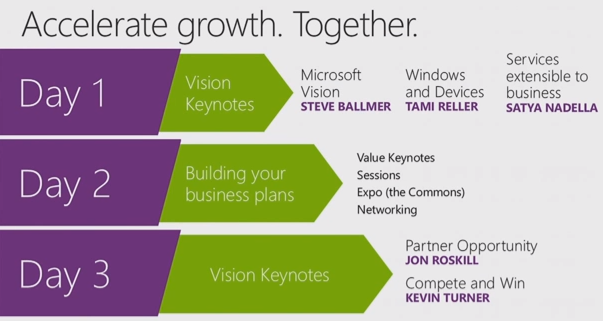
From: Jon Roskill: Worldwide Partner Conference 2013 Introduction [Speech transcript, July 8, 2013]
JON ROSKILL: Now let’s turn our attention and look forward, because while WPC is about celebrating, it’s also about us coming together to build our business plans together for the next year and kick off the fiscal year. That’s what WPC is all about.
And we’ve made a few changes in WPC, some of which you’ve already noticed as you look at things we’ve done in MPN today, but changes based on your feedback.
One of the key ones we’ve made is in the keynotes. You guys told us that you needed to have all of the product strategy upfront in order to be able to go and build your business plans over the remaining days. And so we’ve taken the day two keynote and the day one keynotes, and we’ve combined them together into a WPC day one supersession. So that’s what we’re going to do this morning.
Then you have day two fully open to go and do networking, go to sessions, and build out those business plans.
And then on day three we’ll come back together here with me, Kevin Turner. And then Wednesday night we will celebrate. And boy, are we going to have an amazing celebration. And by Wednesday night I’m going to be so excited to go crowd surfing with you guys.
We’ve also made this year ‘s WPC, we’ve built it around a customer-centric notion, customers at the center of WPC. And we’ve done that by basing WPC around these four industry megatrends: mobility, enterprise social, cloud, and big data. These are trends that are relevant every day to customers, and they’re driving demand for all of our solutions. So you’re going to see these four trends reflected not just in the keynotes and the sessions, but also in the expo across the commons, in the BG areas, et cetera.
Windows 8 takes center stage at Worldwide Partner Conference [Blogging Windows blog, July 8, 2013]
At Microsoft’s annual Worldwide Partner Conference (WPC) in Houston, Texas, executives discussed the company’s approach to services and devices. Tami Reller, Windows chief marketing officer and chief financial officer, announced that Windows 8.1 release to manufacturing (RTM) will be available for original equipment manufacturer (OEM) partners in late August, so they can prepare Windows 8.1 devices just in time for the holidays.
New Power BI solution for Office 365 delivers self-service business intelligence on nearly any device [The Fire Hose blog from Microsoft]
Today, at the Worldwide Partner Conference, Microsoft announced a new offering: Power BI for Office 365 – a cloud-based business intelligence (BI) solution that enables customers to easily gain insights from their data, working within Excel to analyze and visualize the data in a self-service way.
Developments from Worldwide Partner Conference: Partners can go ‘cloud first’ with Windows Azure [Windows Azure blog, July 8, 2013]
At Day 1 of the Worldwide Partner Conference, Microsoft made several announcements that highlight new ways for our partners and customers to embrace cloud computing using the Windows Azure platform.
Partners in the cloud for modern business [The Official Microsoft Blog, July 8, 2013]
From the Microsoft Worldwide Partner Conference (WPC) in Houston, Texas, Microsoft President of Server and Tools Business Satya Nadella announced new programs and services that are designed to help Microsoft partners and customers embrace the challenges and opportunities associated with cloud computing and big data. One such program, Cloud OS Accelerate, brings together Microsoft and key partners – Cisco, NetApp, Hitachi Data Systems, HP and Dell – who will invest more than $100 million to help put thousands of new private and hybrid cloud solutions into the hands of customers.
Partners: Want higher profits and faster growth? Sell cloud solutions, new IDC study says [Microsoft press release, July 8, 2013]
Today from the Worldwide Partner Conference in Houston, Microsoft released a new study from IDC that shows partners selling cloud-based solutions benefit from higher gross profit, more new customers, higher revenue per employee and faster overall business growth. The study also revealed customer buying preferences that highlight the importance of the role of partners in the overall industry cloud transition.
Microsoft survey reveals SMB and enterprise opportunities for partners [Microsoft press release, July 9, 2013]
IPSOS study released at Worldwide Partner Conference highlights utilization of social tools and showcases opportunities for partners.
Windows Embedded partners to join Microsoft Partner Network [Microsoft feature story, July 9, 2013]
Resources will strengthen opportunities in rapidly growing intelligent systems market.
Details
Steve Ballmer at the Day 1 Keynote [msPartner YouTube channel, July 8, 2013]
From: Steve Ballmer: Worldwide Partner Conference 2013 Keynote [Speech transcript, July 8, 2013]
… There’s 15,000 of you here in the room today, and to all of you I want to start with a simple message of thanks. Thanks for your support, thanks for your good work, and thank you every day for taking care of our customers. (Applause.) We have a total of 750,000 partners around the world, but about 90 percent of the revenue that we do is actually represented in some way, shape or form with the partners who are here today: systems integration partners, resale partners, hardware partners, development partners, software partners, cloud partners, framing partners, distribution partners. The range in breadth of the activities in which you engage are amazing. This year, our partners in aggregate had really quite a good year. Growth in the businesses from our partners was about 6.5 percent year over year, but on a base of $650 billion. That’s the total revenue of our partner network, $650 billion, and you still manage to grow at 6.5 percent. Congratulations everybody. (Applause.) …
…
We spend a lot of time as a leadership team thinking about the remaking of Microsoft. About a year ago in our annual report, we talked about the move from being a “software company” to a “devices and services company.” What that really means? It means that the world, and I’ve been saying this at our partner conferences here for a while, the world we grew up in was a world of software. When I dropped out of school and joined Microsoft, I had to explain to my mother and father what software was and why I was joining a software company. That was a long time ago.
And software development, I believe, is still the most valuable skill that anybody on the planet can possibly have. And yet the way in which software innovation gets really packaged and presented now is through a set of devices that include the software, and through a set of cloud services that deliver that software.
Just about six or seven years ago, I started talking about the cloud here at WPC. And it was highly unpopular the first time I talked about it, because it looked like an end around. And yet I think today everybody understands that this is the future of innovation. Even Windows, if you think about it, has really always been much more of a device than a piece of software.
Windows defined a class of devices called the PC. And we are certainly incredibly determined to have Windows define new classes of devices, tablets, phones, two-in-ones, living room devices, defined by Windows as a piece of software, but purchased and implemented by our partners as tested software. So we’re in the transformation from delivering our software value one way to delivering it in a new form, and we need our partners to come with us on that journey, whether you design and build computers, whether you deliver systems integration services, whether you provide custom development, there’s a place in this journey for all of us.
At Microsoft we say, what’s our unique point of view. Our unique point of view is on delivering high-value experiences through our software value-added devices and experiences. We think we understand the tools, the technologies that it takes to help people get work done better than anybody else on the planet, whether you are an employee, whether you are a customer or a trading partner, whether you are an IT person or a developer, we build experience that help people get stuff done. You need to do a piece of analysis, we’re going to have the best tools, the best devices and services for helping people do analysis. You want to participate in a virtual meeting, nobody is going to give you a better experience to participate in a virtual meeting than Microsoft does. You want to ensure information integrity in your customer, because no matter what happens with consumerization, it’s still the IT department that has to protect the integrity and value of corporate information. We together understand these things, and we together, Microsoft and our partners, will deliver the devices and services that really bring these things alive when people want to be productive.
Now, we have another side of ourselves at Microsoft, too. That’s the fun side. I refer to it as serious fun, because unless you’re hardcore about fun, the Xbox probably hasn’t been the product for you. But when it’s serious fun, or serious business, we’re going to make sure that we provide the core experiences through our devices and services, and through the value add of people in this room to really bring that alive. That’s not easy. It takes a lot of core technology investment in operating systems, in user interface, and particularly now natural user interface, in machine learning, in cloud infrastructure.
…
So what is on our customer’s mind? These are the four big trends that I think in particular our IT customers, but businesses in general, want to speak with us about every day. They come to us and they say, what about the cloud? They say it to you. They say it to us. They say, hey, I hear about big data, or I understand big data, or I’m afraid I’m missing out on big data, how are you going to help me get there, they’ll say to the two of us.
Social, part of the consumerization theme of the day is how do we apply techniques and software services that people get to know in their personal lives, how do we apply those to enable business productivity? And we’re going to show you a lot today of what we’re doing with social so that people can come together in what I would call human ways to do superhuman tasks at their work.
And last, but certainly not least, is mobility. I get to do something that the rest of you don’t do, because I sit on the stage, I get to count the number of mobile devices that go up for pictures and various other things during my speech. We’re at about 25 percent would be my gauge this year. I’m sure everybody has got a mobile device with them, but what it says is that the range of applications of mobility just continues to increase. And I want you to really understand just how rich our mobile offering has become, both in terms of the Windows devices that you can use as part of your solution, and the work that we are doing to support some non-Windows devices. So let me dive into each of these in turn.
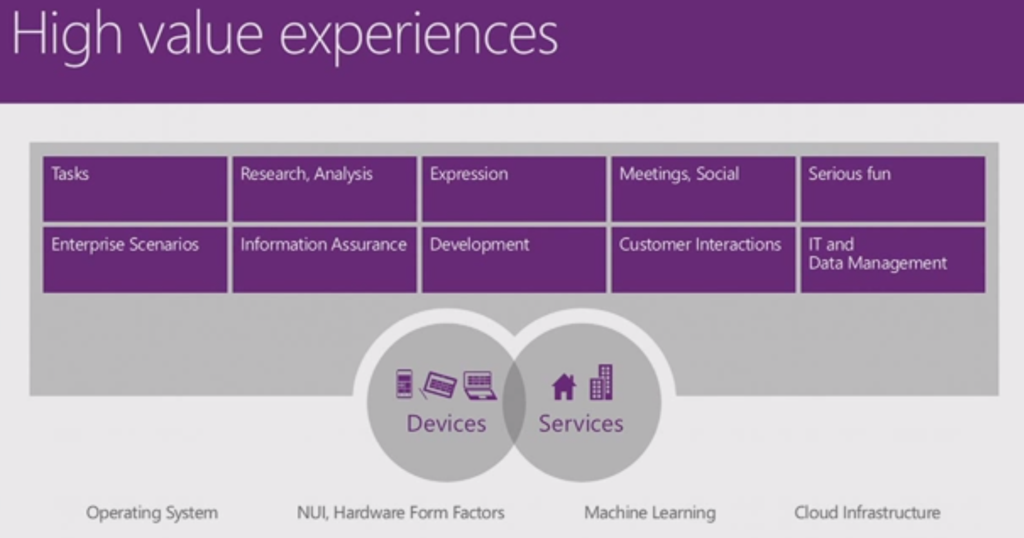

First is the cloud, the cloud remains a little bit of an amorphous thing. But, at the end of the day, the task of the cloud probably means, and it might be 5 years, 10 years, 15 years, 20 years, it is really a path that leads for almost all companies to the public cloud. And that puts a lot of pressure on providers, whether it’s Microsoft, folks we compete with, our service provider partners, it puts a lot of pressure on us to make sure that we have world-class scaled, low-cost, low latency, high-bandwidth cloud infrastructure across the world. How do we, from a public cloud application, deliver with incredibly low-latency and with exactly the right data security and privacy and protection? How do we deliver information, whether it’s in the U.S., or Australia, or China, or Malaysia, or any place else in the world? And we are investing in that infrastructure.
We actually started the investment process in that infrastructure in order to support our own applications, to support Bing, to support Office 365. And what we would tell you is that our cloud infrastructure, Azure, is being proven out, is being battle tested, and is being advanced on the backbone of our own first-party applications, but then that infrastructure, that Azure infrastructure, is there for all of you to use, to deliver solutions to your customers.
I claim there really are almost no companies in the world, just a handful, that are really investing in scaled public cloud infrastructure. We have something over a million servers in our datacenter infrastructure. Google is bigger than we are. Amazon is a little bit smaller. You get Yahoo! and Facebook, and then everybody else is 100,000 units probably or less. So the number of companies that really understand the network topology, the datacenter construction, the server requirements to build this public cloud infrastructure is very, very small, very small. And the number of companies that are at the same time seriously investing in the private cloud, which is not going away, and in these hybrid clouds is really just one and that’s us. We are building in a compatible way private cloud infrastructure based on Windows Server, and public cloud infrastructure based on Windows Azure, and we will talk to you about that today.
Sixty-three percent of customers surveyed will say they really want a single vendor who can provide them both public cloud and private cloud. We think we are the only solution and certainly the best solution for customers who want that. We continue to advance with our cloud applications, our Bing search service has made progress each and every month, improving not only its market-share and its quality, but also the speed and performance with which we deliver our results, which should be a key indication to you on just how rich our cloud infrastructure is.
Through your good work our Office 365 service has literally exploded. For the last few years we were saying SharePoint was the No. 1 fastest growing product at Microsoft. Then it was Lync, the No. 1 fastest growing product at Microsoft. Through your good work it’s Office 365. And what all of that means is our mutual customers are ready for the cloud, and our product line is ready for the cloud. People want full, familiar, world-class productivity tools in the cloud. Only we give people those tools that really let you get work done. There are pretenders who come from the consumer world, but there’s only one set of tools for your business customers who really need a productive, high-security, high-reliability, infrastructure in the cloud for their applications.

No. 2, big data, big data is I think one of the areas that is still very, very early actually in its exploitation. Big data means a lot of things to a lot of people, and it’s very important that we continue to push forward on these big data themes. You’re going to see demonstrations today of some of our tools, some of the work that we’ve done with Excel, and SQL Server, I guarantee you for people who have a lot of data, there is no question that the No. 1 sort of most familiar, easy-to-use toolset to get insight out of data comes from Excel and SQL Server.
Ninety percent, literally, of the world’s data, this is a very interesting fact, ninety percent of the world’s data has actually been created in the last two years, 90 percent of all of the online data in the world in the last two years. What it says is there’s an explosion in this data. And so tools that let people mine it, get insights from it, and understanding from it are essential. We’re going to show you a demonstration of some of the things that you can do with our big data and BI suite later on today that I think will absolutely blow your mind.
But, we’re also providing you with the infrastructure that lets you build out automated solutions for your customers, because over time most of the value in big data will actually be in having the data learn from itself and take automated actions on our joint customers behalf. We’re building out our Hadoop infrastructure on Azure, so that you can do a mix of things with structured and unstructured data. We are certainly doing a lot of work on SQL Azure, so that you can access the structured data in the cloud. Because of our investment in Bing, we know we have a lot of data. We are putting that data in a structured form, where you can use it as part of the applications you deliver.
One of the key things that we showed at our developer conference a couple of weeks ago in Windows 8.1 is the way we’re starting to take entities that Bing understands and make them part of a platform for you to use as developers in your applications.
Last but not least is the Azure Data Marketplace. There is going to be a lot of data that people are going to want to use inside their applications that don’t actually live inside the enterprises you serve. If you want to write a forecasting application for one of your customers that forecasts how many raincoats they need in each of their retail stores, I guarantee you the weather data is a helpful input. And yet most of our joint customers don’t keep the weather data in their enterprise systems. And so we want to let you mix and match public data and private data. We want you to be able to bring that data together in structured and unstructured ways. We want to bring it together in ways in which humans get the insights, and we want to give you the machine-learning infrastructure so that the computers themselves can actually help your customers respond to their customers in real time. The work we’re doing here you’ll hear about throughout the morning, and particularly the demonstrations you’ll see I think will really bring these things alive.

Social. Some people think social is one product. I don’t. Social is a way of working. How do four of us come together and collaborate on a project? How do we collaborate if we work in the same company? How do we collaborate if we work in different companies? How do I reach you if you are in my customer base and I want to do a seminar for you? Or I want to put on and have an event where we communicate real time? All of these are social activities that are involved in business. So it’s people to people, it’s people to businesses, it’s employees to employees, it’s all of the constituents, consumers, employees, customers, and partners. How do you bring them together naturally? Sometimes you want to do that on a real-time basis, and sometimes you want to be able to do that in a way in which people can participate asynchronously.
I’m glad to have 15,000 people here today, but many more people will watch the video of this section in our partner community around the world. And it’s part of, if you will, the social infrastructure, letting people participate the way they want when they want. And we’ve woven this into the fabric of everything we do. Windows devices come from the get-go with integrated communications and social capabilities like Skype. Skype and Lync are being brought together to allow the consumer and the businessperson to interact together in real time.
We continue to push forward in Outlook, adding more social capabilities directly into the e-mail client that is the base station from which most of us would communicate with other people. We acquired Yammer over a year ago, and you’ll see the way we’re using Yammer both inside companies and now enabling it to stretch between companies and their partners to involve real-time communication that feels very much like what somebody would do on Twitter or Facebook, but in a productivity context. We continue to push SharePoint social capabilities forward, and even in our Dynamics product line, even when we’re talking about line of business process, it is very important to collect the information from the social realm, and to be able to let people in formal line of business processes actually connect to social environments. And we’re going to show you some of that later on in the demonstration.

Last but not least is mobility. This is an area where we’ve made huge strides in the last year. I had a chance to beat my chest a little bit, get excited about Windows Phone, but we’re also going to show you today what we’ve done with Windows 8.1, and what our hardware partners have done with Windows devices. You can buy beautiful Windows devices today in so many different shapes and forms. Windows PCs, everybody has a notion of what we mean by a Windows PC. But we’re going to show you small Windows tablets. They’re still all Windows all the time, but they’re hard to mistake for a PC.
We’ll show you Windows two-in-ones, devices, which depending on how you configure them at any time will feel like a PC or can feel like a tablet. I happen to think this will be the most popular configuration for business people because they’ll want the ability to seamlessly go back and forth between their productive life, their consumptive life, and their personal life.
I talked about Windows Phone. You’re going to get a chance to see the Surface. Hopefully many of you will choose to pick one up, but what we’re doing with Surface I think is also amazing. We’re trying to really lead the way on products like Surface Pro, and the use of the pen, which I think is pretty fundamental in mobility.
While we’re making these investments in sort of Windows mobile form factors, if you will, we also continue to do work to support non-Microsoft devices. You’ve seen us certainly move with SkyDrive, with Lync, with OneNote, with a number of our offerings to embrace Android and Apple phones. We’re going to show you some technology today for managing mobile devices that apply outside the Microsoft sphere. So our mobility strategy, as centered as it may feel in our Windows devices, and they are beautiful, and they are the most productive, for those people who just don’t happen to have one, we’ll also show you a little bit of some of the technology that we’ll give you so you can stay well anchored in Windows and Active Directory as the center point for managing devices of all shapes, sizes and forms.
At the end of the day we may see ourselves focusing on high-value experiences, and our customers may ask us collectively about cloud, and big data, and mobility, and social, but at the end of the day we deliver to you some products. And with those products in hand you turn around and try to serve our joint customers.
Windows, we’ll show you 8.1 and I couldn’t be more pleased with the progress. Windows Phone, if you haven’t checked it out recently you must. Surface, I hope you get the opportunity to delve in and really explore at the partner conference. Office 365, including Yammer, and Skype, and Lync, and SharePoint and Excel, and BI, and all of these phenomenal capabilities, the footprint of what you can do with Office is continuously expanding. And when you leave here, we want to make sure you leave here understanding completely the breadth of footprint that Office is embracing. Windows Azure, and when I say Azure today I include Windows Server, and the full on-premise product line. Your ability to go out and articulate a hybrid cloud story with Windows Server, SQL Server, and Windows Azure is incredibly important to us. So we are going to try to equip you to do that by the time you’re done today.
And then last, but not least, is Dynamics. Dynamics continues to evolve in its footprint, in its embrace of the cloud. Dynamics is an amazing business for Microsoft. I’ll bet we get less PR on the business that is billions of dollars for Microsoft, and where we probably have the most loyal committed partner base in the world, and the most loyal committed customer base. And for those of you who have not come back and looked recently at the amazing work that we’re doing in business applications I hope you’ll feel enthused to go do that by the end of the day.
We will only succeed as a company if we arm you to go approach these challenges. You need to see these products. You need to understand their potential. You need to believe that they can help you serve our joint customers. You need to know each other. Some of you are experts in hardware. Some of you are experts in systems integration, some are developers, some are resellers. Bringing you all together and equipping you with the common base, so you understand where we’re going, what we’re doing, and collectively how we can serve our joint customers that’s what WPC is all about, and if we take advantage of this opportunity and certainly with the phenomenal product lineup that we have today, and we’ll roll out over the next month, we know absolutely that we can succeed together.
Thank you all very much and enjoy WPC.
Windows 8.1 Product Enhancements [msPartner YouTube channel, July 9, 2013]
See also: Windows at WPC 2013 [Blogging Windows, July 8, 2013]
From: Tami Reller: Worldwide Partner Conference 2013 Keynote [Speech transcript, July 8, 2013]
Tami Reller: … everything that we are talking about today is anchored by this idea that we can do something that no other company can. And that is one modern and complete experience across the devices that matter today. Your experience, your data, everything can travel with you. And it’s connected through this trusted foundation of Windows. This is one experience that is unique to Windows, but it’s also uniquely yours.
I mean, we know that when a customer chooses an Apple product, they get a device that reflects Apple. When you choose an Android device, you get a device that reflects a dizzying number of points of view. But when you choose a Windows device, you get a device that reflects you.
Start a Word document from your laptop, then easily finish it on a Windows Phone. You get music, video, and games from Xbox. The best of the Web with Internet Explorer. The best cloud storage in SkyDrive. And of course the best way to stay connected, Skype. And the absolute best in productivity with Office. All of this across every device providing the most complete experience from the start.
Well, we’re believers, continue to be believers that user experience and the design is going to continue to be an important differentiator for Microsoft, and it’s also going to continue to be an important differentiator for the experiences that you are building for customers.
What we’re finding is that businesses are seeking trusted partners who can not only write great code, that’s critical of course, but they can also design beautiful and engaging experiences for customers.
Apps that are better designed, they absolutely achieve better ratings in the Windows store, and even equally as important, they are more engaging for customers, and they deliver greater monetization opportunities.
So to support all of this, I’m excited to announce that in January we will be launching a new [partner] competency: The user experience design competency. And the whole idea behind this competency is to give you the best way to train your designers and to get recognized for your expertise with the Microsoft design language and user experience for app building.
This competency will provide your designers with training and certification and gives your firm a head start in building great apps, and we think will help you recruit the best people. So I hope you’re as excited about this as we are, look for this in January.
So we’ve been talking about devices and services for about a year now. And while so much of the opportunity that we see for us and that we see for you is still ahead, there’s a lot of great momentum to talk about.
…
Let’s take, for example, Windows Phone, which Steve did such a great job talking about. Our sales are growing six times faster than the overall smartphone market. Safe to say that we are now officially the third ecosystem in mobility. (Applause.) Thank you. Thank you.
Windows. We are moving forward. Steve did a great job talking about that. We’re moving forward, and you heard us talk about 100 million licenses. I can also report that we have over 20 million enterprise evaluations. So great in consumer and a lot of enterprise traction starting.
And Windows 8, so far, has logged 60 billion hours of use. And our new customer activation continues at a consistent pace.
Office. It’s a great example of a product that is used multiple times every day and it is known and loved by more than a billion people. The new Office is our fastest-selling release in history. Worldwide, one copy is sold every second.
Additionally, one out of four enterprise customers are already on Office 365. And I love this next statistic. Partners lead three out of four enterprise Office 365 deployments, three out of four, great opportunity. Thank you so much for your role in moving businesses to the cloud. (Applause.)
Amazing momentum on Skype. More than 300 million people use Skype each month. And that’s a service that can see up to two billion minutes of use per day on some peak days.
So how our products come together really starts with the experience. And people are using our products as part of everyday life. Important parts of their life. And Steve talked about this as well.
So I have this short video that I think does a great job of showing what we mean by this. Take a look.
(Break for video segment.) [6:40 … 7:10 essentially for Office 365]
… [Office 365: complete Office in the cloud … this is the Office enhancement … +extension to the Open program … +investment in partner enablement]
… [Windows Phone: Lumias … suitable to build end-to-end enterprise solutions … tools to build enterprise solutions]
… [xBox: … newest xBox One …]
… [Surface and Surface Pro: … hand down more productive than iPad … better with Windows 8.1 …]
… [Windows: … mobility is top for CIOs … Windows 8 tablets are best for the business … SkyDrive … destination for developers … more than 100,000 apps … LOB customers need partners … 2 out of 3 enterprise enterprise organizations are investing today in mobile applications … great UI enhancements, great usability functionality … migration from XP opportunity … Windows Accelerate program continued … new Touch Win program incentives directly to authorized distributors as well as reseller partners …]
… [Windows 8.1: … 900 continuous improvements and hundreds of updates to our inbox apps … represents responsiveness, it represents rapid timeframe … feel natural on everything from a small tablet to a large work station …]
[21:18 Jensen Harris showing Windows 8.1 via a jam-packed demo here for the next few minutes, including some things that we have never publicly shown before]
… [Nokia Lumia 925 … 8-inch Acer Iconia W3 … in landscape games and productivity … +optimized Windows 8.1 specifically for portrait for working great on these small tablets e.g. Reading List, ergonomics … ]
Now I’m going to move over here to a Surface and I’m going to show you one of the most important near features in 8.1. Every month, 20 billion searches are performed just in the United States on Windows PCs — 20 billion searches every month. We looked at this as an opportunity to say if we made search better in this product, we would be making 20 billion things every month better for people. And so we’ve introduced search in 8.1.
… [search hero: … curated, built-on-the-fly app that brings together information from Bing, information from your PC, files from the cloud, things from the Web, and puts it all together in one view … integrated with Maps functionality…]
… [xBoxMusic app: … redesigned totally to make it fast, to make it efficient, and to focus on your collection of music …]
[Dell all-in-one, 27 inches with touch … the world’s best Skype device, a Windows 8.1 PC … Start screen changes: all the things that you love on one screen … new personalization options … multiselect … Reading List … SkyDrive … picture editing built-in … a lot of new [built-in] apps: e.g. Food & Drink … hands-free mode … Windows Store big-big update: e.g. recommendation engine built one Bing … … OneNote syncing with SkyDrive …]
[Surface Pro: “play to Xbox One” … Miracast built-in … OneNote
Windows Phone: OneNote syncing with SkyDrive ]
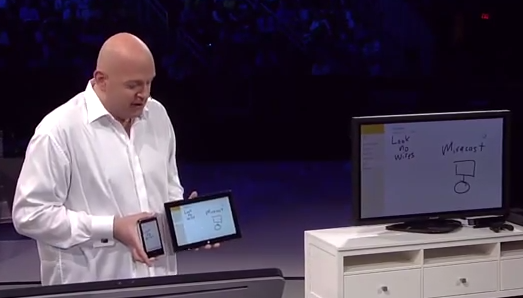
… [desktop PC: … doesn’t need touch …bring together the best of the modern UI and the best of the desktop UI and harmonize them in Windows 8.1 … Start button .. enterprise cosumer dashboard … productivity (… multitasking) taken to next level: e.g. new version of Outlook … ]
Suddenly, I have something that is starting to look like a very productive work station. And I can move these windows around, I can put them where I want. We have maximize, we have resize, and all of a sudden you start to realize that there’s more than one way of doing awesome productivity. This uses all the pixels on my PC.
And on this sort of smallish monitor, I can fit three. But if I had something like a 2550 x 1440 monitor, I could show four apps on the screen at once. And all of a sudden, now you’re way more productive than you could have been on the desktop. You’ve got your Twitter feed, you’ve got your full running mail app, you’ve got multiple browser windows or multiple mails up at once.
And it gets even better. If I attach a second monitor, then suddenly I can do the same thing on multiple monitors at once. So I have any collection of apps across my monitors in any configuration I want, any size I want, blending desktop and modern apps across my screens. I can bring the Start screen up on one and just leave it, and this doesn’t just work for two monitors, it works for three, four, five, six, seven, as many as I have. And so this sort of shows the power of Windows 8.1 and the modern UI even on a desktop engineering workstation making you more productive.
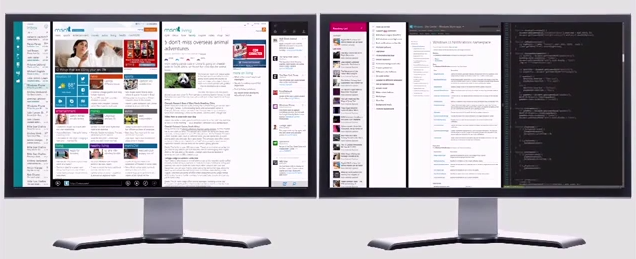
[1:02:06]
Tami Reller: … I’m also quite happy to be able to confirm today that Windows 8.1 will be available for our OEM partners in late August. Meaning that holiday devices, many of them will have Windows 8.1. So late August available to OEMs. So very pleased to confirm that today.
What better timing to talk about our OEM devices? We’d like to do that. Please help me welcome to the stage Nick Parker. To do that, I’d like to open with a little video, a commercial we have on air that shows just why Windows 8 tablets are so special.
(Windows tablet commercial video.) [1:04:05 … 1:04:35 essentially iPad 32 GB $599 vs. Windows Tablet $299 (Dell XPS 10 32GB) Limited time offer at Dell.com]
Dell Tablet vs. iPad [WindowsVideos YouTube channel, June 13, 2013] here the limited time offer at the end stands at $399
Nick Parker:
… Windows Storage Server: e.g. Western Digital Sentinel, a 16-terabyte small business server … Windows Embedded 8: e.g. IEI [?Institute for Emerging Issues?] display panel … large-format touch, or the all-in-one: e.g. Dell XPS 18 also as a desktop replacement … ultrabook: e.g. the world’s thinnest and lightest one Sony VAIO Pro 13 … tablets with touch, and convertible form factors: e.g. Lenovo Helix … tablet with stylus … docking tablet, also as a desktop replacement: e.g. Latitude 10 … Fujitsu Arrows Tab waterproof tablet … Hewlett Packard ElitePad 900 the choice of Emirates Air for their in-flight device, also with a very innovative sleeve … Lenovo ThinkPad Tablet 2 , not just a small app running a stylus capability, but ink immersed as part of your input mechanism … Panasonic FZ-G1, the Panasonic Toughpad ruggedized computer … Acer W3 one-handed Windows … thinnest and the lightest tablet that you can get, as well as having all-day battery and integrated 4G, and those are capabilities built on the ARM platform: Asus VivoTab RT … phones: Nokia 925 and Nokia 520 … innovation: Acer Aspire R7 with innovation in hinge, Toshiba KIRAbook a 221-pixels-per-inch device, HP Rove the 20-inch IPS all-in-one for both desktop replacements as well as great home devices + complete flat tabletop mode for using an application that’s maybe multi-orientational …
[1:22:24]
Note that Samsung was complete missing from this device OEM roundup despite of its leadership ATIV Q, ATIV Tab 3 and ATIV One 5 Style devices, as you could read in 20 years of Samsung “New Management” as manifested by the latest, June 20th GALAXY & ATIV innovations [‘Experiencing the Cloud, July 2-5, 2013]
Satya Nadella about Platform, Infrastructure, and Applications [msPartner YouTube channel, July 8, 2013]
From: Satya Nadella: Worldwide Partner Conference 2013 Keynote [Speech transcript, July 8, 2013]
… <before that: how to enable dynamic business … demoed across Office 365, Dynamics CRM Online Windows Intune, and System Center Configuration Manager, and Azure Active Directory … >
[30:08] When you think about having lots of data and having lots of rich processing capabilities, the next step is to be able to empower your end users with the best tools to drive insights. This is where we collectively have really created one of the most amazing phenomena when it comes to BI with self-service BI. We took the most ubiquitous tool around data in Excel, combined it with the power of SQL Analysis Services, and started the self-service BI revolution, and especially in combination with SharePoint, we really have done a fantastic job of driving insight at the edge of all data, big or small.
Today I’m really pleased to announce the next giant leap, if you will, when it comes to self-service BI. We are announcing Power BI for Office 365 Preview. It takes all of the rich capabilities around data discovery, data navigation, visualization, collaboration, enterprise features around auditability, taking all of that, building it right into Excel and SharePoint, so that every user has friction-free access to it. They’re also delivering all of the rich cloud capabilities that power this natively in Azure. So that means all of the SQL analysis capabilities that power this experience are all there natively in the cloud.
So to show you a glimpse of what this new solution, Power BI for Office 365, can do I wanted to invite up on stage Amir Netz.
Amir.
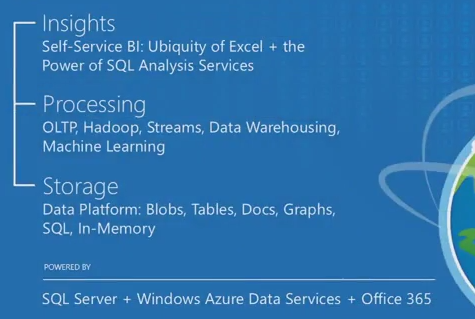
Power BI Demo [msPartner YouTube channel, July 8, 2013] for those who want to watch only this part, watch especially from [8:10] on especially (incredible demo/performance)
AMIR NETZ: Thank you, Satya.
Power BI brings self-service analytics to the cloud and the power of the cloud directly into Excel. It opens amazing new ways for users to connect with data. So let’s take a look. We have here on the screen our Excel 2013. And I want to create a report about our datacenters. I don’t have the data. With Power BI we can actually go and find the data that we need. You see here online search, I am going to use it to go and find the data for my report.
I’m going to type in my search query and just here within Excel Power BI is searching for millions of public data tables, and finding the data that I might need. It comes from Wikipedia, it comes from the marketplace, it comes from Bing, but because I’m a Microsoft employee I’m also getting data not just from the public data sources, I’m also getting data from my enterprise data assets. Those were mapped into the catalogue of Power BI. So here we see a table from my data warehouse, and I can go and add that table to my Excel, and just like that Power BI connects and aligns the data directly to my sheet just like that. It’s so easy.
Now I want to create my report. I’m going to go and use PowerView. It’s also integrated into Excel 2013. So let’s go and create a nice report here. We’re going to take a look at the let’s take the location of the datacenter, the square footage of the datacenter, let’s make it a bit larger. It’s Excel 2013 so we can just convert it immediately to a map. We can go and categorize my datacenters by generation. Just with a few clicks, a beautiful report and it’s not the only report I have here in my workbook. I have a couple more.
So this report here shows me the storage of Azure, just an amazing explanation of the growth in the business. This one here shows me the subscriber’s growth in the business. You see almost 200 percent in just over a year. I mean I can slice and dice and look at segments of users, and see the growth there. So I have this beautiful report, interactive, and I want to share it with other people and to do that I go to the file menu, I do a save as and I’m saving it to the Power BI side in Office 365.
And now what does this site look like? Let’s see how this site looks like in SharePoint Online. This is it. You can see how well organized it is. You see my Azure report, my Office 365 report. It’s clean. It’s crisp. It’s beautiful. I want to go and take a look at one of those reports. I click and of course, because the reports are all created inside Excel, Excel is the application used to be able to browse the reports in my browser. So you can see here the explanation of growth you see in the compute resources of Azure, you can go and look at the other reports of that, the database growth, and of course the whole thing is fully interactive. So I can go select different time slices and in the browser get the full interrogation of the data.
It’s very easy to share, very easy to explore, but it’s more than that, it’s a full enterprise offering. So let’s take a look and see all the options that we have here. So see this menu here, take a look at what we have. I can share with other people, I can protect the data, I can schedule data refresh, where Power BI will reach back from the cloud to the enterprise, go to the original data sources, bring the data on the regular basis up to the cloud, up to the report that we have here. I can track the data usage by my users. And one more thing I can do here, I can add that report to my mobile favorites. And you can see this mobile star here, now that report is here and it’s showing up on my mobile device. It’s a beautiful application Power BI. It’s fully interactive as you use it. And it’s not just this report. I have a full gallery of reports that I can use here. You can see I can browse through that. It’s just the best way you can have to consume reports on the go.
So you’re seeing what kind of a gorgeous, great offering we have here. But, there’s one more thing, one more capability that I think you need to see, because in my opinion it’s the true game changer. So for this I’m going to take a look at another Power BI slide. Look at this one here, and make it a bit larger. This one Power BI slide is for a media company. And you see it has these reports that we created in Excel. But, there’s another role here, we call it “Featured Answers.” And these are the most common questions my users ask about the data. For example, show our sales pipeline. I’m clicking on it and now Power BI connects automatically to the sales pipeline data source and shows me the results. Now it looks like a comp report, but it is not. It is the beginning of a conversation with Power BI.
So I can compute that, show our sales pipeline only with opportunity size greater than $20,000. And as I type I immediately get the answer. You can see that there are six opportunities greater than $20,000. It’s very easy, right. (Applause.) Now one of those opportunities is this rock-themed event series. And I want to continue the line of interrogation I want to ask questions about that, so I can go and ask maybe the top rock classics. And notice I’m using, something magical happens. As I was typing the questions the results came up and I actually realized I’m asking about songs. So I moved away from the pipeline data set, automatically it connects me to a different one. This one is the historical data set for all the music charts in the United States. So I can see that “Bohemian Rhapsody” here, by the way my favorite song of all time, is the top rock classic. And I know it’s right, because Power BI tells me what it understood from me.
Look at that. It tells me that when I said rock I meant rock songs. And when I said classic, I meant a certain period of time, the ’70s and the ’80s. It is not the oldies from the ’50s. And when I said top it said you probably want to rank it by something, so you rank it by the number of weeks it stayed on the charts. So I like that interpretation, but not exactly. And again, Power BI comes to help me. It says, hey, I know what you mean now. So how about instead of ranking by weeks on the chart, I offer other options, rank it by the weeks the song stayed at No. 1. And I can see that “I Love Rock and Roll” is showing at No. 1. And every other part of the sentence is understood with Power BI.
So you say, maybe you don’t want to look at songs, you might want to look at artists or albums. Maybe not rock, here’s other genres. How about pop? Let’s go with pop. And see “Physical,” Olivia Newton John, the top pop classic from that era. It’s just an easy and fun way to interrogate the data. Let’s take this for example; let’s ask for songs about true love. And I can see immediately five different songs, one of them by Bing Crosby, another by Elton John, all called “True Love” showing up on the charts. I can ask questions about people that I know. Songs about Bill Gates, and you’d be surprised there’s actually a song called Bill Gates showing up on the charts, three years ago. Yes, by Lil Wayne, one week on the charts. I looked at the lyrics. It actually is truly not a love song.
We can ask more business questions like number of songs. You can see we have 2,600 songs in the database. Let’s list it by year. And now notice how the system automatically detects what I’m asking, giving me a much better visualization. This is a better way to look at it as a chart, automatically. I don’t have to say anything. And you can see this very interesting chart. It shows how many songs showed up on the music charts every year. And you can see in the late ’60s and early ’70s over 700 different songs on the charts. And then we go to the new millennium you see how it’s kind of dropping gradually and it’s less than half of that when you get to the new millennium. And then there is some recovery. But, when you turn on the radio and it seems like it’s the same song playing again, and again, and again, well now you know, we actually do listen you have the proof. We do listen to way less songs than people in the ’60s and ’70s listened to, very interesting.
Now the picture is even more interesting when you look at it by genre. And again, the system just changed the visualization for me on the fly, and look at that, this is the pop genre. And you see the peak that we saw before, the decline, and some of the recovery. Rock starts the same way, peak, decline, but it doesn’t recover. Something is going on here. And look at that hip-hop. From the mid-’80s hip-hop is growing and growing, and growing and it’s not taking from pop, it’s taking all the market share from rock. So you can see how the data is telling you this fascinating story of the music industry just like that.
[8:10] Now, of course you might want to know other questions. For example, what is the best song of all time? And you can see that we have here Jason Mraz with “I’m Yours.” The first time I saw that I said, who the heck is Jason Mraz? But I had to go look at the data three times and unfortunately it is Jason Mraz, scientifically speaking, it’s the best song of all times, over a year and a half on the chart, like no other song. It’s amazing. And of course, the age old question, who is the best artist? And now we get here, again, a different visualization, and you can see here that you have Mariah Carey, you have The Beatles, we have Usher, we have Elvis, really fantastic artists that we have here. But, these are very different periods of time and it’s really hard to compare The Beatles from the ’60s to Mariah Carey from now. So maybe other visualizations can help me. And with Power BI we can switch the visualization. Look at that, I have a whole list of visualizations. I can change it to a table, for example. It doesn’t help me to explain it. But, there’s one more visualization here that we call the king of the hill. And this one is just specifically designed to explain changes over time.
Now we can see here, let me just explain how it works. It’s kind of a bubble chart. In the middle we have the biggest bubble, it will be the artist that has the most weeks at No. 1 on the chart is the king, right. It’s going to be the center big bubble, around it will be the contenders, the people who want to take the center position from it, the other artists with less weeks on the charts. And we’re going to animate over the time dimension.
So we start with 1955, Frank Sinatra, Pat Boone, and we’ll see the Motown area, so we’re going to see here the Platters joining in. But, in 1957 something amazing happened, Elvis Presley breaks through with “All Shook Up,” and he is the king. This is Elvis in the center. He is going to have over 100 different songs on the Billboard 100. It’s just dominating. But, in the ’60s come and so over the pond the greatest band in the history of music, The Beatles are showing up. And they would have 26 No. 1 hits. They’re going to have eight consecutive ones. They just dominated the rest of the decade into the ’70s, and they’re breaking up. And this is kind of a weird condition. Look at that, Three Dog Night, never heard about them? Forget about them, because the next one is going to be Elton John, he’s a legend. Candle in the Wind is still the No. 1 selling single of all time. This is also the disco era. So we have the Bee Gees, I danced to their songs with my first girlfriend. And of course, it was Olivia Newton John, a giant mega-star in the early ’80s.
And now look at that, what do you have in the ’80s, Paul McCartney, going to be followed by Michael Jackson, going to be followed up by Madonna, going to be followed up by Whitney Houston. This is a parade of the greats we had in the ’80s, George Michael, Paula Abdul, I have no idea what she is doing here. Now, we’re seeing Mariah Carey, she is going to dominate the ’90s. She’s going to have a fight with Boys To Men. But, look at it, she’s in that fight and she’s pushing them out. She is going to continue with 79 weeks at No. 1. She is going to dominate the ’90s. But, the ’90s are coming to an end. Santana is taking over. He is going to take over and then it’s the hip-hop and rap, with Nelly, Kid Rock I cannot stand, and then Usher he is a genius, wonderful, wonderful. But, look at that, it’s Mariah. She’s over here again. She’s looking for a fight in the 2000s, and she’s pushing them out. And now we are getting ready for the era of the divas. Rihanna, look at it she’s taking over. Katy Perry is trying. Adele is trying. But, no Rihanna is here to stay. Thank you, Rihanna. Thank you Power BI.
Thank you all. [43:30]
SATYA NADELLA: Thank you, Amir.
Hopefully you got a good feel for the power of Power BI in Office 365, and now just imagine if you can sort of replace all of the pop data and music data with your business data and your customer data. Mix it up, in fact, with some of the public data inside of Bing, and doing these kinds of demos where people are able to get insights from all of the data that they have inside their organization, and doing a join of that with, in fact, information that’s available publicly. We think that this is the next big leap when it comes to BI and insight around big data. [44:16]
So let’s switch gears and talk about application development. I know many of you in the room have lots of projects that you’re doing application development for. This is something that we have historically done very well together with Visual Studio and .NET. And, in fact, all of our client and server runtime platform. But this is going through a sea change. And, therefore, we are building and retooling for the sea change a few apps that you want to build.
It all starts by having a platform that is capable of both infrastructure as a service and platform as a services. So that’s IaaS plus PaaS. And that means any mission-critical Web application you want to build, any mobile front-end you want to build, where you’re automating a business process with a mobile front-end; any cloud service you want to build, you want to have this rich capability of both infrastructure as a service and a platform as a service. And you want to be able to deliver that, by the way, in both Windows Azure, as well as on Windows Server. So that symmetry of development runtime is also very important, and that’s what we’re building out.
Since you’re building applications for enterprise customers, you’ll want to have real richness of business logic. And this is where we are making some changes, and innovations, which are going to fundamentally change the economics and the repeatability of your business application development, or mission-critical application development. From identity, you saw Azure AD already from an IT perspective, but from a developer perspective now you have a fully programmable identity management solution where you can handle multiple identities, consumer identities as well as enterprise identities.
We have BizTalk services in the cloud now where you can use that to be able to automate your enterprise application integration, or even B-to-B integration. We have all the richness of the data platform I talked about previously that now you can incorporate as part of your solutions without having to really build that all on your own, whereas you now will be able to make API calls.
And, lastly, perhaps most interestingly, is you can, in fact, incorporate all of Office 365 as part of your solution. Office 365 has a very modern API surface area across the entire length and breadth, both on the client side as well as on the server side, that you can now program as part of your solution. Think about all the document workflows within the enterprise business application context that you can incorporate.
Of course, at the end of the day, what matters to you as well as your customers is productivity. And that’s where we’ve always led with the fantastic tooling in Visual Studio. We’re taking that a step further to make rapid application development, especially with the Lightswitch features inside of Visual Studio 2013, we’re making it possible for you to build your Web applications or business applications with Web fronts that much more simple for you to do rapid application development, especially in combination with Office. So the combination of Visual Studio, Lightswitch, the services that go with Visual Studio, either on TFS or on Azure with source code control, project management, build, test, all of those services come together to really improve your productivity.
And we have many, many customers and partners who are taking advantage of this. The one I wanted to highlight was a solution built by .NET Solutions for IT, a financial services company in the UK. And it’s a very cool solution in the sense that they were able to take a very innovative approach to doing codes where they were monitoring the in-car telematics getting back information to Azure, then rendezvousing that with a code system which was on premise to be able to do real-time codes, and do custom codes for their customers. So that’s a pretty innovative way to think about mobile applications, Web tier, as well as being able to service relay back to data inside of your enterprise. And that richness of both tooling and capabilities in the runtime are unparalleled and unique to what we do with the combination of Windows Server and Windows Azure.
So I’m really pleased to announce the availability of Visual Studio 2013 Preview. I really encourage those of you who have .NET practices, Visual Studio expertise, now you can take the tooling coming out, the runtimes that are coming out as part of Windows Server, Windows Azure, as well as Windows 8.1 and Windows Phone, and really build this next generation of mobile applications as well as Web applications, and cloud services.
I’m also pleased to announce SQL Services, or SQL Database Premium Services for Windows Azure. Windows Azure has been going through significant growth, and particularly there’s not a solution that’s built in Windows Azure that does not use SQL Azure. And we are now introducing some capabilities that allow you to make those reservations. That means you can bring your most mission-critical applications over to the cloud. This is, again, something that we are going to be very unique. We are unique already with the fact that we have a PaaS-based SQL Service. And now we are making it much more ready for mission-critical applications.
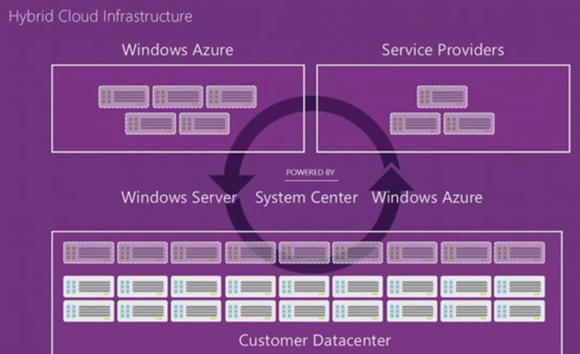
[49:28] So the last piece of the presentation today is cloud infrastructure. Now all of the things that we talked about rely on cloud infrastructure. And our goal has been to build the most robust cloud infrastructure. And to live the cloud lifestyle we build Windows Azure using our server software. So when we sort of say we are serving millions of virtual machines on Windows Azure, it runs, in fact, on Windows Server 2012 hypervisor. So that’s an amazing feedback cycle. Not just that, but all of our first-party workloads, from Office 365 to Bing to Xbox Live, are all running on Windows Azure capabilities. So that this reinforcing feedback cycle is what battle tests our cloud infrastructure.
We are, again, unique in that we take that same cloud infrastructure that we are using on a day-in and day-out basis inside of Azure as well as our first-party applications, and making it available as part of Windows Server and System Center for others to be able to build their own cloud. And that’s what really gives us the ability to deliver a true boundary-less datacenter infrastructure with consistency to our customers.
We think that that is very, very important to be able to really service the needs that enterprise customers have around infrastructure and support of their applications, and this is something that we believe we are setting the pace, and no one else in the industry, neither Amazon nor VMware can promise or deliver this level of consistency, this level of mission-critical readiness because of the battle testing of all the diverse set of first-party workloads.
We have lots and lots of partners who are already taking advantage of it. One example that I wanted to highlight today is what Skyline Technologies did for Trek Bicycles. They really took advantage of all of the capabilities of this boundary-less datacenter. They built out a private cloud solution. They, in fact, used the IaaS capabilities inside of Azure to be able to deploy the retail management solution. They even built a PaaS solution on Azure to be able to automate all of the partner management. So again, you can see how having this consistency gives you the flexibility to be able to take advantage of all the resources in your datacenter, in your partner datacenter, and in Windows Azure, but still have the one consistent virtualization and management pane of glass from an IT perspective.
So now to really show you this boundary-less datacenter in action, I wanted to invite up on stage Jeff Woolsey from our team. Jeff. [52:08]
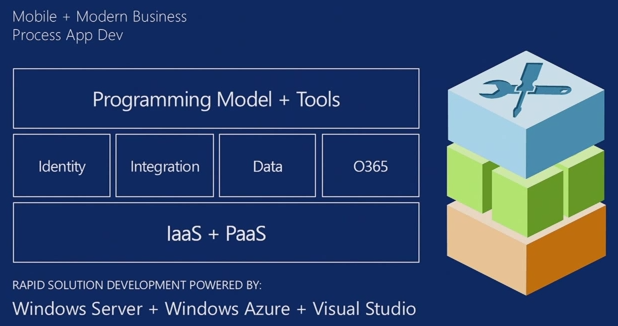


Related post: Partners in the cloud for modern business [Satya Nadella on The Official Microsoft Blog, July 8, 2013]
Today, at the Microsoft Worldwide Partner Conference (WPC), I am excited to announce new programs and services that are designed to help our partners and customers embrace the challenges and opportunities associated with cloud computing and big data.
The first new program we are announcing is Cloud OS Accelerate. As part of this new program, Microsoft and key partners – Cisco, NetApp, Hitachi Data Systems, HP and Dell – will invest more than $100 million to help put thousands of new private and hybrid cloud solutions into the hands of customers. We are also announcing a new Windows Intune offer, effective Oct. 1, that will help connect partners and customers with the latest in cloud connected management at a 30 percent discount. These new programs, and others you will hear about throughout the Worldwide Partner Conference, are designed to help our partners realize the opportunities in cloud computing – today.
We are also announcing previews of new technologies– including:
· Power BI for Office 365 – our new self-service business intelligence (BI) solution that combines the data analysis and visualization capabilities of Excel with the power of collaboration, scale and trusted cloud environment of Office 365. This new solution will help partners deliver powerful BI solutions to small and medium businesses everywhere. Customers and partners can sign up here.
· New Windows Azure Active Directory capabilities that will make it possible for ISVs, CSVs and other third parties to leverage Windows Azure’s directory to enable a single sign-on (SSO) experience for their users, at no cost. Customers can sign up here.
· A Premium offer for Windows Azure SQL Database, which delivers reserved capacity for more powerful and predictable performance. This will allow partners to raise the bar on the types of services and products they can offer to customers. A limited preview will be available in a few weeks, so sign up today so we can notify you when it’s ready.
This news wraps up a wave of new enterprise cloud announcements from the Server and Tools Division, including: new versions of Windows Server 2012 R2, System Center 2012 R2, SQL Server 2014 and Windows Intune at TechEd North America and TechEd Europe; the general availability of Windows Azure Mobile Services and Windows Azure Web Sites at Build 2013; and a new strategic partnership with Oracle to improve customer flexibility and choice.
The technology to help our partners realize the opportunities in cloud computing and big data is here and the time to collectively help our customers embrace these mega trends is now. Together, Microsoft and our partners helped customers successfully navigate the client-server and enterprise IT technology transformations. Going forward, we’re committed to doing that again for enterprise cloud.
Windows Azure becoming an unbeatable offering on the cloud computing market
Almost a year ago, when –among others– the Windows Azure Mobile Services Preview came out, it became evident that Microsoft has a quite old heritage in cloud computing as it is the case that The cloud experience vision of .NET by Microsoft 12 years ago and its delivery now with Windows Azure, Windows 8/RT, Windows Phone, iOS and Android among others [‘Experiencing the Cloud’, Sept 16-20, 2012]. Next, with Windows Azure Media Services, an interesting question came up: Windows Azure Media Services OR Intel & Microsoft going together in the consumer space (again)? [‘Experiencing the Cloud’, Feb 13, 2013]. Then just in the beginning of this month it was possible to conclude that “Cloud first” from Microsoft is ready to change enterprise computing in all of its facets [‘Experiencing the Cloud’, June 4, 2013]. The understanding of importance of the cloud for the company was further enhanced by finding a few days later that Windows Embedded is an enterprise business now, like the whole Windows business, with Handheld and Compact versions to lead in the overall Internet of Things market as well [‘Experiencing the Cloud’, June 8, 2013]. Finally we had a quite vivid example of the fact that Windows Azure is a huge ecosystem effort as well with: Proper Oracle Java, Database and WebLogic support in Windows Azure including pay-per-use licensing via Microsoft + the same Oracle software supported on Microsoft Hyper-V as well [‘Experiencing the Cloud’, June 20, 2013].
Now we have general availability of Windows Azure Mobile Services, Windows Azure Web Sites, as well as previews of improved auto-scaling, alerting and notifications, and tooling support for Windows Azure through Visual Studio. This made me conclude that Windows Azure is becoming an unbeatable offering on the cloud computing market.
Let’s see now the details which I will base not only on the Microsoft materials but on the first media reactions (also in order to have consistency with my post of yesterday on Windows 8.1: Mind boggling opportunities, finally some appreciation by the media [‘Experiencing the Cloud’, June 27, 2013]) as well:
Media reactions in the first 15 hours:
Specific reactions:
Windows Azure Mobile Services, Windows Azure Web Sites – general availability:
- Microsoft makes Windows Azure services generally available [by Mary Jo Foley on CNET, June 27, 2013 at 1:13 PM PDT, also on the ZDNET] “Microsoft is moving more of its Windows Azure products from preview to general availability. The latest: Azure Mobile Services and Azure Web Sites.”
- Windows Azure Web Sites, Mobile Services Now Generally Available [TechCrunch, June 27, 2013]
- Windows Azure Mobile Services and Web Sites now generally available [Neowin.net, June 27, 2013]
- Microsoft’s Azure Mobile Services & Azure Web Sites hit general availability [VentureBeat, June 27, 2013 9:45 AM]
- Microsoft Build 2013: Azure Mobile Services and Azure Web Sites become generally available [Computing News, June 27, 2013]
- Microsoft Launches Azure Mobile Services and Azure Web Sites [Virtualization Review, June 27, 2013]
Using Azure Mobile Services and Web Sites for a Mobile Contest pt. 1 [windowsazure YouTube channel, June 27, 2013]
Using Azure Mobile Services and Web Sites for a Mobile Contest pt. 2 [windowsazure YouTube channel, June 27, 2013]
Partner support:
- Microsoft Adds Engine Yard to its Azure Cloud [SiliconANGLE, June 27, 2013]
- Windows Azure: Microsoft Receives Support From RightScale, EngineYard [Talkin’ Cloud, June 27, 2013]
- Box releasing new SDK that enable developers to integrate Box into their Windows Phone apps with ease [WPSuperfanboy, June 27, 2013 at 20:56]
Xamarin with Craig Dunn [windowsazure YouTube channel, June 27, 2013]
Building a Comprehensive Enterprise Cloud Ecosystem [Windows Azure blog, June 20, 2013]
Over the past two decades, Microsoft has worked with OEMs, Systems Integrators, ISVs, CSVs, Distributors and VARs to build one of the largest enterprise partner ecosystems in the world. We’ve done this because customers – and the industry – need solutions that just work together. With our partners we built the most comprehensive enterprise technology ecosystem – and, now, we’re focused on the enterprise cloud.
That’s why you’ve seen us work with Amazon, to bring Windows Server, SQL Server and the entire Microsoft stack to Amazon Web Services, and with EMC who owns VMware and Pivotal – key competitors in their respective areas. We also work with innovative companies like Emotive, with Systems Integrators like Accenture and Capgemini and a host of other partners – large, small and non-commercial – around the world and across the industry.
The need for diverse technologies and companies to work together is clear – and that means competitors are often partners. To many in the industry that is a given – and it really should be. The need for technologies to work together is particularly clear in cloud computing – where platforms and services are so incredibly connected they must work together to deliver cloud computing benefits when and how customers want it.
So, it should not be a surprise when we partner with technology leaders who are also competitors. We partner with these companies (and plan to partner with more) to bring our products & services to as many customers as possible. We will continue to work across the industry to ensure our products & services work with the many platforms, business apps, services and clouds our customers use.
As you may have heard me say, it’s been an exciting year for Windows Azure – and we are just 6 months in. Stay tuned – there’s more to come!
Steven Martin
General Manager
Windows Azure
All other:
- Microsoft Adds Auto Scaling To Windows Azure [TechCrunch, June 27, 2013]
- Microsoft Tweaks Windows Azure With Autoscaling, More [eWeek, June 27, 2013]
- Microsoft adds mobile services, auto-scaling to Azure [iTnews.com.au, June 28, 2013 at 6:31 AM]
- Microsoft Gives Virtual Machines in Windows Azure a Security Boost [Virtualization Review, June 27, 2013]
- Windows Azure To Gain Auto-Scaling, Single Sign-On Improvements [Virtualization Review, June 27, 2013]
Overall reactions:
Windows Azure Now Stores 8.5 Trillion Data Objects, Manages 900K Transactions Per Second [TechCrunch, June 27, 2013]
Microsoft announced at the Build conference today that Windows Azure now has 8.5 trillion objects stored on its infrastructure.
The company also announced the following:
- Customers do 900,000 storage transactions per second.
- The service is doubling its compute and storage every six months.
- 3.2 million organizations have Active Directory accounts with 68 million users.
- More than 50 percent of the world’s Fortune 500 companies are using Windows Azure.
In comparison, Amazon Web Services said at its AWS Summit in New York earlier this year that its S3 storage service now holds more than 2 trillion objects. According to a post by Frederic Lardinois, that’s up from 1 trillion last June and 1.3 trillion in November, when the company last updated these numbers at its re:Invent conference.
So what accounts for the differene between Azure and AWS? It all has to do with how each company counts the objects it stores. With that in consideration, it’s likely Azure’s numbers are far different if the same metrics were used as AWS.
Nevertheless, the news highlights the importance of Windows Azure for Microsoft, especially as the enterprise moves its infrastructure, shedding data centers to consolidate and reduce their costs.
- Microsoft Beefs Up Azure Cloud Platform at Build [PCMag.com, June 27, 2013 02:09pm EST]
- Microsoft exec on the Valley’s bias against Azure: It’s ‘running out of excuses’ [VentureBeat, June 27, 2013 6:13 PM]
- Microsoft boosts mobile app development and brings Unity3D to Xbox One [Ars Technica, June 27 2013, 11:41pm CEDT] “Build iOS, Android, and Windows Phone apps (and websites) on Windows Azure.”
- Microsoft tunes Windows Azure cloud for developers [InfoWorld, June 28, 2013] “At Build conference, company debuts Azure Mobile Services for mobile back-end app capabilities, Azure Web Sites for ‘business-grade’ Web apps”
- Microsoft server unit shows off full plate of results [The Seattle Times, June 28, 2013 at 03:30 a.m.]
- Microsoft adds 1,000 businesses to its Azure cloud daily – expands focus on mobile apps [Siliconrepublic.com]
Build 2013 Keynote Day 2 Highlights [InfoQ, June 27, 2013]
Server & Tools Business President Satya Nadella opened the keynote this morning with some statistics about Windows Azure and the major Microsoft cloud services.
Windows Azure
– 50% of Fortune 500 companies are using Windows Azure
– 3.2 Million organizations with active directory accounts
– 2 X compute + storage every 6 months
– 100+ major service releases since Build 2012 to Windows Azure
Major Microsoft Cloud Services
– XBox Live 48 million subscribers
– Skype 299 Million connected users
– Outlook.com 1 million users gained in 24 hours
– Office 365 Nearly 50 million Office web apps users
– SkyDriver 250 million accounts
– Bing 1 billion mobile notifications a month
– XBox Live 1.5 Billion games of Halo
Nadella noted the wide variety of first party cloud services that Microsoft supports, and says it is important that they support them as well as provides good learning experience. In his words, “We build for the first party and make available for the third party.”
Scott Hanselman arrived on stage to discuss the latest for ASP.NET on VS2013. A big change is the simplification of starting an ASP.NET application in VS2013. The project types have been reduced to one, “ASP.NET”, and from there the new project wizard lets developers customize their project based on what they would like to create: web forms, MVC, etc.
VS2013 will ship with Twitter’s open source project Bootstrap, and it will be Microsoft supported just like jQuery is now.
An important debugging achievement was demonstrated where browsers can be associated with Visual Studio, allowing for real-time debugging and developing. Edit code in VS2013, and the browser(s) will reflect the updates. In this case the demo showed Hanselman editing cshtml, and via SignalR the updates were shown on the his selected web browsers of IE and Chorme.
In another example, Hanselman went to www.bootswatch.com to obtain a new CSS template which he used to overwrite his current file. Pressing CTRL-ENTER, the browsers reflected this update.
Then Hansleman opened a CSS file to show some new editor tricks. Hovering over CSS statements, VS has a hover window appear that indicates which browser a particular statement applies to. Another ability allows VS to trace and view live streaming trace logs from Azure.
Then Hanselman demonstrated his sample website producing a QR Code of a deep link. He then scanned this on his phone which allowed him to jump into his existing authenticated session, moving from his desktop session to the same screen on his phone.
Satya returned to the stage to announce the general availability of Windows Azure Web Sites, which habe been in preview since Build 2012. Now it is available with full SLA and enterprise support.
Josh Twist from Microsoft’s Mobile Services came on stage to demonstrate using a Mac to add Azure support to an iOS app. Twist noted that developers looking to explore Azure can now create a free 20 meg SQL database which in addition to the 10 free web services allowed.
In Twist’s demo, Azure was used to create a custom XCode project that was preloaded with the appropriate Azure URLs for the project being worked on. This simplifies getting up to speed with Azure development on Mac. Related to this convenience, Windows Azure Mobile Services now enables git source control so that you do not need to edit code on the web portal. So if you would rather develop with a locally (VS, Sublime, etc) you can do by pulling the files down from Azure and the push them back when edits are complete. Twist demonstrated this functionality using Sublime to edit a JavaScript file, and then using a Git push back into Azure.
VS2013 has a new Server Explorer, which is used to browse all of the Mobile Services on Windows Azure for your site/installation. A new wizard has been added which simplifies adding Push Notification for Windows Store based applications.
Satya Returns to Introduce Scott Guthrie.
The big news is the new auto-scaling on Windows Azure for billing. Developers can manage the instance count, target CPU, VMs, No billing when a machine is stopped (only pay when the machine is working.)
Per minute billing has been added, for greater granularity. Preview of Windows Azure AutoScale is now live
Windows Azure
– Active Directory for the Cloud
– Integrate with on-premises Active Directory
– Enable single sign-on within your cloud Apps
– Supports SAML, WS-Fed, and OAuth 2.0
Applications tab shows all apps registered with the current Active directory. Manage Application to integrate (external) app with Active Directory. For example, developers can Use Windows Azure AD to enable user access to Amazon Web Services.
Satya describes Office 365 as “…a programmable surface area”
Jay Schmelzer to demonstrated the changes being made to allow/promote Office 365 as a platform.
– Rich Office Model
– Use Web APIs to access
– Extend with Azure
– First class tools support in VS2013
– Office 365 Apps + Windows Azure
Increasing promotion of Windows Azure, MSDN subscribers receive greater discounts and incentives to use the Azure platform.
1. Use your MSDN Dev/Test licenses on Windows Azure
2. Reduced rates for Dev/test licenses up to 97% discounts
3. No Credit card required for MSDN members
Microsoft showcases developer opportunity on Windows Azure, Windows devices [press release, June 27, 2013]
…
Increasing importance of cloud services
Developers today are building multidevice, multiscreen, cloud-connected experiences. Windows Azure spans infrastructure and platform capabilities to provide them with a comprehensive set of services to easily and quickly build modern applications, using the tools and languages familiar to them.
“Developers are increasingly demanding a flexible, comprehensive platform that helps them build and manage apps in a cloud- and mobile-driven world,” [Satya] Nadella [, president, Server and Tools Business] said. “To meet these demands, Microsoft has been doubling down on Windows Azure. Nearly 1,000 new businesses are betting on Windows Azure daily, and as momentum for Azure grows, so too does the developer opportunity to build applications that power modern businesses.”
Delivering on its commitment to provide developers with the most comprehensive cloud platform, Microsoft announced the general availability of Windows Azure Mobile Services. Mobile Services enables developers building Windows, Windows Phone, iOS and Android apps to store data in the cloud, authenticate users and send push notifications. TalkTalk Business, a leading business telecommunications provider in the United Kingdom, chose Windows Azure Mobile Services to create new ways to engage with its customers and serve demand for mobile access.
Microsoft also announced the general availability of Windows Azure Web Sites, which allows developers to create websites on a flexible, secure and scalable platform to reach new customers. With the investments Microsoft has made in ASP.NET and Web tools, Web developers can now create scalable experiences easier than ever. Dutch brewer Heineken is using Windows Azure to power a social pinball game for the UEFA Champions League Road to the Final campaign, with the expectations of millions of interactions scaled on Windows Azure. Heineken exceeded its usage metrics by a wide margin yet experienced no scalability issues with Windows Azure.
[Scott] Guthrie[, Corporate Vice President, Windows Azure] also highlighted Microsoft’s continued enterprise cloud momentum by demonstrating several platform advancements, including previews of improved auto-scaling, alerting and notifications, and tooling support for Windows Azure through Visual Studio. In addition, he previewed how Windows Azure Active Directory provides organizations and ISVs, such as Box, with a single sign-on experience to access cloud-based applications.
Developers can go to the Windows Azure site today for a free trial:http://www.windowsazure.com/en-us/pricing/free-trial/?WT.mc_id=AE37323DE.
…
Windows Azure: General Availability of Web Sites + Mobile Services, New AutoScale + Alerts Support, No Credit Card Needed for MSDN [ScottGu’s Blog, June 27, 2013 at 10:41 AM]
This morning we released a major set of updates to Windows Azure. These updates included:
- Web Sites: General Availability Release of Windows Azure Web Sites with SLA
- Mobile Services: General Availability Release of Windows Azure Mobile Services with SLA
- Auto-Scale: New automatic scaling support for Web Sites, Cloud Services and Virtual Machines
- Alerts/Notifications: New email alerting support for all Compute Services (Web Sites, Mobile Services, Cloud Services, and Virtual Machines)
- MSDN: No more credit card requirement for sign-up
All of these improvements are now available to use immediately (note: some are still in preview). Below are more details about them.
…
Windows Azure: Major Updates for Mobile Backend Development [ScottGu’s Blog, June 14, 2013]
This week we released some great updates to Windows Azure that make it significantly easier to develop mobile applications that use the cloud. These new capabilities include:
– Mobile Services: Custom API support
– Mobile Services: Git Source Control support
– Mobile Services: Node.js NPM Module support
– Mobile Services: A .NET API via NuGet
– Mobile Services and Web Sites: Free 20MB SQL Database Option for Mobile Services and Web Sites
– Mobile Notification Hubs: Android Broadcast Push Notification Support
All of these improvements are now available to use immediately (note: some are still in preview). Below are more details about them.
Windows Azure: Announcing New Dev/Test Offering, BizTalk Services, SSL Support with Web Sites, AD Improvements, Per Minute Billing [ScottGu’s Blog, June 3, 2013]
This morning we released some fantastic enhancements to Windows Azure:
- Dev/Test in the Cloud: MSDN Use Rights, Unbeatable MSDN Discount Rates, MSDN Monetary Credits
- BizTalk Services: Great new service for Windows Azure that enables EDI and EAI integration in the cloud
- Per-Minute Billing and No Charge for Stopped VMs: Now only get charged for the exact minutes of compute you use, no compute charges for stopped VMs
- SSL Support with Web Sites: Support for both IP Address and SNI based SSL bindings on custom web-site domains
- Active Directory: Updated directory sync utility, ability to manage Office 365 directory tenants from Windows Azure Management Portal
- Free Trial: More flexible Free Trial offer
There are so many improvements that I’m going to have to write multiple blog posts to cover all of them! Below is a quick summary of today’s updates at a high-level:
…
From Announcing LightSwitch in Visual Studio 2013 Preview [Visual Studio LightSwitch Team Blog, June 27, 2013]
…
Sneak Peek into the Future
At this point, I’d like to shift focus and provide a glimpse of a key part of our future roadmap. During this morning’s Build 2013 Day 2 keynote in San Francisco, an early preview was provided into how Visual Studio will enable the next generation of line-of-business applications in the cloud (you can check out the recording via Channel 9). A sample app was built during the keynote that highlighted some of the capabilities of what it means to be a modern business application; applications that run in the cloud, that are available to a myriad of devices, that aggregate data and services from in and out of an enterprise, that integrate user identities and social graphs, that are powered by a breadth of collaboration capabilities, and that continuously integrate with operations.
Folks familiar with LightSwitch will quickly notice that the demo was deeply anchored in LightSwitch’s unique RAD experience and took advantage of the rich platform capabilities exposed by Windows Azure and Office 365. We believe this platform+tools combination will take productivity to a whole new level and will best help developers meet the rising challenges and expectations for building and managing modern business applications. If you’re using LightSwitch today, you will be well positioned to take advantage of these future enhancements and leverage your existing skills to quickly create the next generation of business applications across Office 365 and Windows Azure. You can read more about this on Soma’s blog.
…
Additional information:
– Announcing the General Availability of Windows Azure Mobile Services, Web Sites and continued Service innovation [Windows Azure blog, June 27, 2013]
– 50 Percent of Fortune 500 Using Windows Azure [Windows Azure blog, June 14, 2013]
– Azure WebSites is now Generally Available [Enabling Digital Society blog of Microsoft, June 27, 2013]
– New features for Windows Azure Mobile Services [Enabling Digital Society blog of Microsoft, June 14, 2013]
– Lots of Azure Goodness Revealed [Enabling Digital Society blog of Microsoft, June 3, 2013]
– BizTalk Services is LIVE! [To BizTalk and Beyond! blog of Microsoft, June 3, 2013]
– Hello Windows Azure BizTalk Services! [BizTalk Server Team Blog, June 4, 2013]
– Windows Azure BizTalk Services – Preview [The Enterprise Integration Space blog of Microsoft, June 4, 2013]
– Business Apps, Cloud Apps, and More at Build 2013 [Somasegar’s blog, June 27, 2013]
Day 2 Keynote [Channel 9 video, June 27, 2013] Windows Azure related part up to [01:31:12], click on the link or the image to watch the video

Speech transcript: Satya Nadella and Scott Guthrie: Build 2013 Keynote
Remarks by Satya Nadella, President, Server & Tools Business; and Scott Guthrie, Corporate Vice President, Windows Azure; San Francisco, Calif., June 27, 2013
ANNOUNCER: Ladies and gentlemen, please welcome President, Server and Tools Business, Satya Nadella. (Applause.)
SATYA NADELLA: Good morning. Good morning, and welcome back to day two of Build. Hope all of you had a fantastic time yesterday. From what I gather, there were half a trillion megabytes of downloads as far as the show goes in terms of show net, so we really saturated the show net with all the downloads of Windows 8.1. So that’s just tremendous to see that all of you took Steve’s guidance and said, “Let’s just download it now and play with it.” Hopefully you had fun with it, also had a chance to get Visual Studio and maybe hack some of those Bing controls last night after the party.
But welcome back today, and we have some fantastic stuff to show. There’s going to be a lot more code onscreen as part of this keynote.
Yesterday, we talked about our devices, and we’re going to switch gears this morning to talk about the backend.
The context for the backend is the apps, the technology, as well as the devices, experiences that all of us collectively are building. We’re for sure well and truly into the world of devices and services. There is not an embedded system, not a sensor, not a device experience that’s not connected back to our cloud service. And that’s what we’re going to talk about.
And we see this momentum today in how we are seeing the backend evolve. If you look at Windows Azure, we have over 50 percent of the Fortune 500 companies already using Windows Azure. We have over 250,000 customers. We’re adding 1,000 customers a day.
We have 3.2 million distinct organizations inside of Azure AD representing something like 65 million users active. That’s a fantastic opportunity, and we’ll come back to that a couple of different times during this keynote.
Our storage and compute resources are doubling every six months. Our storage, in fact, is 8.5 trillion storage objects today, doing around 900K transactions per second. Something like 2 trillion transactions a month.
The last point, which is around the hypervisor growth, where we’re seeing tremendous hypervisor share growth is interesting. Because we are unique in that we not only are building an at-scale public cloud service, but we’re also taking all of the software technology that is underneath our public cloud service and making it available as part of our server products for service providers and enterprises to stand up their own cloud. That’s something pretty unique to us.
Given that, we’re seeing tremendous growth for the high-end servers that people are buying and the high-end server software people are buying from us to deploy their own cloud infrastructure in support of the applications that you all are building.
Now, of course at the end of the day, all that momentum has to be backed up by some product. And in that case, Steve talked a lot about our cadence and increased cadence across our devices. But when it comes to Windows Azure and our public cloud service, that cadence takes on a different hyper drive, if you will, because we are every day, every week, every month doing major updates. We’ve done over 100-plus major updates to our services from the last Build to now.
In fact, this is even translating into a much faster cadence for our server. We now have the R2 updates to our 2012 that were made available yesterday. So all around, when it comes to server technology and cloud technology, we have some of the fastest cadences, but very targeted on the new scenarios and applications and technologies that you’re building to run these cloud services.
Now, one of the other things that drives us and is at play for us on a daily basis is the feedback cycle of our first-party workloads. We have perhaps the most diverse set of first-party workloads at Microsoft. You know, these are SaaS applications that we run ourselves.

Now, these applications keep us honest, especially if you’re in the infrastructure business, you’ve got to live this live site availability day in and day out. And the diversity also keeps us honest because you build out your storage compute network, the application containers, to meet the needs of the diversity these applications represent.
Take Xbox. When they started Xbox Live in 2002, they had around 500 servers. Now, they use something like 300,000 servers, which are all part of our public cloud to be able to really drive their experiences. Halo itself has had over a billion games played, and something like 270 million hours of gameplay. And Halo uses the cloud in very interesting ways for pre-production, rendering support, gameplay, post-production analytics, the amount of real-time analytics that’s driving the continuous programming of Halo is pretty stunning.
Take SkyDrive. We have over 250 million accounts. You combine SkyDrive with the usage of Office Web Apps, where we have more than 50 million users of Office Web Apps, you can see a very different set of things that are happening with storage, collaboration, productivity.
Skype is re-architecting their core architecture to take advantage of the cloud for their 190-plus million users.
Bing apps that you saw many of them yesterday as part of Windows 8.1 are using the Azure backend to do a lot of things like notifications, which is one of the core scenarios for any mobile apps. And it’s going to send something like a billion notifications a month.
So all of these diverse needs that we have been building infrastructure for, we have this one simple mantra where “first party equals third party.” That means we build for our first party and make all of that available for our third party. And that feedback cycle is a fantastic cycle for us.
Now, when you put it all together, you put what we’re building, what you’re building, we see the activity on Azure, we listen to our customers, and you sort of distill it and say, “What are the key patterns of the modern business for cloud? What are the applications people are building?”
Three things emerge: People are building Web-centric applications. People are building mobile-centric applications. And what we call cloud-scale and enterprise-grade applications. So the rest of the presentation is all about getting into the depth of each of these patterns.
Now, in support of these applications, we’re building a very robust Windows Azure app model. Now, of course, at the bottom of the app model is our infrastructure. We run 18-plus datacenters on our own, 100-plus co-locations. We have an edge network. And so that is the physical plant. But the key thing is it’s the fabric, the operating system that we build to manage all of those resources.
At the compute-storage-network level, at the datacenter scale and multi-datacenter scale. And that really is the operating system that is Windows at the backend, at this point, which in fact shipped even in Windows Server for a different scale unit.
But that infrastructure management or resource management is one part of the operating system.
Then about that, you have all the application containers. And we’re unique in providing a complete IaaS plus PaaS, which is infrastructure as a service and platform as a service capability when it comes to application containers. Everything from virtual machines with full persistence to websites to mobile to media services to cloud services. So that capability is what allows you to build these rich applications and very capable applications.
Now, beyond that, we also believe that we can completely change the economics of what complex applications have needed in the past. We can take both productivity around development and continuous deployment and cycling through your code of any complex application and reduce it by orders of magnitude.

Take identity. We are going to change the nature of how people set up your applications to be able to accept multiple identities, have strong authentication and authorization, how to have a directory with rich people schema underneath it that you can use for authorization.
Integration, take all of the complex business-to-business or EI type of project that you have to write a lot of setup before you even write the core logic; we want to change the very nature of how you go about that with our integration services.
And when it comes to data, there is not a single application now that doesn’t have a diverse set of needs when it comes to the data from everything from SQL to NoSQL, all types of processing from transactional to streaming to interactive BI to MapReduce. And we have a full portfolio of storage technologies all provided as platform services so that your application development can be that much richer and that much easier.
Now, obviously, the story will not be complete without great tooling and great programming model. What we are doing with Visual Studio, we will see a lot of it throughout the demos. .NET, as well as our support for some of the cloud services around continuous development — everything from source code control, project management, build, monitoring — all of that technology pulled together, really take everything underneath it to a next level from an application development perspective.
But also supporting all the other frameworks. In fact, just this week we announced with Oracle that we will have even more first-class support for Java on Windows Azure. And so we have support for node, we have support for PHP and so on. So we have a fantastic set of language bindings to all of our platform support and a first-class support for Visual Studio .NET, as well as TFS with Git when it comes to application development.
So that’s really the app model. And the rest of the presentation is really for us to see a lot of this in action.
Let me just start with our IaaS and PaaS and virtual machines. We launched our IaaS service just in April. In fact, we have tremendous momentum. Something like 20 percent of all of Azure compute already is IaaS capacity. So that’s tremendous growth.
The gallery of images is constantly improving and increasing in size, in depth, breadth, and variety. In fact, if you want to spin up Windows Server 2012 R2, I would encourage you to go off to the Azure gallery and spin it up because it’s available as of yesterday there, and so that will be a fantastic use of the Azure IaaS, and test that out.
So what I want to talk about is websites. We’ve made a lot of investments in websites. And when we say “websites” we mean enterprise-grade Web infrastructure for your most mission-critical applications. Because if you think about it, your website is your front door to your business. It could be a SaaS business, it could be an enterprise business, but it’s the front door to your business. And you want the most robust enterprise-scale infrastructure for it. And we’ve invested to build the best Web stack with the best performance, load balancing built in, elasticity built in, and from a development perspective, integrated all the way into Visual Studio.
So we think that what we have in our website technology is the best-in-class Web for the enterprise-grade applications you want to build.
Now, you can also start up for free, and you can scale up. So maybe even the starting process with our Web, very, very easy.
Now, of course having Web technology is one, but it’s also very important for us to have a lot of framework support. And we have a lot of frameworks. But the one framework that we hold close and dear to our heart is ASP.NET. This is something that we have continued to innovate in significant ways. One of the things that we’ve done with the new version of ASP.NET, which is in preview as part of .NET 4.5.1. is the one ASP.NET. Which means that you can have one project where you can bring all of the technologies from Web forms to MVCs to Web APIs to signal all together.
We also improved our tooling from a scaffolding perspective across all of these frameworks.
You’re all building even these rich Web applications. So these single-page Web applications. And for that, you need new frameworks. We have Bootstrap. You also want to be able to call into the server side, we made that easy with OLAP support, we made it easy with Web APIs. So this makes it much easier for you now to be able to build these rich Web apps.
And Entity Framework. We’ve now plumbed async all the way back into the server. So now, you can imagine if you’re building one of those social media applications with lots of operations on the client, as well as needing the same async capabilities on the backend, you now have async end to end.
So a lot of this innovation is, I think, in combination with our Web is going to completely change how you could go about building your Web applications and your Web technologies.
To show you some of this in action, I wanted to invite up onstage Scott Hanselman from our Web team. Scott? (Applause.)
SCOTT HANSELMAN: Hello, friends. I’m going to show you some of the great, new stuff that we’ve got in ASP.NET and Visual Studio 2013.
I’m going to go here and hit file, new, project. And you’ll notice right off the bat that we’ve got just one ASP.NET Web application choice. This is delivering on that promise of one ASP.NET. (Applause.)
Awesome, I’m glad you dig that. And this is not the final dialog, but there is no MVC project or Web forms project anymore. I can go and say I want MVC with Web API or I want Web forms plus MVC. But there is, at its core, just one ASP.NET.
We’ve got an all-new authentication system. I can go in here and pick organizational accounts, use Active Directory or Azure Active Directory, do Windows auth.
For this application, I’m going to use an individual user account. I’m going to make a geek trivia app. So I’ll hit create project.
Now, of course when you’re targeting for the Web, it’s not realistic to target just one browser. We’re not going to use just Internet Explorer; we’re going to use every browser and try to make this have as much reach as possible.
So up here, I’m going to click “browse with” and then pick both Internet Explorer and Google Chrome and set them both as the default browser. (Applause.)
Now, we’ll go ahead and run our application. And I’ll snap Visual Studio off to the side here. You notice Visual Studio just launched IE and Chrome.
You can see that we’re using Twitter Bootstrap. We’re shipping Bootstrap with ASP.NET; you get a nice, responsive template. We’ve got the great icons, grid system, works on mobile. And that’s going to ship just like we shipped jQuery, as a fully supported item within ASP.NET, even though it’s open source.
I’m going to open up my index.cs HTML over here. You can see we’ve got ASP.NET as my H1. Notice next to multiple browsers, we’ve got a new present for you. You see this button right here? We’re running SignalR in process inside of Visual Studio, and there’s now a real-time connection between Visual Studio and any number of browsers that are running.
So now I can type in the new geek quiz application and hit this button. And using Web standards and Web sockets, we’ve just talked to any number of browsers. (Applause.)
Now, this is just scratching the surface of what we’re going to be able to do. What’s important isn’t the live reload example I’ve just shown you, but rather the idea that there’s a fundamental two-directional link now between any browser, including mobile browsers or browser simulators and Visual Studio.
Now, this is using the Bootstrap default template, which is kind of default. So I’m going to go up to Bootswatch, which is a great website that saves us from the tyranny of the default template.
And I’m going to pick — this looks appropriately garish. I’m going to pick this one here. And I’m going to just right click and say “save target as” and then download a different CSS, and I’m going to save that right over the top of the one that came with ASP.NET.
And then I’ll come back over here and use the hotkey control/alt/enter and update the linked browsers. And you’ll see that right there, the hotdog theme is back today, and this is the kind of high-quality design and attention to — I can’t do that with a straight face — attention to detail and design that you’ve come to expect from us at Microsoft. That’s beautiful, isn’t it? You’ve got to feel good about that, everybody.
I’m going to head over into Azure. And I’m going to say “new website.” You know, creating websites is really, really easy from within the portal. I’ll say geek quiz. Blah, blah, blah, and I’m going to make a new website.
And this is going to fire up in the cloud right now. You can see it’s going and creating that. And that’s going to be ready and waiting to go when it’s time for me to publish from Visual Studio.
Now, I’m going to fast forward in time here and close down this application and then do a little Julia Child action and switch into an application that’s a little bit farther along.
So we’re going to write a geek quiz or a geek trivia app. And it’s going to have Model View Controller and Web API on the server. And it’s going to send JSON across the wire over to the client side. This trivia controller, which is ASP.NET, Web API is going to be feeding that.
This is code that I’m not really familiar with. I can spend a lot of time scrolling around, or I could right click on the scroll bar, hit scroll bar options, and some of you fans may remember this guy. It’s back. And now you’ve got map mode inside of the scroll bar. I can move around, find my code really, really easily. Here is the GET method. Notice that this GET method is going to return the trivia questions into my application here. And it’s marked as async. We’ve got async and await all the way through. So this asynchronous Web API method is then going to call this service call, next question async.
Now, I could right click and say “go to definition.” But I could also say “peek definition.” And without actually opening the source code, see what’s going on in that file. (Applause.)
I could promote that if I wanted to. You notice, of course, I’m using Entity Framework 6, I’ve got async and await from clients to servers to services all the way down into the database non-blocking I/O, async and await all the way down. I just hit escape to drop out of there. So it makes it really, really easy to move around my code.
So this is going to serve the trivial questions. I’m just going to hit control comma, go get my index.cs HTML.
Now, in this HTML editor that’s been completely rewritten in Visual Studio 2013, you notice that I’ve got a couple of things you may not have seen before in an ASP.NET app. I’ve got Handlebars, which is a templating engine, and I’ve got Ember. So we’ve got model view controller on the server and model view controller on the client. So we can start making those rich, single-page applications.
Now, this Ember application here has some JavaScript. And on the client, we’ve got a next question method. This is going to go and get that next question, and I’ve got that Web API call. So this is how the trivia app is going to get its information. And then when I answer the question, I’m going to go and send that and post that same RESTful service. So you’ve got really nice experience for front-end Web developers. That’s the Ember stuff.
Here, I’ve got the Handlebars. This is a client-side template. You can see right off the bat that I’ve got syntax highlighting for my Handlebars or my Moustache templating. And I’m going to go ahead and fire this up, and I’ll put IE off to the side there, and I’ll put VS over here.
And I’m going to log into my geek quiz app. See if I can type my own name a few times here, friends. There we go. And this is going to go and fetch a trivia question. See, it said, “loading question.” And then it says, “How many Scotts work on the Azure team?” Which is a lot, believe me.
You’ll see that that’s coming from this bound question tile. So we’ve got client-side data binding right there.
Now, I need to figure out what the buttons are going to look like. I’ve got the question, but I don’t have the buttons. I could start typing the HTML; that’s kind of boring. But I could use Visual Studio Web Essentials, which takes the extensibility points in Visual Studio and extends them even further.
And I could say something like hash fu dot bar and hit tab. And now I’ve got Zen Coding, also known as Emmet, built in with Web Essentials.
So that means I could go and say, you know, I need a button. And button has a button trivia class, but I need four of those buttons.
And then, again, I hit — you like that, kids? (Applause.) Then I hit refresh, and you’ll notice that my browser is updating as I’m going.
But that’s not really good. I need more information. I really want the text there that says “answer,” and I want to have answer one, answer two, answer three. So I’ll go like that. And then hit refresh, and then we’re seeing it automatically update.
So that looks like what I want it to look like. But I want to do that client-side data binding. So I’m going to take this here, and I’m going to spin through that JSON that came across the wire. So I’m going to go open Moustache, and I’m going to say for each, and again, syntax highlighting, great experience for the client-side developer.
I’m going to say for each option, and then we’ll close up each here. And answer one, just like question title is going to be bound. So I’m going to open that up, and I’m going to say option.title. And then when a user clicks on that button, we’re going to have an Ember action. I’m going to say the action is call that send answer passing in the question and then passing in the option that the user chose.
I just did an update with the hotkey, how many Scotts work on Azure? 42. How old is Guthrie? He is zero XFF because he’s quite old. What color is his favorite polo? Goldenrod, in fact, is my — no? I’m sorry, Goldenrod is the next version of Windows, Windows Goldenrod. So my mistake there.
That’s a pretty nice flip animation. Let’s take a look at that. I’m going to go ahead and hit control comma again and type in “flip.” Go right into the flip CSS. You’ll see that that animation actually used no JavaScript at all. That, in fact, was done entirely in CSS, which can sometimes be hard to figure out, but with Web Essentials, I can actually hover over a rule, and it’ll tell me which version of which browser which vendor prefix supports. (Applause.)
So that’s pretty hot. I’m going to go ahead and right click and hit publish. And because I’ve got the Azure SDK installed, I can do my publish directly from Visual Studio. We’re going to go and load our Azure website. Hit OK. It brings the publish settings right down into Visual Studio. And I can go and publish directly from here.
So now I’m doing a live publish out to Azure directly from Visual Studio. It goes and launches the browser for me.
And I can click over here on the Server Explorer, and Windows Azure actually appears on the side now. I can start and stop virtual machines, start and stop websites; they’re all integrated inside of the Server Explorer.
That’s my website. I can double click on it, and again, while I can go to the management portal, I can change my settings, my .NET version and my application logging without having to enter the portal.
So back over into my app, when I sign in, I know that people are going to be pushing buttons and answering questions backstage. I want to see that. I put in some tracing. So what I’m going to do is right click and say view streaming logs in the output window.
This is the Visual Studio output window. And I’m just going to pin that off to the side. And then as I’m answering questions, and it looks like someone backstage is answering questions as well. I’m getting live streaming trace logs from Azure fed directly into Visual Studio. (Applause.)
Now, you know that we’ve also rewritten the entire authentication infrastructure and made it based on OWIN, which is the Open Web Interface for .NET. It’s an open source framework that lets you have pluggable middleware. So identity and authorization has been rewritten in a really, really clean way. And it allows us to do stuff that we really couldn’t do before and extend it in a pretty funny way.
And I think that every good sample involves a QR code, right? Don’t you think? This will bring the number of times that you’ve seen a QR code scanned in public to three. (Laughter.)
So what I want to do is I want to install this QR sample because I know people are going and checking out these trivia stats. And I’ve got SVG and SignalR giving me real-time updates as people are answering trivia questions.
I’m logged in right now as CHanselman. I want to take this session and I want to deep link into an authenticated session on a phone and then view these samples and take them with me.
So I’ve gone and used NuGet to bring in the QR sample. And now I’m going to go and publish that again to the same site. This is an incremental publish now. So this is going to go and send that new stuff up to Azure.
And then I’ll bring up my phone here. I’ve got my phone. And my camera guy, he follows me around. And I’m going to click on trivia stats. And here are the real-time trivia stats.
And then I’m going to click on transfer to mobile up here in the auth area. And we’re going to do is we’re going to generate a QR code. I’m going to then scan that code, and we get a deep link that pops up generated by ASP.NET that’s then going to bring me in IE, and now I’ve got SingnalR, SVG, and Flot all running inside of my browser and I’ve jumped into my authenticated session using OWIN, ASP.NET, and HTML5. It’s pretty fabulous stuff. (Applause.)
So we’ve got the promise of one ASP.NET; we’ve got browser link, bringing all of those browsers together with Web standards using SignalR. You saw Web Essentials as our playground that we’re adding new features to Visual Studio 2013. We can make Azure websites easily in the portal, publish directly from VS, logging, SignalR everywhere. Thanks very much, I hope you guys have fun. (Applause.)
SATYA NADELLA: So I hope you got a great feel for how we’re going to completely change or revolutionize Web development by innovation in tools, in the framework, and in the Web server in Windows Azure. And round-tripping across all three such that you can really do unimaginable things in a much more productive way.
We have over 130,000 active websites or Web applications today using Azure websites. Some big-name brands — Heineken, 3M, Toyota, Trek Bicycle — doing some very, very cool stuff using some of this technology.
I’m very, very pleased that we’re using all of that feedback to announce the general availability of Windows Azure Websites. This has been in preview now since last Build, and we’ve had some tremendous amount of feedback from all of the customers who have been using it. Many of them, obviously, in production. But now you can start using it for full SLA and enterprise support from us. So we’re really, really pleased to reach this milestone. Hope you get a chance to start using it as well. (Applause.)
I’m also pleased to announce the preview of Visual Studio 2013. You got to see it yesterday, today, and you’ll see a lot more of it. It’s just pretty stunning improvements in the tool itself. And combined with the .NET 4.5.1 framework update, you now have the previews of both the framework and the tools, and we really encourage you to give us feedback like you did the last time in your app development, and we’ll be watching for that.
So now I want to switch to mobile. Now, when you think about mobile-centric application development, the key consideration perhaps more than anything else is how do you build these mobile apps fast? And since there’s not a single mobile experience or application you’re building which doesn’t have a cloud backend, then the natural question is: What can we do to really speed up the building of these cloud backends?
And that’s exactly what Azure Mobile Services does, which is we provide a very easy way for you to build out a backend for your mobile experiences and applications. We provide a rich set of services from identity to data to push notification, as well as background scripting.
And then, of course, we support all of the platforms, Windows, Windows Phone, Android, IOS, as well as HTML5.
To show you this in action, I wanted to invite up onstage Josh Twist from our Windows Azure Mobile Services team. Josh? (Applause, music.)
JOSH TWIST: Thanks. We launched Windows Azure Mobile Services into preview in August last year. And in case you weren’t familiar, mobile services makes it incredibly easy to add the power of Windows Azure to your Windows Store, Windows Phone, IOS, Android, and even Web and HTML applications.
To prove this to you, I’m going to give you a demo now of how easy it is to add the cloud services you need to an IOS application using this map.
Here we are in the gorgeous Azure portal, and creating a new mobile service couldn’t be easier. I click, new, compute, mobile service, create. I enter the name of my mobile service, and then I choose a database option.
And I want to point out, look at this new option we have here. You can now create a free 20-megabyte SQL database. Which means it’s now completely free for developers to work against Mobile Services with the 10 free services and that free 20-megabyte SQL database.
Now, I’ve already created a service we have here today that we’re going to use called My Lists. If I click on the name, I’m greeted by our quick start, which is a short tutorial that shows me how to build a to-do list application.
Now, I selected IOS, but this same mobile service could simultaneously power all of these platforms.
We’re going to create a new IOS application. And since it’s a to-do list app, I need a table to hold my to-do list items.
And then I’m going to download a personalized starter project. So here it comes. That’s a little zip file. And inside that zip file I’m downloading from the portal is an Xcode project. So if I double click this, it’ll open up in Xcode, and then we’re going to take a look at the source. Because what we’ve done is we’ve pre-bootstrapped the application to be ready to talk to Mobile Services. You’ll see it already contains the URL for my new mobile service.
So what I’m going to do is launch this in the simulator. And what we’ll see here is a little to-do list application that inserts, updates, and reads data from Windows Azure with each operation being a single line of code, even in Objective-C.
So I’m going to create a little to-do list item here to add to my tasks. Let’s just save that. So now that’s saved in Windows Azure. To prove that to you, I’m going to switch over to the portal. We take a look at the data tabs, and you’ll see I can drill into the table, view all of my data right here, and there’s the item I just added saved safely into a SQL database in Windows Azure.
Now, we have so many cool features in Mobile Services. Here’s another one. I can actually add a script that executes securely on the server and intercepts those CRUD operations.
So what I’m going to do here, just to give you a quick example, is I’m going to add a time stamp to items that are being inserted. So I simply say item dot created equals new date. I’m going to save that. And right here from the portal, that’s going to go live into Windows Azure and be updated in just a few seconds. So it’s done.
Switch back to the app. Let’s insert a new item. That’s now saved. So if I switch back to browse, we’ll see that data again, but notice how we’ve automatically created a new column, and we’ve got that extra piece of data in there that executed on the server.
Now, we have this amazing script editing experience here in the browser, but not everybody wants to edit code in the portal. And so we’ve added a new feature to Windows Azure Mobile Services that allows you to manage all of your source assets using Git Source Control.
So I’m going to show you how to enable that. We go to the dashboard. Just down here under quick glance, we’ll get an option to set up source controls. So I’m going to click on that and kick it off.
Now, this can take a minute or two. So while that’s running, I’m going to give you a tour of some of the other new features we’ve added to Mobile Services recently.
One of our most-requested features was the ability to have service scripts for execute on the server but not in conjunction with HTTP CRUD operations where I can create an arbitrary REST API.
We’ve added that feature, and it’s called Custom API. So I can now create a completely arbitrary REST API in a matter of minutes with Mobile Services.
We also have a scheduler that allows me to execute scripts on a scheduled basis. So I can execute these every 15 minutes, every night at 2 a.m., whatever I prefer. And we also make it incredibly easy for you to authenticate your users with Microsoft Accounts, Facebook, Twitter, and Google. It’s just a single line of code in your applications.
Now, our source control’s still running here. So what I’m going to do actually is switch to another service, not make you guys wait.
So we have one here where I pre-configured Git. So if we go to the configure tab, you’ll see what we have here is a Git URL. So I’m going to copy this to the clipboard and then switch the terminal. And we’re now going to pull all of the source files down from the server repo onto my local machine.
That’s going to take just a few seconds. It’s going to pull those files down so I can now work on them locally with my favorite tools.
So I’m going to just drive into this directory here and show you what the tree looks like. So you can see we can see all of the API files, the scheduler files, and my table files including that insert script that we just edited in the portal.
Let’s take a look at that in Sublime. And you can see there’s that change. Now, we can make more changes here. I’m just going to comment this out and save it. And then I’m going to do a Git push to push that back up. So let’s commit it to the tree. And then Git push, and in a matter of seconds, that change will go live into Windows Azure.
So enough with the Mac. Let’s talk about what’s happened since preview. We’re now supporting tens of thousands of services in production on Mobile Services to all kinds of scenarios from games to business applications and consumer engagement applications.
I want to talk to you today about one of my favorite applications that we have in the store. And it’s from a company called TalkTalk Business. TalkTalk Business are one of the U.K.’s leading telephony providers for businesses. And these guys have a serious focus on customer service. So they’ve created a Windows Phone app and a Windows Store app.
Let me show you the phone application now. So here’s the app on my Start screen. If we launch it, you’ll see we get an instant at-a-glance view of my billing activity, my account balance. I can see all of the services I can use with TalkTalk Business, and I get real-time delivery of up-to-the-minute service alerts.
Now, it should come as no surprise that best-in-class applications like this need best-in-class services. And this is actually built using Mobile Services and is live in the U.K. stores today.
Now, they also have a Windows Store application. And I actually have a replica of that project here on my Windows machine.
And you can see the project’s open in the next version of Visual Studio 2013. One of the capabilities this app has is it lets me manage my user profile.
Now, let me show you some of the code that does that. So over here in this file, you can see where we upload the user profile when we make a save. Notice how that’s just a single line of code to write that data all the way through to my database.
And here we load a user profile into the UI, again, with a single line of code.
Now, these guys also have tables and scripts. And I want to show you those, but instead of switching out to the portal, let’s do it using the new Server Explorer in Visual Studio 2013.
So I can open up the Server Explorer here, dive into Windows Azure, notice the new Mobile Services tab, expand that, and we’ll see enumerated all of our Mobile Services.
There’s my TalkTalk service. And if we open this, we’ll see all of the tables that are backing that service, including my user profiles table down here.
If we look in that, we’ll be able to see all of my scripts. The best thing is I can now edit them here in Visual Studio.
So I launched the script editor. I can make a change. And then when I hit save, this is going to deploy live to Windows Azure directly from Visual Studio in a matter of seconds. It’s done. (Applause.)
So the next thing I want to do is app push notifications for this application.
Now, setting up push traditionally is quite a few steps. I have to register my application with the Windows Store. I have to configure Mobile Services with my credentials to call Windows Notification Services. I have to require a channel URI on my client and upload that to Mobile Services so it’s ready to send the push.
Let me show you just how easy we’ve made this in the next version of Visual Studio.
I simply right click, add push notification, and this wizard is going to guide me through all of the steps necessary. So I’m just entering my credentials there for the Windows Store. And then it’s going to ask me to choose which application I want to associate. So I’m going to choose this one.
The next step, I’ll be asked to choose which mobile service I want to configure. I’m going to choose TalkTalk, and we’re done.
What’s going to happen now is this is going to make some changes to my mobile service and to my client application. In fact, it’s going to prewire a test notification so I can be superbly confident that everything is wired correctly and going to work. And to try that out, all I have to do is launch the application.
Let’s try that now. It’s going to take a second to deploy. And then what we should see is a push notification arrive in the top-right corner. And there we go. So that’s how easy we’ve made it now to add a push notification to your application with Mobile Services and Visual Studio 2013. (Applause.)
The next thing I want to do is create an ability for the administrators at TalkTalk Business to actually send these service alerts. And these guys use a Web portal. So let’s switch over to their Web project.
So here it is in Visual Studio. And you’ll see we have an index HTML file. Let’s open that up.
Now, notice how we pre-configured this with the Mobile Services JavaScript SDK that we added recently. It now means it’s super easy to add Mobile Services to your Web and HTML hybrid applications.
We’ve already added the client. So all I need to do now is add the code to invoke the service API that sends those messages. So let’s try that. So I start client dot invoke API. I need the name of the API I’m calling, which is send alert, in this case. And then since I’m doing a post, I need to specify the body. Body is service alert. And we’re done.
So I’m going to save that and launch it in the local browser. Now, since we’ve already pre-configured the client to receive push notifications, we can actually test this whole scenario end to end right here on this machine.
So what I’m going to do is send out a service alert for email in the midlands and western region that says SMTP upgrade complete. And when I hit send notification I should get a push notification in the top-right corner that was initiated from a website. And there we go. (Applause.) Thank you.
You can see just how easy it is to add some incredible capabilities to your apps using Windows Azure Mobile Services. I really can’t wait to see what you guys do with this. I’ll see you at 2:00. (Applause.)
SATYA NADELLA: Thanks, Josh.
As Josh was saying, we’ve been in preview, and we’ve got some tremendous feedback. We’ve had over 20,000 active apps on Azure Mobile Services to date, and TalkTalk Business is something that Josh showed. There’s a cool app written by Aviva, which is an application that collects telematic data from a mobile app and gives you a real-time quote based on your driving habits for your car insurance, which is a fascinating application, and there are many, many applications like that, which are getting written on top of Azure Mobile Services.
So I’m really, really pleased to announce the general availability of Azure Mobile Services today. We think that this is going to really help in your mobile development efforts across all devices, and we look forward to seeing what kind of applications you go build.
So now to take you to the next section, which is all around cloud scale and enterprise grade, let me invite up onstage Scott Guthrie. Scott? (Applause.)
SCOTT GUTHRIE: Well, this morning we looked at how you can use Windows Azure to build Web and mobile applications and host them in the cloud.
I’m now going to walk through how we’re making it even easier to scale these apps, as well as integrate them within enterprise environments.
Let’s start by talking about scale. Specifically, I’m going to use a real-world example, which is Skype.
Now, Skype is one of the largest Internet services in the world. And over the last year, they’ve been working to migrate that service to run on top of Windows Azure.
One of the benefits they get from moving to Windows Azure is that they can avoid having to buy and provision their own servers, and instead leverage a dynamic cloud environment.
Like most apps, Skype sees fluctuations in terms of load throughout the day, the week, even different parts of the year. And in a traditional datacenter environment, they need to deploy a thick set of servers in order to handle their peak load.

The downside with this, though, is that you end up having a lot of expensive, unused compute capacity during non-peak times.
Moving to a cloud environment like Windows Azure allows them to, instead, dynamically scale their compute capacity based on just what their service needs at any given point in time. And this can yield enormous cost savings to both small and especially to very large services.
Now, with Windows Azure, you’ve always been able to dynamically scale up and scale down your apps, but you had to typically write custom scripts or use other tools in order to enable that. What we’re excited to announce today is that we’re going to make this a lot easier by baking in auto-scale capability directly into Windows Azure. And this is going to make it easy for anyone to start taking advantage of these kind of dynamic scale environments and yield the same cost savings.
I’d like to invite Charles Lemanna onstage to show it off in action. (Applause.)
CHARLES LEMANNA: I’ll be giving a quick demo of the brand-new autoscale feature that supports Windows Azure Compute Services.
First, I’ll cover the website autoscale, then the cloud services, and then the virtual machine.
So if I navigate to the website you saw earlier from Scott Hanselman’s demo, the geek quiz website, we see all the normal metric information that Windows Azure is collecting for his deployment. In this case, CPU time, response time, and network traffic.
But now there’s a new prompt to configure autoscale for this particular website. In the past, when the website would get lots of traffic, people would come in and take the quiz. Scott would have to go in and manually drag the slider to increase his capacity so his response time is not impacted.
However with autoscale, I’m able to now configure a basic set of rules that will manage the capacity from my website automatically.
I can configure an instance count range with a minimum value that we’ll always honor, as well as a maximum value. In this case, we’ll never go above six instances, so you can be sure you won’t get a giant bill.
Next, you can also configure a target CPU range. In this case, I say choose 40 to 54 percent, and what that means is the autoscale engine for Azure in the background we’ll be turning off and turning on website instances so your CPU always stays in that range. In other words, if you go below 40 percent, we’ll turn off the machine to save you money, and if you go above 54 percent, we’ll turn on a new machine so none of your users are impacted.
And just like that, I click save, and Windows Azure will manage my website, scale, and capacity entirely on its own. (Applause.)
Next, I’ll hop over to the cloud service autoscale. I just have a simple deployment here with a Web front end where my customers can come and, say, place T-shirt orders or other memorabilia. And this front end puts items into a queue, which I have a background worker role, which will go and pull items from this queue and process them for billing or shipping.
For the Web role, I’ve already configured autoscale based on CPU, just like you saw for websites with an instance range and a CPU range. But I also can configure a scale up button, which impacts the velocity by which I increase my capacity. I’ve chosen to scale up by two instances with only a five-minute cool down because I want to respond immediately and quickly to spikes in customer demand.
For my background worker role, it’s a little bit different. I don’t care as much about CPU; I care about how many items are waiting in the queue to be processed, how many orders I have to go through.
In this case, I’ve already configured autoscale based on queue depth by selecting a storage count and queue name, as well as the target number of items in that queue per machine.
In this case, as the queue gets bigger, we’ll add more machines. Imagine it’s the holidays and a bunch of new orders come in; we’ll make sure you have enough capacity to process it in real time.
And imagine it’s a Sunday night and not as many people are coming to your website and placing orders. We’ll go down to your minimum to save you even more money on your monthly Azure bill.
Lastly, I’ll hop over to virtual machines. Virtual machines are just like cloud services in that you configure autoscale for a set of virtual machines based on either CPU or queue.
For the virtual machines, you can choose minimum-maximum instances, and we’ll move you up and down within that range by turning on and turning off those machines. And with the recent announcement of no billing while the machine’s stopped, you don’t have to worry about being charged in this case.
As you can see, it just took a few minutes to configure autoscale across all these different compute resources. And that’s what the power of autoscale brings to Windows Azure. In just a few minutes, you can make sure your cloud application runs, stays up and running for the lowest possible cost. Thank you. (Applause.)
SCOTT GUTHRIE: So as Charles showed you, it’s super easy to configure autoscale and set it up so you can really take advantage of some great savings. He also mentioned, two of the improvements that we made earlier this month is the ability now to stop VMs without incurring any billing compute charge, as well as the ability to now bill per minute. This means that if you run your site or you run your VM for only 20 minutes, we’re only going to bill you for the 20 minutes that you actually run it instead of the full hour.
And when you combine all these features together, it really yields a massive cost savings over what you can do today in the cloud, but in particular, also over what you can do in an on-premises environment.
We’re really excited to announce that the preview of Windows Azure Autoscale is now live. And you can actually all try it out for free and start taking advantage of it today. (Applause.)
So let’s switch gears now and talk a little bit about enterprise integration and some of the things that we’re doing to make it even easier for you to build cloud apps and integrate them within your corporate or enterprise environment. Whether you’re an enterprise building your own apps or you also hear a little bit about how we’re enabling ISVs that are building SaaS-based solutions to sell into an enterprise environment and monetize even more effectively.
There are a whole bunch of services that we have built into Windows Azure in the identity space that makes it really easy to do this kind of enterprise identity integration so that you can define an Active Directory in the cloud using a service we call Windows Azure Active Directory.
You can basically have a cloud-only directory, meaning you only have one directory, and it’s in the cloud, and you put all your users in it.
What’s nice about Windows Azure Active Directory though is it also supports the ability where you can synchronize it with an on-premises Active Directory that you’re running on Windows Server. And this is great for enterprises or corporates that already have Active Directory installed. And it allows them to very easily synchronize all their users into the cloud and allow cloud-based applications to start using that directory very easily to authenticate and enable single sign-on for all their customers.
And what’s nice about Windows Azure Active Directory is it’s built using open standards. So we support SAML, OAuth, as well as WS Federation, which makes it really easy for you as developers to start authenticating and enabling single sign-on within all your apps using existing libraries and protocols that you already use.
So what I thought I’d do is actually walk through a simple example of how this week we’re making it even easier in order to take advantage of that.
So what I’m going to show here is just a simple example where we have a company called Contoso that has an Active Directory on premises. And they’re going to basically spin up an Azure Active Directory running inside Windows Azure. And they can synchronize their directory up into the cloud. That means all their users are now available there.
And what they can then do is they can start to build apps, whether they’re mobile apps, Web apps, or any other type of app, deploy them in the cloud, and now any of their employees when they go ahead and access that application can enable single sign-on using their existing enterprise credentials and be able to securely login and start using that app. Let’s go ahead and walk through some code on how we do that.
So what I’m standing in front of here is the Windows Azure Management Portal, which you already seen Scott and Josh and Charles walk through earlier today.
What I’m going to do is click on this Active Directory tab that’s within the portal, which allows me to control and configure my Windows Azure Active Directory.
And what you can see here is the Contoso directory has already been created. I’m creating directories inside Windows Azure; it’s actually free; it doesn’t cost anything. So every developer they want can create their own directory, and companies can very easily go ahead and populate their directory with their information.
You can see here this directory; I already have a number of users that are stored within it. If I want to, I could directly inside the admin tool create new users and manage them through the admin console.
I could also click that directory integration tab and then set up a sync relationship with my on-premises Active Directory. That means every time a user is added or updated inside my on-premises Active Directory, it’ll be automatically reflected inside Windows Azure as well.
So once I have this, I basically have a directory that I can use within my applications to authenticate users.
So let’s build a simple app using the new Visual Studio 2013 and the new ASP.NET release coming out this week and show how I could basically integrate that within a Web app.
So I’m going to use the same Web application template that Scott showed earlier. Call this Simple App.
I can choose whatever frameworks I want within it. I can also click this change authentication dialog box that Scott touched on briefly in his talk.
And what I’m going to do is I’m going to click this organizational accounts tab. And I can go ahead now and enter in the name of the domain of my company. You’ll notice inside this dropdown we’ve added support so that both for internal apps within an enterprise that want to target a single company, they can do it. We also support the ability if you want to develop a SaaS application and target multiple enterprise customers, you can go ahead and select that as well. (Applause.)
I can then go ahead and just enter the password here. What I’m doing here is just registering this application with Windows Azure. And I just hit create project, and what this is literally going to go ahead and do now is create for me an ASP.NET project using whatever framework that I wanted to specify as registering that application with Windows Azure. So it’s basically saying I’m going to do secure sign-on with it.
And now if I go ahead and run this application in the browser, it’s going to launch, and one of the first things you’ll see it do is because I’ve enabled Active Directory single sign-on, it’s just going to automatically show me a single sign-on screen. And right now, I’m on the Internet, so that’s why it’s going to prompt me with this in HTML. I can also set it up if I was in an intranet environment where I wouldn’t have to explicitly sign in.
But right now, I can sign in. And I’m just going to say Contoso Build.com. If I do this now, I’m logged into this ASP.NET. I’m logged in using my Active Directory account that the employee has. And I’ve literally in a matter of moments set this thing up where I’m actually now using the cloud in order to actually use a single sign-on provider.
What this means is not only can I run this thing locally, but I can now just right click and hit publish, and I can publish this as a website, I can publish this as a virtual machine or in a cloud service. And now any of the employees within my organization that access it are integrated with their existing enterprise security credentials and can do single sign-on within the application. (Applause.)
So this makes it really, really easy for you now to build your own custom applications, host them in the cloud, and enable enterprise security throughout.
What we’re also doing with Windows Azure Active Directory is making sure that not only can you host your own applications, but we also want to make it really easy for enterprises to be able to consume and integrate existing SaaS-based solutions and have the same type of single sign-on support with Active Directory as well.
This is great for enterprises because it suddenly means that they can go ahead and take advantage of all the great SaaS solutions that are out there, and they can start to integrate more and more apps with less friction into their enterprise environment. And it’s really great from an ISV and developer perspective because it now means that you can go ahead and build SaaS solutions and sell them to enterprises at a fraction of the friction that was required today. That makes it much easier to go ahead and show the value quickly, makes it much easier to onboard your enterprise customers, and at the end of the day, enables you to make a lot more money.
So what I’m going to do is walk through an example of how this works. So we’re going back to the Windows Azure portal. And we’ve got our users, like we had before here. I’m now going to click this applications tab as well. And what the applications tab does is it’s going to show me all of the apps that have been registered with this directory. So any of the custom apps that I would build would show up here.
You’ll notice also inside this list, we have a bunch of popular SaaS-based solutions that have already been registered with Contoso as well. So we’ve got Box, Basecamp, and many others.
What I can do now inside the Windows Azure portal if I’m an administrator of the directory is I can go ahead and just click add. Click this manage access to an application link. And what we’re integrating is SaaS-based directory of existing SaaS-based solutions that this organization can now seamlessly integrate as part of their Windows Azure Active Directory system.
So, for example, I could do popular ones like DocuSign or Dropbox or Evernote.
We’ve got ones you might not expect at a Microsoft conference. We’ve got Google Apps. We’ve got Salesforce.com. We even just for giggles enabled Amazon Web Services. (Laughter.) Some of these we’d like you to use more than others. (Laughter.) But regardless, you can add any of these, and basically once you just click add, they’ll show up in this list. And then all you need to do in order to integrate your single sign-on with one of these apps is drill into it.
So in this case here, I’m going to drill into Box. Basically, I can just hit configure. I can say I want to enable my users to authenticate the Box using my Windows Azure Active Directory. Just paste in my Box tenant URL, which is the URL I get from Box. And I just download and upload a cert in order to make sure that we have a secure connection.
And once I do that, I then basically have integrated my Active Directory with Box. I can then go ahead and hit configure user access. This will bring up my list of all the users within my Windows Azure Active Directory. I can then go ahead and click on any of them, click enable access.
You’ll notice we’ve even integrated if the SaaS provider has roles defined within their application, I cannot only give this user access to Box, but I can actually map which roles within the Box applications they should have access to. And then hit OK and then literally in a matter of seconds, that user is now provisioned on Box and they can now use their Active Directory credentials in order to do single sign-on to that SaaS application. (Applause.)
So I’m going to switch gears now and go to another machine. So I was showing you kind of the administrator experience for how an administrator would login or enable that. I’m now going to kind of show you the end-user experience of what this translates into. And once we set up that relationship with that particular employee, that employee can go ahead and just go to Box directly and use their Active Directory credentials to sign in.
Or one of the other things that we’ve done which we think is kind of cool is integrated the ability so that the company can expose the single dashboard of all the SaaS applications that they’ve configured that employees can just go ahead and bookmark.
So in this case here, going ahead and logging into this. So this is kind of an end-user experience. All of the apps, SaaS solutions, or custom apps that the administrator of Active Directory has gone ahead and said you have access to will show up in this list. So you can see the Box app that we’ve just provisioned shows up here now. And as more get added, we’ll just dynamically show up.
And then what the user can do is just go ahead and click on any of them in order to initiate a single sign-on relationship. And that’s how easy now our Contoso employee is now logged into Box. And they can now do all the standard Box operations now using their Active Directory against it. (Applause.)
The beauty about this model is not only is it super easy to set up, you saw both on the administrator side, as well as on the developer side, it’s really, really easy to integrate. But it also means from an enterprise perspective, they feel a lot more secure. It means that if the employee ever leaves the organization or their account is ever suspended, they basically lose all access to the SaaS applications that they’ve been using on the company’s behalf. So the company doesn’t have to worry about the data leaving or the employee still able to kind of login and make changes to their data. So it enables a very nice model there.
And I think from a developer perspective, you know, one of the things to think about in terms of what we’re enabling here is not only is it easy, but it’s going to enable you to reach a lot of customers. We have more than 3.2 million businesses that have already synced their on-premises Active Directory to the cloud and more than 68 million active users that login regularly using that system.
That basically means as a developer, as a company that wants to sell to enterprises, you’ve got an awesome market that you’re now able to go ahead and sell to and makes it real easy for you to monetize.
And what I thought I’d do is actually invite Aaron Levie, who is the co-founder and CEO of Box to actually come onstage and talk a little bit about what this means to Box and some of the kind of possibilities this opens up for them.
AARON LEVIE: Hey, how you doing? (Applause.) How’s it going? So I’m really excited to be here. At Box, we help businesses store, share, manage, and access information from anywhere. And we’re big supporters of Microsoft. We build for the Windows desktop, we build on Windows 8, build on Windows 8 Phone. We love to integrate our work with SharePoint. Unfortunately, they haven’t returned our email yet, but maybe spam filter, we don’t know what’s going on there.
But it’s really exciting to see sort of an all-new Microsoft. I think the amount of support for openness and heterogeneity is incredibly amazing. I think you normally wouldn’t have seen a development preview on top of a Mac or whatever. I was actually afraid that Bill Gates was going to drop down from the ceiling and rip it off. So that was really exciting to see.
So we’re really excited to be supporting Windows Azure Active Directory. It helps reduce the friction for customers to be able to deploy cloud solutions, and we think it’s going to be great for developers. We think that’s going to be great for startups and the ecosystem broadly.
SCOTT GUTHRIE: Yeah, we were talking a little bit earlier about some of the friction that it reduces. I don’t know maybe you could talk as an enterprise SaaS solution what that friction is like, and how does something like this help?
AARON LEVIE: Yeah, I mean, if you think about how the enterprise software industry for decades basically if you wanted to deploy software or technology in your enterprise, you had to build this sort of massive competency in managing infrastructure and managing services and managing new software that you want to deploy. And there was so much friction for implementing new solutions into your business. So any new problem that you wanted to solve, you had to have the exact same amount of technology that you had to implement per solution.
Even harder was getting things like the identity to integrate and getting the technology to actually talk to each other. The power of the cloud is that any business anywhere in the world — and we’re talking millions of businesses that now have access to these solutions — can instantly on-demand light up new tools.
And so what that means is when you have lower friction, when you have more openness, we’re going to see way more innovation. And that creates an environment where startups can be much more competitive, where we can build much better solutions, and I think the ecosystem broadly can actually expand. And the $290 billion that is spent every year on enterprise software today on-premises can massively move to the cloud, and we can actually expand the amount of market potential that there is between the ecosystem.
SCOTT GUTHRIE: That’s awesome. You know, we’re kind of excited on our side in terms of the opportunity both kind of to enable that kind of shift. How we can use Windows Azure, how we can use the cloud in order to provide sort of this great opportunity for developers to basically build solutions that really can reach everyone.
You know, I think one of the other things that’s just nice is sort of how we can actually interoperate and integrate with systems all over the place. And that’s across protocols, that’s across operating systems, that’s devices, that’s even across languages. And I think as Aaron mentioned, it’s going to open up a ton of possibilities. And at the end of the day, I think really provide a lot of economic opportunity out there, hopefully for everyone in the audience.
AARON LEVIE: Cool.
SCOTT GUTHRIE: So thanks so much, Aaron.
AARON LEVIE: Thanks a lot, appreciate it. See you. (Applause.)
SCOTT GUTHRIE: I’m really excited to say that everything that we just showed here from a developer API perspective, you can start plugging into and taking advantage of this week. We’ve got a lot of great sessions on Windows Azure Active Directory where you can learn more, and you can start taking advantage of all the tools that we are providing in ASP.NET and with the new version of .NET and VS to get started and make it really easy to do it.
We’re then going to go ahead and soon have a preview of the SaaS app management gallery that you can also start loading your applications into, and we’ll start taking advantage of as an enterprise. So we’re pretty excited about that, and we think, again, it’s going to offer a ton of opportunity.
So let’s switch gears now. We’ve talked a little bit about identity and how we’re trying to make it really easy for you to integrate that within an enterprise environment. I’m going to talk a little bit about the integration space more broadly, and in particular talk about how we’re also making it really easy to integrate data, as well as operations in a secure way into your enterprise environment as well.
And we’ve got a number of great services with Windows Azure that make it really easy to do so.
One of them is something that we first launched this month called Windows Azure BizTalk Services. And I’m pretty excited about this one in that it really allows me to dramatically simplify the integration process. For people that haven’t ever tried to integrate, say, an SAP system with one of their existing apps, or ever tried to integrate an SAP system with an existing SaaS-based solution, there’s an awful lot of work involved in terms of doing that both in terms of code, but also in terms of monitoring and making sure everything is secure. And these types of integration efforts can often go on for months or years as you integrate complex line-of-business systems across your enterprise.
What we’re trying to do with Windows Azure BizTalk Services is just dramatically lower that cost in a really quantum way. And basically with Windows Azure BizTalk services, you can stand up an integration hub in a matter of minutes inside the cloud. You can do full B2B EDI processing in the cloud so you can process orders and manage supply chains across your organization.
We’re also enabling enterprise application integration support so that you can very easily integrate lots of different disparate apps within your environment, as well as integrate them with cloud-based apps, both your own custom solutions, as well as SaaS-based apps that your enterprise wants to go ahead and take advantage of.
You know, we think the end result really is going to be a game-changer in the integration space and opens up a bunch of possibilities.
So what I thought I’d like to do is walk through just sort of a simple example of how you can use it. So I’m going to go back to our little Contoso company.
And they want to be able to consume and use a SaaS-based app that does travel management. We’ll call it Tailspin Travel. And they want to be able to do single sign-on with their employees so that their employees can login using their Active Directory credentials.
But to really make it useful, they also want to be able to tie in their travel information and policies with their existing ERP system on premises, and that poses a challenge, which is how do you securely open up your ERP system and enable a third party to have access to it? How do you monitor it? How do you make sure it’s really secure?
And so that’s where BizTalk services comes into play. So with BizTalk services, you can go to Windows Azure, you can very easily and very quickly stand up a Windows Azure BizTalk service. And then we have a number of adapters that you can go ahead and download and run on-premises to connect it up.
In particular, we have an SAP adapter. We also have Oracle adapters, Siebel adapters, JD Edwards adapters, and a whole bunch more. So, basically, without you having to write any code, you can actually just define what we call bridges, which make it really easy and secure for you to go ahead and expose just the functionality you want.
That SaaS app or your own custom app can then go ahead and call endpoints within Windows Azure BizTalk Services using just standard JSON or REST APIs, and then basically securely go through that bridge and execute and retrieve the appropriate data.
Again, it’s really simple to set this up. What I’d like to do is just walk through a simple example of how to do it in action.
So what I have here is kind of the end-user app that our Contoso employees will use. It’s a Web-based application. Again, our Tailspin Travel. You’ll notice that the users are already logged in using the Windows Azure Active Directory already within the app. So this app could be hosted anywhere on the Internet.
I could then create new trips as an employee, or I could go ahead and look at existing ones that I’ve already booked. So here’s one, this is the return trip from Build. Right now, I’m flying in economy. I don’t know, maybe it would be nice to get upgraded. So I can go ahead and try to enter that.
But you’ll notice here at the top when I do it, a few seconds later, I’ve got a policy violation that was surfaced directly inside the Tailspin Travel app. And basically it just was saying I can’t just do this myself; my manager actually has to go ahead and approve it. And it’s coming directly out of the SAP system of Contoso.
So how did this happen? Well, on the Tailspin Travel side, this is the SaaS app, they’re building it in .NET. This is basically a simple piece of code that they have, which allows them on the SaaS side to actually check whether or not this trip is in policy.
Basically, the way they’ve implemented it is they’re just making a standard REST call to some endpoint that’s configured for the Contoso tenant. And this doesn’t have to be implemented with Azure, doesn’t have to be implemented with .NET, it can be implemented anywhere. And it’s just making a standard REST call. And depending on that action, the SaaS app then goes ahead and does something.
So how do we implement this REST call? Well, we could implement it in a variety of different ways on Windows Azure. We could write our own custom REST endpoint and process the code and handle it that way. We have lots of great ways to do that. Now, the downside, though. The tricky part of this is not going to be so much implementing the REST API; it’s actually implementing all the logic to flow that call to an on-premises SAP system, get the information validated, and return it.
Again, that would typically require an awful lot of code if you needed to do that from scratch.
What I’m going to do here is switch here to the other machine. And walk through how we can use BizTalk services to dramatically simplify it.
So you can create a new BizTalk service. Go ahead and just say new app service, BizTalk service custom create. I could say Contoso endpoint. And literally just by walking through a couple wizards here and hitting OK, I can basically stand up my own BizTalk service inside the cloud hosted in a high-availability environment literally in a matter of minutes.
And for anyone who’s ever installed BizTalk Server or an integration hub themselves, they’ll know that typically that does not take a couple minutes. And the nice thing about the cloud is we can really kind of make this almost instantaneous.
Once the service is created, you get the same kind of nice dashboard view and quick start view that you saw Josh with Mobile Services. And so there are ways that you download the SDK. You can also monitor and scale up and scale down the service dynamically.
And then as a developer, I can just launch Visual Studio. I can say new project. I can say I want to create a new BizTalk service, which will define all the mapping rules and the bridge logic that I want to use.
This is one I’ve created earlier. You’ll notice here on the left in the Server Explorer we have a number of LOB adapters that are automatically loaded inside the Server Explorer, so I can connect through my SAP system directly and do that.
Add it to the design surface, and then I can create these bridges that I can either define declaratively; I can also write custom code using .NET in order to customize. Basically, I can just double-click it. This little WYSIWYG designer here lets me actually map the REST calls that I’m getting from that Tailspin Travel SaaS app, transform it, and then I can basically map it to my SAP system.
And you can see here in our schema designer, we basically allow you to do fairly complex mapping rules between any two formats. So here on the right-hand side, I have my SAP schema that’s stored in my on-premises environment; the left-hand side here, there’s that REST endpoint. This is a very simple example with a lot of these integration workflows. You might have literally thousands of fields that you’re mapping back and forth.
Once I do the mapping, though, all I need to do is just go ahead and hit deploy, and this will immediately upload it into my BizTalk Azure service and at that point, it’s live on the Web. I can then choose who do I want to give access to this bridge? And I can now securely start transferring just the information I want into and out of my enterprise.
For an IT professional, they can then go ahead and open up our admin tool. They can see all the bridges that have been defined. And then one of the things that we also build directly into Windows Azure BizTalk Services is automatic tracking support. And what this means is now the IT professional can actually see all of the calls that are going in and out of the enterprise. It’s all logged; it’s all audited so it’s fully compliant, and they can basically now keep track of exactly all the communication that’s going on to make sure that it’s in policy.
Literally, you saw all of this sort of a simple example here, but this really starts to open up tons of possibilities where you can integrate either with other SaaS out there that your organization wants to use, or as you want to start building your own custom business application and host within Windows Azure, you can now securely get access to your on-premises line-of-business capabilities and very securely manage it. (Applause.)
And I’m excited to announce that everything we just showed here, as well as everything I showed when I created that Active Directory app, is now available for you to start using. You can go to WindowsAzure.com, and you can start taking advantage of Windows Azure BizTalk Services today. (Applause.)
So I talked a little bit about how we’re making it easy to integrate enterprise systems with the cloud, both on the identity side as well as the integration side. The other side of enterprise grade services that we’re delivering fall into the data space. And here we’re really trying to make it easy for you to store any data you want in the cloud, any amount of data you want in the cloud, and be able to perform really rich analysis on top of it. And so with Windows Azure storage, we have a really powerful storage system that lets you store hundreds of terabytes, or even petabytes, of storage in any format that you want. We have NoSQL capabilities that are provided as part of that as well as raw block capability. With our SQL database support, we now have a relational engine in the cloud that you can use. You can very easily spin up relational databases literally in a matter of seconds and start using the same ADO.NET and SQL syntax features that you are familiar with today.
We also a few months ago launched a new service that we call HD Insight. This makes it really easy for you to spin up your own Hadoop cluster in the cloud, and that you can then go ahead and access any of this data that’s being stored and perform map reduce jobs on it. And what’s nice about how we’re doing HD Insight, like you’ve seen with a lot of the openness things that we’ve talked about throughout the day, is it’s built using the same Hadoop open source framework that you can download and use elsewhere. We’re actually contributors into the project now.
And with Windows Azure, it’s now trivially easy for you to spin up your own Hadoop cluster, be able to point at the data and immediately start getting insights from it, and starting to integrate it with your environment. And so I think in the next keynote later today, you’re actually going to see a demo of that in action. So I’ll save some of that for them.
But the key takeaway here is just sort of the combination of all these capabilities in identity integration and data space really we think are game-changers for the enterprise, really enable you to build modern business applications in the cloud. I think they’re going to be a lot of fun to use. So we look forward to seeing what you build.
Thank you very much.
(Applause.)
SATYA NADELLA: Thanks, Scott.
So one last thing I want to talk about is Office and Office 365 as a programmable surface area. We talked a lot about building SaaS applications using services, Scott talked about it. But what if you were a large developer, line-of-business application developer, or a SaaS application developer and could use all of the power of Office as part of your application? And that’s what we’re enabling with the programming surface area of Office.
What that means is the rich object model of Office, everything from the social graph, the identity, presence information, document workflows, document libraries, all of that is available for you to use using modern Web APIs within your application. You can, in fact, have the chrome either in the Office client or in SharePoint, and you can have the full power of the backend in Azure. And, of course, the idea is here is to be able to do all of that with first-class tool support.
To show you some of this in action, I wanted to invite up onstage Jay Schmelzer from our Visual Studio team to show you some of the rapid application development in Office.
Jay, come on in.
JAY SCHMELZER: Thank you. The requirements and expectations and importance of business applications has never been greater than it is today. Modern business applications need to access data available inside and outside the organization. They need to enable individuals across the organization to connect and easily collaborate with each other in rich and interesting ways. And the applications themselves need to be available on multiple different types of devices and form factors.
As developers, we need a platform that provides a set of services that meet the core requirements of these applications. And we need a toolset that allows us to productively build those applications while also integrating in with our existing dev ops processes across the organization.
What I want to show you this morning is a quick look at some things we’re still working on inside of Visual Studio to enable developers to build these modern business applications that extend the Office 365 experience leveraging those services available both from Office 365 and the Windows Azure platform.
And, of course, doing it inside of a Visual Studio experience that allows the developer to focus on unique aspects of their business, and their application, not spending as much time in boilerplate code.
To do that, we’re going to focus on the human resources department at Contoso, who has been using Office 365 to manage the active job positions across the organization. And we want to create a new application that allows individuals in the company to submit potential candidates for open positions from within their Office 365 site using whichever device they happen to have available at the time.
To do that, we’ll switch over to Visual Studio, and we’ll see that we have a new Office 365 Cloud Business app project template available to us. This project goes and builds on the existing apps for Office and apps for SharePoint capabilities that are surfaced as part of that new cloud app model Satya was talking about. And it provides us a prescriptive solution structure for building a modern business application.
I mentioned data is a core part of this, and you see we’ve already started creating the definition for a new table that we’ll use to store our potential candidates. What Office 365 Cloud Business apps does for us is surface additional data types that provide access to these core capabilities of the Office 365 and Windows Azure platform.
Some examples of that we see here that the referred by is typed as a person, giving us access to all the capabilities in Office 365 associated with that Office 365 or Azure Active Directory user. The document, their resume, is stored as a typed document. So we can store it in a document library, and it leverages the rich content management and workflow capabilities associated with Office documents.
We also need to be able to go and pull in data from elsewhere. In our case, we want to go and grab data from that existing SharePoint list the human resources team is using to manage active positions, so that our users can choose a potential position they think those candidates are appropriate for. You see, I’ve already added that, so it’s in my project.
We’ll just go and connect it up between the candidate and our job postings, specify the relationship, and say OK. And now we have this virtual relationship between our Office 365 list and our SQL Azure Database.
OK, the next thing we want to do, though, is really enable that people interaction. If you notice, when I look over here at the candidate, if I select this, you’ll see right from here I have the ability to have the application interact with my corporate social network on my behalf as I’m doing interesting things in the application.
So we have the data model defined. The next thing we need to do is create the UI model. Users of business applications today expect a modern look and feel, a modern experience, but they also want it to be consistent. Visual Studio gives you great ways of doing this for providing a set of patterns that are going to be consistent across your applications. We’ll select a browse pattern, just choose, or the default pattern, choose the table we care about, and now let Visual Studio go and create for us a set of experiences for browsing, viewing, editing and updating that candidate information.
So we have our data model. We have our UI model. The last thing we want to do is go in and actually write some business logic. In this case, back on the entity designer, we’ll go in, and we’ll leverage the data pipeline where we can interact with data moving in and out of the application. In this case, we’ll use our validate. And what we’ll do is, we’ll just go in and make sure that the only folks that can go and actually set or modify the interview date are members of the HR department. And here’s another example where we see the power of surfacing those underlying platform capabilities. I’m able to reach in to the current user, into their Azure Active Directory settings, and grab the current department and validate it against the checks we want to make.
Let’s go ahead and set a breakpoint here. I think we’re probably in good shape. Anyway, so we’re going to launch the application, and Visual Studio is going to go package this up, send the manifest off to our remote Office 365 developer site, and then launch our application. We have no candidates yet, so we’ll create a new one. Last night when we were talking about this stuff, Scott seemed pretty excited about what we’re doing. So maybe he would be an interesting person for us to work with.
When I go in and actually start specifying who it is that’s going to refer this person, you see I’m by default getting the list of the users available on this Office 365 site because I typed that it’s a person. So we’ll select Jim there, one of our team members, go ahead and upload a document that is Scott’s resume. And we’ll specify an interview date, maybe we’ll go out here into September.
The last thing we want to do is go choose which of the positions we think is appropriate to Scott. He’s going to be new to the team, so we’ll maybe choose a little more junior role for him so that he can be successful. We hit save. If we’d actually set that breakpoint, we would see our business logic would have been executed, and we would be able to get that rich debugging experience you’ve come to know and expect from Visual Studio.
We now see we have our candidate. When I drill in and look at it, you see that we’re getting that consistency of experience. I’m getting presence information for the person. When I hover over it, we see the contact card. A little misplaced, but if I want to have a conversation with Jim right now, I can go ahead and do that right from within the application just because we’ve leveraged those underlying capabilities. Of course, in the document we can see the properties of the document. We can view it in the Web application right from the site, or we can follow it if we want to do that as well.
I noticed one thing here; I’ve got this extra ID showing up. So let me go flip over to Visual Studio, and we’ll look at the View Candidate page. And just like we can with any other Web development, we can just go in here and while the application is running we’ll just remove that. We’ll save those changes, flip back over here, just kind of do a little quick refresh, and now when I go in you’ll see that, hey, that extraneous value is no longer there.
The other thing you’ll notice is that in addition to the values we specified for our SQL data, we also have built in the ability to do the basic tracking of, hey, who was the last person who created or modified this record, just core requirements of a business application.
The last thing we’ll look at is on the newsfeed we’re going to click over to that, and you’ll see that the application has gone and interacted on my behalf, right, and entered things into our internal social network, letting people know that, hey, I just submitted somebody as a potential new candidate. So if you folks want to follow them, and so forth.
OK. Our application is looking good. It’s time to go get it integrated with our existing dev ops processes. To do that, we’ll just go over here to the solution explorer, we’ll right click on the solution, and we’ll start by adding this to source code control. In this case, we’ll add it to our Team Foundation Service instance. We’ll go right click; we’ll go check in all these changes that we just made, and while that’s happening I’m going to switch over and take a look at some of the build environments we have established in our Team Foundation Service.
In this case. we’ll see that we have an existing build definition for HR jobs. If I look at that definition, we’ll see that the things I can do is I can switch it to now be continuous, so that as we check in code we can go move on. The other interesting thing is here we’ve got a custom process template that understands how to take the output of the build and deploy it into our Office 365 test site. So this is all just basic power, and this is all built on the underlying technologies and capabilities inside of Visual Studio. That also means we can extend this beyond the SharePoint experience into the Office client experiences, as well.
So here I’ve also built a mail app that allows me to go and prepopulate information in the application from the content of the mail and shove it right into creating a new user, without having to go directly into the application. Hopefully with that, you got a really quick look at some things we’re still working on in Visual Studio, to enable developers to build modern business applications, extending the Office 365 experience, building on the capabilities of Office 365 and the Windows Azure platform.
Thank you very much.
SATYA NADELLA: Thanks, Jay. Thank you.
So hopefully, you got a feel for how you can rapidly build these Office applications, but more importantly, how you could compose these applications you build with, in fact, your full line of business application on Azure and enrich your SAS app, or your line of business enterprise app. I’m very, very pleased to announce that there is a subscription of my Office 365 Home Premium for 12 months that’s going to come to you via email later this afternoon. We hope you enjoy that subscription. (Applause.)
And I know everyone in the room is also perhaps an MSDN subscriber. So we are continuing to improve MSDN benefits. One of the things that we are doing with Windows Azure is to make it very, very easy for you to be able to do dev tests. So now you can use your dev test licenses on Windows Azure. In fact, the cost and the pricing for that is such that you can probably share something like 97 percent of your dev test expenses. We’re also going to give you credits based on your various levels of MSDN. So if you’re a premium subscriber, you get $100, which you can use across your VMs, databases, as well as doing things like load testing. So fantastic benefits I would encourage everyone to go take advantage of it. And also to reduce the friction even further, we have now made it possible for any MSDN subscriber to be able to sign up to Azure without any credit card. I know this is something that many of you have asked for. We’re really pleased to do that. (Applause.)
We had a whirlwind tour of the backend technologies. Really with Windows Azure, we think we now have a robust platform for you to be able to do your modern application development for a modern business. It could be Web, mobile, or this cloud scale and enterprise grade. So hope you get a chance to play with it. We welcome all the feedback, and have a great rest of the Build.
Thank you very, very much.
END


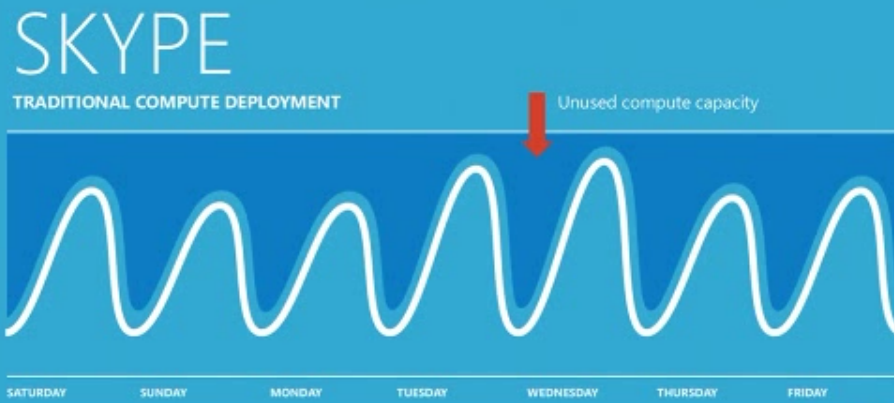


Proper Oracle Java, Database and WebLogic support in Windows Azure including pay-per-use licensing via Microsoft + the same Oracle software supported on Microsoft Hyper-V as well
While with the latter Hyper-V is gaining significant market advantage against the VMware vSphere it is even more important that Windows Azure is becoming a true open cloud computing platform, especially by fully supporting Java and Oracle developers (in addition to existing .NET and various web developers), and Oracle cloud offerings are also vastly extended, especially in the crucially important “pay-per-use” space as the cloud offerings of the Oracle software so far have been only:
– Oracle [Public] Cloud (Larry Ellison’s Oracle Cloud Announcement Highlights [Oracle YouTube channel, July 6, 2012] for when it was finally delivered and TechCast Live Introducing Oracle Public Cloud [Oracle YouTube channel, Dec 9, 2011] when it was pre-announced) which has application solutions in the cloud as well
– Amazon Relational Database Service (Amazon RDS) for Oracle available with “pay-per-use” (officially named “license included” by AWS, earlier named “on-demand hourly”) licensing since Q2 2011 (Amazon RDS for Microsoft SQL Server came a year later), as well as Oracle Fusion Middleware (which includes the GlassFish Java application server and the WebLogic web application server), and Oracle Enterprise Manager licensed in the AWS Cloud

The essence according to Java and other Oracle software heads to the Microsoft cloud [Ars Technica, June 24, 2013]
Microsoft and Oracle may compete head to head in many ways within the database realm, but today the two companies performed the most sweeping cross-join ever as executives from the two companies announced a broad partnership around cloud computing. In a conference call this afternoon, Microsoft CEO Steve Ballmer and Oracle President Mark Hurd discussed a partnership between the companies that will bring Oracle platforms—including Java middleware—into Microsoft’s Azure cloud.
Oracle has moved to certify and support its products, including Oracle WebLogic, the Oracle database, and Oracle Linux, for Azure and Microsoft’s Hyper-V hypervisor. “At the highest level, this partnership extends Oracle’s support of Windows Server to also include Windows Hyper-V and Windows Azure as supported platforms,” Ballmer said.
Oracle will provide full license mobility, Ballmer added, so that customers can move existing Oracle software licenses from on-premises physical or virtual servers to virtual servers on Hyper-V and in the Azure cloud. “There’s an immediate benefit for our customers,” he said. Support of Oracle’s database and application server products, and of Oracle Linux, is available immediately starting today.
Microsoft also agreed to license Oracle’s enterprise Java run-time and APIs and make Java “a first class runtime in Windows Azure, fully licensed and fully supported by Oracle” according to Satya Nadella, Microsoft’s president of Microsoft Corporation’s Server and Tools Business. Previously, Microsoft offered open Java SDKs, he said. “Now we have the licensed [Oracle] Java stack, plus the [Oracle] middleware stack, available. We think it makes Java more first class within Azure.”
Hurd said that in addition to allowing existing licenses to be moved into the Azure cloud, Microsoft would provide a mechanism to obtain licenses on demand “for those who don’t have licenses for Oracle or Java.” Nadella emphasized that Microsoft would “make it easier to spin up Oracle software in Azure with pay-as-you-go licenses,” including pre-built Oracle Linux images that can be deployed in Azure as server instances.
Oracle has been pursuing its own cloud strategy, but Hurd said he saw “nothing but good” coming from a partnership with Microsoft. “I think it just makes sense for us to continue to improve our capabilities but also form partnerships like this,” he said. “Java is the most popular development platform in the world. The fact that more people will get access to our IP is favorable.”
A general business media opinion:
Rivals Microsoft, Oracle bonding in the cloud [The Seattle Times, June 24, 2013]
The partnership looks to be a good move for both companies, while being bad for mutual competitor VMware, said veteran Microsoft and Oracle analyst Rick Sherlund, of investment bank Nomura.
Back in the day, Microsoft and Oracle were bitter rivals, competing over providing database and server products and trading barbs during the U.S. government’s antitrust suit against Microsoft in the 1990s.
Now they’re holding hands and looking at a future together.
Microsoft and Oracle announced Monday a cloud partnership in which customers will be able to run Oracle software (including Java, Oracle Database and Oracle WebLogic Server) on Microsoft’s Windows Server Hyper-V or in Windows Azure. Oracle will provide certification and full support.
Oracle Linux will also be made available to Windows Azure customers.
…
“I think they need each other,” Sherlund said. “They’re cooperating in areas that are mutually beneficial.”
Microsoft is getting Oracle’s support for Hyper-V, Microsoft’s hypervisor technology, which allows companies to run virtual servers. That’s important because Hyper-V competes against VMware, which is dominant in the server virtualization market. And many of the businesses that would be interested in such technology already use some Oracle software.
“It’s an advantage for Microsoft to be able to say: ‘All this Oracle stuff runs on Hyper-V,’ ” said Sherlund, who added that Oracle does not support VMware’s vSphere.
The move likely also allows Microsoft to say it’s being open with its Azure platform.
“That’s the rap you have against Microsoft: That it’s all the Microsoft platform,” Sherlund said. “If you’re in the cloud, it’s good that you’re supporting other platforms.”
Oracle, meanwhile, has traditionally delivered its software to its customers’ own premises. Now that it’s focusing more on delivering its software as services, it’s “motivated to make sure that [the services are] available on a lot of different cloud platforms,” Sherlund said. “So that’s good for Oracle.”
…
… these days, both companies are battling newer competition from the likes of VMware and Seattle-based Amazon.com.
Ballmer and Oracle President Mark Hurd said during the conference call after Monday’s announcement that their two companies would continue to compete.
But, Ballmer said, “the relationship between the two companies has evolved … in a very positive and constructive manner on a number of fronts.”
Hurd said, “The cloud is the tipping point that made this all happen.”
Hurd said Oracle would continue to offer its own public, private and hybrid platforms. But the fact that Java will be accessible to programmers who work in Windows Azure “is a good thing for us. … The fact that more people get access to our IP is favorable,” he said. “It’s good for our customers and therefore good for Oracle.”
Oracle CEO Larry Ellison had also said last week that the company would be announcing partnerships with Salesforce.com and NetSuite.
And an ICT analyst opinion: ORACLE EMBRACING THE BROADER CLOUD LANDSCAPE [James Staten on Forrester blogs, June 24, 2013]
It’s easy to accuse Oracle of trying to lock up its customers, as nearly all its marketing focuses on how Oracle on Oracle (on Oracle) delivers the best everything, but today Ellison’s company and Microsoft signed a joint partnership that empowers customer choice and ultimately will improve Oracle’s relevance in the cloud world.
The Redwood Shores, California software giant signed a key partnership with Microsoft that endorses Oracle on Hyper-V and Windows Azure, which included not just bring-your-own licenses but pay-per-use pricing options. The deal came as part of a Java licensing agreement by Microsoft for Windows Azure, which should help Redmond increase the appeal of its public cloud to a broader developer audience. Forrester’s Forrsights Developer Survey Q1 2013 shows that Java and .Net are the #2 and #3 languages used by cloud developers (HTML/Javascript is #1). The Java license does not extend to Microsoft’s other products, BTW.
This deal gives Microsoft clear competitive advantages against two of its top rivals as well. It strengthens Hyper-V against VMware vSphere, as Oracle software is only supported on OracleVM and Hyper-V today. It gives Windows Azure near equal position against Amazon Web Services (AWS) in the cloud platform wars, as the fully licensed support covers all Oracle software (customers bring their own licenses), and pay-per-use licenses will be resold by Microsoft for WebLogic Server, Oracle Linux, and the Oracle database. AWS has a similar support relationship with Oracle and resells the middleware, database, and Oracle Enterprise Manager, plus offers RDS for Oracle, a managed database service.
Bring your own license terms aren’t ideal in the per-hour world of cloud platforms, so the pay-per-use licensing arrangements are key to Oracle’s cloud relevance. While this licensing model is limited today, it opens the door to a more holistic move by Oracle down the line. Certainly Oracle would prefer that customers build and deploy their own Fusion applications on the Oracle Public Cloud, but the company is wisely acknowledging the market momentum behind AWS and Windows Azure and ensuring Oracle presence where its customers are going. These moves are also necessary to combat the widespread use of open source alternatives to Oracle’s middleware and database products on these new deployment platforms.
While we can all argue about Oracle’s statements made in last week’s quarterly earnings call about being the biggest cloud company or having $1B in cloud revenue, it is clearly no longer up for debate as to whether Oracle is embracing the move to cloud. The company is clearly making key moves to cloud-enable its portfolio. Combine today’s moves with its SaaS acquisitions, investments in cloud companies and its own platform as a service, and the picture clearly emerges of a company moving aggressively into cloud.
I guess CEO Ellison no longer feels cloud is yesterday’s business as usual.
Microsoft and Oracle announce enterprise partnership [joint press release, June 24, 2013]
Microsoft Corp. and Oracle Corp. today announced a partnership that will enable customers to run Oracle software on Windows Server Hyper-V and in Windows Azure. Customers will be able to deploy Oracle software — including Java, Oracle Database and Oracle WebLogic Server — on Windows Server Hyper-V or in Windows Azure and receive full support from Oracle. Terms of the deal were not disclosed.
As part of this partnership, Oracle will certify and support Oracle software — including Java, Oracle Database and Oracle WebLogic Server — on Windows Server Hyper-V and in Windows Azure. Microsoft will also offer Java, Oracle Database and Oracle WebLogic Server to Windows Azure customers, and Oracle will make Oracle Linux available to Windows Azure customers.
Java developers, IT professionals and businesses will benefit from the flexibility to deploy fully supported Oracle software to Windows Server Hyper-V and Windows Azure.
“Microsoft is deeply committed to giving businesses what they need, and clearly that is the ability to run enterprise workloads in private clouds, public clouds and, increasingly, across both,” said Steve Ballmer, chief executive officer of Microsoft. “Now our customers will be able to take advantage of the flexibility our unique hybrid cloud solutions offer for their Oracle applications, middleware and databases, just like they have been able to do on Windows Server for years.”
“Our customers’ IT environments are changing rapidly to meet the dynamic nature of the world today,” said Oracle President Mark Hurd. “At Oracle, we are committed to providing greater choice and flexibility to customers by providing multiple deployment options for our software, including on-premises, as well as public, private, and hybrid clouds. This collaboration with Microsoft extends our partnership and is important for the benefit of our customers.”
Additional information about support and the licensing mobility changes that went into effect today is available on Oracle’s blog at https://blogs.oracle.com/cloud/entry/oracle_and_microsoft_join_forces.
Oracle and Microsoft Expand Choice and Flexibility in Deploying Oracle Software in the Cloud [Oracle Cloud Solutions blog, June 24, 2013]
Oracle and Microsoft have entered into a new partnership that will help customers embrace cloud computing by providing greater choice and flexibility in how to deploy Oracle software.
Here are the key elements of the partnership:
- Effective today, our customers can run supported Oracle software on Windows Server Hyper-V and in Windows Azure
- Effective today, Oracle provides license mobility for customers who want to run Oracle software on Windows Azure
- Microsoft will add Infrastructure Services instances with popular configurations of Oracle software including Java, Oracle Database and Oracle WebLogic Server to the Windows Azure image gallery
- Microsoft will offer fully licensed and supported Java in Windows Azure
- Oracle will offer Oracle Linux, with a variety of Oracle software, as preconfigured instances on Windows Azure
Oracle’s strategy and commitment is to support multiple platforms, and Microsoft Windows has long been an important supported platform. Oracle is now extending that support to Windows Server Hyper-V and Window Azure by providing certification and support for Oracle applications, middleware, database, Java and Oracle Linux on Windows Server Hyper-V and Windows Azure. As of today, customers can deploy Oracle software on Microsoft private clouds and Windows Azure, as well as Oracle private and public clouds and other supported cloud environments.
For information related to software licensing in Windows Azure, see Licensing Oracle Software in the Cloud Computing Environment.
Also, Oracle Support policies as they apply to Oracle software running in Windows Azure or on Windows Server Hyper-V are covered in two My Oracle Support (MOS) notes which are shown below:
MOS Note 1563794.1 Certified Software on Microsoft Windows Server 2012 Hyper-V – NEW
…
MOS Note 417770.1 Oracle Linux Support Policies for Virtualization and Emulation – UPDATED
…
Explanation for that is in Partners in the enterprise cloud [Satya Nadella on the The Official Microsoft Blog, June 24, 2013]
As longtime competitors, partners and industry leaders, Microsoft and Oracle have worked with enterprise customers to address business and technology needs for over 20 years. Many customers rely on Microsoft infrastructure to run mission-critical Oracle software and have for over a decade. Today, we are together extending our work to cover private cloud and public cloud through a new strategic partnership between Microsoft and Oracle. This partnership will help customers embrace cloud computing by improving flexibility and choice while also preserving the first-class support that these workloads demand.
As part of this partnership Oracle will certify and support Oracle software on Windows Server Hyper-V and Windows Azure. That means customers who have long enjoyed the ability to run Oracle software on Windows Server can run that same software on Windows Server Hyper-V or in Windows Azure and take advantage of our enterprise grade virtualization platform and public cloud. Oracle customers also benefit from the ability to run their Oracle software licenses in Windows Azure with new license mobility. Customers can enjoy the support and license mobility benefits, starting today.
In the near future, we will add Infrastructure Services instances with preconfigured versions of Oracle Database and Oracle WebLogic Server for customers who do not have Oracle licenses. Also, Oracle will enable customers to obtain and launch Oracle Linux images on Windows Azure.
We’ll also work together to add properly licensed, and fully supported Java into Windows Azure – improving flexibility and choice for millions of Java developers and their applications. Windows Azure is, and will continue to be, committed to supporting open source development languages and frameworks, and after today’s news, I hope the strength of our commitment in this area is clear.
The cloud computing era – or, as I like to call it, the enterprise cloud era – calls for bold, new thinking. It requires companies to rethink what they build, to rethink how they operate and to rethink whom they partner with. We are doing that by being “cloud first” in everything we do. From our vision of a Cloud OS – a consistent platform spanning our customer’s private clouds, service provider clouds and Windows Azure – to the way we partner to ensure that the applications our customers use run, fully supported, in those clouds.
We look forward to working with Oracle to help our customers realize this partnership’s immediate, and future, benefits. And we look forward to providing our customers with the increased flexibility and choice that comes from providing thousands of Oracle customers, and millions of Oracle developers, access to Microsoft’s enterprise grade public and private clouds. It’s a bold partnership for a bold new enterprise era.
IMPORTANT: for Java developers this strategic partnership will be really important when the latest versions will be covered on Windows Azure, see:
– Java EE 7 / GlassFish 4.0 Launch Coverage [Oracle’s The Aquarium blog, Jan 12, 2013]
Java EE 7, the standard in community-driven enterprise software, is now available. Back in April, Java EE 7 completed the JCP final approval ballot. Today, developers can learn all about Java EE 7 during the Java EE 7 Live Web Event, and get some hands-on experience with the arrival of the Java EE 7 SDK and GlassFish Server Open Source Edition 4.0. Of course, others have quite a bit to say about Java EE 7 as well, and this is just for starters:
- Oracle Announces Availability of Java Platform Enterprise Edition 7 (Press release)
- Oracle Officially Launching Java EE 7 and GlassFish 4 Today (InfoQ)
- Talking Java EE 7 with Anil Gaur, Vice President of software development at Oracle(JaxEnter)
- GlassFish 4 brings Java EE 7 (DZone / Markus Eisele)
- Java EE 7 Recipes and Introducing Java EE 7 (Josh Juneau)
- Java EE 7 and GlassFish Day at CloudBees (CloudBees)
- NetBeans 7.3.1 with Java EE 7 Support (NetBeans)
- What’s new in GlassFish 4 (C2B2)
- Java Magazine – Java EE 7 (Oracle)
- Oracle releases Java EE 7 with eye on HTML5 development (InfoWorld/Computerworld)
- Fifteen Java EE APIs Featured in the Java Spotlight Podcast (Oracle)
- Oracle releases Java Platform Enterprise Edition 7 (ZDNet)
- Oracle Announces Availability of Java Platform Enterprise Edition 7 (MarketWatch)
- Oracle Announces Availability of Java Platform Enterprise Edition 7 (MCPro)
- Oracle Announces Availability of Java Platform Enterprise Edition 7 (Data Manager Online)
- Java EE 7 officially launches, bringing HTML5 and WebSocket support (jaxenter)
- New Java EE 7 and GlassFish Support in OEPE 12.1.1.2.2 (Oracle)
- Working with Eclipse and GlassFish (Gerry Tan)
- Java EE 7 melds HTML5 with enterprise apps (The Register)
- Oracle Delivers Java EE 7 with HTML5 Support (eWeek)
- Java grows up in the enterprise (Holger)
- Java EE 7 tutorial released (Java Tutorials)
- No Clouds, Only Sunshine (Markus Eisele)
- Reference implementation for Java EE: GlassFish 4.0 Released (Markus Eisele)
- Newly released NetBeans IDE 7.3.1 Introduces Java EE 7 Support (Geertjan Wielenga)
– Java EE 7 SDK and GlassFish Server Open Source Edition 4.0 Now Available [Arun Gupta, Miles to go … weblog among Oracle technical blogs, June 12, 2013]
Java EE 7 (JSR 342) is now final!
I’ve delivered numerous talks on Java EE 7 and related technologies all around the world for past several months. I’m loaded with excitement to share that the Java EE 7 platform specification and implementation is now in the records.
The platform has three major themes:
- Deliver HTML5 Dynamic Scalable Applications
- Reduce response time with low latency data exchange using WebSocket
- Simplify data parsing for portable applications with standard JSON support
- Deliver asynchronous, scalable, high performance RESTful Service
- Increase Developer Productivity
- Simplify application architecture with a cohesive integrated platform
- Increase efficiency with reduced boiler-plate code and broader use of annotations
- Enhance application portability with standard RESTful web service client support
- Meet the most demanding enterprise requirements
- Break down batch jobs into manageable chunks for uninterrupted OLTP performance
- Easily define multithreaded concurrent tasks for improved scalability
- Deliver transactional applications with choice and flexibility
This “pancake” diagram of the major components helps understand how the components work with each other to provide a complete, comprehensive, and integrated stack for building your enterprise and web applications. The newly added components are highlighted in the orange color:
In this highly transparent and participatory effort, there were 14 active JSRs:
- 342: Java EE 7 Platform
- 338: Java API for RESTful Web Services 2.0
- 339: Java Persistence API 2.1
- 340: Servlet 3.1
- 341: Expression Language 3.0
- 343: Java Message Service 2.0
- 344: JavaServer Faces 2.2
- 345: Enteprise JavaBeans 3.2
- 346: Contexts and Dependency Injection 1.1
- 349: Bean Validation 1.1
- 352: Batch Applications for the Java Platform 1.0
- 353: Java API for JSON Processing 1.0
- 356: Java API for WebSocket 1.0
- 236: Concurrency Utilities for Java EE 1.0
The newly added components are highlighted in bold.
And 9 Maintenance Release JSRs:
- 250: Common Annotations 1.2
- 322: Connector Architecture 1.7
- 907: Java Transaction API 1.2
- 196: Java Authentication Services for Provider Interface for Containers
- 115: Java Authorization for Contract for Containers
- 919: JavaMail 1.5
- 318: Interceptors 1.2
- 109: Web Services 1.4
- 245: JavaServer Pages 2.3
Ready to get rolling ?
Binaries
Tools
- NetBeans 7.3.1
- GlassFish Tools for Kepler(Technology Preview)
- Maven Coordinates
Docs
- Java EE 7 Whitepaper
- Java EE 7 Tutorial (html pdf)
- First Cup Sample Application
- Java EE 7 Hands-on Lab
- Javadocs (online download)
- Specifications
- All-in-one GlassFish Documentation Bundle
A few articles have already been published on OTN:
- What’s new in JMS 2.0: Part 2 (Jun 2013)
- What’s new in JMS 2.0: Part 1 (May 2013)
- Java EE 7 and JAX-RS 2.0 (Apr 2013)
- JSR 356, Java API for WebSocket (Apr 2013)
- Ten ways in which JMS 2.0 means writing less code (Apr 2013)
- Higher Productivity and Embracing HTML5 with Java EE 7 (Feb 2013)
And more are coming!
This blog has also published several TOTD on Java EE 7:
- TOTD #212: WebSocket Client and Server Endpoint
- TOTD# 211: Chunked Step using Batch Applications
- TOTD #210: Consuming and Producing JSON using JAX-RS Entity Providers
- TOTD #203: Concurrency Managed Objects
- TOTD #202: Resource Library Contracts in JSF 2.2
- TOTD #199: Java EE 7 and NetBeans IDE
- TOTD #198: JSF 2.2 Faces Flow
- TOTD #196: Default DataSource in Java EE 7
- TOTD #194: JAX-RS Client API and GlassFish 4
- TOTD #192: Batch Applications in Java EE 7
- TOTD #191: Simple JMS 2.0 Sample
- TOTD #189: Collaborative Whiteboard using WebSocket in GlassFish 4
- TOTD #188: Non-blocking I/O using Servlet 3.1
All the JSRs have been covered in the Java Spotlight podcast:
- #136: Paul Parkinson on JSR 907/JTA 1.2
- #135: Marina Vatkina on JSR 318/Interceptors 1.2
- #134: Kin-man Chung on JSR 341/Expresion Language 3.0
- #133: Sivakumar Thyagarajan on JSR 322/Connectors 1.7
- #132: Shing-Wai Chan on JSR 340/Servlet 3.1
- #131: Nigel Deaking on JSR 343/JMS 2.0
- #130: Santiago Pericas-Geertsen on JSR 339/JAX-RS 2.0
- #129: Anthony Lai on JSR 236/Concurrency Utilities for Java EE 1.0
- #126: Jitendra Kotamraju on JSR 353/JSON 1.0
- #124: Chris Vignola from JSR 352/Batch 1.0
- #119: Emmanuel Bernard on JSR 349/Bean Validation 1.1
- #117: Danny Coward on JSR 356/WebSocket 1.0
- #115: Ed Burns on JSF 344/JSF 2.2
- #109: Pete Muir on JSR 346/CDI 1.1
- #90: Marina Vatkina on JSR 345/EJB 3.2
- #84: Anil Gaur on JSR 342/Java EE 7
The latest issue of Java Magazine is also loaded with tons of Java EE 7 content:
Media coverage has started showing as well …
And you can track lot more here.
You can hear the latest and greatest on Java EE 7 by watching replays from the launch webinar:
This webinar consists of:
- Strategy Keynote
- Technical Keynote
- 16 Technical Breakouts with JSR Specification Leads
- Customer, partner, and community testimonials
- And much more
Do you feel enabled and empowered to start building Java EE 7 applications ?
Just download Java EE 7 SDK that contains GlassFish Server Open Source Edition 4.0, tutorial, samples, documentation and much more.
Enjoy!


Previous situation:

From Oracle Database Cloud Service [Oracle presentation, Feb 15, 2013]
as well as: New Java Resources for Windows Azure! [Windows Azure blog, July 31, 2012]
… Make the Windows Azure Java Developer Center your first stop for details about developing and deploying Java applications on Windows Azure. We continue to add content to that site, and we’ll describe some of the recent additions in this blog.
Using Virtual Machines for your Java Solutions
We rolled out Windows Azure Virtual Machines as a preview service last month; if you’d like to see how to use Virtual Machines for your Java solutions, check out these new Java tutorials. …
New in Access Control
Included in the June 2012 Windows Azure release is an update to the Windows Azure Plugin for Eclipse with Java (by Microsoft Open Technologies). …
The Java part of this partnership is dating back to GlassFish and Java EE 6 everywhere, even in the Azure cloud! [Oracle’s The Aquarium blog, Jan 18, 2011]
Microsoft’s technical architect David Chou has a detailed blog entry on how to run a recent GlassFish 3.1 build on the Microsoft Azure Platform (wikipedia). The article builds on this other recent blog entry on running Java applications in Azure and adds GlassFish-specific instructions.
In Azure terminology, the article discusses setting up a Worker Role using Visual Studio, reserving Ports, setting up a Startup Task (for the JVM), and configuring the Service, GlassFish in this case. This uses Windows Server 2008 (a GlassFish supported platform) and a zip install of GlassFish.
It’s early days (need best practices on working around some of the cloud-inherent limitations) but with this support of GlassFish, the Azure platform now has full support for Java EE 6!

which then was followed with a Java wishlist for Windows Azure [Arun Gupta, Miles to go … weblog among Oracle technical blogs, Feb 11, 2011]
TOTD #155 explains how to run GlassFish in Windows Azure. It works but as evident from the blog, its not easy and intuitive. It uses Worker Role to install JDK and GlassFish but the concepts used are nothing specific to Java. Microsoft has released Azure SDK for Java and AppFabric SDK for Java which is a good start but there are a few key elements missing IMHO. These may be known issues but I thought of listing them here while my memory is fresh 🙂
Here is my wish list to make Java a better on Windows Azure:
- Windows Azure Tools for Eclipse has “PHP Development Toolkit” and “Azure SDK for Java” but no tooling from the Java perspective. I cannot build a Java/Java EE project and say “Go Deploy it to Azure” and then Eclipse + Azure do the magic and provide me with a URL of the deployed project.
- Why do I need to configure IIS on my local Visual Studio development for deploying a Java project ?
- Why do I have to explicitly upload my JDK to Azure Storage ? I’d love to specify an element in the “ServiceConfiguration” or where ever appropriate which should take care of installing JDK for me in the provisioned instance. And also set JAVA_HOME for me.
- Allow to leverage clustering capabilities of application servers such as GlassFish. This will also provide session-failover capabilities on Azure 🙂
- Sticky session load balancing.
- If Windows VM crashes for some reason then App Fabric restarts it which is good. But I’d like my Java processes to be monitored and restarted if they go kaput. And accordingly Load Balancer switches to the next available process in the cluster.
- Visual Studio tooling is nice but allow me to automate/script the deployment of project to Azure.
- Just like Web, Worker, and VM role – how about a Java role ?
- And since this is a wishlist, NetBeans is the best IDE for Java EE 6 development. Why not have a NetBeans plugin for Azure ?
- A better integration with Java EE APIs and there are several of them – JPA, Servlets, EJB, JAX-RS, JMS, etc.
- The “happy scenario” where every thing works as expected is fine is good but that rarely happens in software development. The availabilty of debugging information is pretty minimal during the “not so happy scenario”. Visual Studio should show more information if the processes started during “Launch.ps1” cannot start correctly for some reason.
And I’m not even talking about management, monitoring, adminstration, logging etc.
Thank you Microsoft for a good start with Java on Azure but its pretty basic right now and needs work. I’ll continue my exploration!
Christmas is coming later this year … and I’ll be waiting 🙂
See also:
 Running your Java EE 6 Applications in the Cloud (presentation by Arun Gupta, Java EE & GlassFish Guy, May 11, 2011) with agenda as seen on the right:
- Using Java™ Technology in the Windows Azure Cloud via the Metro Web Services Stack [joint Sun Microsystems and Microsoft presentation, June 6, 2009]

Windows Embedded is an enterprise business now, like the whole Windows business, with Handheld and Compact versions to lead in the overall Internet of Things market as well
OR Windows Embedded: Recommitting to x86 across all of the edge devices of the future intelligent systems of enterprise customers and consumers while pushing ARM along its current positions in mobile and real-time, which is essentially corresponding to the Windows 7 licensing and pricing described by this source
OR Windows Embedded enterprise solutions strategy based on creating actionable operation intelligence extended to edge devices in retail and hospitality, healthcare, manufacturing, and automotive industries
OR Capitalizing on the Internet of Things [WindowsEmbedded YouTube channel, March 20, 2013] and Transforming Business
OR Building Edge Devices & Intelligent Solutions [WindowsEmbedded YouTube channel, March 20, 2013]
OR (as stemming from The future of Windows Embedded: from standalone devices to intelligent systems [this same ‘Experiencing the Cloud’ blog, March 9-29, 2012], note however that ARM architecture support was delivered only in Handheld and Compact versions despite original hint included into that post)
An intelligent system built on Windows Embedded—with the expertise of the extensive community of established Windows Embedded partners—extends the power of Windows and Microsoft technologies to edge devices. Our portfolio of products powers solutions that meet unique industry needs and span enterprises of any size and complexity.
coinciding with:
1. Microsoft betting on boosting Windows RT demand with top level ARM SoCs from its SoC partners, Windows 8.1 enhancements, Outlook addition to the Office 2013 RT and very deep tactical discounts to its OEM partners for tablet offerings of more value and capability [‘Experiencing the Cloud’, June 6, 2013] and
2. “Cloud first” from Microsoft is ready to change enterprise computing in all of its facets [‘Experiencing the Cloud’, June 4, 2013], as well as
3. Visual Studio 2012 Update 2 is here [The Visual Studio Blog, April 4, 2013] which according to ANNOUNCING VISUAL STUDIO 2012 UPDATE 2 CTP 2 [BlendInsider, Jan 30, 2013] providing the utmost effectivity in developer productivity, finally achieving uniformity in XAML based embedded user experience design as well with one version of Blend for everything (highlighted inserts are mine):


as Windows Azure is providing a leading cloud application platform for all that (download): 
and an excellent testimony to that is given in Discovering Intelligent Systems at work in Manufacturing [Windows Embedded Blog, Nov 27, 2012] from which it is important to include the basic story (just substitute “’intelligent’screwdriver” with “any enterprise or consumer device enhanced with ‘intelligence’”, “larger network in the factory” with “classic and mobile Internet” and the “backend” with “Windows Azure” to understand the enormous potential which is becoming available for Microsoft in terms of the Internet of Things market):
Hey everyone, recently our Windows Embedded team was on a customer site visit in Europe, and we came across a fantastic example of Intelligent Systems in action. While we were touring an automobile manufacturing plant, we observed the line using electric screwdrivers like the one pictured below. They had two cables running into them. Power and Ethernet. We asked the tour director about the network cable, and they explained that the screwdriver was actually an ‘intelligent’ screwdriver.
We smiled at the thought of this basic piece of hardware actually being able to think about what it was doing. Then he explained it and we were amazed. The screwdriver was hung off a manufacturing line Windows Embedded Compact PC that was connected to a larger network in the factory. The backend provided the screwdriver engineering specs about the screw going into that location on the car, including the required torque and even the number of revolutions that Class 1 screw should take to achieve the desired torque. So, when the technician popped the screw into the chassis, all they had to do was fire the trigger, and everything was automatic. They even had some scenarios where this was done using robotic arms instead of people.
When the screw was installed in the car, a data point was generated that came back down the network cable and registered in the factory database. Basically, an ‘OK’, or ‘NOT OK’ was registered, and in the case of either the torque being missed, or that torque being achieved in an unexpected number of revolutions, a flag was popped to investigate further. In summary, the car would not get off the production line if the quality bar wasn’t met.
We have learned since this visit that a number of our partners, and several large automotive manufacturers have deployed this technology in their factories both here in North America and in Europe.
The volume of parts going into just one car is massive, a true big data story, and the business doesn’t necessarily want to know about the hundreds of thousands of screws installed in their factory. What they do want to know is when a threshold like an engineering spec is missed. This type of approach enables business critical data to be presented, relevant, and not washed out in the volumes of activities/events happening minute by minute on the factory floor. …

In the IDC iView, sponsored by Microsoft, The Rise of Intelligent Systems: Connecting Enterprises and Smart Devices in Seamless Networks [April 18, 2012], you can find the following market forecast:
… embedded and intelligent systems represent a much larger opportunity than the PC, tablet, or even the smartphone market. IDC estimates that the intelligent systems market will grow from 19% of all major electronic system unit shipments in 2010, to more than 27% of all systems by 2016. Revenue for the intelligent systems market will grow from more than $649 billion in 2012, to more than $1.4 trillion in 2016 (PCs and smartphones excluded from market-size numbers).
On the market for more than five years and with more than 5 million cars sold already, but in joint development since 2005, Ford SYNC based on Microsoft embedded technology is the best showcase of both the market potential and the level of achievements possible in this post-PC market for Microsoft:
Soon we will have further advancements: Ford to Show the Smarter Way to Get There at Computex 2013 [press release, May 23, 2013] which you can follow on a special Ford Motor Company – Computex FB site which currently contains teaser videos about Future Technology Trends, Open Innovation and Device Interaction featuring Microsoft as well(note that those things are quite necessary as competition is getting stronger)
Ford will be the only automaker at Computex 2013, the largest computer exhibition in Asia
Ford will make several major announcements on its smart technologies for both Taiwan and Asia Pacific and Africa markets
Ford to showcase its most advanced class-leading technologies, designed to take the driving experience for customers to a new level
Inserted later: Ford Press Conference Highlights at Computex 2013 [FordAPA YouTube channel, June 6, 2013]
Ford Motor Company today announced it will bring its Ford Developer Program to markets in Asia Pacific and Africa to allow developers to create voice-activated apps for the car, further reinforcing its position as a global leader in technology.
TAIPEI, Taiwan, May 23, 2013 – Ford Motor Company will show the Smarter Way to Get There at Computex 2013 with the most advanced class-leading technologies to further enhance the driving experience for customers.
Ford will be the only automaker at Asia’s biggest computer exhibition from June 4-8, 2013, where it will make several major announcements for both Taiwan and Asia Pacific.
“As one of the world’s largest and most influential technology shows, Computex is the ideal platform for Ford to showcase how our smart technologies are improving the driving experience for our customers in the digital age, ” said John Lawler, chairman and CEO, Ford Motor China.
“In a world where consumers want to be connected all the time, be it at home, in the office or in their cars, we have a great opportunity to provide driver-connect technologies in our vehicles which enable drivers to stay connected through voice commands while keeping their hands on the wheel and eyes on the road. The technologies we are bringing to our vehicles not only give our customers a connected driving experience, they also make that experience simple, safe and personalized.”
The Ford stand at Computex will not only feature the company’s most advanced technology developments, but also the all-new Ford Kuga, dubbed by Ford as the “Smarter SUV” because of its fuel economy, versatility and new technology that makes driving easier and more fun.
Inserted later: Ford at Computex 2013 – Panel Discussion
[FordAPA YouTube channel, June 5, 2013]On June 4, Ford will be part of the Computex Smart Living Industry Forum at which Edward Pleet, Connected Services Director, Ford Motor Company, Asia Pacific and Africa, and Europe will discuss The Smart Living, Networked Society.
The Ford booth will be located at Taipei Word Trade Center Nangang Exhibition Hall, 4th Floor, booth number M2005.

OR Windows Embedded: Recommitting to x86 across all of the edge devices of the future intelligent systems of enterprise customers and consumers while pushing ARM along its current positions in mobile and real-time, which is essentially corresponding to the Windows 7 licensing and pricing described by this source as (here only WIN7 COMPACT (CE) has ARM support as well):
(click here or on the above image to see the full table, note also that the true enterprise licensing via even cheaper SELECT and EA (Enterprise Agreement) programs is not shown in the table, for explanations also see WES 7 “E” & “P”, WES SKU Differences, FES, FES 7 Pro, FES 7 Ultimate, WES vs FES, FES Pro & Ultimate SKU Differences, Win7 Compact (CE), Win7 Compact (CE) SKU Differences, Win7 Compact (CE) OS Components and “SKU rationale” from Microsoft) on which I overlaid the corresponding Windows Embedded 8 products and their already known (like General Embedded / NR / Entry for Windows Embedded Compact 2013 to be generally available on June 13) or supposed (like Standard ?…? / Standard ?Enterprise? for the Windows Embedded 8 Standard) SKUs.
 Note that the above table could be misleading since it is just representing low-volume purchases while Microsoft is using License Packs as well where the per unit price is non-linearly decreasing with the number of licenses in the Pack. Fortunately I’ve found current trade data records for WINDOWS EMBEDDED STANDARD 8 EMB ESD OEI RUNTIME -7WT-00094(N-77P-3153) [April 9, 2013] and WIN PRO EMBEDDED 8 EMB ESD OEI -42C-00051(N-77P-3154) [April 9, 2013] from Taiwan to India which I could use as Model 1 and Model 2 for supposed pricing of the Windows Embedded 8 Standard, see the results on the above right. This could certainly be not so steep in reality (e.g. the model numbers were “more decreased” in trade declarations for the larger License Packs representing higher absolute value in order to decrease the absolute tax even more) as it is only giving a kind of idea for License Packs.

It is also important to include here the argumentation why Isn’t a Linux or Android solution cheaper? [one of FAQs answered by Avnet Embedded, May 1, 2013]:
Linux or Android solutions may seem cheaper initially. However, the Total Cost of Ownership (TCO) should be taken into account as a useful metric for assessing the overall cost impact of your investment. For example:
- Acquisition costs— Inexpensive comparable products can cost as much or more than Windows to acquire and support.
- Total costs—Acquisition costs are a very small component of TCO. Even when the costs of different operating systems are comparable, research shows that Windows often offers a lower TCO because of cost advantages in the other, larger components, such as staffing and downtime.
- Cost vs. Value—In addition to what you must pay for, if you are making an investment in IT you should also consider what you will get in return; including features or capabilities that improve productivity and deliver additional value.
To find out more about the TCO of Windows Embedded, read ‘The Total Cost of Ownership (TCO) benefits of Windows Embedded software’ ebook.
If the runtime license still looks too expensive than it is important to consider that we are talking here about very special types of devices with the x86 based Windows Embedded 8. Here is how Microsoft representing that x86-only focus on the top of “edge devices of the future intelligent systems of enterprise customers“: 
This has even very strong industry focus: Retail (from Kiosk to ATM), Manufacturing and Health Care. So we can proceed to other post titles which are equally important to properly represent the redefined Windows Embedded positioning:
OR Windows Embedded enterprise solutions strategy based on creating actionable operation intelligence extended to edge devices in retail and hospitality, healthcare, manufacturing, and automotive industries
OR Capitalizing on the Internet of Things [WindowsEmbedded YouTube channel, March 20, 2013] and watch also: Transforming Business
OR Building Edge Devices & Intelligent Solutions [WindowsEmbedded YouTube channel, March 20, 2013]
Other videos in the “Building Edge Devices & Intelligent Solutions” series:
Dell Wyse, HP, Omnicell and ParTech, Inc. I will embedd here even Bravo Outdoor Advertising Reaches Greater Heights With Intelligent System [WindowsEmbedded YouTube channel, Feb 11, 2013] as it shows very well how the range of edge devices could be hugely extended over the years (here with digital signage on the public transport in Ireland):
OR
(as stemming from The future of Windows Embedded: from standalone devices to intelligent systems [this same ‘Experiencing the Cloud’ blog, March 9-29, 2012], note however that ARM architecture support was delivered only in Handheld and Compact versions despite original hint included into that post)
An intelligent system built on Windows Embedded—with the expertise of the extensive community of established Windows Embedded partners—extends the power of Windows and Microsoft technologies to edge devices. Our portfolio of products powers solutions that meet unique industry needs and span enterprises of any size and complexity.
From Learn more about intelligent systems subpage linked on Microsoft > Windows Embedded > Products and Solutions page [May 6, 2013] which page also contains:
Unlock intelligence with the full breadth of Microsoft technologies
What happens when devices at the edge of enterprise networks are connected to software and services in the back end or the cloud? Suddenly, a rich new source of information is available. The data has always been there—but today, an integrated stack of Microsoft technologies, extending from the server room to the customer’s fingertips, can help evolve business intelligence to operational intelligence by enabling enterprises to identify and act on opportunities that would otherwise be out of reach. For OEMs, the ability to harness the power of Microsoft technologies to capitalize on data gathered from edge devices translates to new and expanded potential for creating solutions for customers.
[The Big Shift From Software to Cloud Services video of Nov 13, 2012 from WindowsEmbedded YouTube channel is quite important to embed here, since it clearly shows that Microsoft is shifting from being a software company to a hardware & services company:]
Windows Azure Marketing General Manager Eron Kelly discusses Microsoft Corp.’s focus on delivering software through the cloud and the opportunity it creates for devices and intelligent systems.One Microsoft, everything you need
When connecting industry devices powered by Windows Embedded to back-end systems running SQL Server on-premise—or secured by Azure in the cloud–business data is without boundaries. Those building intelligent system solutions will shorten development time, and simplify implementation and management by harnessing the full breadth of Microsoft technologies, from the rich, familiar experience of Windows, to simplified management with System Center and security with Forefront. Device manufacturers, evaluate your intelligent systems business capabilities with Microsoft.
Devices at the network edge: critical infrastructure for intelligent systems
Intelligent systems are revolutionizing business, and Microsoft is focused on driving innovation in a number of industries, including retail and hospitality, healthcare, manufacturing and automotive. Whether streamlining inventory management with industry handheld devices, securely handling medical records using a thin-client solution, reinventing the customer experience with point-of-sale devices, transforming factory efficiencies with embedded robots, or reimagining the driving experience with an in-car infotainment system, edge devices are all around us. Powering these devices with Windows Embedded harnesses Microsoft technologies to create customized solutions that address specific industry needs and drive innovation—and profits—forward.
According to IDC, unit shipments of IP-connected embedded systems, excluding mobile phones and PCs, will more than double by 2015, growing from approximately 1.4 billion in 2010 to over 3.3 billion.
Source: IDC, “Smart Tech Market Forecast and 2020 Vision.”
Specialized devices in the marketplace
Select an industry [with a latest video of May 6, 2013 embedded here for each from WindowsEmbedded YouTube channel, in order to let you see how Microsoft and Windows Embedded are providing the technology, strategic leadership and partner ecosystem that are driving innovation]
- Retail
Tap into the huge amount of data generated by edge devices, and you’ll enhance business insight, streamline operations and transform customer service
Read also:
– Signs of the times: the shifting consumer experience [Windows Embedded blog]: part 1 [May 15, 2013] and part 2 [May 16, 2013] “From attracting customers through digital signage to creating in-store dressing-room intelligent systems, technology is no doubt transforming the consumer experience.”
– Intelligent systems in retail: Even the credit-card reader cares! [Windows Embedded blog, June 6, 2013]
– Seen at the Show: Three Outstanding Retail Solutions [Windows Embedded blog, April 9, 2013]
– Augmented Reality Vending Machines, and Other Glimpses of the Future of Retail [Windows Embedded blog, March 14, 2013]
– The Intelligent Grocery Store: The Future of the Retail Industry [Windows Embedded blog, March 4, 2013]
– A Prediction for the Future of Retail Technology: The Rise of Vending Machines [Windows Embedded blog, Jan 15, 2013]
Watch also:
– Exploring Intelligent Systems in Retail Part 1, Part 2 and Part 3
– Transforming Business in Retail
– Intelligent Systems Changing the Face of Retail
– Microsoft Redefines the Retail Experience
– Intelligent Systems in the Hospitality and Retail Industries- Healthcare
Improve patient care—and transform healthcare processes—with a connected solution based on Windows Embedded.
Watch also:
– Exploring Intelligent Systems in Healthcare Part 1 and Part 2
– Transforming Business in Health
– How Intelligent Systems Streamline Data Landscapes in Healthcare
– Interactive Terminals Connect Patients to Their Care
Read also:
– Spotted in real life: Windows Embedded making life a little easier for patients [Windows Embedded blog, June 5, 2013]- Manufacturing
Manufacturing is fueled by big data, and intelligent systems have the potential to transform the industry.
Watch also:
– Exploring Intelligent Systems in Manufacturing Part 1 and Part 2
– Transforming Business in Manufacturing
– Intelligent Systems in Manufacturing [related blog post: Discovering Intelligent Systems at work in Manufacturing [Windows Embedded blog, Nov 27, 2012]]
– Driving Efficiency with Intelligent Systems- Automotive
Microsoft designer Melissa Quintanilha combines technical savvy, an artist’s passion for design, and a global perspective that comes from growing up in Brazil, to design a car that doesn’t just drive, but learns who you are and anticipates your needs.
Other videos in the “Designing the Future of the Intelligent Car” series:
Glanceable Design, Experience Matters, The Driving Experience and
The Updateable Car
Read also: – Building the intelligent car of the future
[Microsoft feature story, May 7, 2013]
– A gearhead’s perspective on the car of the future [Windows Embedded blog, June 3, 2013]
– Behind the scenes at the birth of Microsoft’s intelligent car program [Windows Embedded blog, May 20, 2013]
– Introducing the Windows Embedded Automotive Team! [Windows Embedded blog, May 7, 2013] “Today, Microsoft launched the “Designing the Future of the Intelligent Car” digital series to showcase the team we have working on Microsoft’s automotive solutions and our vision for the intelligent car of the future. To kick-off the series I’ve asked the leader of the Windows Embedded Automotive team, Pranish Kumar, to provide some perspective on the team and the work they are doing.”
– Designing the Car Experience of the Future [Windows Embedded blog, Nov 9, 2012] “Together with Ford, we celebrated the 5th anniversary of Ford SYNC and 5 million SYNC enabled vehicles [mostly in North America] shipped milestone. The conference theme was “connected design,” exploring how design and user interface impact the experience people have interacting with connected devices. This is a topic my team is focused on in our work with Ford and our other automotive partners as we explore how our intelligent systems strategy can help deliver a richer, more personalized experience in the car. We are thinking about the contextual environment inside the car and how computing helps that experience for customers.”
As far as the Windows Embedded 8 is concerned we have a pretty clear picture now:
Windows Embedded 8 [Microsoft > Windows Embedded > Products and Solutions > Windows Embedded Products page, May 6, 2013]
From this page the basic offerings (based on Windows 8) are the following ones:
The Windows Embedded 8 family of platforms and tools helps companies extend their operational intelligence [by harnessing the flow of data across industry devices on the edge and back-end systems], using their existing IT infrastructure and industry devices that securely exchange data with back-end systems. Offering the same rich, multi-touch experience as Windows 8 and Windows Phone 8 , Windows Embedded 8 delivers compelling user experiences on a range of industry devices.
Windows Embedded 8 Pro
The power and flexibility of Windows 8 in a platform designed specifically for building edge devices [digital signs or point-of-service terminals in a store environment, handheld devices, robots on the manufacturing floor, or thin client devices in hospitals to transform business intelligence to actionable operation intelligence] and intelligent systems solutions [such as kiosks, medical devices, digital signage and HMI (human machine interface)].
- Deliver a user experience that’s identical to Windows 8.
- Design custom apps that feature the fast, fluid behavior of Windows 8.
- Security features such as Bitlocker and Trusted Boot.
- Compatible with line-of-business and productivity apps.
[The Next Generation Digital Signage on Display at Computex 2012 video of June 25, 2012 from WindowsEmbedded YouTube channel is quite important to embed here, since it clearly discusses the direction for digital signage systems where full Windows compatibility is essential:]
Windows Embedded’s John Boladian and Intel’s Gark Tan show off today’s interactive digital signage that create an engaging and connected experience for customers through combined technologies from Kinect for Windows, Windows Embedded and Intel’s Core processors.Windows Embedded 8 Standard
Offers flexibility for purpose-built devices, such as thin clients, kiosks [digital signage] and automated manufacturing solutions.
- Compelling UI, powerful app support, security and manageability of Windows 8.
- Modular format allows you to use only the components needed.
- Ensure consistent configuration with embedded specific lockdown features.
- Custom branding feature.
[The Demo: Windows 8 on Embedded Devices video of Nov 13, 2012 from WindowsEmbedded YouTube channel is quite important to embed here, since it clearly shows the actually best example of a purpose-built ruggedized device (from a long-time partner Motion Computing) based on Windows 8 which is a kind of prototype of similar “custom branded” devices based on Windows Embedded 8 Standard:]
Embedded Group Manager John Coyne shows off an industry application on a PC running Windows Embedded 8.Windows Embedded 8 Industry
A consistent, streamlined application platform that shortens development cycles for specific industry device scenarios in retail, manufacturing and other industries [such as POS terminals, ATMs, automated manufacturing solutions and medical devices].
- Compelling UI, powerful app support, security and manageability of Windows 8.
- Ensure consistent configuration with lockdown features.
- Fixed platform provides a consistent development experience.
- Plug and play peripheral capabilities with POS for .NET.
[The Intelligent Systems Making Vending Machines Fun at Computex 2012 video of June 25, 2012 from WindowsEmbedded YouTube channel is quite important to embed here, since it demonstrates an interactive smart vending machine where retail peripheral support is essential:]
Windows Embedded’s John Boladian and Intel’s Gark Tan discuss the value and growth of intelligent systems across devices and the cloud. By highlighting an interactive smart vending machine, they show that intelligent systems not only make the purchase experience fun, but give the vendor a competitive advantage through increased connectivity, data collection, manageability and business analytics[Read also: Windows Embedded 8 Industry: A Modern OS for Industry Devices [Windows Embedded blog, April 2, 2013] “On the heels of our recent release of the Windows Embedded 8 platform, we’re making another member of the Windows Embedded family available today — Windows Embedded 8 Industry. David Wurster, Microsoft Windows Embedded’s senior product manager, has details on how Windows Embedded has evolved beyond point-of-service (POS) systems in retail to do much more in the Windows 8 era.”]
Compare Windows Embedded 8 products
Features
Pro
Standard
Industry
Rich multitouch, multi-user interface
Connectivity features, including connected standby, mobile broadband and WiFi
Powerful security features, including anti-malware support, BitLocker and Trusted Boot
Lockdown support, including unified write filter, gesture and keyboard filters
Retail peripheral support
Custom branding
Full Windows compatibility
Fixed image
Easy end-to-end device management with Microsoft System Center
Modular OS

![clip_image002[1]](https://lazure2.wordpress.com/wp-content/uploads/2013/06/clip_image0021.jpg "clip_image002[1]")
![clip_image002[2]](https://lazure2.wordpress.com/wp-content/uploads/2013/06/clip_image0022.jpg "clip_image002[2]")
![clip_image002[3]](https://lazure2.wordpress.com/wp-content/uploads/2013/06/clip_image0023.jpg "clip_image002[3]")
![clip_image002[4]](https://lazure2.wordpress.com/wp-content/uploads/2013/06/clip_image0024.jpg "clip_image002[4]")
![clip_image002[5]](https://lazure2.wordpress.com/wp-content/uploads/2013/06/clip_image0025.jpg "clip_image002[5]")
![clip_image002[6]](https://lazure2.wordpress.com/wp-content/uploads/2013/06/clip_image0026.jpg "clip_image002[6]")
![clip_image002[7]](https://lazure2.wordpress.com/wp-content/uploads/2013/06/clip_image0027.jpg "clip_image002[7]")
![clip_image002[8]](https://lazure2.wordpress.com/wp-content/uploads/2013/06/clip_image0028.jpg "clip_image002[8]")
![clip_image002[9]](https://lazure2.wordpress.com/wp-content/uploads/2013/06/clip_image0029.jpg "clip_image002[9]")
![clip_image002[10]](https://lazure2.wordpress.com/wp-content/uploads/2013/06/clip_image00210.jpg "clip_image002[10]")
![clip_image002[11]](https://lazure2.wordpress.com/wp-content/uploads/2013/06/clip_image00211.jpg "clip_image002[11]")
![clip_image002[12]](https://lazure2.wordpress.com/wp-content/uploads/2013/06/clip_image00212.jpg "clip_image002[12]")
![clip_image002[13]](https://lazure2.wordpress.com/wp-content/uploads/2013/06/clip_image00213.jpg "clip_image002[13]")
![clip_image002[14]](https://lazure2.wordpress.com/wp-content/uploads/2013/06/clip_image00214.jpg "clip_image002[14]")
![clip_image002[15]](https://lazure2.wordpress.com/wp-content/uploads/2013/06/clip_image00215.jpg "clip_image002[15]")
![clip_image002[16]](https://lazure2.wordpress.com/wp-content/uploads/2013/06/clip_image00216.jpg "clip_image002[16]")
![clip_image002[17]](https://lazure2.wordpress.com/wp-content/uploads/2013/06/clip_image00217.jpg "clip_image002[17]")
![clip_image002[18]](https://lazure2.wordpress.com/wp-content/uploads/2013/06/clip_image00218.jpg "clip_image002[18]")
![clip_image002[19]](https://lazure2.wordpress.com/wp-content/uploads/2013/06/clip_image00219.jpg "clip_image002[19]")
In addition there are the following complementary offerings, which are not based on Windows 8, are shown on the same page as well:
Windows Embedded 8 Handheld
Built on Windows Phone 8 to offer intuitive line-of-business applications [such as package delivery, mobile point-of-service, communication and collaboration, and scanning and data capture], with proven integration and security for industry handheld devices.
- Common application programming interfaces so that devices easily integrate.
- Manage devices across the network through the use of Windows Intune and SCCM 2012.
- Benefit from a large selection of Windows Phone 8 apps.
- Use the Windows Phone 8 SDK and Visual Studio 2012 to create custom apps.
[Read also: Windows Embedded 8 Handheld joins the Windows Embedded 8 family [Windows Embedded blog, Jan 14, 2013] “Windows Embedded 8 Handheld is more than just the successor to Windows Embedded Handheld 6.5. It’s a complete re-imagination of the enterprise mobile device. With Windows Embedded 8 Handheld, the platform is now based on the Windows Phone 8, which itself is built on Windows 8. In addition to the highly-praised Windows Phone 8 user interface, both Windows Phone 8 and Windows Embedded 8 Handheld now share a common kernel with Windows.”]
Windows Server 2012 for Embedded Systems
Binary identical to Windows Server, a proven, highly reliable operating system for embedded applications in server appliances [such as of telecommunications, medical imaging, industrial automation and corporate headquarters]
- Enable informed, real-time decisions that keep your enterprise ahead of the competition.
- New storage features optimize the reliability and efficiency of data stores and scale to meet demand and reduce costs.
- Equip employees with insightful analysis and reporting services.
Microsoft SQL Server 2012 for Embedded Systems
A database management tool, binary identical to Microsoft SQL Server, for use with purpose-built hardware running the Windows Embedded Server operating system [such as in telecommunications, medical imaging, industrial automation and corporate headquarters].
- Glean new business insights from data, and harness it in real time.
- Provide access to powerful data analysis and visualization tools.
- Flexibility and usability for auditing and security manageability across SQL Server environment.
Windows Embedded 8 Mission and Vision (from Microsoft’s Intelligent Systems [Microsoft > Windows Embedded > Intelligent Systems page, May 7, 2013])
Actionable data fueled by intelligent systems is the new currency for business, and its value is expected to increase exponentially, improving how people live, learn and conduct business. Gartner predicts that big data will “deliver transformational benefits to enterprises” in the coming 2-5 years, and that by 2015, enterprises that employ big data strategies “will begin to outperform their unprepared competitors within their industry sectors by 20 percentage in every available financial metric.” (Source: Hype Cycle for Cloud Computing, August, 2012.) With intelligent systems, Microsoft is helping organizations access and transform critical data into operational intelligence by providing a wide range of operating systems, tools, and systems and services.
Our mission is to drive business growth and competitive advantage for our enterprise customers and partners through technology innovations that capitalize on the vast potential of data. Your investment in Windows Embedded is backed by Microsoft’s proven commitment to intelligent systems through more than 15 years of experience in the market.
Industry Focus (from Microsoft’s Intelligent Systems [Microsoft > Windows Embedded > Intelligent Systems page, May 7, 2013])
Intelligent systems are revolutionizing business and Microsoft is focused on driving innovation in retail and hospitality, healthcare, manufacturing, and automotive industries. Customized solutions built with Windows Embedded harness Microsoft technologies to address specific industry needs by connecting devices on the edge of enterprise networks with existing IT infrastructures—on a single platform. The resulting intelligent systems help retailers deliver personal, seamless and differentiated experiences to customers; manufacturers increase efficiencies at every level of the operation to deliver innovative services, implement best-practice operations and enhance planning and decision-making processes; healthcare institutions optimize patient care and outcomes by bringing people, processes and information together; and automakers evolve “intelligent car” experiences, allowing drivers to access innovative in-car communication, infotainment, navigation and fuel-efficiency features.
Our Solutions Approach (from Microsoft’s Intelligent Systems [Microsoft > Windows Embedded > Intelligent Systems page, May 7, 2013])
Microsoft’s tools and technologies for intelligent system solutions extend beyond a software package or device; the great power and flexibility of industry devices running the Windows Embedded platform is that it works in concert with Microsoft’s cloud products and services, and with existing IT infrastructure to customize a complete connected system.
Windows Embedded minimizes risk and complexity by providing one trusted platform with which to build solutions and broaden business opportunity. Windows Embedded fits with your needs, connecting data across a diverse set of technologies, providing compatibility across your existing systems, and enabling customization through a worldwide network of partners, to increase ease of use and drive efficiency. And a Microsoft solution extends the intelligence of your organization, increasing opportunities for your workforce to act on data and insights that would otherwise be out of reach.
On the adjacent to the above “Windows Embedded Products” page there is a “Product Lifecycles” [May 7, 2013] page which contains the following
Road map for intelligent systems
With Windows Embedded 8, Microsoft extends Windows 8 to intelligent systems, creating the next wave of enterprise tools and technology. The release schedule includes the Windows Embedded 8 family of device operating systems, each with a distinct feature set that includes the building blocks for an intelligent system across hardware, software and services.

It means that from the whole portfolio the “Windows Embedded Compact 2013” was missing on May 7 as it was to be delivered in Q2 2013. When clicking on its “+” sign one gets the following description (corrections came in the first week of June with v.3 mark deleted after Blend and “sensory input and Kinect for Windows” deleted, and XAML for Windows embedded, multi-core support as well as Snapshot Boot added; it also coincided with “Microsoft Windows Embedded Compact 2013 ISO-TBE” availability for download):
A streamlined, componentized device operating system, Windows Embedded Compact 2013 gives developers all the tools they need to create the next generation of intelligent systems solutions. Compact 2013 provides the flexibility and real-time support to reduce time to market, while creating an easy-to-use, multi-touch experience that helps enterprise customers improve worker productivity.
- Access to up-to-date tools such as Platform Builder, Visual Studio 2012 and Expression Blend
v.3helps developers to streamline development.- Support for XAML for Windows embedded, multi-touch,
sensory input and Kinect for Windowsand multi-core support enables the creation of immersive applications.- Leverage the power of cloud computing through Windows Azure Application Services, giving customers a greater ability to extend their intelligence.
- Improved file system performance and Snapshot Boot gives companies the confidence that their devices will always be available, whatever their current state .

The first description of it was given in Windows Embedded Compact v.Next uncovered [Windows Embedded Blog, Nov 14, 2012] as follows
Posted By David Campbell
Program ManagerWoo hoo, it’s finally time to share more information about the upcoming release! First, the release now officially has a name: Windows Embedded Compact 2013. (I know that folks probably have questions around why we chose this name. We thoroughly considered a long list of potential names, including Windows CE again, and Windows Embedded Compact 2013 really did receive the best response.)
I’ll be doing a number of posts about the various key features and changes in Windows Embedded Compact 2013 over the next few posts, but I want to start with arguably the most interesting of the new features: the investments made for Visual Studio 2012 support, both ISV/app development via Visual Studio directly; and the OEM/device development experience with Platform Builder, now hosted in Visual Studio 2012!
With all development now in Visual Studio 2012, there is no longer a need for multiple versions of Visual Studio to support Compact development alongside other Windows platforms. Plus, you’ll get many of the new features and productivity improvements available in Visual Studio 2012 when developing for Compact! We now have the same C++ toolset and standards supported everywhere. (And of course Visual Studio 2012 includes the new features from Visual Studio 2010, which were not previously to Compact developers.)
We also have a new CRT, which has key new functionality aligned as well. (The existing CRT on Compact hasn’t been updated in some time.) And the new optimizer supports functionality like auto-parallelization of your code and auto-vectorization–so if your processor has FP registers, the optimizer will automatically generate code to use vector FP. The 2012 C++ compiler also includes many of the language features from the new C++11 standards.
C++11 has new language features that allow you to write better performing, safer code and code it faster than ever before. For example, RValue references let you operate on data without having to copy it. And C++11 brings in functional semantics to make writing code more efficient, like having anonymous functions. We also support range based loops, letting you iterate over members of a list directly. More information is available on the Visual Studio team blog.
.Net CF has also been upgraded to 3.9, which inherits the support Windows Phone updates while still being app compatible with 3.5. This upgrade improves performance significantly in a number of ways. .Net CF 3.9 has greatly improved performance overall, as well as memory allocation and garbage collection using the generational garbage collector. This not only improves performance, but also provides more predictability in the execution of applications. The memory footprint of the runtime is also smaller for both the framework and applications, using what is known as “the sharing server,” allowing loaded code to be reused across applications. The runtime itself is also multi-core enabled, which can improve the performance of all your applications. More information on the updated .Net CF is available on the .NET Framework blog.
The embedded developer experience improvements of bringing the new features of Visual Studio 2012 to Windows Embedded Compact are amazing, and I’m sure you’ll be as excited as I am to get started using the new features of Visual Studio 2012, Platform Builder and the new Compact OS.
For information on the upcoming Windows Embedded Compact release, visit www.windowsembedded.com.
Previous versions with some important new features (my own judgement + Windows CE Wikipedia article + other inputs):
CE7: Windows Embedded Compact 7 (March 2011)
– Silverlight for Windows Embedded (UX C++ XAML API): application development made easy, synching designers and developers.
– Windows Phone 7 IE with Flash 10.1 support: panning, zooming, multitouch and viewing bookmarks using thumbnails, etc
– Multi-core supportCE6: Windows Embedded CE 6.0 (September 2006)
– Significant change in architecture over previous versions of CE (process address space is increased from 32 MB to 2 GB, number of processes has been increased from 32 to 32,768 etc.)
– Incremental updates to features as R1, R2 and R3 releases
– Silverlight introduced, Microsoft Office and PDF viewers support too.CE5: Windows CE 5.0 (August 2004)
– Remote Desktop Protocol (RDP) introduced
– Updates to Graphics and Multimedia supportCE4: Windows CE 4.x (Jan 7, 2002)
– .Net Compact Framework introduced
– Since Windows CE.NET 4.2 system uses a new shell with integrated Internet ExplorerCE3: Windows CE 3.0 (June 15, 2000)
– Major recode that made CE hard real time down to the microsecond level
– Base for the Pocket PC 2000, Handheld PC 2000, Pocket PC 2002 and Smartphone 2002CE2: Windows CE 2.x (Sept 29, 1997)
– Real-time deterministic task scheduling
– Architectures: ARM, MIPS, PowerPC, StrongARM, SuperH and x86CE1: Windows CE 1.0 (November 1996)
Related post: Introducing NETCF 3.9 in Windows Embedded Compact 2013 – a faster, leaner and multi-core runtime! [.NET Framework blog, Nov 16, 2012]
Ever since .NET Compact Framework was introduced at the PDC conference in 2001, programming with .NET has scaled from some of the smallest devices to the largest servers. With C# and Visual Basic, developers can apply the same skills to program both devices and servers to form a complete end-to-end solution. As the devices become more prevalent in our daily lives, .NET is evolving too. Abhishek Mondal, the program manager for .NET Compact Framework [note that Abdishek Mondal was the program manager for GC as well], shares the following highlights of the latest version. –Brandon
NETCF 3.9 advances the Windows Embedded Compact Platform
We are happy to announce that we will be including the .NET Compact Framework 3.9 in Windows Embedded Compact 2013, as part of its upcoming release. We have made major updates in this version of the .NET Compact Framework, which deliver benefits in startup time, application responsiveness and memory utilization. You should see significantly better performance characteristics of your applications on both x86 and ARM devices, running Windows Embedded Compact 2013. You can read more about the Windows Embedded Compact 2013 release at the Microsoft News Center.
The .NET Compact Framework is a version of the .NET Framework for embedded devices. It provides .NET development support for low-end embedded devices that run the Windows Embedded Compact 2013 OS. NETCF provides a familiar and rich development platform for embedded application development, with a small foot print and an extensive set of .NET functionality. For clarity, the other Windows Embedded OSes use the desktop .NET Framework, the same version that is included with desktop Windows.
NETCF 3.9 is based on the NETCF version that shipped with Windows Phone 7.5. The following features are the key advances in NETCF 3.9, all big steps forward for app performance:
New Generational Garbage Collector for more responsive apps
NETCF runtime is now multi-core safe to take advantage of multi-core hardware
Sharing Server feature that reduces working set and improves app launch
Another major benefit of NETCF 3.9 is Visual Studio 2012 support! You will be able to use the same tools for Windows Embedded Compact 2013 development as you use for Windows, Windows Phone and Windows Azure development. Visual C++ development for this new Windows Embedded Compact version will also be supported in Visual Studio 2012, as reported on the Visual C++ team blog.
Applications run (a lot) faster with NETCF 3.9
NETCF 3.9 is a faster and leaner runtime for Windows Embedded Compact 2013. We have made many changes that should enable your apps to run much faster. NETCF is also multi-core safe, enabling you to take advantage of multiple cores on embedded devices. Multiple cores are increasingly available on today’s devices, and can be an important part of delivering a compelling experience to your customers. Let’s take a more in-depth look at some of the additional improvements that are part of NETCF 3.9.
Faster app performance
NETCF 3.9 has greatly improved performance overall. There are three key features that will speed up your apps. Let’s start with the new garbage collector in NETCF. We have observed app performance in the lab that shows 50-60% drops in GC time. We no longer see GC pauses significantly affecting app responsiveness, in our lab apps, which was a problem that was reported in the past. The new GC is a lot faster!
For apps that use floating point arithmetic code, you may notice an additional performance boost, since NetCF takes advantage of ARM VFP instructions.
Last, we’ll look at the new Sharing Server feature. Sharing Server enables a significant improvement in the warm start-up time of your app, particularly in scenarios where multiple applications run on a device. It is able to achieve this benefit by sharing loaded assemblies and JITed machine code across apps (including re-launching the same app).
Efficient memory utilization of managed application
The Sharing Server feature also enables lower memory use for NETCF 3.9 apps. As already discussed, the Sharing Server allows code to be reused across applications. In addition to benefiting app launch performance, this feature significantly lowers the aggregate memory use of devices in scenarios where multiple apps are in use.
Developing apps with NETCF 3.9
You will find that NETCF is a great addition to a modern development environment. You can use Visual Studio 2012 for development, including features such as Team Foundation Server for source control and feature management.
Visual Studio 2012 will support Windows Embedded Compact development
The single most compelling attraction of this release for many of you is the support for embedded development in Visual Studio 2012. This support will simplify development if you are already developing for both Windows or Windows Phone and Windows Embedded Compact, since you can do all of your work in a single Visual Studio environment.
If you develop exclusively for the embedded platform, then Visual Studio 2012 support will enable you to use ALM tools and TFS in your development environment. There are also other benefits to Visual Studio 2012 such as performance improvements and other tools, which you can explore and enjoy.
Here is a snapshot of a sample managed application developed using NETCF 3.9 with VS2012:
A simple “Hello World” application on NETCF 3.9
You can see this same app, running in Hyper-V, stopped at a breakpoint in Visual Studio 2012, using remote debugging:
Debugging a NETCF 3.9 app on Windows, using Hyper-V
NETCF 3.9 is source compatible with NETCF 3.5
NETCF 3.9 is a big step forward for performance, however, the APIs that you’ve used in NETCF 3.5 stay the same. As a result, you can move existing .NETCF source code and investments forward to NETCF 3.9.
You may wonder why NETCF 3.9 is source compatible with NETCF 3.5 and not binary compatible, since .NET assemblies are compiled to the machine-independent MSIL format. There is no change in our assembly format, nor are there any compatibility checks in NETCF 3.9.
We chose a single compatibility message for Windows Compact Embedded 2013, for both native and .NET development, which is source compatibility. The single biggest driver of this support policy is C++, which needs to be re-compiled for the ARM thumb2 instruction set, with the new Visual Studio 2012 Visual C++ compiler. We have also found that many of you pair your managed code with native implementations. As part of re-compiling that native code, we expect that you may make API changes that would affect your P/Invoke declarations. As a result, we decided that a single compatibility policy for the whole release was the best choice.
Wrapping Up
If you are an embedded developer, I’m sure that you are excited that we are making NETCF 3.9 available to you for your embedded apps. We have already talked to a set of developers, who are looking forward to this big update, to significantly improve the runtime performance of the apps that you run on your devices. We look forward to seeing your new devices and the rich experiences that they deliver, after Windows Embedded Compact 2013 is released.
NETCF 3.9 will be made available with the Windows Embedded Compact 2013 OS, when it is released. It isn’t available at this time. It will also be included in the SDK for the OS, for use with Visual Studio 2012. Watch the Windows Embedded Newsroom for future updates on release plans.
Follow us or talk to us on Twitter — http://twitter.com/dotnet.


Then here is Windows Embedded Compact 2013 presentation @Embedded World 2013 [kojtp2 YouTube channel, March 3, 2013]
Since this video has bad voice recording quality it is also worth to watch the Windows Embedded Compact 2013 Technical Overview of what’s new [Microsoft Webinar Live Meeting record, April 30, 2013] from which I will include the following slide screenshots and some transcripts of my own:
[21:35] Very cool news: „an entirely rewritten and upgraded .NET Compact runtime”
![clip_image002[83]](https://lazure2.wordpress.com/wp-content/uploads/2013/06/clip_image00283_thumb.jpg?w=590&h=453 "clip_image002[83]")
[25:25] „XAML for [Windows] Embedded” [changed the name to XAML from Silverlight] allowing UI developers to write using Silverlight, in Expression Blend 5.0 with this release [vs Blend 3 in the previous], which will generate XAML describing the user inerface and the user interactions. We link that in with native C++ code in the back-end, and that allows for extremely powerful interfaces while still allowing for high performance that we use native code plus there’s nothing between us and the operating system, and there’s nothing between us and the hardware, so we have
much better performance, from real-time perspective as well, not just general performance perspective. … There is increased functionality [in this release] in terms of data binding and data context. … We’ve got new triggers that are supported. … This is still a very, very important area for Microsoft, and frankly from embedded perspective XAML gives you in many ways a superior user interface description environment compared to HTML5. … [27:30]
[36:00] .. all-up general SKU … NR SKU for personal navigation devices … and we are coming with a brand new SKU „Windows Embedded Compact 2013 Entry” SKU. And this is the SKU for smaller devices that don’t need XAML capability. .. We haven’t announced our pricing for the 3 SKUs yet. That will be announced around the general availability [GA] timeline. … Windows Embedded Compact 2013 is still on schedule to ship in the first half of 2013. That means June. So we will be shipping and announcing the product in June. What we are giving now is a kind of sneak preview which will give you a technical introduction to the product. [27:53]
From Q&A
Using the same rendering engine as before
XAML for Windows Embedded is not supporting C#


![clip_image002[83]](https://lazure2.wordpress.com/wp-content/uploads/2013/06/clip_image00283.jpg "clip_image002[83]")
![clip_image002[85]](https://lazure2.wordpress.com/wp-content/uploads/2013/06/clip_image00285.jpg "clip_image002[85]")
![clip_image002[87]](https://lazure2.wordpress.com/wp-content/uploads/2013/06/clip_image00287.jpg "clip_image002[87]")
More information:
– Windows Embedded Compact 2013 [MSDN Library, April 26, 2013]
from which of particular interest are:
– What’s New (Compact 2013) [MSDN Library, April 26, 2013]
– Expression Blend and XAML for Windows Embedded (Compact 2013) [MSDN Library, April 26, 2013]
– XAML for Windows Embedded Application Development (Compact 2013) [MSDN Library, April 26, 2013]
– Developer Guides (Compact 2013) [MSDN Library, April 26, 2013]
from which of particular interest is:
– .NET Compact Framework (Compact 2013) [MSDN Library, April 26, 2013]
Windows Embedded Compact 7 [Windows Embedded Products Overview > Windows Embedded Compact 7 Product Details page, May 7, 2013]
Windows Embedded Compact 7 is a componentized, real-time operating system designed for small-footprint devices at the edge of enterprise networks. With support for x86 and ARM architectures, Windows Embedded Compact 7 allows devices to leverage the latest innovations in hardware, and equips developers and device manufacturers with the tools they need to create nimble, enterprise-class intelligent system solutions, while reducing time to market.
Top features
Rich user interface
Includes XAML for Windows Embedded, a powerful technology that allows you to build interfaces that incorporate touch and gesture support.
Flexible architecture
Real-time operating system supports an array of hardware requirements and key processor architectures, including x86 and ARM, to power everything from tiny controls to fully automated factories.
Secure and reliable
One-tier security model feature is SDL compliant and helps ensure that only authenticated applications can run on an industry device, with reliable wireless connectivity and networking performance.
Ease of development
Familiar tools like Visual Studio and Expression Blend allow you to create attractive and intuitive user interfaces, and bring differentiated devices to market faster than ever before.
Things you can do
For Enterprises
One trusted platform
Devices running on Windows Embedded Compact 7 are covered under a 10-year support program from Microsoft. You can deploy industry devices with the assurance that technical support will be there, when and if it’s needed. And because you can continue using your existing applications based on Windows Embedded CE 6.0, there is a smooth upgrade path for using current applications while moving to the next generation of touch-enabled apps that provide an easy-to-use experience for getting things done more quickly.
Meets your needs
Arm your employees with a new breed of business applications harnessing touch and gesture input that showcase your company’s work and give employees better tools to get things done with intuitive access to information. Windows Embedded Compact 7 also provides a flexible device platform that can run on the smallest of devices, or power rich device experiences. And with the capabilities of a real-time operating system, you can be confident of its ability to meet the most exacting of industry requirements.
Extend business intelligence
Windows Embedded Compact 7 supports a variety of connectivity options, providing more flexibility for connecting industry devices to your company’s network. Support for enhanced WiFi, Ethernet, Bluetooth and USB enables you to deploy devices across your corporate network, where they can help automate business processes and generate data that leads to greater insight. Collectively, these devices can provide you with greater visibility into what’s happening throughout your company. As critical components of an intelligent system, these devices can help you make decisions in real-time, as well as formulate long-term plans for the growth of your business.
For OEMs
One trusted platform
With Windows Embedded Compact 7, you can develop industry devices within the integrated environment of Platform Builder, to allow adjustments on the hard, real-time operating system while working on specific projects simultaneously. And support for Visual Studio 2008, Expression Blend 3.0 and the .NET Compact Framework 3.5 provides access to the tools that OEMs rely on. Windows Embedded Compact 7 also ensures a consistency of APIs and SDKs, making it possible to leverage past investments and current skillsets to create products that are supported by a 10-year support program from Microsoft, along with the assurance that Windows Embedded Compact 7 will be available for 15 years from the time it was first released.
Create differentiated devices
Windows Embedded Compact 7 includes a development framework based on XAML and supports a range of architecture options, including ARM, MIPS and x86. As a result, you have greater flexibility to create devices that match your customers’ specifications. Creating these experiences is simplified with tools such as 3D transformation and Pixel/Shader effects. Your devices will give customers the ability to seamlessly share content on business networks, as well as network devices. And the introduction of touch gesture interface allows developers to create a more natural, interactive experience.
Extend business intelligence
Create an experience that helps companies get more done. With Windows Embedded Compact 7, you can design a solution that’s more seamless, making it easier for companies to synchronize content with their Windows PCs. And with the Connection Manager feature and multiple connectivity options, you can ensure that businesses have the optimum level of connectivity across the workplace. Support for enhanced WiFi, Ethernet, USB and Bluetooth virtually guarantees that your device will connect with the other devices, PCs and servers already running in the enterprise. With this connectivity in place, employees will be able to remotely access Microsoft Outlook via Microsoft Air Sync. And the ability to view Adobe and Microsoft Office files will help them stay current on business developments.
Sample device types
Human machine interface (HMI)
The devices provide the ability to monitor automated processes, such as manufacturing, to safegueard against diminished product quality or equipment breakdowns
RFID scanners
Speed the completion of common tasks such as inventory, shipping and receiving with these devices
Medical devices
Sonograms and other medical devices enable doctors to monitor a baby’s health in utero and send images to researchers in real time via a wireless network
GPS devices
Help people stay on course to their destination with these navigation devices
News: Building the intelligent car of the future
[Microsoft feature story, May 7, 2013]
Microsoft: Working with automotive industry to design an updateable car that’s easier to use and responds to the driver’s needs.In the 1920’s, carmakers started offering an accessory that would revolutionize the driving experience: the radio. While tooling down the road you could tune into the nightly newscast, a live jazz performance or the seventh game in the series. It provided a connected experience that replaced the steady drone of the four liter under the hood with the soaring notes of Duke Ellington’s bugle or the crack of Babe Ruth’s bat as the ball hurtled toward the right-field stands.
Since then, the notion of the connected car has changed. Features such as streaming music from your smartphone and using voice commands to control the stereo and environment are standard equipment in many models. And Microsoft has a vision for in-car technology that takes us beyond the confines of the cockpit to what they call the intelligent car — a scenario in which telematics data can help improve the driving experience, and the design of the vehicle.
Led by Group Program Manager Pranish Kumar, the Windows Embedded Automotive team is focused on fulfilling this vision and, in the process, developing an upgradeable technology solution that extends the useful life of the vehicle.
Says Kumar: “The automotive industry faces a lot of unique challenges, perhaps first of which is that cars must be supportable for much longer than consumer electronics devices — 10 or 20 years, in most cases. I think we’ve developed a solid understanding of some of these challenges and how technology can address them, while providing drivers with a better experience.”
Microsoft’s Pranish Kumar and his team work to develop reliable in-car experiences, not by sitting at a desk but by working behind the wheel of a fleet of test vehicles.
A relationship built on experience and trust
Microsoft’s involvement in the automotive industry stretches back 15 years to 1998 when the company partnered with Clarion to announce the Auto PC, a first-of-its-kind solution that gave drivers access to email, driving directions, paging and traffic alerts, and their entertainment system. And in 2003 Microsoft developed the Microsoft TBox, a telematics device that went on to power infotainment systems for a variety of carmakers.
When it came to working directly with carmakers, Kumar says it was an uphill battle to gain their trust. Many had tried to design their own infotainment system and were convinced that it couldn’t be done in a shorter time than seven or eight years. Microsoft has since proven itself by reducing development time down to just two to three years.
Kumar’s team also adopted the same level of rigor and many of the testing methodologies that carmakers use when conducting customer road tests. Making this change gave the team a “greater degree of confidence” that their development and reporting processes met the carmaker’s need and that the finished product would meet or exceed the driver’s expectations.
From the connected car to the intelligent car
For carmakers, the Promised Land lies in giving drivers the ability to access information and services anywhere they live, whether an app on their smartphones, a music file on their tablet at home, or customer contact information on their computer at work or in the cloud. Over time, members of the Windows Embedded Automotive team have earned a reputation for providing solid insight to help make these experiences a reality.
Together with Kumar, Creative Director John Hendricks, Principal Program Manager Jay Loney, Partner Development Manager David Kelley, and Experience Designers David Walker and Melissa Quintanilha are part of a larger team developing and designing the future of Microsoft’s automotive technologies.
Top Gear U.S.’s Tanner Foust talks with Microsoft engineers and designers about their vision for the future intelligent car.In doing so, they are moving away from a focus on creating in-dash technologies, such as the entertainment or navigation systems, to an emphasis on creating a solution that would power these technologies as part of an overall user experience. Taking this approach has given carmakers the ability to provide periodic updates that refresh the driving experience and extend compatibility to the latest consumer devices.
In the future Microsoft wants to take that experience a step further. Whereas today consumers demand a car that’s more connected — to their phones, their music and their services — Windows Embedded Automotive is focused on designing intelligent cars that respond to the driver’s needs.
One example that Kumar cites involves the difficulty of pairing new phones, which is one of the most frequent problems facing car owners. According to IDC, 722 million smartphones were shipped globally in 2012, a 46.1 percent increase over the previous year.[1] As demand for smartphones continues, ensuring compatibility between new models and infotainment systems will remain a challenge.
A Windows Embedded-based system could transmit data about the unsuccessful pairing to Microsoft and overnight a solution could be identified and downloaded to the car. When the owner gets in his car the next morning, his phone would automatically pair. Over time, that same data could be used to design a user experience that’s not only easier to use but that performs tasks on your behalf, such as tuning to your favorite station or rescheduling a meeting due to traffic delays.
Drivers also stand to gain from the availability of data. Many vehicles contain sensors that monitor factors such as speed, braking, fuel consumption, tire pressure and environmental conditions. Drivers can already use this information to assess their performance and get recommendations on how to improve fuel efficiency or vehicle maintenance.
Using the same data, carmakers could augment the existing battery of tests that are part of their proving process. So in addition to putting a vehicle through the environmental extremes of Northern Sweden or California’s Death Valley, they could evaluate its performance in day-to-day conditions. Engineers and product planners could get a head start on the next year’s model through insights around where design improvements are needed or where a car has been over-engineered. They could even fine tune an engine over-the-air to improve fuel economy of the current model year.
Kumar believes that many of the systems are already in place to make this vision a reality. Using technologies such as Windows Update, cars could be automatically updated — in much the same way as smartphones automatically update when you activate them. And the combination of big data and machine learning could lead to cars that develop an understanding of your preferences and driving behavior to become more responsive to your needs.
“We’ve come a long way in terms of creating a product that works reliably and meets the quality standards of the automotive industry. And we’re continuing our work with carmakers to reach the full potential of in-car technology,” says Kumar. “Through a combination of software, hardware and user-centric design, we believe that car owners will experience driving like never before possible.”
[1] IDC Worldwide Mobile Phone Tracker, Jan. 24, 2013
See also: Maximizing Internet Explorer in Windows Embedded Compact 7 [Windows Embedded blog, June 11, 2012]
Windows Embedded Compact has a customized version of Microsoft’s Internet Explorer named Internet Explorer (IE) for Embedded. This powerful browser can be used in a number of ways in an embedded system to enhance the functionality of the system. This post will discuss the various ways to tune, customize and even embed IE for Embedded inside embedded applications.
IE for Embedded is a customized version of Internet Explorer 7 for the desktop with performance enhancements from IE 8 added as well. Specifically, the JScript engine brought from IE 8 provides a 400% performance improvement over the original IE 7 scripting engine. In addition gesture support along with zoom and pan support is in this browser.
Internet Explorer for Embedded is fundamentally an HTML rendering engine. As such, the user input surrounding the engine, (the “chrome”) isn’t really part of IE for Embedded. Windows Embedded Compact comes with two examples of IE for Embedded; one with classic “Windows” controls and the other one with the chrome rendered with the XAML-driven, Silverlight for Embedded framework. Both of these examples come with the source code that demonstrates how to host the IE control. They also both illustrate that almost all the functionality of these Browsers is contained within the control itself. The chrome only provides input from the user and a platform for returning feedback.
The classic browser example, IESample, supports a favorites list, browser history and URL completion. It incorporates an internet control panel that can tune how the browser connects to the web as well as setting security settings. The XAML-based browser, IEExr, has a vastly different look and feel. However, it too handles a favorites list, history and control pane. IEExr even supports tabbed browsing using a thumbnail page to switch between pages. The reason the two examples have similar features is that most of the functionality, is incorporated in the IE ActiveX control itself.
…
Silverlight for Windows Embedded (Windows Embedded Compact 7) [MSDN Library, Jan 23, 2013]
Microsoft Silverlight for Windows Embedded is a native (C++) UI development framework for Windows Embedded Compact powered devices that is founded on Microsoft Silverlight 3. You can use Silverlight for Windows Embedded to do the following:
- Separate programming logic and UI design.
- Define visual UIs for applications in XAML.
- Add, modify, and customize the UI at run time.
- Create interactive multimedia UIs.
- Collaborate with designers who use Microsoft Expression Blend 3 projects.
- Simultaneously develop applications for Microsoft Silverlight 3 and Silverlight for Windows Embedded with a common UI defined in XAML files.
Silverlight for Windows Embedded is compatible with Silverlight 3 XAML and provides a set of equivalent classes for supported XAML elements. For information about Silverlight 3, see http://www.silverlight.net/.
Silverlight for Windows Embedded is also compatible with existing Windows Embedded Compact window controls, so you can use your existing window controls.
To add this feature to your OS, see Silverlight for Windows Embedded Catalog Items and Sysgen Variables.
For reference information, see Silverlight for Windows Embedded Reference.
…
For step-by-step guidelines and code examples to help you learn how to create a UI by using Silverlight for Windows Embedded, see Silverlight for Windows Embedded Application Development.
For recommendations on which hardware to use with Silverlight for Windows Embedded, see Silverlight for Windows Embedded Hardware Recommendations.
More information:
– Differences Between Microsoft Silverlight 3 and Silverlight for Windows Embedded [MSDN Library, Jan 23, 2013]
– Silverlight for Windows Embedded Application Development [MSDN Library, Jan 23, 2013]
Microsoft Silverlight for Windows Embedded is a “UI development framework” for “embedded devices” and is based on Microsoft Silverlight for the desktop browser. By using Silverlight for Windows Embedded, you can create an application that supports features such as storyboard animations, transformations, interactive controls, a layout system, and a visual tree.
Silverlight for Windows Embedded is a native C++ development framework in which you can design a UI for the shell and applications for a Windows Embedded Compact device. You can use Microsoft Expression Blend 3 to quickly design a UI in Extensible Application Markup Language (XAML), which you can then convert, or you can build your application from scratch in Microsoft Visual Studio 2008 by using one of the Smart Device project templates. In the native C++ source files for your application, you can use the rest of the features of Windows Embedded Compact 7, including any existing window controls.
By using Silverlight for Windows Embedded, you can create a UI that provides advanced visual effects for your Windows Embedded Compact device shell and applications. Silverlight for Windows Embedded makes this possible by supporting a subset of Silverlight XAML elements and by supplying a set of C++ classes that provide access to these elements.
– Graphics and Performance in Silverlight for Windows Embedded (Windows Embedded Compact 7) [MSDN Library, Jan 23, 2013]
– Hardware Acceleration in Silverlight for Windows Embedded (Windows Embedded Compact 7) [MSDN Library, Jan 23, 2013]
Many modern device platforms include on-board graphics processing units (GPUs) with two-dimensional or three-dimensional capabilities or both. Microsoft Silverlight for Windows Embedded provides support for using a GPU to accelerate certain types of animations. Hardware acceleration is accomplished by using the GPU (rather than the CPU) to do some critical composition steps in the rendering process. Silverlight for Windows Embedded supports hardware-based acceleration of graphics for both Microsoft DirectDraw and OpenGL.
For information on how to implement hardware acceleration, see Implement Hardware Acceleration for Graphics in Silverlight for Windows Embedded [Reference].
With Visual Studio 2012 Update 2 Now Available [Somasegar’s blog on MSDN, April 4, 2013]
It includes support in Blend for SketchFlow, WPF 4.5, and Silverlight 5.
which according to ANNOUNCING VISUAL STUDIO 2012 UPDATE 2 CTP 2 [Blend Insider, Jan 30, 2013]
Blend for Visual Studio [as part of a consolidated designer/developer offering retained only from previous Expression products that were phased out with the Visual Studio 2012] now support WPF, Silverlight and SketchFlow projects in the same version of Blend (support for these was previously available only as a standalone Preview release of Blend). With this CTP release, Blend now supports developing Windows Store, Windows Phone, WPF and Silverlight apps without needing to have multiple versions of Blend on the same machine. The table below highlights the various platforms that are now supported in Blend for Visual Studio 2012:
TARGET PLATFORM
VERSIONS SUPPORTED
SPECIFIC REQUIREMENTS
Windows Store XAML and HTML
Windows 8
Windows 8
Windows Phone
Windows Phone 8, Windows Phone 7.5
Windows Phone 8 SDK
WPF
3.5, 4.0, 4.5
Silverlight
4, 5
SketchFlow
WPF 4.0 and Silverlight 4
Visual Studio 2012 Premium or higher
…
Additional details:
– in Silverlight 5 Beta – available now! [Silverlight Team blog on MSDN, April 22, 2011] for Silverlight 5 Available for Download Today [Silverlight Team blog on MSDN, Dec 9, 2011]
– in What’s New in Silverlight for Windows Phone [MSDN Library] (which is part of Silverlight for Windows Phone [MSDN Library])
Silverlight for Windows Phone OS 7.1 is based on Silverlight 4. That means if you create a new Silverlight for Windows Phone application that targets Windows Phone OS 7.1, you can take advantage of several new features. You can still write applications that target Windows Phone OS 7.0, but to take advantage of the new features, you must target Windows Phone OS 7.1. Applications that target Windows Phone OS 7.0 will run on devices running Windows Phone OS 7.1. This topic introduces some of the new features and improvements in Silverlight for Windows Phone.
– in What Version is Windows Phone Mango? [Shawn Wildermuth blog, Aug 19, 2011]
In finishing up my new Windows Phone book, I had to deal with the confusing version problem. There are three version numbers to be aware of:
- Windows Phone 7.5
- Windows Phone OS 7.1
- Windows Phone SDK 7.1
So what is Mango? It comes down to this:
- Windows Phone 7.5: The marketing name of the phone. This is the phrase you’ll see in the ads to consumers.
- Windows Phone OS 7.1: The name of the actual operating system. When you create a new application in Visual Studio (or upgrade an existing one), you’ll see this version.
- Windows Phone SDK 7.1: The name of the Mango tools.
So get your nomenclature right and stop being confused.
– Features Differences Between Silverlight and Silverlight for Windows Phone [MSDN Library]
– Implementation Differences Between Silverlight and Silverlight for Windows Phone [MSDN Library]
“Cloud first” from Microsoft is ready to change enterprise computing in all of its facets
… represented by these alternative/partial titles explained later on in this composite post:
OR Choosing the Cloud Roadmap That’s Right for Your Business [MSCloudOS YouTube channel, June 3, 2013]
OR Microsoft transformation to a “cloud-first” (as a design principle to) business as described by Satya Nadella’s (*) Leading the Enterprise Cloud Era [The Official Microsoft Blog, June 3, 2013] post
OR Faster development, global scale, unmatched economics… Windows Azure delivers [Windows Azure MSDN blog, June 3, 2012] which is best summarized by Scott Guthrie (*) as the following enhancements to Windows Azure
OR as described by Brian Harry (*) in Visual Studio 2013 [Brian Harry’s MSDN blog, June 3, 2013]
OR as described by Brad Anderson (*) in TechEd 2013: After Today, Cloud Computing is No Longer a Spectator Sport [TechNet Blogs, June 3, 2013]
OR as described by Quentin Clark (*) in SQL Server 2014: Unlocking Real-Time Insights [TechNet Blogs, June 3, 2013]
OR as described by Antoine Leblond (*) in Continuing the Windows 8 vision with Windows 8.1 [Blogging Windows, May 30, 2013], and continued by Modern Business in Mind: Windows 8.1 at TechEd 2013 [June 3, 2013] from Erwin Visser (*) describing some of the features that businesses can look forward to in Windows 8.1
OR putting all this together: Microsoft unveils what’s next for enterprise IT [press release, June 3, 2013]
First watch how this whole story was presented in the keynote to TechEd North America 2013 on June 3, 2013:
The final recap by Brad Anderson well represented the story shown in the keynote:
- [2:03:20] Microsoft’s cloud vision is the Cloud OS in which they have 4 promises:

which was fully covered in the keynote (actually in that order) and - [2:03:50] with the new announcements demonstrating execution on those promises:


Then here is the alternative/partial information which became also available:
OR Choosing the Cloud Roadmap That’s Right for Your Business [MSCloudOS YouTube channel, June 3, 2013]
Introductory information: Built From the Cloud Up [MSFTws2012 YouTube channel, Nov 20, 2012]
OR Microsoft transformation to a “cloud-first” (as a design principle to) business as described by Satya Nadella’s (*) Leading the Enterprise Cloud Era [The Official Microsoft Blog, June 3, 2013] post:
Two years ago we bet our future on the cloud and quietly refocused our 19 billion-dollar software business by completely transforming our products, culture and practices to be cloud-first. We knew the journey would be long and challenging with plenty of doubters. But we forged ahead knowing that the cloud transition would change the face of enterprise computing. […]
To enable this transformation we had to make deep changes to our organizational culture, overhauling how we build and deliver products. Every one of our division’s nearly 10,000 people now think and build for the cloud – first. […]
We are already seeing this bet deliver substantial returns. Windows Azure is going through hyper-growth. Half the Fortune 500 companies are using Windows Azure. We have over 1,000 new customers signing up every day and over 30,000 organizations have started using our IaaS offering since it became available in April. We are the first multinational company to bring public cloud services to China. Ultimately we support enormous scale, powering some of the largest SaaS offerings on the planet.
(*) Satya Nadella is President, Server & Tools Business, a US$19 billion division that builds and runs the company’s computing platforms, developer tools and cloud services. The whole above mentioned post contains the email he sent to employees about the progress they’ve made completely transforming Microsoft products, culture and practices to be cloud-first.
Introductory information: Enable Modern Apps [MSFTws2012 YouTube channel, Nov 20, 2012]
OR Faster development, global scale, unmatched economics… Windows Azure delivers [Windows Azure MSDN blog, June 3, 2012] which is best summarized by Scott Guthrie (*) as the following enhancements to Windows Azure:
Windows Azure: Announcing New Dev/Test Offering, BizTalk Services, SSL Support with Web Sites, AD Improvements, Per Minute Billing [ScottGu’s blog, June 3, 2013]
- Dev/Test in the Cloud: MSDN Use Rights, Unbeatable MSDN Discount Rates, MSDN Monetary Credits
- BizTalk Services: Great new service for Windows Azure that enables EDI and EAI integration in the cloud
- Per-Minute Billing and No Charge for Stopped VMs: Now only get charged for the exact minutes of compute you use, no compute charges for stopped VMs
- SSL Support with Web Sites: Support for both IP Address and SNI based SSL bindings on custom web-site domains
- Active Directory: Updated directory sync utility, ability to manage Office 365 directory tenants from Windows Azure Management Portal [regarding this read also: Making it simple to connect Windows Server AD to Windows Azure AD with password hash sync [Active Directory Team Blog, June 3, 2013]]
- Free Trial: More flexible Free Trial offer
(*) Scott Guthrie, Corporate Vice President (CVP) of Program Management leading the Windows Azure Application Platform Team in the Server & Tools Business
OR as described by Brian Harry (*) in Visual Studio 2013 [Brian Harry’s MSDN blog, June 3, 2013]
Today at TechEd, I announced Visual Studio 2013 and Team Foundation Server 2013 and many of the Application Lifecycle Management features that they include. … I will not, in this post, be talking about many of the new VS 2013 features that are unrelated to the Application Lifecycle workflows. Stay tuned for more about the rest of the VS 2013 capabilities at the Build conference. […]
We are continuing to build on the Agile project management features (backlog and sprint management) we introduced in TFS 2012 and the Kanban support we added in the TFS 2012 Updates. With TFS 2013, we are tackling the problem of how to enable larger organizations to manage their projects with teams using a variety of different approaches. … The first problem we are tackling is work breakdown. … We are also enabling multiple Scrum teams to each manage their own backlog of user stories/tasks that then contributes to the same higher-level backlog. […]
We’ve been hard at work improving our version control solution. … We’ve added a “Connect” page to Team Explorer that makes it easier than ever to manage the different Team Projects/repos you connect to – local, enterprise or cloud. …We’ve also built a new Team Explorer home page. …The #1 TFS request on User Voice. … So, we have introduced “Pop-out Team Explorer pages”. … Another new feature that I announced today is “lightweight code commenting”. […]
As always, we’ve also done a bunch of stuff to help people slogging code every day. The biggest thing is a new “heads up display” feature in Visual Studio that provides you key insights into your code as you are working. We’ve got a bunch of “indicators” now and we’ll be adding more over time. It’s a novel way for you to learn more about your code as you read/edit. … Another big new capability is memory diagnostics – particularly with a focus on enabling you to find memory leaks in production. […]
In addition to the next round of improvements to our web based test case management solution, today I announced a preview of a brand new service – cloud load testing. […]
At TechEd today, perhaps my biggest announcement was our agreement to acquire the InRelease release management product from InCycle Software. I’m incredibly excited about adding this to our overall lifecycle solution. It fills an important gap that can really slow down teams. InRelease is a great solution that’s been natively built to work well with TFS. […]
With TFS 2013 we are trying a new tact to facilitate that called “Team Rooms”. A Team Room is a durable collaboration space that records everything happening in your team. You can configure notifications – checkins, builds, code reviews, etc to go into the Team Room and it becomes a living record of the activity in the project. You can also have conversations with the rest of your team in the room. It’s always “on” and “permanently” recorded, allowing people to catch up on what’s happened while they were out, go back and find previous conversations, etc. […]
(*) Brian Harry, Microsoft Technical Fellow working as the Product Unit Manager for Team Foundation Server (TFS).
Introductory information: Empower People Centric IT [MSFTws2012 YouTube channel, Nov 20, 2012]
OR as described by Brad Anderson (*) in TechEd 2013: After Today, Cloud Computing is No Longer a Spectator Sport [TechNet Blogs, June 3, 2013]
We are now delivering on our vision with a wave of enterprise products built with this cloud-first approach: Windows Server & System Center 2012 R2 and the update to Windows Intune bring cloud-inspired innovation to the enterprise, and enable hybrid scenarios that cannot be duplicated anywhere in the industry.
With this new wave, our partners and customers can do four key things:
- Build a world-class datacenter without barriers, boundaries, or limitations.
- Use a Cloud OS to innovate faster and better than ever before.
- Embrace and control the countless ways users circumvent IT, but still enable productivity.
- Get serious about the cloud with a partner who takes the cloud seriously.
These developments shatter the obstacles which once stood in the way of turning traditional datacenters into modern datacenters, and which inhibited the natural progression to hybrid clouds. These hybrid scenarios are especially exciting – and Microsoft’s comprehensive support for them sets us apart from each and every other competitor in the tech industry.
(*) Brad Anderson, Corporate Vice President (CVP) of Program Management leading the Windows Server and System Center Group (WSSC) in the Server & Tools Business. The rest of his above post will shed more light on the Microsoft achievements delivered in his sphere of activity. See also his In the Cloud blog for more details.
Follow-up information: Transform the Datacenter [MSFTws2012 YouTube channel, Nov 20, 2012]
(*) Bill Laing, Corporate Vice President (CVP) for Server and Cloud [Development]. Read also his Announcing New Windows Azure Services to Deliver “Hybrid Cloud” [Windows Azure blog, June 6, 2012] post.
Introductory information: Webcast: From Data to Insights [sqlserver YouTube channel, April 2, 2013]
OR as described by Quentin Clark (*) in SQL Server 2014: Unlocking Real-Time Insights [TechNet Blogs, June 3, 2013]
The next version of our data platform – SQL Server 2014 – is a key part of the day’s news. Designed and developed with our cloud-first principles in mind, it delivers built-in in-memory capabilities, new hybrid cloud scenarios and enables even faster data insights. […]
Today, we’re delivering Hekaton’s in-memory OLTP in the box with SQL Server 2014. For our customers, “in the box” means they don’t need to buy specialized hardware or software and can migrate existing applications to benefit from performance gains. … SQL Server 2014 is helping businesses manage their data in nearly real-time. The ability to interact with your data and the system supporting business activities is truly transformative. […]
Insert: Edgenet Gain Real-Time Access to Retail Product Data with In-Memory Technology [MSCloudOS YouTube channel, June 3, 2013]
End of Insert
Delivering mission critical capabilities through new hybrid scenarios SQL Server 2014 includes comprehensive, high-availability technologies that now extend seamlessly into Windows Azure to make the highest level of service level agreements possible for every application while also reducing CAPEX and OPEX for mission-critical applications. Simplified cloud backup, cloud disaster recovery and easy migration to Windows Azure Virtual Machines are empowering new, easy to use, out of the box hybrid capabilities.
We’ve also improved the AlwaysOn features of the RDBMS with support for new scenarios, scale of deployment and ease of adoption. We continue to make major investments in our in-memory columnstore for performance and now compression, and this is deeply married to our business intelligence servers and Excel tools for faster business insights.
Unlocking real-time insights Our big data strategy to unlock real-time insights continues with SQL Server 2014. We are embracing the role of data – it dramatically changes how business happens. Real-time data integration, new and large data sets, data signals from outside LOB systems, evolving analytics techniques and more fluid visualization and collaboration experiences are significant components of that change. Another foundational component of this is embracing cloud computing: nearly infinite scale, dramatically lowered cost for compute and storage and data exchange between businesses. Data changes everything and across the data platform, we continue to democratize technology to bring new business value to our customers.
(*) Quentin Clark, Corporate Vice President of Program Management leading the Data Platform Group. The rest of his above post emphasizes the great progress of the Microsoft SQL Server for which he also includes the below diagram:


Introductory information: Selling Windows 8 | Windows 8 business apps as big bet [msPartner YouTube channel, March 1, 2013]
TechEd North America 2013 – Windows 8.1 Enterprise Build 9415 [lyraull [Microsoft Spain] YouTube channel, June 4, 2013]
OR as described by Antoine Leblond (*) in Continuing the Windows 8 vision with Windows 8.1 [Blogging Windows, May 30, 2013]
Windows 8.1 will advance the bold vision set forward with Windows 8 to deliver the next generation of PCs, tablets, and a range of industry devices, and the experiences customers — both consumers and businesses alike — need and will just expect moving forward. It’s Windows 8 even better. Not only will Windows 8.1 respond to customer feedback, but it will add new features and functionality that advance the touch experience and mobile computing’s potential.
Windows 8.1 will deliver improvements and enhancements in key areas like personalization, search, the built-in apps, Windows Store experience, and cloud connectivity. Windows 8.1 will also include big bets for business in areas such as management and security – we’ll have more to say on these next week at TechEd North America. Today, I am happy to share a “first look” at Windows 8.1 and outline some of the improvements, enhancements and changes customers will see. […]
(*) Antoine Leblond, Corporate Vice President (CVP) of Windows Program Management. His above post from last Thursday was continued by Modern Business in Mind: Windows 8.1 at TechEd 2013 [June 3, 2013] from Erwin Visser (*) describing some of the features that businesses can look forward to in Windows 8.1 such as
Networking features optimized for mobile productivity. Windows 8.1 improves mobile productivity for today’s workforce with new networking capabilities that take advantage of NFC-tagged and Wi-Fi [Miracast etc.] connected devices […]
Security enhancements for device proliferation and mobility.Security continues to be a top priority for companies across the world, so we’re making sure we continue to invest resources to help you protect your corporate data, applications and device […]
Improved management solutions to make BYOD a reality. As BYOD scenarios continue to grow in popularity among businesses, Windows 8.1 will make managing mobile devices even easier for IT Pros […]
More control over business devices. Businesses can more effectively deliver an intended experience to their end users – whether that be employees or customers. … Windows Embedded 8.1 Industry – Our offering for Industry devices like POS Systems, ATMs, and Digital Signage that provides a broader set of device lockdown capabilities. […]
On June 26, at the Build developer conference in San Francisco, Microsoft will release a public preview of Windows 8.1 for Windows 8, Windows RT and Windows Embedded 8.1 Industry. Upgrading to Windows 8.1 is simple as the update does not introduce any new hardware requirements and all existing Windows Store apps are compatible. […]
(*) Erwin Visser, Senior Director of Windows Commercial Business Group
OR putting all this together: Microsoft unveils what’s next for enterprise IT [press release, June 3, 2013]
New wave of 2013 products brings it all together for hybrid cloud, mobile employees and modern application development.
NEW ORLEANS — June 3, 2013 — At TechEd North America 2013, Microsoft Corp. introduced a portfolio of new solutions to help businesses thrive in the era of cloud computing and connected devices. In today’s keynote address, Server & Tools Corporate Vice President Brad Anderson and fellow executives showcased how new offerings across client, datacenter infrastructure, public cloud and application development help deliver the most comprehensive, connected enterprise platform.
“The products and services introduced today illustrate how Microsoft is the company that businesses can bet on as they embrace cloud computing, deliver critical applications, and empower employee productivity in new and exciting ways,” Anderson said. “Only Microsoft connects the dots for the enterprise from ‘client to cloud.’”
Today’s keynote featured several customers, including luxury car manufacturer Aston Martin. The company is an example of the many enterprises that use the full range of Microsoft products and cloud platforms for IT success.
Driving Strategy and Innovation with the Power of the Microsoft Cloud OS Vision [MSCloudOS YouTube channel, June 3, 2013]
Behind every luxury sports car produced by Aston Martin is a sophisticated IT Infrastructure. The goal of the Aston Martin IT team is to optimize that infrastructure so it performs as efficiently as the production line it supports. This video describes how Aston Martin has used cloud and hybrid-based solutions to deliver innovation and strategy to the business.“Our staff’s sole purpose is to provide advanced technology that enables Aston Martin to build the most beautiful, iconic sports cars in the world,” said Daniel Roach-Rooke, IT infrastructure manager, Aston Martin. “From corporate desktops and software development to private and public cloud, Microsoft is our IT vendor of choice.”
Fueling hybrid cloud
At TechEd, Microsoft introduced upcoming releases of its key enterprise IT solutions for hybrid cloud: Windows Server 2012 R2, System Center 2012 R2 and SQL Server 2014. Available in preview later this month, the products break down boundaries between customer datacenters, service provider datacenters and Windows Azure. Using them, enterprises can make IT services and applications available across clouds and scale them up or down according to business needs. Windows Server 2012 R2 and System Center 2012 R2 are slated to release by the end of calendar year 2013, with SQL Server 2014 slated for release shortly thereafter.
With advances in virtualization, software-defined networking, data storage and recovery, in-memory transaction processing, and more, these solutions were engineered with Microsoft’s “cloud-first” focus, including a faster pace of development and release to market. They incorporate Microsoft’s experience running large-scale cloud services, connect to Windows Azure and work together to provide a consistent platform for powerful hybrid cloud scenarios. More information can be found at blog posts by Anderson about Windows Server and System Center and by Quentin Clark about SQL Server.
Further showcasing Microsoft’s hybrid cloud advantage, today the company also announced the public preview of Windows Azure BizTalk Services for enterprise integration solutions, both on-premises and in the cloud. In addition, Windows Azure now offers industry-leading, per-minute billing for virtual machines, Web roles and worker roles that improves cloud economics for customers. More information is available at the Windows Azure blog.
Windows 8.1: Empowering modern business
During the keynote address, Iain McDonald, partner director of program management for Windows, detailed key business features in the recently announced Windows 8.1 update — including advances in security, management, mobility and networking — to offer the best business tablets with the most powerful operating system for today’s modern business needs.
New networking features in Windows 8.1 aim to improve mobile productivity for today’s workforce, with system-on-a-chip (SoC)-integrated mobile broadband, native Miracast wireless display and near field communication (NFC)-based pairing with enterprise printers. Security is also enhanced in the new update to address device proliferation and to protect corporate data and applications with fingerprint-based biometrics, multifactor authentication on tablets and remote business data removal to securely wipe company data from a device. And improved management capabilities in Windows 8.1 give customers more flexibility with supported options such as System Center Configuration Manager 2012 R2 and new mobile device management (MDM) solutions with third-party MDM partners, in addition to updated Windows Intune support.
On June 26, at the Build 2013 developer conference in San Francisco, Microsoft will release a public preview of the Windows 8.1 update for Windows 8 and Windows RT customers. More information on new features found in Windows 8.1 for businesses, including updated Windows deployment guidance for businesses, is available on the Windows for your Business blog.
Fostering modern application development
Microsoft today also introduced Visual Studio 2013 and demonstrated new capabilities for improving the application lifecycle, both on-premises and in the cloud. A preview of Visual Studio 2013, with its new enhancements for agile portfolio planning, developer productivity, team collaboration, quality enablement and DevOps, is slated for release in the coming weeks, timed with the Build conference.
Furthermore, Microsoft today announced an agreement to acquire InCycle Software Inc.’s InRelease Business Unit. InRelease is a leading release management solution for Microsoft .NET and Windows Server applications. This acquisition will extend Microsoft’s offerings in the application lifecycle management and DevOps market. More information is available on S. Somasegar’s blog.
In addition, the company today announced new benefits that enable Microsoft Developer Network (MSDN) subscribers to more easily develop and test more applications with Windows Azure. New enhancements include up to $150 worth of Windows Azure platform services per month at no additional cost for Visual Studio Professional, Premium or Ultimate MSDN subscribers and new use rights to run select MSDN software in the cloud.
Founded in 1975, Microsoft (Nasdaq “MSFT”) is the worldwide leader in software, services and solutions that help people and businesses realize their full potential.
Read More: SQL Server, Brad Anderson, Enterprise, IT Professionals, BUILD, Cloud Computing, Windows Server 2012, S. Somasegar, Windows Azure, Windows Intune, Visual Studio, .NET, TechEd North America 2013, TechEd 2013
- Microsoft reaches agreement to acquire InRelease business of InCycle Software June 03, 2013
- Study finds more than 52 percent of organizations turning to the cloud for business growth May 29, 2013
- 305 young innovators advance to Microsoft Imagine Cup Worldwide Finals May 29, 2013
- Bring your own service: Employees want social tools at work, despite company restrictions and hesitation, reports new Microsoft survey May 27, 2013
 Experiencing the Cloud
