Home » Posts tagged 'Apple iPhone'
Tag Archives: Apple iPhone
Q3’13 smartphone and overall mobile phone markets: Android smartphones surpassed 80% of the market, with Samsung increasing its share to 32.1% against Apple’s 12.1% only; while Nokia achieved a strong niche market position both in “proper” (Lumia) and “de facto” (Asha Touch) smartphones
Details about Samsung’s strengths you can find inside the Samsung has unbeatable supply chain management, it is incredibly good in everything which is consumer hardware, but vulnerability remains in software and M&A [‘Experiencing the Cloud’, Nov 11, 2013] post of mine.
My findings supporting the above title:
- 205 million Android smartphones were delivered in Q3’13, representing 15.2% growth sequentially (Q/Q) and 67.3% growth relative to the same period of last year (Y/Y)
- Meanwhile the number of Apple iPhones shipped increased only to 33.8 million, growing by 8.3% sequentially (Q/Q), but still representing a 25.65% growth relative to the same period of last year (Y/Y)
- The shipment of “proper” smartphones from Nokia (S60/Symbian and Lumia/Windows Phone) increased to 8.8 million units, representing 18.9% growth sequentially (Q/Q) and 39.7% growth relative to the same period of last year (Y/Y)

- Meanwhile the shipment of “de facto” smartphones from Nokia (S60/Symbian, Lumia/Windows Phone and Asha Full Touch in S40 Series) increased to 14.7 million units, representing 25.6% growth sequentially (Q/Q) and 14.8% growth relative to the same period of last year (Y/Y). It is also important that the decline of Asha Full Touch after its peak of 9.3 million units sold in Q4’12 has been reversed with 5.9 million units shipped, representing a sizable 37.2% growth sequentially (Q/Q).
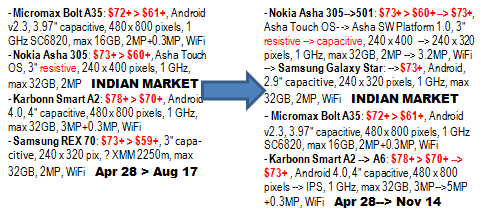
- The new (in Q3’13) Asha 501 became the most popular smartphone on the Indian market in the $60-80 price range (as per Flipkart, see above), successfully beating off the best competitive offerings from Samsung and the two leading local brands, Micromax and Karbonn. This is another positive sign of successfull revival of the Asha Touch platform started with Asha 501 (via the Asha Software Platform 1.0) as described in the New Nokia Asha platform for developers [‘Experiencing the Cloud’, May 9, 2013] and New Asha platform and ecosystem to deliver a breakthrough category of affordable smartphone from Nokia [‘Experiencing the Cloud’, May 9 – July 5, 2013] posts of mine. Everything is well represented by comparing the “micro reports” included into the bottom left corner of the overall chart a quarter ago and now:

- As one currently could see this Nokia (the devices part of it soon becoming the part of Microsoft*) could realise its goal of selling “100 million of the new generation Asha smartphones over the coming years, beginning with the Nokia Asha 501”. The Asha 500, Asha 502 and Asha 503 introduced in October 22 could already deliver a huge jump in shipments of “de facto smartphones” under Asha brand, helping to defend further and even improve Nokia’s market position against the sub $100 Android smartphones in Q4’13. Note also that Asha 500 was announced for $69 list price (before taxes or subsidies) which means that—depending on “race to the bottom” competition—could easily mean a street price of $60+ on the Indian market.
-
* See also the previous posts of mine:
– Unique Nokia assets (from factories to global device distribution & sales, and the Asha sub $100 smartphone platform etc.) will now empower the One Microsoft devices and services strategy [‘Experiencing the Cloud’, Sept 3 – Oct 23, 2013]
– Microsoft answers to the questions about Nokia devices and services acquisition: tablets, Windows downscaling, reorg effects, Windows Phone OEMs, cost rationalization, ‘One Microsoft’ empowerment, and supporting developers for an aggressive growth in market share [‘Experiencing the Cloud’, Sept 3 – Oct 23, 2013]
– Microsoft Nokia Transaction Conference Call with slides from Microsoft Strategic Rationale inserted-ebook – 3-Sept-2013 edited by Sándor Nacsa from those two sources into an ebook format PDF
– Leading edge Nokia phablets for both entertainment and productivity: Lumia 1320 targeting the masses at $339, and Lumia 1520 the imaging conscious business users and individuals at $749 [‘Experiencing the Cloud’, Oct 26, 2013] - The Asha Touch revival was also able to stop the decline of the overall Nokia “mobile phones” category (Nokia S30, S40, Asha and Asha Full Touch phones) exactly at 55.8 million units, the same number as for the Q1’13.

- In addition there are now the Leading edge Nokia phablets for both entertainment and productivity: Lumia 1320 targeting the masses at $339, and Lumia 1520 the imaging conscious business users and individuals at $749 [‘Experiencing the Cloud’, Oct 26, 2016].
- With that Nokia established a strong niche market position on both the $130+ market (starting with Lumia 520 sold at that price in India, also the most popular one on Flipkart for the the $80-160 price range of devices) and the sub $80 market against the onslaught of Android devices. The rest will depend now only on Microsoft.



Than for the lead smartphone market, i.e. Mainland China I will include here:
- China market: Smartphone sales top 93 million units in 3Q13, says Analysys [Digitimes, Nov 12, 2013]
There were 102.66 million handsets sold in the China market during the third quarter of 2013, growing 13.6% on quarter and 54.5% on year, of which 93.08 million units were smartphones, increasing 20.7% on quarter and 89.3% on year, according to China-based consulting company Analysys International.

While for the worldwide market:
- China-based smartphone vendors set to rise in 2013 rankings, says IC Insights [Digitimes, Nov 13, 2013]
Lenovo, ZTE, Huawei and Yulong/Coolpad have taken advantage of the surging low-end smartphone market. According to IC Insights, the four major China-based handset companies are forecast to ship 168 million smartphones in 2013 and together hold a 17% share of the worldwide smartphone market.
Lenovo, ZTE, Huawei and Yulong/Coolpad shipped a combined 98 million smartphones in 2012, a more than 300% surge from the 29 million units shipped in 2011, IC Insights disclosed. It should be noted that the China-based suppliers of smartphones are primarily serving the China and Asia-Pacific marketplace, and offer low-end models that typically sell for less than US$200.
Low-end smartphones are expected to represent just under one-third (310 million) of the total 975 million smartphones shipped in 2013. IC Insights forecast that by 2017, low-end smartphone shipments will represent 46% of the total smartphone market with China and the Asia-Pacific region to remain the primary markets for these low-end models.
Samsung Electronics and Apple are set to continue dominating the total smartphone market in 2013. The two vendors are forecast to ship 457 million units and together hold a 47% share of the total smartphone market in 2013, IC Insights said. In 2012, Samsung and Apple shipped 354 million smartphones and took a combined 50% share of the total smartphone market.
Nokia was third-largest supplier of smartphones behind Samsung and Apple in 2011, but has seen its share of the smartphone market fall. Nokia’s smartphone shipments are forecast to decline by another 4% and grab an only 3% share of the total smartphone market in 2013, IC Insights indicated.
Other smartphone producers that have fallen on hard times include RIM and HTC. While each of these companies had about a 10% share of the smartphone market in 2011, IC Insights estimated they will have only about 2% shares of the 2013 smartphone market.

-
Gartner Says Smartphone Sales Accounted for 55 Percent of Overall Mobile Phone Sales in Third Quarter of 2013 [press release, Nov 14, 2013]
– Western Europe Grew for the First Time this Year
– Lenovo Became the No. 3 Worldwide Smartphone Vendor for the First Time
Worldwide mobile phone sales to end users totaled 455.6 million units in the third quarter of 2013, an increase of 5.7 percent from the same period last year, according to Gartner, Inc. Sales of smartphones accounted for 55 percent of overall mobile phone sales in the third quarter of 2013, and reached their highest share to date.
Worldwide smartphone sales to end users reached 250.2 million units, up 45.8 percent from the third quarter of 2012. Asia/Pacific led the growth in both markets – the smartphone segment with 77.3 percent increase and the mobile phone segment with 11.9 percent growth. The other regions to show an increase in the overall mobile phone market were Western Europe, which returned to growth for the first time this year, and the Americas.
“Sales of feature phones continued to decline and the decrease was more pronounced in markets where the average selling price (ASP) for feature phones was much closer to the ASP affordable smartphones,” said Anshul Gupta, principal research analyst at Gartner. “In markets such as China and Latin America, demand for feature phones fell significantly as users rushed to replace their old models with smartphones.”
Gartner analysts said global mobile phone sales are on pace to reach 1.81 billion units in 2013, a 3.4 percent increase from 2012. “We will see several new tablets enter the market for the holiday season, and we expect consumers in mature markets will favor the purchase of smaller-sized tablets over the replacement of their older smartphones” said Mr. Gupta.
While Samsung’s share was flat in the third quarter of 2013, Samsung increased its lead over Apple in the global smartphone market (see Table 1). The launch of the Samsung Note 3 helped reaffirm Samsung as the clear leader in the large display smartphone market, which it pioneered.
Lenovo’s sales of smartphones grew to 12.9 million units, up 84.5 percent year-on-year. It constantly raised share in the Chinese smartphone market.
Apple’s smartphone sales reached 30.3 million units in the third quarter of 2013, up 23.2 percent from a year ago. “While the arrival of the new iPhones 5s and 5c had a positive impact on overall sales, such impact could have been greater had they not started shipping late in the quarter. While we saw some inventory built up for the iPhone 5c, there was good demand for iPhone 5s with stock out in many markets,” said Mr. Gupta.

In the smartphone operating system (OS) market (see Table 2), Android surpassed 80 percent market share in the third quarter of 2013, which helped extend its leading position. “However, the winner of this quarter is Microsoft which grew 123 percent. Microsoft announced the intent to acquire Nokia’s devices and services business, which we believe will unify effort and help drive appeal of Windows ecosystem,” said Mr. Gupta. Forty-one per cent of all Android sales were in mainland China, compared to 34 percent a year ago. Samsung is the only non-Chinese vendor in the top 10 Android players ranking in China. Whitebox Yulong [Coolpad] is the third largest Android vendor in China with a 9.7 percent market share in the third quarter of 2013. Xiaomi represented 4.3 percent of Android sales in the third quarter of 2013, up from 1.4 percent a year ago.

Mobile Phone Vendor Perspective
Samsung: Samsung extended its lead in the overall mobile phone market, as its market share totaled 25.7 percent in the third quarter of 2013 (see Table 3). “While Samsung has started to address its user experience, better design is another area where Samsung needs to focus,” said Mr. Gupta. “Samsung’s recent joint venture with carbon fiber company SGL Group could bring improvements in this area in future products.”
Nokia: Nokia did better than anticipated in the third quarter of 2013, reaching 63 million mobile phones, thanks to sales of both Lumia and Asha series devices. Increased smartphone sales supported by an expanded Lumia portfolio, helped Nokia move up to the No. 8 spot in the global smartphone market. But regional and Chinese Android device manufacturers continued to beat market demand, taking larger share and creating a tough competitive environment for Lumia devices.
Apple: Gartner believes the price difference between the iPhone 5c and 5s is not enough in mature markets, where prices are skewed by operator subsidies, to drive users away from the top of the line model. In emerging markets, the iPhone 4S will continue to be the volume driver at the low end as the lack of subsidy in most markets leaves the iPhone 5c too highly priced to help drive further penetration.
Lenovo: Lenovo moved to the No. 7 spot in the global mobile phone market, with sales reaching approximately 13 million units in the third quarter of 2013. “Lenovo continues to rely heavily on its home market, which represents more than 95 per cent of its overall mobile phone sales. This could limit its growth after 2014, when the Chinese market is expected to decelerate,” said Mr. Gupta.

Apple’s Consumer Computing System: 5 years of “revolutionary” iPhone and “magical” iPad
Updates: The real threat that Samsung poses to Apple [ASYMCO, Dec 7, 2012]
– iPhone 3GS Prices Lowered Down To Rs 9,999 [US$ 179] in India [iPhone Help, July 20, 2012]
– Fighting Android, The Apple iPhone Strategy [Only Gizmos, July 21, 2012]
There was a 5 years anniversary of iPhone on June 29. This product and the adjacent iPad (called “revolutionary” and “magical”, subsequently, by the vendor itself) skyrocketed Apple to previously unbelievable heights in company valuations by the stock market:

Apple Stock Price Reaches All-Time High [NewsyHub YouTube channel, April 12, 2012]
Transcript by http://www.newsy.comBY VICTORIA CRAIGANCHOR JIM FLINKAll three major stock indeces fell triple digits by the end of Tuesday’s trading day. But one individual stock price surged — reaching a mark only one other stock has managed to do…ever. Phoenix’s KNXV has the details.“The world’s most valuable company is now worth even more. Apple computers’ value is now more than $600 billion based on its stock price. Its shares are up almost 60% since the beginning of the year.”Apple’s price hit a daytime high of $644 in the morning. PC Advisor explains why this mark is nearly unprecedented.“The stock price rose to $644 in the morning, and then fell back to $629 by midday. Only one other company has reached the $600 billion value: Microsoft on Dec. 30, 1999, was valued at $619 billion. Today, its value is $260 billion..”Adjusting for inflation, Microsoft’s 1999 total would be today’s equivalent of about $800 billion. In total, Apple stock has risen 58 percent on the year…and it didn’t take long for the stock to cross the threshold from $500 billion to $600 billion. The Wall Street Journal explains the stock’s journey to the top and what it means for the NASDAQ. |
“To put the rally in perspective, it took Apple only 28 trading days to add $100 billion in value as Apple first crossed $500 billion on Feb. 29. In comparison, only 24 members of the S&P 500 have market capitalizations above $100 billion.”So what’s the reason behind the rally? A writer for Pad Gadget.com explains it’s more than just it’s mobile devices, citing…“… Apple’s intentions to initiate a dividend and share repurchase program starting later this year plus the usual anticipation over potential new products. Most consumers and investors alike are waiting on the edg[e] of their seats to see what television-related product Apple has waiting in the wings, with the expectations all quite high that it will be equal parts amazing and marketable.”Nifty new gadgets aside, what’s next for Apple? Will it continue its climb or fall back…retracing the steps of its biggest competitor? A contributor for CNBC says Apple’s stock is overbought and growth from here will likely slow. But another analyst disagrees and speculates big movement for the stock.“Some of the analysts are saying that we could see a trillion dollar market cap figure in a calendar year 2014. I think we might actually see that a little earlier. For me, I think there are still some very positive catalysts around this stock. Expecting the iPhone 5 during the summer.”Early in the trading day Wednesday, Apple’s stock price was up almost 7 points, reaching a value of $635. |
There were several articles about that fundamental change, most importantly:
Business Insider articles:
– Apple Stock vs Google Stock Since The Launch Of The iPhone [June 30, 2012]
– 9 Fascinating Facts About Apple’s Stock [May 21, 2012]
– THE EXPERTS SPEAK: Here’s What People Predicted Would Happen When The iPhone Came Out… [June 29, 2012]
– 10 Things You Didn’t Know About The Birth Of The iPhone [June 27, 2012]
– Yes, You Should Be Astonished By Apple … [April 25, 2012]
Other noteworthy articles:
– The Untold Story: How the iPhone Blew Up the Wireless Industry [Wired Magazine, Jan 9, 2008]
– Apple’s stock is getting creamed by Verizon and AT&T [CNNMoney, May 9, 2012]
– I declare independence from Apple [BetaNews, July 4, 2012]
– Apple’s injunction stopping Galaxy Nexus sales is shameful [BetaNews, June 29, 2012]
– Appeals court delays Galaxy Nexus ban [Android Central, July 6, 2012]
– Nine Reasons You Should Boycott Apple [David Amerland, July 7, 2012]
– Android vs. iOS: A Developer’s Perspective [July 5, 2012]: The architecture of Android is just plain BETTER. They don’t restrict what you can do and there always seems to be a good tutorial to follow telling you exactly how to do the exact crazy thing that you want to do. As far as the languages go, I don’t really have a preference for Obj-C vs. Java. They both do the job pretty well. I still don’t quite have my head wrapped around ARC, but that’s a post for another day.
– China’s smartphone market grows 164%, Apple’s iOS takes 17.3% share [Apple Insider, July 9, 2012]: Even without availability on China’s largest mobile provider, the iPhone’s market share in China has grown form 9.9 percent a year ago to 17.3 percent in the June quarter. … stems from the launch of the iPhone on China Telecom this year. … the company has yet to forge a partnership with China Mobile, the largest wireless provider in the world with more than 650 million subscribers. Reports have suggested that Apple’s next iPhone will add compatibility with China Mobile’s proprietary wireless network. Apple’s 17.3 percent share in China was well behind Google’s Android platform, which dominated with 69.5 percent of smartphones sold in the country. Apple took second place, while Nokia finished in third with an 11.2 percent share.
– Building and dismantling the Windows advantage [the Asymco blog, July 2, 2012]
…
If we consider all the devices Apple sells, the whittling becomes even more significant and the multiple drops to below 2. Seen this way, Post-PC devices wiped out of leverage faster than it was originally built. They not only reversed the advantage but cancelled it altogether.Considering the near future, it’s safe to expect a “parity” of iOS+OS X vs. Windows within one or two years. The install base may remain larger for some time longer but the sales rate of alternatives will swamp it in due course.
The consequences are dire for Microsoft. The wiping out of any platform advantage around Windows will render it vulnerable to direct competition. This is not something it had to worry about before. Windows will have to compete not only for users, but for developer talent, investment by enterprises and the implicit goodwill it has had for more than a decade.
It will, most importantly, have a psychological effect. Realizing that Windows is not a hegemony will unleash market forces that nobody can predict.

Now let’s see how that has come about in terms of market volume and technological improvements:
 – 6/29/2007: iPhone, iPod touch (ARM 1176JZ(F)-S @412 MHz, 128MB, PowerVR MBX Lite, GPRS/EDGE 2.5G for iPhone, 3.5” display of 480 × 320 pixels, 2MP)
– 7/11/2008: iPhone 3G (the same except 3.6 Mbps UMTS/HSDPA) & App Store
– 6/19/2009: iPhone 3GS (the same except ARM Cortex-A8 @600 MHz, 256MB, PowerVR SGX535, 7.2 Mbps UMTS HSDPA, 3MP camera)
– 4/03/2010: iPad (ARM Cortex-A8 @1 GHz, 256MB, PowerVR SGX535, 9.7” display of 1024×768 pixels, WiFi [+3G])

Currently marketed devices (all use iOS 5.x which cannot be used on earlier iPhone and iPhone 3G, so those are not iCloud capable), in addition to iPhone 3GS ($330+ unlocked in US, but $179+ in India since July 20, 2012) which is also marketed:
– 6/24/2010: iPhone 4 (ARM Cortex-A8 @800 MHz, 512MB, PowerVR SGX535, 3.5G 5.76 Mbps HSUPA, 3.5” Retina display of 960 x 640 pixels, 5MP camera), $550+ unlocked
– 3/25/2011: iPad 2 (ARM Cortex-A9 @1 GHz, 512MB, PowerVR SGX543MP2, 9.7” display of 1024 x 768 pixels, WiFi [+3.5G HSUPA]), $350+
– 10/24/2011: iPhone 4S (dual-core ARM Cortex-A9 @800 MHz, 512MB, PowerVR SGX543MP2, 4G LTE, 3.5” Retina display of 960 x 640 pixels, 8MP camera), IOS 5 (Notification Center, iMessage and Newsstand … 1,500 new APIs) & iCloud (store music, photos, apps, contacts, calendars, documents and more in the cloud, keeping them up to date across all your devices via the cloud), $790+ unlocked
– 3/16/2012: New, 3d generation iPad (dual-core ARM Cortex-A9 @1 GHz, 1GB, PowerVR SGX543MP4, WiFi [+4G LTE], 9.7” Retina display of 2048 × 1536 pixels), $500+
Note that in April 2012 the under $200 (unlocked) Android smartphones came quite close to the capabilities of the iPhone 4S thanks to Boosting the MediaTek MT6575 success story with the MT6577 announcement [June 27, 2012]. Only the SGX531 GPU of MT6577 is a significant deficiency against that of SGX543MP2 used in the iPhone 4S. As a consumer computing system Google was also able to match Apple with the Nexus 7: Google wanted it in 4 months for $199/$245, ASUS delivered + Nexus Q (of Google’s own design and manufacturing) added for social streaming from Google Play to speakers and screen in home under Android device control [June 28, 2012].
Wikipedia is the best source of detailed technical and other information (by far), except that of iCloud currently (so find a better source of information on that given in sections of this post):
List of iOS devices |
iPhone |
iPad |
iPod touch |
iOS |
iCloud |
iTunes |
iTunes Store |
iBooks |
iTunes Ping |
AirPlay |
AirPort |
Apple TV |
App Store (iOS) |
FairPlay |
Book:Apple Inc. |
iLife |
iWork |
Safari |
History of the iPhone |
In addition I compiled a 5 years of “revolutionary” iPhone and “magical” iPad [June 29, 2012] PDF document from all related Apple press releases for that period. In it there are the following sections:
– Product ramp-up and momentum
– The strongly related iTunes Store momentum during these 5 years
– Essential Device Announcements
– All related Apple press releases
In addition there are document bookmarks included everywhere for easy navigation around the whole 129 pages long compound document.
Note: Official specifications for iPhone, iPad, iPod touch and Apple TV you can find under the URLs just given.
Finally I have further information in this blogpost specifically compiled in order to represent the Apple iOS based consumer computing solution as a system since, in my view, that is one of the most important aspects of this 5 years anniversary which is not represented anywhere else at the moment:
1. Overall picture at the moment (video-based)
2. Current iPhone and iPad products (video-based)
3. Earlier products (video-based)
4. iCloud
5. iTunes
6. App Store
1. Overall picture at the moment:
Apple — Special Event — June 11, 2012 [Apple YouTube channel, June 30, 2012]
2. Current iPhone and iPad products:
Apple – iPhone 4S – TV Ad – Joke [Apple YouTube channel, May 23, 2012]
Apple – Introducing iPhone 4S [Apple YouTube channel, Oct 6, 2011]
Apple – Introducing iOS 5 [Apple YouTube channel, June 6, 2011]
Apple – The new iPad – TV Ad – Do It All [Apple YouTube channel, June 18, 2012]
Apple – Introducing the new iPad [Apple YouTube channel, March 8, 2012]
Apple – Introducing the iPad Smart Cover [Apple YouTube channel, March 2, 2011]
3. Earlier products:
Official Apple iPhone 4 Video [June 7, 2010]
iPhone 3GS ads all in one. Official Apple Commercials spots HQ [Glarand YouTube channel, Sept 29, 2011]
HQ Apple WWDC 2009 Keynote – NEW iPhone 3GS [MicrositeSolutions YouTube channel]
Talking Tech: Apple’s new iPhone 3GS [USATODAY, June 17, 2009]
ALL iPhone 3G official Ads… Collected&Edited in One Video HQ [hsmmgg YouTube channel, March 21, 2009]
WWDC 2008 News: iPhone 3G makes its debut [CNETTV YouTube channel, June 9, 2008]
[HD] Steve Jobs – 2007 iPhone Presentation ( Part 1 of 2 ) [UG3Genki YouTube Channel]
[HD] Steve Jobs – 2007 iPhone Presentation ( Part 2 of 2 ) [UG3Genki YouTube Channel]
iPad 2 Official Introduction Video [March 2, 2011]
Apple iPad: First TV Commercial [March 8, 2010]
Apple iPad Official Video [1080p HD] [Jan 27, 2010]
4. iCloud [Apple microsite, June 6, 2011]:
It’s the easiest way to manage your content. Because now you don’t have to.
Apple – Introducing iCloud [Apple YouTube channel, Oct 4, 2011]
iTunes in the CloudYour music, movies, and TV shows. Wherever you want them.You never know when you’ll suddenly be in the mood to listen to a favorite song, rewatch a classic movie, or share that hilarious sitcom episode with a friend. With iCloud, you can have iTunes automatically download new music purchases to all your devices the moment you tap Buy. You can also access past music, movie, and TV show purchases from any of your devices — wirelessly and without syncing.1Learn more about iTunes in the Cloud1.Automatic downloads and downloading previous purchases require iOS 4.3.3 or later on iPhone 3GS or later, iPod touch (3rd and 4th generation), or iPad; iOS 5 on iPhone 4 (CDMA model); or a Mac or PC with iTunes 10.3.1 or later. Previous purchases may be unavailable if they are no longer in the iTunes Store, App Store, or iBookstore. Downloading previous movie purchases requires iTunes 10.6, iOS 5 or later, or Apple TV software 4.3 or later. Not all previously purchased movies are available for downloading to your other devices. Download iTunes 10.6 free.iTunes MatchIf you want the benefits of iTunes in the Cloud for music you haven’t purchased from iTunes, iTunes Match is the perfect solution. It lets you store your entire collection, including music you’ve imported from CDs. For just $24.99 a year.2Learn more about iTunes Match2.iTunes Match requires iOS 5.0.1 on iPhone 3GS or later, iPod touch (3rd and 4th generation), or iPad, or a Mac or PC with iTunes 10.5.1. Limit 25,000 songs. iTunes purchases do not count against limit. Access to some services is limited to 10 devices. |
Photo StreamSnap. And it’s everywhere.With Photo Stream, you can take a photo on one iOS device and it automatically appears on all your other devices, including your Mac or PC. Import new pictures to your computer from a digital camera, and iCloud sends copies over Wi-Fi to your iPhone, iPad, and iPod touch. You can even view recent photos on your big-screen TV via Apple TV. There’s no syncing, no email attachments, no file transfers. Your pictures are just there — on whichever device you happen to have handy.Learn more about Photo StreamDocuments in the CloudStart here. Finish there.You can create amazing documents and presentations on your iPhone, iPad, and iPod touch. And now with iCloud, you can keep your work up to date across all your iOS devices. You don’t have to save your work or transfer any files. Your documents — with all your latest edits — automatically appear everywhere. iCloud is already built into Apple iOS apps like Keynote, Pages, and Numbers. It can also work with other iCloud-enabled apps. So you can do things like create a spreadsheet on your iPad and make edits to it on your iPhone. Or start sketching on your iPod touch and add the finishing touches on your iPad at home.Learn more about Documents in the Cloud |
AppsAll your apps. Always at hand.If you have an iPhone, iPad, or iPod touch, you have apps. And you probably download new ones all the time. iCloud lets you automatically download new app purchases to all your devices at once. So the app you need is always right where you need it. If an app you bought previously isn’t on one of your devices, not to worry. You can download it again from your purchase history — at no additional charge.1Learn more about apps |
iBooksAll your devices are on the same page.Buy a new book from the iBookstore, and iCloud makes sure it appears everywhere — your iPhone, iPad, and iPod touch. So if you have to put it down, you can pick it back up on another device, in exactly the same place. In addition to the best seller you’re glued to at the moment, the iBooks app keeps a list of titles you’ve read before. And just like with apps, you can download them again to any of your devices.1 |
Calendar, Mail, and ContactsUp-to-date everything.iCloud stores all the stuff you can’t live without — your calendars, email, and contacts — and keeps it up to date across all your devices. Say you delete an email, add a calendar event, or change some settings. iCloud makes all your changes everywhere. Same with your notes, reminders, and Safari bookmarks.Learn more about Calendar, Contacts, and Mail |
BackupiCloud saves the day.iCloud backs up your iOS device daily over Wi-Fi when it’s connected to a power source. From your Camera Roll and messages to your device settings and ringtones, everything is backed up quickly and efficiently. And since iCloud is built into iPhone, iPad, and iPod touch, you can restore your personal data on a new iOS device or one you already have without using a single cable.3iCloud does it all for you over Wi-Fi. |
Find My FriendsFriend-spotting.For finding your way to the party, keeping track of family at a crowded amusement park, or getting picked up at the airport, Find My Friends is your app.4 You can give friends and family permission to see your whereabouts. And vice versa. When you don’t want to be found, a single switch takes you off the grid. Simple as that.Learn more about Find My Friends |
Find My iPhone, iPad, iPod touch, and MacLost. And found.If checking all the usual spots hasn’t turned up your missing iOS device, Find My iPhone, iPad, iPod touch, and Mac can help.4Just sign in at icloud.com or use the Find My iPhone app on another device to locate yours on a map, display a message on its screen, remotely set a passcode lock, or initiate a remote wipe to delete your data.Learn more about Find My iPad |
3. Backup of purchased music is not available in all countries. Previous purchases may not be restored if they are no longer in the iTunes Store, App Store, or iBookstore. |
4.Find My Friends and Find My iPhone enable you to locate iOS devices only when they are on and connected to a registered Wi-Fi network or have an active data plan. |
iCloud requires iOS 5 on iPhone 3GS or later, iPod touch (3rd and 4th generation), or iPad; a Mac computer with OS X Lion; or a PC with Windows Vista or Windows 7 (Outlook 2007 or 2010 or an up-to-date browser is required for accessing email, contacts, and calendars). Some features require a Wi-Fi connection. Some features are not available in all countries. Access to some services is limited to 10 devices. Map data © 2012 Google. © 2012 Google. Map data © 2012 Google.
Apple – iCloud – Coming Soon [page on the iCloud microsite, June 11., 2012]:
iCloud is about to get even better. With the launch of Mountain Lion this July and iOS 6 in the fall, iCloud gets brand-new features for iPhone, iPad, iPod touch, Mac, and PC.
Safari. Keeps tabs on your web pages.
iCloud Tabs show the web pages you have open on all your other devices, so you can see all your pages on your iPad, iPhone, iPod touch, and Mac, and pick up browsing wherever you left off. Safari now saves web pages — not just links — in your Reading List. So you can get caught up on any device, even when you can’t connect to the Internet. 11. Offline Reading List will be available on iPhone 4 or later and iPad 2 or later.2. Shared Photo Streams requires iOS 6 on iPhone 4 or later or iPad 2 or later, or a Mac computer with OS X Mountain Lion. An up-to-date browser is required for accessing shared photo streams on the web. |
Shared Photo Streams. Share select photos with a select audience.
Now you can share just the photos you want, with just the people you choose. Simply select photos from the Photos app, tap the Share button, choose who you want to share your photos with, and they’re on their way. Friends using iCloud on an iOS 6 device or a Mac running Mountain Lion get the photos delivered immediately in the Photos app or iPhoto. You can even view shared photo streams on Apple TV. If the folks you’re sharing with aren’t using an Apple device, they can view your photos on the web. People can like individual photos and make comments. And you can share as much as you want: Your shared photo streams don’t count against your iCloud storage, and they work over Wi-Fi and cellular.2 |
Find My Phone. Stay on the trail of your iPhone.
It happens. You misplace your iPhone, or your iPad, or your iPod touch. Luckily, iOS 6 and iCloud now offer Lost mode, making it even easier to use Find My iPhone to locate and protect a missing device. Immediately lock your missing device with a four-digit passcode and send it a message displaying a contact number. That way a good Samaritan can call you right from your Lock screen without accessing the rest of the information on your device. And while in Lost mode, your device will keep track of where it’s been and report back to you any time you check in with the Find My iPhone app.3 |
Find My Friends. Good friends aren’t hard to find.
Find My Friends is a great way to share your location with people who are important to you. Family and friends who share their locations with you appear on a map so you can quickly see where they are and what they’re up to. And with iOS 6, you can get location-based alerts — like when your kids leave school or arrive home. Find My Friends can also notify others about your location, so you can stay connected or keep track of the ones you love.3.Find My iPhone and Find My Friends enable you to locate iOS devices only when they are on and connected to a registered Wi-Fi network or have an active data plan. |
5. iTunes [Apple microsite, Oct 4, 2011]:
Apple – iTunes – Your media on your Mac, PC, iPod, iPhone, and iPad.
Apple iPhone 4 TV Ad iPod + iTunes [Apple YouTube channel, Aug 2, 2011]
[iTunes app]Play, buy, and end enjoy your music, movies, TV shows, apps, and more. Everywhere.iTunes is a free application for your Mac or PC. It lets you organize and play digital music and video on your computer. It can automatically download new music, app, and book purchases across all your devices and computers. And it’s a store that has everything you need to be entertained. Anywhere. Anytime. |
iTunes PlayerWhere listening, watching, and playing start.iTunes lets you enjoy all your music, movies, videos, and TV shows on your Mac or PC. When you want to watch or listen to something, you no longer have to look through your CDs or flip through channels — just go to your computer and open iTunes. With your entire media collection in your iTunes library, you can browse everything faster, organize it all more easily, and play anything whenever the mood strikes.Learn more about the iTunes player |
iTunes StoreThe world’s #1 music store. And more.Music is just the beginning. You can also rent or buy blockbuster movies, buy HD episodes of your favorite TV shows, shop for books, and download apps for your iPhone, iPod touch, or iPad. Subscribe to free podcasts about anything and everything. For further enlightenment, visit iTunes U and download free lectures, discussions, and lessons from universities and cultural institutions around the globe. You’ll find thousands of hours of entertainment on the iTunes Store.Learn more about the iTunes Store |
iTunes EverywhereiTunes in the Cloud.With iTunes in the Cloud, you can wirelessly download your content to all your devices, regardless of which device you used to purchase it. Your new music, apps, and books just appear — automatically. And you can view your purchase history to choose the TV shows you want to download.1 Effortlessly. Learn more1. Automatic downloads and downloading previous purchases require iOS 4.3.3 or later on iPhone 3GS or later, iPod touch (3rd and 4th generation), iPad, or iPad 2; iOS 5 on iPhone 4 (CDMA model); or a Mac or PC with iTunes 10.3.1 or later. Previous purchases may be unavailable if they are no longer in the iTunes Store, App Store, or iBookstore. Download iTunes 10.6 free. |
Learn more about iTunes everywhereA match made in iCloud.With iTunes Match, you can store your music collection in iCloud, including songs you’ve imported from CDs. And you can play them on any iPhone, iPad, iPod touch, Apple TV, Mac, or PC — all for just $24.99 a year.2 Learn more2. iTunes Match requires iOS 5.0.1 on iPhone 3GS or later, iPod touch (3rd and 4th generation), iPad, or iPad 2, or a Mac or PC with iTunes 10.5.1. Limit 25,000 songs. iTunes purchases do not count against limit. Access to some services is limited to 10 devices. |
Music’s in the house.AirPlay lets you stream music throughout your whole house — wirelessly. AirPlay wireless technology is integrated into many speaker docks, AV receivers, and stereo systems. So you can enjoy your entire iTunes library. Every song and every playlist. In any room, anytime. [Learn more][Remote is a free, fun, and easy-to-use app that turns your iPhone, iPad, or iPod touch into a remote control. So wherever you are in your house, you can control your computer’s iTunes library and your Apple TV with a tap or flick of a finger. Learn more] |
Features are subject to change. Access to some services is limited to 10 devices. See www.apple.com/legal/itunes/ww/ for more information.
The iTunes Store is available only to persons age 13 or older in the U.S. Requires compatible hardware and software and Internet access (fees may apply). Terms apply. See www.apple.com/itunes/what-is/store.html for more information.
Available on iTunes. Title availability is subject to change.
More information:
– iTunes Match puts your whole music library in iCloud. [Apple’s Inside iTunes blog, Jan 16, 2012]
– Get Books On iTunes, the iBookstore, and the App Store [Apple’s Inside iTunes blog, April 18, 2011]
– iTunes 10.3 Now Includes iBookstore [Apple’s Inside iTunes blog, June 8, 2011]
– iBooks 2 brings new Multi-Touch textbooks to iPad [Apple’s Inside iTunes blog, Jan 30, 2012]
– New features in iBooks 2.1. [Apple’s Inside iTunes blog, March 26, 2012]
– New iTunes U app delivers online courses to mobile devices. [Apple’s Inside iTunes blog, Feb 6, 2012]
– Movies now available on iCloud. [Apple’s Inside iTunes blog, March 19, 2012]
– New Categories make browsing Newsstand’s offerings easier. [Apple’s Inside iTunes blog, May 25, 2012]
Apple – iPhone 4S – Keep yourself entertained at the iTunes Store. [Apple product page, Oct 3, 2011]
iTunes
Millions of ways to stay entertainedYou’re in a coffee shop and you hear a song you just have to have. Or you’re at the airport, wishing you had a good movie to watch. Just go to iTunes. Find all the new music, movies, TV shows, and podcasts you want. Then download it all wirelessly, right to your iPhone. Wherever you happen to be. |
Explore the store.Browse New Releases, Top Tens, and Genres. If you know exactly what you’re looking for, type in a quick search. Play a preview of any song or video, then tap to buy it.1 With millions of songs and thousands of movies, TV episodes, and music videos in the iTunes Store — and a huge selection in HD — you’re sure to find something you’ll love.1. Downloads over 50MB require a Wi-Fi connection. |
The Tone Store.
|
iTunes Ping. Stay in the know.Follow friends to find out what music they’re listening to, buying, and recommending. Catch up with your favorite artists and see if they’re playing near you. That way, you’ll never miss another show. You can even see which of your friends are planning on going, too.Learn more about Ping |
iTunes in the Cloud.When you buy music from iTunes, iCloud automatically downloads it to all your devices over Wi-Fi or a cellular network. So everything new appears everywhere — on your iPhone, iPad, and iPod touch. You can also browse your purchase history and choose specific songs, albums, movies, or TV shows to download again at no additional cost.2 Sign up for iTunes Match and you can access all your other music from iCloud — including music you’ve imported from CDs. For just $24.99 a year.32. Automatic downloads and downloading previous purchases require iOS 4.3.3 or later on iPhone 3GS or later, iPod touch (3rd and 4th generation), or iPad; iOS 5 on iPhone 4 (CDMA model); or a Mac or PC with iTunes 10.3.1 or later. Previous purchases may be unavailable if they are no longer in the iTunes Store, App Store, or iBookstore. Downloading previous movie purchases requires iTunes 10.6, iOS 5 or later, or Apple TV software 4.3 or later. Not all previously purchased movies are available for downloading to your other devices. Download iTunes 10.6 free.3. iTunes Match requires iOS 5.0.1 or later on iPhone 3GS or later, iPod touch (3rd and 4th generation), or iPad, or a Mac or PC with iTunes 10.5.1 or later. Limit 25,000 songs. iTunes purchases do not count against limit. Access to some services is limited to 10 devices. |
Apple – iPod touch – Browse and buy anytime you want with iTunes.[Apple product page, Oct 3, 2011]
iTunes
Your DJ-slash-cineplex-slash-TV and more.You could be anywhere — in line for your “fixes everything” fruit smoothie or just lounging in the quad — when it hits you. There’s a song you need by a band you love, a TV show you missed, or a movie you just have to see, right then and there. Enter iTunes on iPod touch. |
Get your entertainment fix on the fly.Access the iTunes Store over Wi-Fi and you can discover new music from millions of songs. Buy or rent movies. Buy TV shows. Or find free podcasts. Browse New Releases, Top Tens, and Genres. If you know exactly what you’re looking for, type in a quick search. Play a preview of any song or video, then tap to buy it. It downloads right to your iPod touch, making you the master of long waits. |
iTunes in the Cloud.When you buy music from iTunes, iCloud automatically downloads it to your other devices over Wi-Fi or a cellular network. So everything new appears everywhere — on your iPod touch, iPhone, iPad, Mac, or PC. You can also browse your purchase history and choose songs, albums, movies, or TV shows to download again at no additional cost.1 Sign up for iTunes Match and you can access all your other music from iCloud — including music you’ve imported from CDs. For just $24.99 a year.2 Learn more about iCloud |
1. Automatic downloads and downloading previous purchases require iOS 4.3.3 or later on iPhone 3GS or later, iPod touch (3rd and 4th generation), or iPad; iOS 5 on iPhone 4 (CDMA model); or a Mac or PC with iTunes 10.3.1 or later. Previous purchases may be unavailable if they are no longer in the iTunes Store, App Store, or iBookstore. Downloading previous movie purchases requires iTunes 10.6, iOS 5 or later, or Apple TV software 4.3 or later. Not all previously purchased movies are available for downloading to your other devices. Download iTunes 10.6 free.2. iTunes Match requires iOS 5.0.1 or later on iPhone 3GS or later, iPod touch (3rd and 4th generation), or iPad, or a Mac or PC with iTunes 10.5.1 or later. Limit 25,000 songs. iTunes purchases do not count against limit. Access to some services is limited to 10 devices. |
Now you have a following.Ping your friends and follow each other to find out what music everyone loves, buys, and recommends. You can even follow your favorite artists and see who they follow. And when they’re playing a show near you, Ping tells you which friends are up for going. |
iTunes U hones your know-it-all skills.Discover iTunes U on your iPod touch and download some knowledge. You’ll find lectures, discussions, language lessons, audiobooks, podcasts, and more from top universities, museums, and other cultural institutions around the world. |
Genius recommends.With millions of songs and thousands of movies, TV episodes, and music videos in the iTunes Store — and a huge selection in HD — you might need some help finding new favorites. Genius keeps track of what you love and recommends more of the same. |
Shop the new Tone Store.You hear an alert go off — like a new text message or Facebook update — and think, “Is that me?” You check your iPod touch, and it turns out it’s not. It’s the guy with the iPhone across from you. Now you can make your alerts a lot more individual thanks to the Tone Store and iOS 5. Part of the iTunes Store, the Tone Store is where you can download alert tones for just 99¢. Here’s to your supreme uniqueness. |
iCloud requires iOS 5 on iPhone 3GS or later, iPod touch (3rd and 4th generation), or iPad; a Mac computer with OS X Lion; or a PC with Windows Vista or Windows 7 (Outlook 2007 or 2010 or an up-to-date browser is required for accessing email, contacts, and calendars). Some features require a Wi-Fi connection. Some features are not available in all countries. Access to some services is limited to 10 devices.
The iTunes Store is available only to persons age 13 or older in the U.S. and many other countries; see www.apple.com/support/itunes/ww for a list of countries. Requires iTunes, compatible hardware and software, and Internet access; broadband recommended (fees may apply). See www.apple.com/itunes/whats-on/ for more information. Terms apply.
Apple – The new iPad – Amazing iPad apps, built right in. [Apple product page, March 7, 2012]
…
iTunes
Open the iTunes app to shop for thousands of HD movies and TV shows (up to 1080p HD, to be exact) 24/7/365.5 While you’re there, pick up a song or two. There are over 20 million to choose from. And iCloud lets you access your iTunes purchases from every device you use — iPad, iPhone, iPod touch, Mac, or PC.1
…
1. Automatic downloads and downloading previous purchases require iOS 4.3.3 or later on iPhone 3GS or later, iPod touch (3rd and 4th generation), or iPad; iOS 5 on iPhone 4 (CDMA model); or a Mac or PC with iTunes 10.3.1 or later. Previous purchases may be unavailable if they are no longer in the iTunes Store, App Store, or iBookstore. Downloading previous movie purchases requires iTunes 10.6, iOS 5 or later, or Apple TV software 4.3 or later. Not all previously purchased movies are available for downloading to your other devices.Download iTunes 10.6 free.
…
5. Not all purchased movies are available in 1080p HD.
That is for iPad there is no product specific iTunes page!
6. App Store
Apple Answers the FCC’s Questions [Apple, Aug 21, 2009]
We are pleased to respond to the Wireless Telecommunications Bureau’s inquiry dated July 31, 2009, requesting information regarding Apple’s App Store and its application approval process. In order to give the Bureau some context for our responses, we begin with some background information about the iPhone and the App Store.
Apple’s goal is to provide our customers with the best possible user experience. We have been able to do this by designing the hardware and software in our products to work together seamlessly. The iPhone is a great example of this. It has established a new standard for what a mobile device can be—an integrated device with a phone, a full web browser, HTML email, an iPod, and more, all delivered with Apple’s revolutionary multi-touch user interface.
Apple then introduced something altogether new—the App Store—to give consumers additional functionality and benefits from the iPhone’s revolutionary technology. The App Store has been more successful than anyone could have ever imagined. Today, just over a year since opening, the App Store offers over 65,000 iPhone applications, and customers have downloaded over 1.5 billion applications.
The App Store provides a frictionless distribution network that levels the playing field for individual and large developers of mobile applications. We provide every developer with the same software that we use to create our own iPhone applications. The App Store offers an innovative business model that allows developers to set their own price and keep more (far more in most cases) of the revenue than traditional business models. In little more than a year, we have raised the bar for consumers’ rich mobile experience beyond what we or anyone else ever imagined in both scale and quality. Apple’s innovation has also fostered competition as other companies (e.g., Nokia, Microsoft, RIM, Palm and Verizon) seek to develop their own mobile platforms and launch their own application stores.
Apple works with network providers around the world so that iPhone users have access to a cellular network. In the United States, we struck a groundbreaking deal with AT&T in 2006 that gives Apple the freedom to decide which software to make available for the iPhone. This was an industry first.
We created an approval process that reviews every application submitted to Apple for the App Store in order to protect consumer privacy, safeguard children from inappropriate content, and avoid applications that degrade the core experience of the iPhone. Some types of content such as pornography are rejected outright from the App Store, while others such as graphic combat scenes in action games may be approved but with an appropriate age rating. Most rejections are based on bugs found in the applications. When there is an issue, we try to provide the developer with helpful feedback so they can modify the application in order for us to approve it. 95% of applications are approved within 14 days of their submission.
We’re covering new ground and doing things that had never been done before. Many of the issues we face are difficult and new, and while we may make occasional mistakes, we try to learn from them and continually improve.
<then answers to the specific questions>
… Question 5. What other applications have been rejected for use on the iPhone and for what reasons? Is there a list of prohibited applications or of categories of applications that is provided to potential vendors/developers?
If so, is this posted on the iTunes website or otherwise disclosed to consumers?In a little more than a year, the App Store has grown to become the world’s largest wireless applications store, with over 65,000 applications. We’ve rejected applications for a variety of reasons. Most rejections are based on the application containing quality issues or software bugs, while other rejections involve protecting consumer privacy, safeguarding children from inappropriate content, and avoiding applications that degrade the core experience of the iPhone. Given the volume and variety of technical issues, most of the review process is consumed with quality issues and software bugs, and providing feedback to developers so they can fix applications. Applications that are fixed and resubmitted are approved.
The following is a list of representative applications that have been rejected as originally submitted and their current status:
- Twittelator, by Stone Design Corp., was initially rejected because it crashed during loading, but the developer subsequently fixed the application and it has been approved;
- iLoveWiFi!, by iCloseBy LLC, was rejected because it used undocumented application protocols (it has not been resubmitted as of the date of this letter);
- SlingPlayer Mobile, by Sling Media, was initially rejected because redirecting a TV signal to an iPhone using AT&T’s cellular network is prohibited by AT&T’s customer Terms of Service, but the developer subsequently fixed the application to use WiFi only and it has been approved; and
- Lingerie Fantasy Video (Lite), by On The Go Girls, LLC, was initially rejected because it displayed nudity and explicit sexual content, but the developer subsequently fixed the application and it has been approved with the use of a 17+ age rating.
Apple provides explicit language in its agreement with iPhone developers regarding prohibited categories of applications, for example:
- “Applications may be rejected if they contain content or materials of any kind (text, graphics, images, photographs, sounds, etc.) that in Apple’s reasonable judgment may be found objectionable, for example, materials that may be considered obscene, pornographic, or defamatory; and
- Applications must not contain any malware, malicious or harmful code, program, or other internal component (e.g. computer viruses, trojan horses, ‘backdoors’) which could damage, destroy, or adversely affect other software, firmware, hardware, data, systems, services, or networks.”
And we also provide a reference library that can be accessed by members of the iPhone Developer Program that lists helpful information such as Best Practices and How To Get Started.
Question 6. What are the standards for considering and approving iPhone applications? What is the approval process for such applications (timing, reasons for rejection, appeal process, etc.)? What is the percentage of applications that are rejected? What are the major reasons for rejecting an application?
As discussed in the response to Question 5, Apple provides guidelines to developers in our developer agreement as well as on its web site regarding prohibited categories of applications. These materials also contain numerous other provisions regarding technical and legal requirements that applications must comply with, and Apple uses these standards in considering whether or not to approve applications.
Apple developed a comprehensive review process that looks at every iPhone application that is submitted to Apple. Applications and marketing text are submitted through a web interface. Submitted applications undergo a rigorous review process that tests for vulnerabilities such as software bugs, instability on the iPhone platform, and the use of unauthorized protocols. Applications are also reviewed to try to prevent privacy issues, safeguard children from exposure to inappropriate content, and avoid applications that degrade the core experience of the iPhone. There are more than 40 full-time trained reviewers, and at least two different reviewers study each application so that the review process is applied uniformly. Apple also established an App Store executive review board that determines procedures and sets policy for the review process, as well as reviews applications that are escalated to the board because they raise new or complex issues. The review board meets weekly and is comprised of senior management with responsibilities for the App Store. 95% of applications are approved within 14 days of being submitted.
If we find that an application has a problem, for example, a software bug that crashes the application, we send the developer a note describing the reason why the application will not be approved as submitted. In many cases we are able to provide specific guidance about how the developer can fix the application. We also let them know they can contact the app review team or technical support, or they can write to us for further guidance.
Apple generally spends most of the review period making sure that the applications function properly, and working with developers to fix quality issues and software bugs in applications. We receive about 8,500 new applications and updates every week, and roughly 20% of them are not approved as originally submitted. In little more than a year, we have reviewed more than 250,000 applications and updates.
[Visit the App Store] App Store Downloads on iTunes [Apple microsite, Jan 4, 2011]
See also: Apple – iTunes – iTunes Store – Charts [Apple microsite, Sept 1, 2005]
iTunes Store Charts
Music Charts
Choose and Album Chart Choose a Song Chart Top 10 Albums
Top 10 Alternative Albums
Top 10 Blues Albums
Top 10 Classical Albums
Top 10 Children’s Albums
Top 10 Comedy Albums
Top 10 Country Albums
Top 10 Dance Albums
Top 10 Electronic Albums
Top 10 Folk Albums
Top 10 Hip-Hop Albums
Top 10 Jazz Albums
Top 10 New Age Albums
[Top 10 Opera Albums]
Top 10 Pop Albums
Top 10 Reggae Albums
Top 10 Rock Albums
Top 10 R&B/Soul Albums
Top 10 Soundtrack Albums
Top 10 Vocal Albums
Top 10 World AlbumsTop 10 Songs
Top 10 Alternative Songs
Top 10 Blues Songs
Top 10 Classical Songs
Top 10 Children’s Songs
Top 10 Comedy Songs
Top 10 Country Songs
Top 10 Dance Songs
Top 10 Electronic Songs
Top 10 Folk Songs
Top 10 Hip-Hop Songs
Top 10 Jazz Songs
Top 10 New Age Songs
Top 10 Pop Songs
Top 10 Reggae Songs
Top 10 Rock Songs
Top 10 R&B/Soul Songs
Top 10 Soundtrack Songs
Top 10 Vocal Songs
Top 10 World SongsApp Store Charts [Dec 27, 2008]
Choose an App Store Chart Top 10 Apps – Paid
Top 10 Apps – Free
Top 10 Apps – New
Top 10 Apps – Books
Top 10 Apps – Business
Top 10 Apps – Education
Top 10 Apps – Entertainment
Top 10 Apps – Finance
Top 10 Apps – Games
Top 10 Apps – Healthcare & Fitness
Top 10 Apps – Lifestyle
Top 10 Apps – Medical
Top 10 Apps – Music
Top 10 Apps – Navigation
Top 10 Apps – News
Top 10 Apps – Photography
Top 10 Apps – Productivity
Top 10 Apps – Reference
Top 10 Apps – Social Networking
Top 10 Apps – Sports
Top 10 Apps – Travel
Top 10 Apps – Utilities
Top 10 Apps – WeatherAudiobooks Charts [Dec 26, 2008]
…
Movies Charts
…
TV Shows Charts
…
Podcasts Charts [Jan 25, 2007 for Health; July 4, 2009 for others]
…

Note that there is a separate microsite for Apple – Web apps – All Categories [Oct 10, 2007 – Dec 3, 2010] where there are only 5106 apps, and the most recent one is dated back to Dec 3, 2010. These apps are described as:
Apple – Web apps [Jan 15, 2008]
Part fun. Part function
Flick through movie time. Tap on a train route. Scroll thropugh sports scores. Web apps and Multi-Touch make it possible.
The Internet meets Multi-Touch
Web applications — or web apps — combine the power of the Internet with the simplicity of Multi-Touch technology, all on a 3.5-inch screen. iPhone and iPod touch let you easily flick through news on Digg, play Sudoku or Bejeweled with a finger tap, and quickly check movie times, train schedules, and favorite blogs.
Browsing web apps is easy. Just visit www.apple.com/webapps on your iPhone or iPod touch. You’ll find a growing list of over 1700 web apps to flick and scroll through. Browse now
One tap web apps.
When you find a web app you like, you can put it front and center on your Home screen. Just open the web app on your iPhone or iPod touch, tap the plus sign, and then tap “Add to Home screen.” A Web Clip will be added to your Home screen automatically for easy, one-tap access. You have up to nine Home screen pages for all your Web Clips and you can organize them however you like.
[Learn more about apps on iPhone] Apple – iPhone 4S – See apps and games from the App Store. [Apple product page, Oct 4, 2011]
Over 500,000 apps.
For work, play, and everything in between.The apps that come with your iPhone are just the beginning. Browse the App Store to find hundreds of thousands more. The more apps you download, the more you realize there’s almost no limit to what your iPhone can do.
Learn more about the App Store
Apps by Apple
Create and send letterpress cards. Shoot and edit HD movies. Make presentations and spreadsheets.
Learn moreBusiness
Follow the market, pay your bills, and track everything from your time to your gas mileage.
Learn moreTravel
Book that overdue vacation and find the best spots to see before you get there.
Learn moreSports & Fitness
Tone those muscles, drop those extra pounds, and get fit with the help of these apps.
Learn moreSocial Networking
Update your status, share photos and video, and let the world know what you’re up to.
Learn moreNews
Stay in the know as you tap into weather forecasts and breaking news from all over the planet.
Learn moreLifestyle
Find great deals in your neighborhood, cook up the perfect dish, and control everything in your house with iPhone. Learn more
Games
Soar through the air, take the checkered flag, and save the universe from aliens. It’s all in a day’s work.
Learn moreEntertainment
Catch a good movie or shoot one of your own — these apps offer endless hours of satisfaction.
Learn moreEducation
See the world. See the universe. And make it back in time to get your homework done. Learn more
Family & Kids
Read along together, complete puzzles, and make every night family night.
Learn moreMusic
Discover new music, make your own, and turn iPhone into your mobile recording studio.
Learn moreTop iPhone Apps Visit the App Store
Top Paid Apps Top Free Apps Top Grossing Apps 1. …
2. …
3. …
4. …
5. …1. …
2. …
3. …
4. …
5. …1. …
2. …
3. …
4. …
5. …View all Paid Apps View all Free Apps View all Top Grossing Apps
[Learn more about the App Store] Apple – iPhone 4S – Find over 500,000 apps on the App Store. [Apple product page, Oct 3, 2011]
Every app you download from the App Store makes your iPhone do even more. And with hundreds of thousands of apps to choose from, we mean a whole lot more.

Browse, buy, and
even give apps.Enter the App Store to shop for amazing apps in almost every category: games, lifestyle, social networking, and education, for starters. Many apps are even free. If you’re just browsing, the App Store makes it easy. You can see what’s new in Featured, check out the Top 25, and flick through a few screenshots. Find apps by doing a quick search, then download them from wherever you are.1 Or purchase apps to send as gifts to friends and family. Just use the same Apple ID on the App Store that you use to buy anything on iTunes. It’s that easy. And it’s always safe and secure.
Learn more about apps on iPhoneYour apps in iCloud.
When you buy and download apps from the App Store, you always have access to them, no matter which device you’re using. Because the App Store keeps them in the cloud. So if you bought an app on your iPhone, it can automatically download straight to your iPad over Wi-Fi or 3G and vice versa.2 And if you delete an app from your device, you can always download it again.
Stay up to date.
Developers are constantly improving their apps. When you visit the App Store, the Update icon shows you when an update is available for an app you have. With a tap, you can download the updates either one at a time or all at once. Then you’ll always have the latest versions.
Get recommendations.
With so many apps available, you need an easy way to find new ones to enjoy. That’s where Genius comes in. With just a tap, Genius gives you personalized recommendations for apps you might like based on apps you and others have downloaded. You can also read reviews from other app users and see their ratings, and even add your own.
iCloud keeps the stuff you use every day up to date on all your devices. Like all the amazing apps you download from the App Store. Learn more about iCloud
Camera
HD Video Recording
FaceTime
Messages
Reminders
Phone
Safari
Music
Videos
Photos
App Store
iTunes
Maps + Compass
Game Center
Calendar
Contacts
Find My
iPhoneMore
Built-in Apps


Apple – The new iPad– Explore a world of apps made just for iPad. [Apple product page, Dec 8, 2011]
An app made for iPad is an app like no other. That’s because apps for iPad are designed specifically to take advantage of all the technology built into iPad. And with over 225,000 apps to choose from, there’s no telling where the next tap will take you.

Apps by Apple
Incredible apps designed by the people who designed iPad. Learn more
Business
Manage projects, tap into industry news, and get real-time market quotes. Learn more
Productivity
Stay productive with powerful apps that get the job done in style. Learn more
Education
From learning math to understanding science, iPad apps offer fun, interactive ways to learn. Learn more
Entertainment
Discover great movies and TV shows or create art with a few swipes of your finger. Learn more
Music
Turn iPad into a mobile recording studio or rock any party, anytime. Learn more
Games
Rule the skies, explore worlds unknown, or kick back and solve a puzzle. Learn more
Social Networking
Update your status, share photos and video, and let the world know what you’re up to. Learn more
News
Interact with breaking news from around the world through iPad apps that keep you current. Learn more
Sports
Improve your game, track your team, and discover new ways to stay fit. Learn more
Travel
Find the best deals wherever you’re going. And know the best sights to see before you arrive. Learn more
Newsstand
Enjoy your favorite subscriptions — newspapers, magazines, and more — like never before. Learn more
Lifestyle
Get interior design tips, find new recipes, and get even more out of your favorite hobbies. Learn more
Top iPad Apps Visit the App Store
Top Paid Apps Top Free Apps Top Grossing Apps 1. …
2. …
3. …
4. …
5. …1. …
2. …
3. …
4. …
5. …1. …
2. …
3. …
4. …
5. …View all Paid Apps View all Free Apps View all Top Grossing Apps
Apple – iPod touch – See games and apps from the App Store. [Apple product page, Oct 4, 2011]
The App Store features over 500,000 apps, many of which are free. That includes over 100,000 game and entertainment titles — more than any other platform. And you can go head-to-head with millions of other gamers on Game Center. No wonder iPod touch is the world’s most popular portable game player. You’ll wish you had more fingers.
Apps by Apple
Get one-tap access to podcasts. Create and send letterpress cards. Shoot and edit HD movies. And more. Learn more
Music
Make your own radio station, create your own beats, and turn iPod touch into your personal recording studio. Learn more
Games for Gamers
Explore fantasy worlds, battle fierce competition, or take your team to the championship game. Learn more
Casual Games
Kick back and relax as you slice through fruit, launch an airborne attack, and rule your own island. Learn more
Strategy Games
Test your skills by safely landing aircraft, maneuvering through enemy territory, and outsmarting the opposition. Learn more
Action Games
Conduct secret missions, fight your way to the finish line, or take to the skies for intense aerial combat. Learn more
Sports Games
Run the table, rule the ring, and control the court. You were born to perform with these games. Learn more
Lifestyle
Buy and sell on the go, discover new recipes, and find the best deals on everything from fashion to travel. Learn more
Entertainment
See what movies are playing tonight, watch trailers, read reviews, or stay home and make your own mini-movies. Learn more
Social Networking
Update your status, share photos and video, and let the world know what you’re up to. Learn more
Education
Organize homework assignments, learn a new language, and study up with iPod touch. Learn more
Family & Kids
Read along together, complete puzzles, and make every night family night. Learn more
Top iPod touch Apps Visit the App Store
Top Games Top Paid Apps Top Free Apps 1. …
2. …
3. …
4. …
5. …1. …
2. …
3. …
4. …
5. …1. …
2. …
3. …
4. …
5. …View all Games View all Paid Apps View all Free Apps

Apple – Business – App Store Volume Purchasing for Business [June 12, 2012]
Unleash the App Store to your entire workforce.
Whether you’re providing apps to ten employees or ten thousand, the Volume Purchase Program makes it simple to find, buy, and distribute the apps your business needs.
The Volume Purchase Program also provides a way to get custom B2B apps built by third-party developers to meet the unique needs of your business.
The Volume Purchase Program is currently available in the US only.
Get started. Enroll in the US Program
Learn more. Download the Guide
Coming Soon. The App Store Volume Purchase Program is expanding to the following countries: Australia, Canada, France, Germany, Italy, Japan, New Zealand, Spain, and United Kingdom.
Buy apps in volume.
Streamline your purchasing process and put more power and productivity in the hands of your workforce. Every paid app in the App Store is available for businesses to buy in volume through the program website. Simply search for the apps you need, enter the quantity you want to buy, and complete the transaction with your corporate credit card. Apps are available for purchase at the same price listed in the App Store.
Discover great apps for business: iPad | iPhone
Get custom B2B apps.
Custom B2B apps are built just for you by third-party developers and business partners to address a specific business process, integrate with a unique back-office environment, or deliver a custom interface for your users. Using the Volume Purchase Program you can securely and privately download custom B2B apps that make your business even more effective. Pricing for custom B2B apps is set by the developer and can be either free or paid.
If you are a developer who is enrolled in the iOS Developer program you can create custom B2B apps for customers who are enrolled in the Volume Purchase Program.
Learn more about developing custom B2B apps
Easily distribute apps.
The Volume Purchase Program makes it easy to distribute apps within your organization. When you buy apps in volume or custom B2B apps, you will receive redemption codes for each app. You can control who gets the apps by providing these codes to users via email or an internal website. You can also use third-party Mobile Device Management (MDM) solutions or Apple Configurator for OS X to centrally manage redemption codes.
Learn more about Mobile Device Management
Learn more about Apple Configurator for OS X
Open for business.
Any business in the US can participate in the Volume Purchasing Program. To start buying apps in volume for your business, you’ll need to enroll and create a volume purchasing account with Apple. Enrolling in the program is simple. Here’s what you’ll need:
- Basic contact information to verify your business
- Dun & Bradstreet number (D-U-N-S)
- Corporate credit card or PCard to purchase apps
Get started. Enroll in the US Program
Learn more. Download the Guide
@Work Collection
Discover great apps for your business at the App Store. There you’ll find apps across a range of categories for your business.
View in iTunes: iPad | iPhone
iPad and iPhone Apps for Business
Put iPad and iPhone to work for your business. Visit the iPad in Business or iPhone in Business websites to explore how to transform business activities you do everyday. iPad | iPhone
Getting Started Guide
Choose great apps to purchase for your employees and help them get started with this self-paced discovery guide of business apps from the App Store. Download the Guide


Apple – Education – Volume Purchase Program [Jan 19, 2012]
The Volume Purchase Program allows educational institutions to purchase iOS apps and books in volume and distribute them to students, teachers, administrators, and employees.*
How to Enroll
It’s quick and easy to set up your organization for volume purchasing. First, designate yourself or someone else in your organization as the Program Manager. Then you can sign up Program Facilitators, which will allow them to make purchases.
If your institution is tax exempt, you will not be charged sales tax. The program also allows app developers to offer special pricing for purchases of 20 apps or more.
Enroll Now Frequently Asked Questions
*Subject to Apple Volume Purchase Program terms and conditions. Any K-12 institution or district or any accredited, degree-granting higher education institution in the U.S. is eligible to participate. Note: Apple reserves the right to determine eligibility. Campus bookstores and other retail institutions are not eligible. Volume Vouchers cannot be resold.
Coming Soon. The Apple Volume Purchase Program is expanding to the following countries: Australia, Canada, France, Germany, Italy, Japan, New Zealand, Spain, and United Kingdom.
How It Works
Buy apps and books
Through the Volume Purchase Program Education Store, your institution’s Program Facilitators can purchase apps and books in volume, using a credit card, PCard, or Apple Volume Vouchers.
- Shop for K-12
- Shop for higher education
- Or call 1-800-800-2775 .
Get and distribute codes
After making a purchase, Program Facilitators receive a unique code for each app or book. Codes can then be distributed to students, teachers, administrators, or anyone at the institution who will be using the apps or books.
Visit the Volume Purchase Program
Education Store
Redeem codes
Once they have their codes, end users go to the iTunes Store to redeem them. They just enter the code and download the apps or books to their devices.
Apple Education Pricing
Faculty, staff, and students or their parents can get special pricing on Mac computers and more. And institutions can get in touch with an Apple representative to learn more about volume purchasing.
How to buy

The technical excellence of the new Symbian range from Nokia
Nokia 701 vs Apple iPhone 4 display brightness comparison [Oct 1, 2011]
PhoneArena examines the 1000 nits display on the Nokia 701 via an improvised outdoor comparison with the Apple iPhone 4 and the Samsung Galaxy S II, about which you can read on:
Thousand points of light: the brightest mobile display to date on the Nokia 701 compared [Oct 1, 2011]
If we are asked which feature we’d like improved on current smartphones, apart from the obvious contender battery life, we’d answer screen brightness. Average pixel density we can live with, but the brighter the display the less annoying its outdoor usage, especially if you have that old yellow star shining directly on your phone’s screen while you are trying to quickly look up a contact, or check a website.
The Nokia 701 manages to cram in the brightest screen on a mobile phone to date, which, with its 1000 official nits, is almost 50% easier to see outside than the LG Optimus Black, for example, with its 700 nits, or the previous champion Nokia E6 with its 900 nits. The E6 excels in pixel density, though, with its Retina Display-like 325ppi.
Now let’s cut to the chase and examine this sweet 3.5”LED-backlit IPS-LCD display on the Nokia 701, with 360×640 pixels and the ClearBlack technology, which manages to shine like a crazy diamond with 1000 nits of brightness. In short, having a stronger backlight, or whatever other trick the screen manufacturer is using to make the display brighter, is great outside. Compared to some other phones we put it next to in the sunshine outdoors, it was way more visible at full throttle.
To put things in perspective, we compared the Nokia 701 outside with the Apple iPhone 4, which can hit peak brightness of about 600 nits, not shabby at all, and the Samsung Galaxy S II, which goes up to around 400 nits. Nokia says that due to the ambient light sensor the effect on battery life is minimal, as you won’t always have the screen at peak brightness, but it’s good to have a luminous display when you need it, and we tend to agree. Our unscientific test showed that running an HD movie at full brightness claimed about 30% more juice out of the battery than at average luminousity, but that can be said for most other smartphones as well.
see more in the original article

Background details:
The already announced gradual phase-out of the current Symbian based flagship smartphone line means a significant upgrade first, both in hardware and software capabilities (please note the great hardware commonality as well as the differentiation factors between the different models):
Dhrystone Performance:
- Qualcomm Snapdragon/Scorpion: 2.1 DMIPS/MHz
- Marvell PJ1 Sheeva: 1.46 DMIPS/MHz
- Marvell PJ4 Sheeva: 2.41 DMIPS/MHz
- ARM1136: 1.25 DMIPS/MHz
- Cortex A8: 2.0 DMIPS/MHz
- Cortex A9: 2.5 DMIPS/MHz
|
Nokia N701 |
Nokia N700 |
Nokia N600 |
Nokia N500 |
|
Display and User Interface |
|||
| – Screen size: 3.5″- Resolution: 16:9 nHD (640 x 360 pixels)- IPS-LCD- 16 million colours; 160° viewing angle
– ClearBlack display – Corning® Gorilla® Glass – Capacitive touch screen – Orientation sensor (Accelerometer) – Proximity sensor – Ambient light detector |
– Screen size: 3.2″- Resolution: 16:9 nHD (640 x 360 pixels)- AMOLED- 16 million colours
– ClearBlack – Capacitive touch screen – Orientation sensor (Accelerometer) – Proximity sensor – Ambient light detector |
– Screen size: 3.2″- Resolution: 16:9 nHD (640 x 360 pixels)- TFT display- 16 million colours
– Capacitive touch screen – Orientation sensor (accelerometer) – Compass (Magnetometer) – Proximity sensor – Ambient light detector |
– Screen size: 3.2″- Resolution: 16:9 nHD (640 x 360 pixels)- TFT display- 16 million colours
– Capacitive touch screen – Orientation sensor (accelerometer) – Compass (Magnetometer) – Proximity sensor – Ambient light detector |
|
Memory |
|||
| – Internal memory: 8 GB- MicroSD memory card slot, up to 32 GB | – Internal memory: 2 GB- MicroSD memory card slot, up to 32 GB | – Internal memory: 2 GB- MicroSD memory card slot, up to 32 GB | – Internal memory: 2 GB- MicroSD memory card slot, up to 32 GB |
|
Data network |
|||
| – GPRS/EDGE class B, multislot class 33- HSDPA Cat10, maximum speed up to 14.4 Mbps, HSUPA Cat6 5.76 Mbps- GSM CS data 9.6/14.4/HSCSD MSC6- GSM GPRS data class 33, GSM EGPRS data class 33, DTM 32- WLAN IEEE802.11 b/g/n with UPnP support- TCP/IP support- Capability to serve as data modem- Support for MS Outlook synchronisation of contacts, calendar and notes | -GPRS/EGPRS: Class B, MSC 32 (max 6 RX, max TX, max speed UL/DL= 236,80/296 Kbits)- HSDPA 14.4 Mbit/s- HSUPA 5.76 Mbit/s- WLAN IEEE802.11- Capability to serve as data modem- Support for MS Outlook synchronisation of contacts, calendar and notes | – GPRS/EDGE class B, multislot class 33- HSDPA Cat. 10 maximum speed up to 14 Mbit/s, HSUPA Cat. 6 5.7 Mbit/s- WLAN IEEE802.11- Capability to serve as data modem- Support for MS Outlook synchronisation of contacts, calendar and notes | – GPRS/EDGE release 6, class B, multislot class 33- HSDPA Cat10 14.4 Mbps, HSUPA Cat6 5.76 Mbps- WLAN IEEE802.11 b/g- Capability to serve as data modem- Support for MS Outlook synchronisation of contacts, calendar and notes |
See the full hardware specification table in PDF. That table includes the Operating Frequency, Connectivity, Power Management, Camera and Video Cameras aspects of the specification as well.
See the overall Features comparison of these models in PDF as well. Here are the Key Facts are joined by Messaging and communication, Camera, Internet and Media, Connectivity, and Accessories set of features.
Nokia launches three no-compromise mass-market smartphones powered by Symbian Belle [Nokia press release, Aug 24, 2011]
Nokia 700, Nokia 701 and Nokia 600 smartphones introduce latest Symbian software update while new NFC-enabled stereo Bluetooth headset takes advantage of NFC pairing and sharing functionality
Espoo, Finland and Hong Kong – Nokia today announced the launch of three feature-packed, mass market smartphones, bringing the latest smartphone functionality at attractive price points and including market-leading innovation with Symbian Belle. The Nokia 700, Nokia 701 and Nokia 600 extend the range of available designs, features and functionality in the Nokia Symbian smartphone range. Symbian Belle powers all three, with single-tap NFC technology sharing and pairing, the most personal user interface so far and a more powerful mobile Web browsing experience. As well as allowing content to be shared between devices, NFC capabilities allow any of the three new smartphones to pair with NFC-enabled mobile accessories such as speakers or Bluetooth headphones and headsets. To extend the range of available NFC-enabled accessories, Nokia is also announcing the launch of the Nokia Essence Bluetooth Stereo Headset, which can be paired with any NFC-enabled smartphone simply by tapping the two devices together.
While all three smartphones contain recognizable Nokia features, they each represent a very distinct set of priorities to allow users to choose what matters most in a smartphone. The most compact touch screen monoblock smartphone in the world (Nokia 700); a sleek and stylish smartphone with the world’s brightest mobile display for indoor or outdoor use (Nokia 701), and Nokia’s loudest entertainment smartphone (Nokia 600) all bring firsts to the Nokia product portfolio.”After bringing exciting new features to the Symbian user experience only two months ago with Symbian Anna, we are now driving the platform even further with our most competitive Symbian user experience ever,” said Ilari Nurmi, Vice President at Nokia. “Symbian Belle and the three new handsets we are launching today show our commitment to continue delivering Symbian products that allow people to choose what is most important to them in terms of user experience, design, functionality and price. These will not be last products or updates we will deliver on Symbian.”
“With the announcement today Nokia has made it clear that Symbian will continue to play an important role in its product portfolio along side Windows Phone 7” said Nick McQuire IDC. “There is a sense of urgency in the way improvements and innovation are being delivered to the platform that demonstrates how committed Nokia is to make Symbian products a competitive smartphone choice.”
Nokia 700: Nokia’s smallest smartphone
At only 50 cubic centimetres, weighing 96gm and at 110 x 50.7 x 9.7 mm, the Nokia 700 not only becomes Nokia’s most compact smartphone in the Symbian range, it is the most compact touch monoblock smartphone in the world. What it lacks in size it makes up for in functionality, with single-tap NFC sharing and pairing capabilities, a 1Ghz processor, 3.2 inch AMOLED screen ClearBlack display, 2GB of internal memory (with the option of using a 32GB microSD card for a total of 34GB), HD video capture and 5MP full focus camera with LED flash. The Nokia 700 is also Nokia’s most eco-friendly smartphone. With a long battery life, extensive use of eco-friendly materials and features to minimize battery consumption, it is the perfect smartphone for any environmentally-conscious smartphone user.Nokia 701: Nokia’s brightest smartphone
The Nokia 701is a sleek, slim smartphone incorporating the world’s brightest ever mobile phone display, based on a 3.5 inch ClearBlack display that makes it perfect for indoor and outdoor use. It also has active noise cancellation for the clearest sound quality and, like the other new smartphones, provides single-tap NFC pairing and sharing capabilities, allowing content to be shared and sound to be streamed wirelessly to headphones and NFC-enabled speakers.Based on the popular Nokia C7 design, the Nokia 701 smartphone also has a 1GHz processor, 8MP full focus camera with dual LED flash and 2 X digital zoom, 2nd front-facing camera and HD video capture. It comes with 8GB internal memory and the possibility to increase to 40GB by installing a 32GB microSD card.
Nokia 600: Nokia’s loudest smartphone
The Nokia 600 smartphone delivers a big sound and a big personality in a small package and is Nokia’s loudest at 106 Phons. With built-in FM radio antenna for listening to radio without headphones and FM transmitter that makes it possible to broadcast music from your phone to any FM radio, the Nokia 600 is a music-lover’s dream. With 60 hours of music playback time, an incredibly powerful internal loudspeaker and the ability to also stream music wirelessly to NFC-enabled accessories, it is the perfect smartphone to get the party started.
Available at a lower price point than the Nokia 700 and Nokia 701, the Nokia 600 still comes with a 1 GHz processor; 5MP full focus camera with LED flash and HD video capture, and 2GB of internal memory with ability to increase to 34GB using a 32GB microSD card.
Symbian Belle
Symbian Belle is the latest in a series of planned software updates to the Symbian platform, which started with Symbian Anna and will continue into 2012. Symbian Belle increases the number of home screens from three to six providing more room to display applications and services. Live widgets, now come in five different sizes, making the home screens come alive and giving users more flexibility to personalize the user experience. It also includes a pull down menu and taskbar to access notifications from any of the home screens and further enhancements to the Web browsing experience. All in all, Symbian Belle provides Nokia’s most competitive, seamless and intuitive Symbian experience so far.
One of Symbian Belle’s most exciting features is the single-tap NFC sharing and pairing capability. This allows contacts, videos and images to be shared with other NFC-enabled devices and smartphones, as well as pairing with NFC-enabled mobile accessories such as speakers and headsets. Gaming fans also benefit from the NFC capabilities of the new handsets with the ability to unlock additional levels in Angry Birds or find a hidden blade in Fruit Ninja just by touching two NFC-enabled devices together. On the Nokia 701 smartphone, which comes preloaded with Asphalt 5, two friends can even pair to compete on the same racetrack.
Nokia Essence Bluetooth Stereo Headset
The new Nokia Essence Bluetooth Stereo Headset uses special active noise cancellation technology to eliminate an unprecedented 99.8% of background noise – delivering pure, high-fidelity sound no matter how noisy the surroundings for people who don’t want to sacrifice audio quality when going wireless. Using NFC technology, the Bluetooth headset can be paired with any NFC-enabled smartphone simply by tapping the two devices together.


Symbian Anna now available for download [Nokia press release, Aug 18, 2011]
Symbian Anna – the latest software update for Symbian smartphones – is available for download starting today*.
Symbian Anna significantly enhances the user experience on the Nokia N8, Nokia C7, Nokia C6-01 and Nokia E7. A new user interface, virtual QWERTY keypad in portrait mode, split-screen messaging, enhanced Nokia Maps, better web browsing and stronger security are just a few of the improvements that people will be able to enjoy. Symbian Anna can be downloaded using the latest version of Ovi Suite (version 3.1.1) on a PC, or over-the-air directly to your smartphone**.
“Nokia’s Symbian smartphones are used by millions of people around the world every day, addressing specific consumer needs and providing choices at many price points,” said Ilari Nurmi, Vice President at Nokia. “Symbian Anna represents a significant update to the experience those users have and demonstrates our ongoing commitment to Symbian, which will see up to 10 more phones introduced over the next 12 months, further updates to the user experience and support for the software until at least 2016.”
Key features with Symbian Anna:
– User interface: Symbian Anna brings a fresh new look and feel to the Nokia N8, Nokia C7, Nokia C6-01 and Nokia E7 with crisp icons and multiple usability enhancements. Typing on the touchscreen is much easier with a split screen, so you can see message threads, webpages, contacts or email view while typing on the virtual QWERTY keypad – now also available in portrait mode.
– Maps and navigation: Symbian Anna enhances Nokia Maps with better search functionality, new public transportation routes and the ability to check-in to favorite geo-social network sites like Facebook, Foursquare and Twitter
– Browsing: A faster, easier-to-use browser, delivering quicker page loads and improved device navigation allowing people to connect more easily to their favorite sites on the go.
– Better for business: Symbian Anna brings true business-grade security with improved data encryption on Nokia smartphones. Business users with a Nokia N8, Nokia C7, Nokia C6-01 or Nokia E7 can now easily and securely access their company intranet with IPSEC and SSL VPN enablers.
– Near Field Communications (NFC): The Symbian Anna software update also activates the NFC hardware in the Nokia C7, so people can now simply tap their Nokia C7s together to share contacts, photos, videos and play games; easily pair with NFC-enabled accessories from Nokia and others; and read NFC tags to check-in and more
*The precise rollout schedule of the Symbian Anna software update varies from market to market.
**Method of delivery of the software update differs from market to market and operator to operator.
Notes to editors:
Symbian Anna key features:
– Virtual portrait QWERTY for fast, one handed typing
– Split screen view while typing; so you can see message threads, webpages, contacts or email
– An easier to use and faster browser, delivering quicker page loads and improved navigation
– Refreshed Nokia Maps including simpler search, new public transportation routes and the ability to check-in to Facebook, Twitter, Foursquare or local social networks
– A feature to share your location via email and SMS (even to non-Nokia phones)Features for business users:
– Instant messaging and presence with Microsoft Communicator Mobile
– E-mail enhancements including full meeting request support
– True business grade security with hardware accelerated encryption
– Easy and secure intranet access for business users who want to access their company intranetFeatures for developers:
– Flashlite 4
– Java Runtime 2.2
– Qt Mobility 1.1
– Qt4.7Visit www.nokia.com/symbiananna for more information.


Launch: the Nokia 500 – fast, light and multicoloured [Nokia Conversations [Official Blog], Aug 1, 2011]
Today sees the launch of a new smartphone, the Nokia 500. Boasting a 1GHz processor, changeable back covers plus the Symbian Anna operating system, this is a nifty, personalisable performer that comes in at a price that won’t break the bank. Read on for all the details.
If you’re looking for a low-cost, full-function smartphone, then the Nokia 500 should meet your needs and more. As you can see from the pictures, this is a touch-screen phone. It’s got a 3.2-inch capacitive touch display, with a screen resolution of 640 x 360 pixels. On the back, there’s a 5-megapixel camera that can also capture video – ideal for holiday snaps and days out.
The Nokia 500 comes with the latest Symbian Anna OS, offering a refreshed UI, a better browser and split-screen messaging. As you’d expect, preinstalled you’ll find the latest version of Nokia Maps for free drive and walk navigation, plus you can download every other app you might need from the Store. If you’re anything like us, then your first week with the phone will be occupied filling and then emptying the phone of dozens of apps. The music player is complemented by an FM radio receiver and Internet Radio access to all the music and news you might need, not just from your own country, but from around the world. Social Media is catered for through the Social app, bringing friends’ updates to your homescreen.
Under the hood, there’s the 1GHz processor – allowing for plenty of oomph when you’re multitasking lots of apps or doing something extra-demanding. There’s 2GB of storage memory, plus the possibility of increasing this by a further 32GB using the micro-SD card slot. Like all our recent smartphones, it offers pentaband radio coverage so world travellers need never be out of touch, 3G data up to HSUPA speeds [that’s a whopping maximum speed of 5.8Mbps nowadays, by the way]. There’s also Bluetooth 2.1 and Wi-Fi b/g, as you’d expect. The phone measures 111.3 x 53.8 x 14.1mm and weighs in at 93g – lighter than any other Symbian^3 phone to date.
It’s also worth mentioning the battery, which despite the faster processor, still manages to pull off a very respectable performance. For us, that’s an absolute priority. The battery will see you through 5-7 hours talk time, 450+ hours in standby mode or up to 35 hours of music playback, if that’s your thing.
And here it is in video form:
The Nokia 500 will be available in black and white varieties, black first and then white before the end of the year. And there’s three different-coloured back covers in the box. More colours for these will become available soon – including purple, azure blue, pink, coral red, orange and dark silver. Having seen the hot pink versions of the Nokia N8 and N9, we’re convinced that colour will win a lot of fans.
Excluding any local taxes or operator subsidies, the Nokia 500 will cost just €150 before taxes and subsidies, and will be available from the third quarter of this year.
More details are available at http://www.nokia.com/500. What else would you like to know about the Nokia 500?


 Experiencing the Cloud