Home » Posts tagged 'Connected Standby'
Tag Archives: Connected Standby
ASUS EeePC revival with the $199/€199 EeeBook X205 at IFA 2014: the Chromebooks alternative based on Windows 8.1 with Bing
To be available in the U.S. and Europe starting in November. Plus information about:
– InstantGo (previously known at Connected Standby) from Microsoft aimed to bring smartphone-type power management capabilities to the PC platform, as well as increasing physical security,
– InstantGo combined with ICS (Internet Connection Sharing commonly referred to as tethering) for Connected Standby Hotspot funcionality, and
– touch gestures in Windows 8.1 supported by Smart Gesture technology of the X205 touchpad that is 36% larger compared to the ones found on the 14-inch ASUS laptop models.
Also compare with The growing Chromebook challenge for Windows laptops: promises from Google I/O are getting realized with new Chromebooks introduced at IFA 2014 post of mine as of September 5, 2014.
Information still to come (by November):
– monetization by Microsoft on the back end with Bing integration as well as MS services attach (as just mentioned by Satya Nadella on MSFT July 25 Earnings Conference Call)
See also my already existing posts about Intel Bay Trail-T, especially the Intel CTE initiative: Bay Trail-Entry V0 (Z3735E and Z3735D) SoCs are shipping next week in $129 Onda (昂达) V819i Android tablets—Bay Trail-Entry V2.1 (Z3735G and Z3735F) SoCs might ship in $60+ Windows 8.1 tablets from Emdoor Digital (亿道) in the 3d quarter of April 11, 2014. See also PadNews articles on Type 3 Z3735 (Bay Trail-Entry V2.1) based tablets (i.e. the same SoCs to be used in EeeBook X205):
– Z3735G (http://www.padnews.cn/?tag=Z3735G) and
– Z3735F (http://www.padnews.cn/?tag=Z3735F)
DETAILS
ASUS EeeBook X205 199 Euro Laptop Hands on [Steve Paine YouTube channel] with Intel’s Bay Trail-T (i.e. tablet) platform
From ASUS Sep 3, 2014 press release:
EeeBook X205, chic and compact
EeeBook X205 is an affordable, chic and compact 11.6-inch laptop that weighs less than 1kg and is designed for on-the-go students and young professionals. Powered by Windows 8.1 with Bing — for maximum application compatibility — EeeBook X205 offers users a convenient smartphone-like experience, thanks to its use of Connected Standby technology. Connected Standby enables almost-instant resume from sleep mode and gives users an enhanced internet experience, as they are always connected to all their social apps and email — even when X205 is in standby mode. Available in four distinctive colors — black, white, gold and red — EeeBook X205 is designed with smooth curves and tactile surfaces to make it the ideal take-anywhere laptop.
ASUS EeeBook X205 Hands On – $199 Netbook unveiled at IFA 2014 [Mobilegeeks.de YouTube channel, Sept 3, 2014]
ASUS announces the EeeBook X205 at IFA 2014 by Brandon LeBlanc [Blogging Windows, Sept 3, 2014]
Today at IFA 2014, ASUS has announced the EeeBook X205 – an affordable 11.6-inch laptop with Windows 8.1 with Bing priced at just $199 (U.S.). The EeeBook X205 comes powered by an Intel Atom quad-core processor and features InstantGo (previously known at Connected Standby) giving it an almost-instant resume from sleep mode with up 8 hours [up to 12-hours of web browsing see below] of battery life. It’ll run Microsoft Office smoothly as well as other desktop apps and apps from the Windows Store.
The EeeBook X205 has a compact and ergonomic design for people constantly on-the-go – like students for example. It weighs less than 1kg and has a full-size, one-piece seamless chiclet keyboard with 1.6mm of key travel for comfortable typing. It also has a 36% larger touchpad compared to the ones found on the 14-inch ASUS laptop models. And the touchpad uses Smart Gesture technology that supports touch gestures in Windows 8.1.
The EeeBook X205 will come in four colors – black, white, gold, and red – and available in the U.S. and Europe starting in November.
ASUS EeeBook X205TA [product page]
Easy to Learn, Work and Play.
Windows 8.1 with Bing
*Disclamer: 12-hours of web browsing
EeeBookX205 is an affordable, chic and compact 11.6-inch laptop that weighs less than 1kg and is designed for on-the-go students and young professionals. Windows 8.1 with Bing gives EeeBook X205 maximum application compatibility; while Connected Standby technology gives users a smartphone-like computing experience.This enables almost-instant resume from sleep mode and gives users an enhanced internet experience, as Connected Standby means they are always connected to all their social apps and email, even when X205 is in standby mode. Available in four distinctive colors — black, white, gold and red — EeeBook X205 is designed with smooth curves and tactile surfaces to make it the ideal take-anywhere laptop.
Specification
Processor
Quad core Intel® Atom™ Bay Trail-T Z3735 processor running at up to 1.83GHz
Display
11.6-inch LED backlit HD (1,366 x 768)
High-contrast gloss finishOperating System
Windows 8.1 with Bing
Storage
eMMC 32/64GB
115GB Microsoft OneDrive free for 2 years (15GB for life)
500GB ASUS WebStorage free for 2 yearsRAM
2GB
Connectivity
802.11a/b/g/n dual-band Wi-Fi
Bluetooth 4.0Input
2x USB 2.0
Micro HDMI out
1x 3.5mm headphone/mic combo jack
Micro SD card slot (SDXC, up to 64GB)Camera
Front-facing VGA
Audio
2x 2W high-quality stereo speakers
High quality microphoneBattery
38Wh, 12 hours for web browsing
Dimensions
286 x 193.3 x 17.5mm
Weight
980g
Colors
Black, White, Red and Gold


We should note here that the Bay Trail SoCs for the EeeBook X205 are the specifically developed ones according to the following Intel slide:

1 MRD7 and MRD8/10 are Android* only. Windows is for selected ODMs with committed volume.
A significant SoC and PCB cost reduction effort (with design for “China Technical Ecosystem”) is lying behind those, so called Bay Trail Entry Z3735F/G products:
| The original Windows capable Bay Trail-T already used in tablets since Oct’131: | The Bay Trail-Entry version of Bay Trail-T specifically designed for heavy PCB cost reduction (used in X205): |
| – Z3745D (1.83 GHz, 25×16 LCD) with DDR3L, and 8L2 HDI3 (Type4 packaged SoC based) PCBs 1 Dell Venue 8 Pro ($299+, now $249+)
2 8L PCB = 8-layer Printed Circuit Board;3 HDI—High Density Interconnects (aka Type 4 packaging) PCBs are utilizing blind, buried or microvia technologies. |
– Z3735F (1.83GHz, <=2GB, <=19×12 LCD) 4 6L PCB = 6-layer Printed Circuit Board+ New PMIC for higher integration |
In broad respects see the latest Z3735E, Z3735D, Z3735F, Z3735G comparison table of Sept 6, 2014, and in the most specific form the below table (taken from Z3600 and Z3700 Series Datasheet as of April 2014 when Type 3 SoC related information was added):

From MSFT Earnings Conference Call [July 22, 2014]
Satya Nadella, chief executive officer:
We feel good about the progress we are making with Windows. Developed markets continue to show stability, and we’re encouraged by the initial response from OEMs to our new consumer offerings like Windows with Bing.
…
In April, we released an update to Windows 8.1. To start, we improved the core desktop experience with mouse and keyboard advancements. For enterprises, we released Internet Explorer Enterprise Mode and extended our mobile device management capability. With the Windows 8.1 update, we also lowered the hardware spec required so OEMs can build tablets and clamshells at lower price points.
In addition, we made the decision to evolve the Windows business model. Now, Windows licenses are zero dollars for any OEM building a device less than nine inches. We also added a low-cost Windows offering with Bing integration for OEMs. This new offering combined with lower hardware specs means OEMs will bring a fantastic line-up of value-based notebooks and tablets to market this holiday.
…
We will have our OEM monetization, and some of these new business models are about monetizing on the back end with Bing integration as well as our services attach, and that’s the reason fundamentally why we have these zero priced Windows SKUs today.
Windows 8.1 with Bing for OEMs [April 2, 2014]
The Windows 8.1 with Bing edition sets Bing as the default search engine within Internet Explorer. Users will be able to manually change default search settings and install additional browsers of their choice.
Windows 8.1 with Bing is based on the feature set available in Windows 8.1 Core and incudes all of the latest updates, including Windows 8.1 Update. Windows 8.1 with Bing is available for 32-bit and 64-bit platforms.
What’s new for OEMs?
Windows 8.1 with Bing is similar to other editions of Windows and should be imaged, updated, and deployed the same as any other Windows edition. However, OEMs will not be able to change the default search engine with the SearchScopes unattend setting, Registry key, or 3rd party installation tools. When a user starts Internet Explorer, Bing is automatically set to the default Search Engine and will override any OEM-configured search provider. No other Internet Explorer defaults are changed.
…
Helping our hardware partners build lower cost Windows devices by Brandon LeBlanc [Blogging Windows, May 23, 2014]
Over the next couple weeks leading into Computex in Taipei, you’re going to see many of our hardware partners announce new Windows devices.
Microsoft was built on the foundation of partner opportunity and our goal remains mutual success for us and our partners. This means a continued commitment to helping ensure our hardware partners are able to build innovative, differentiated and competitive devices on the Windows platform. Over the past year, we have done a lot of work to scale Windows to an even greater number of customers with more partners and new devices at a broader range of price points. In 2013, we began to ease our approach to device certification and reduced some hardware component requirements, helping to empower our partners to drive further device differentiation and price competitiveness. And most recently with the Windows 8.1 Update, we are enabling our hardware partners to build lower cost devices with only 1GB of memory and 16GB of storage that provide customers with the fast and fluid experience they expect from a Windows device. We also announced that Windows will be available for 0 dollars to our hardware partners for Windows Phones and tablets smaller than 9-inches in screen size.
As we move forward, many of these lower cost devices will come with a new edition of Windows called Windows 8.1 with Bing. Windows 8.1 with Bing provides all the same great experiences that Windows 8.1 offers with the Windows 8.1 Update, and comes with Bing as the default search engine within Internet Explorer. And of course customers will be able to change that setting through the Internet Explorer menu, providing them with control over search engine settings. This new edition will be only be available preloaded on devices from our hardware partners. Some of these devices, in particular tablets, will also come with Office or a one-year subscription to Office 365.
The end result is that more people—across consumer and commercial—will have access to an even broader selection of new devices with all the awesomeness that Windows 8.1 provides, and get Office too, all at a really affordable price. Additionally, as reach expands, the opportunity for developers and their apps also increases.
We’re excited for our partners and the new devices that will be in market soon, and we’ll continue to work closely with our partners deliver innovative and high quality devices based on the Windows experience.
Stay tuned for more as these new devices get announced by our hardware partners over the coming weeks!
InstantGo: a better way to sleep by Kevin A Chin [Blogging Windows, June 19, 2014] (see also the InstantGo article on Wikipedia)
You may have heard about InstantGo in Windows 8.1 (known as Connected Standby in Windows 8 and Windows RT), and how it has replaced the traditional sleep or standby function in many Windows 8.1 and Windows RT 8.1 systems. What you might not know is how fundamentally different—and better—it is, and why.
First, let me give you a little background. These days, a lot of modern computing is performed on System on Chip (SoC) designs. These single chips tightly integrate the components for what used to be a complete motherboard, and allow for hardware that is thinner, lighter, and more power efficient. There are SoC designs with processors from both Intel and ARM running Windows.
These innovations in hardware go beyond just extending battery life—they actually make new user experiences possible. InstantGo is a great example of what SoC makes possible: network connectivity with very low power consumption and instant resume capabilities. With the right hardware, whether it’s a Windows powered tablet, or a convertible 2-in-1, it’s always ready for interaction.
What is InstantGo?
InstantGo maintains network connectivity when your screen is off in standby mode, allowing the system to update things in the background, and keeping it ready to instantly resume. For example, it can sync your email while your screen is off so new mail is ready and waiting as soon as you come back. Or if you want to be reachable via Skype even when you step away from your PC, you can go ahead and turn the screen off, and your calls will still come through. Power consumption in this connected standby mode is very low, and yet the system is always ready to spring back to life with your next interaction.
Common misconceptions
We’ve seen some misconceptions about InstantGo out there on the Internet, so I’d like to clear up a few of these. First of all, if your PC doesn’t already have Connected Standby (in Windows 8 or Windows RT) or InstantGo (in Windows 8.x or Windows RT 8.x), you can’t just add it as a feature – as mentioned, it’s built into the hardware and the operating system, and so it’s either there from the beginning or it isn’t. Furthermore, it isn’t limited to a particular processor architecture – it might be present on ARM, x86, and x64 systems. Finally, InstantGo is not just for tablets. You can have it on a 2-in-1 system that looks very much like a traditional laptop. You might even see two systems running the same CPU or SoC architecture, and one of them has InstantGo while the other one doesn’t. It’s really up to the hardware manufacturer to decide which systems they want to design with this capability.
Here’s a summary of the common misconceptions:
Misconception
Fact
InstantGo is a Windows software feature.
InstantGo depends on tight integration between hardware, software (drivers), and operating system to deliver new user experiences.
InstantGo only runs on ARM architecture systems.
InstantGo systems exist for ARM, x86, and x64 architectures.
InstantGo is only useful if I’m connected to a network.
All InstantGo systems allow you to turn the screen on and off almost instantly.
InstantGo is only available on Surface Pro and Surface 2.
Numerous systems support InstantGo. Examples include: Dell Venue Pro 8 , Dell Venue Pro 11, Asus T100TA, ThinkPad Tablet 2, Surface, Surface 2, and more.
InstantGo runs exclusively on Windows RT.
All Windows RT systems support InstantGo. But Windows 8 and Windows 8.x systems with the proper hardware may also support InstantGo.
InstantGo only runs on tablets.
InstantGo systems include tablets, convertibles with docks, and even some laptops.
Do you already have InstantGo?
As InstantGo is not limited to a particular form factor (tablet or laptop), or a particular architecture (ARM, x64, or x86), you might not know if you have it or not. InstantGo requires Windows RT, Windows 8, or any of the updates released after Windows 8, as well as tightly integrated hardware and software. You can see if you have it or not by running the powercfg option from a command prompt. When you type powercfg /a and press Enter, you’ll see the Standby (Connected) option only if you have InstantGo:

After using Windows on an InstantGo system, I’ve come to expect all my computers to have long battery life and still instantly resume from sleep.
For more on InstantGo (known as Connected Standby in Windows 8), see these articles:
- MSDN Connected Standby
- Introduction to Connected Standby (downloadable document)
In my next blog post, I’ll talk about Sleep Study — an easy way to measure your battery life while in the connected standby state.

Windows 8.1 ICS and InstantGo (Connected Standby Hotspot) [Steve Paine YouTube channel, Oct 17, 2013]
See also:
- Creating and configuring Internet Sharing experiences [Windows > Dev Center – Hardware > Device experience > Mobile broadband > Mobile operator scenarios, Aug 27, 2013]
In Windows 8.1, Internet Sharing, commonly referred to as tethering, has been added to enable users to share their mobile broadband network connection with one or more other devices that are not mobile broadband-capable. Traditional tethering mechanisms include Bluetooth and USB. However, Wi-Fi can provide the fast and easy mobile broadband connection sharing mechanism, such as personal hotspots, mobile hotspots, and so on, since it requires little configuration, enables high-speed data transmission, and relies on the familiar Wi-Fi connection process.
Windows 8.1 extends the Internet sharing capability further by enabling customers to turn on and connect to PCs that have Internet Sharing configured, known as a tethering access point, just as if it was a standard Wi-Fi network.
…
- Using ICS (Internet Connection Sharing) [Windows Help, April 27, 2013]
- Metered Internet connections: FAQ [June 1, 2012]
- steps to create hotspot connection in windows8 [Microsoft Community, from July 2013 and on]
Sleep Study: Diagnose what’s draining your battery while the system sleeps by Kevin A Chin [Blogging Windows, June 26, 2014]
In my last post, I introduced you to InstantGo (previous to Windows 8.1, we called this Connected Standby), a new power model used on some Windows 8.x systems. InstantGo is a tight integration of software (firmware, drivers, OS) with System on Chip (“SoC”) hardware to provide a sleep mode with long battery life and a connected, instant-on user experience.
In this post, I’d like to introduce you to Sleep Study, a new tool available on Windows 8.x systems with InstantGo that can help you identify sources of battery drain that occurred while the PC was in sleep mode (that is, when the screen was off).
Sleep Study tells you how well the system slept and how much activity it experienced during that time. While in the sleep state, the system is still doing some work, albeit at a lower frequency. Because the resulting battery drain is not easily perceptible (you can’t see it draining), we built the Sleep Study tool in Windows 8.1 to allow you to track what is happening. We thought of simply using traditional logging to do this, but ironically, the logging itself would drain the battery. With this in mind, we designed the Sleep Study tool to minimize its own impact on battery life, while tracking the battery draining activities.
The Sleep Study report
You can use Sleep Study to see which apps and devices are most active during a sleep session. Sleep Study reviews all the sleep sessions longer than 10 minutes and provides you with a report that color codes each session according to its power consumption. A session is defined as the period from Screen Off to Screen On. In cases when the system is plugged into AC power, the policies are less stringent than when on battery power. While the tool still tracks connected standby activity on AC power, it is more useful to identify unexpected drains on battery, or DC power.
To help you easily identify apps, devices and services with higher power consumption, these are highlighted in red or orange in the report, and represent opportunities to extend your battery life.
In this video, we walk you through a typical Sleep Study report.
[SleepStudy powercfg command for connected standby]
…
The ASUS EeeBook touchpad uses Smart Gesture technology that supports touch gestures in Windows 8.1: Touch: Swipe, tap, and beyond [Windows Help, Nov 12, 2013]
If you want to know what we mean when we mention swiping, tapping, or other ways of interacting withWindows 8.1 or Windows RT 8.1 when you’re using a touchscreen, take a look at this table.
What we say
How to do it
What it does
Tap
Tap once on an item.
Opens, selects, or activates whatever you tap. Similar to clicking with a mouse.
Press and hold
Press your finger down and hold for about a second.
Shows info to help you learn more about an item or opens a menu specific to what you’re doing. For example, press and hold a tile on the Start screen to rearrange, resize, or pin it. Only works for some items.
Similar to right-clicking with a mouse.
Pinch or stretch to zoom
Touch the screen or an item with two or more fingers, and then move the fingers toward each other (pinch) or away from each other (stretch).
Visually zooms in or out, like with pictures or maps. A good place to explore this is the Start screen.
Slide to scroll
Drag your finger on the screen.
Moves through what’s on the screen. Similar to scrolling with a mouse.
Slide to rearrange
Press and briefly drag an item in the direction opposite the way the page scrolls, then move it wherever you want. (For example, if you would scroll left or right, drag the item up or down.) When you’ve moved the item to the new location, let it go.
Moves an item. Similar to dragging with a mouse.
Swipe to select
Swipe an item with a short, quick movement in the direction opposite the way the page scrolls. For example:
• If the page scrolls left or right, swipe the item up or down to select it.
• If the page scrolls up or down, swipe the item left or right to select it.
Selects an item, and often brings up app commands. A good place to explore this is in the Mail app.
Swipe or slide from the edge
Starting on the edge, either swipe your finger quickly or slide across the screen without lifting your finger.
• Open the charms (Search, Share, Start, Devices, Settings). Swipe in from the right edge.
• Open a recently used app. Swipe in from the left edge. Keep swiping to switch between all of your recently used apps.
• Open another app at the same time. Slide in from the left edge without lifting your finger and drag the app until a divider appears. Then move the app where you want it, and slide the divider to adjust the app size.
• See a list of recently used apps. Slide in from the left edge without lifting your finger, and then push the app back toward the left edge.
• Show commands for the current apps, like New and Refresh. Swipe in from the top or bottom edge.
• Close an app. Slide down from the top edge without lifting your finger, and then drag the app to the bottom of the screen.
Rotate
Put two or more fingers on an item and then turn your hand.
Rotates items in the direction you turn your hand. Only some items can be rotated


The long awaited Windows 8.1 breakthrough opportunity with the new Intel “Bay Trail-T”, “Bay Trail-M” and “Bay Trail-D” SoCs?
“Bay Trail” was, and still is a highly secretive project inside Intel as you could see from this latest video Update: New Atom Chip, Bay Trail: Great User Experience and Battery Life [channelintel YouTube channel, Sept 26, 2013]
 Coming back to the title of the post: could be very much so. Look at the first tablet:
ASUS Transformer Book T100 [the Official ASUS Facebook page, Sept 11, 2013]
The announcements just keep coming! Introducing the ASUS Transformer Book T100, the 2-in-1 Ultraportable laptop with a 10″ tablet powered by Intel’s latest Bay Trail-T quad-core [Atom] processor. Available in the US starting October 18th from only $349.
ASUS Transformer Book T100 Press Event [ASUS North America YouTube channel, Sept 12, 2013]
From ASUS Transforms Expectations for Mobile Computing with New Transformer Books at IDF 2013 [press release, Sept 12, 2013]:
“The ASUS Transformer Book T100 is the perfect transformation of the Eee PC with full compatibility, detachable touch screen, immersive entertainment and enough battery for all-day computing,” said ASUS Chairman Jonney Shih. “It is truly a game-changer for our mobile lifestyle.”
Transformer Book T100— high-mobility notebook and tablet combined
ASUS Transformer Book T100 is a 10.1-inch ultraportable with an Intel® Atom™ ‘Bay Trail’ quad-core processor and detachable HD display than can be used as a standalone Windows 8.1 tablet. Featuring a sleek design and durable finish, Transformer Book T100 is not only one of the lightest ultraportables currently available at just 1.07kg, but also one of the lightest 10-inch tablets around, at 550g.
Transformer Book T100 features the new Intel® Atom™ Bay Trail-T Z3740 [2M Cache, 1.33 GHz, up to 1.86 GHz] quad-core processor for smooth multi-tasking performance and incredible energy efficiency that can last up to 11 hours on battery power. The lightweight keyboard dock features precision-engineered keys designed for comfortable extended use, a multi-touch touchpad with full Windows 8.1 gesture support and USB 3.0. Just 10.5mm thin, Transformer Book T100 features a brilliant HD 10.1-inch tablet IPS multi-touch display with wide 178-degree viewing angles and razor-sharp images. Transformer Book T100 is also pre-installed with Microsoft Office Home & Student 2013 with full versions of Word, Excel, PowerPoint and OneNote, the perfect productivity solution for both school and work.

In retrospective:
ASUS: We are the real transformers, not Microsoft [‘Experiencing the Cloud’, Oct 17, 2012]
ASUS Transformer Book T100 – Intel Bay Trail Quad-Core Tablet / Notebook 2-in-1 Hands On Preview [TechnologyGuide YouTube channel, Sept 12, 2013]
From Intel we learned the same day that smaller 8” or even 7” tablets without detachable keyboards will come for as low as $199. There will be certainly higher priced versions as well, with higher resolution than that of the T100’s 1366×768 (which has an IPS screen nevertheless), 11” screen instead of the 10” T100, and most importantly using the higher-end Z3770 SoC with up to 2.4 GHz in burst mode (when thermal and other conditions allow it) instead of T100’s Z3740 SoC with up to 1.8 GHz only. In fact there will be notebook and desktop SoC products as well, code named Bay-Trail-M and Bay-Trail-D, respectively.

#5 slide of SPCS004 – Technology Insight: Intel® Platform for Tablets, Code Name Bay Trail-T
by Shreekant (Ticky) Thakkar – Intel Fellow, Director, Platform Architecture,
Mobile & Communications Group, Intel Corporation


#47 slide of the same SPCS004 presentation as above

This is pretty good as the Qualcomm Snapdragon 800 and NVIDIA Tegra 4 are the current leaders among quad-core ARM SoCs. And a very important point here is that Intel went down very significantly with the recommended customer price of just $37 in volume (1K TRAY) for Z3770. Its “little brother” the Z3740 has even lower $32 price in volume (1K TRAY) while the same clock frequency Clover Trail Z2760 launched a year ago had $41 price (1K TRAY) but significantly less performance as you will see below. And remember that the non-tablet but netbook Atoms, the N470 and N475, launched 2 and a half year ago had even $75 (1K TRAY) price, and were inferior in all regards even to the Z2760. Intel has definitely decided to compete with ARM quadcores not only in performance but in price as well.
UPDATE as of Sept 20, 2013: By the time of publishing my analysis of The manufacturing side of the “Race to the Bottom” Ecosystem [‘USD 99 Allwinner’, Sept 19, 2013] the pricing information for the announced Bay Trail-T SoCs as well as the earlier generation Clover Trail (Z3770, Z3740 and Z2760) disappeared from subsequent ark.intel.com specification pages. I cannot think any other reason than the indicative pricing information became a public blunder for Intel when people were asking questions similar to the two opening ones in my above indicated post:
Update as of Oct 14, 2013:
|
Let’s see then the great video decoding capability of Z3770:
Bay Trail playing 4K video 100Mb/s on a 2560×1440 sreen [of Intel Z3770 based Reference Design] [Francois Piednoel YouTube channel, Sept 11, 2013]
then a recent game with 3D graphics: Torchlight II on Intel’s Bay Trail Tablet at IDF13 [HardwareZoneMY YouTube channel, Sept 11, 2013]
No wonder as relative to the previous generation Clover Trail Atom Z2760 introduced last September, which had the Imagination PowerVR SGX545 GPU @533 MHz, the Bay Trail Atom Z3770 has the Intel HD Graphics (Gen 7 with 4EU) @313 MHz. Measured at the same 13×7 resolution the improvement is not less than 6.42 times according to benchmarking run by Intel. It is also significantly better than the contemporary (Sept’12) leaders of quad-core ARM SoCs from NVIDIA and Qualcomm, by 4.4 and 3 times, respectively:
 #52 slide of SPCS004 – Technology Insight: Intel® Platform for Tablets, Code Name Bay Trail-T
by Shreekant (Ticky) Thakkar – Intel Fellow, Director, Platform Architecture,
Mobile & Communications Group, Intel Corporation

This comparison is speaking for itself:
Intel Bay Trail demo (tablet on the right) vs. Clover Trail (tablet on the left) [zzopmusic YouTube channel, Sept 11, 2013] i.e. the previous generation Atom
Note that relative to the current quadcore SoC leaders from ARM the GPU performance of Bay Trail Z3770 is still lagging somewhat:

#49 slide of SPCS004 – Technology Insight: Intel® Platform for Tablets, Code Name Bay Trail-T
by Shreekant (Ticky) Thakkar – Intel Fellow, Director, Platform Architecture,
Mobile & Communications Group, Intel Corporation

It is important here to compare the Bay Trail Z3770 with Qualcomm Snapdragon 800 only because only they are at the same 19×10 resolution while NVIDIA Tegra 4 is at the much higher 25×16 resolution.
This current lag in GPU performance may be overcome in the future as the Bay Trail-T GPU had been announced by much higher clock frequency possibilities, as given on #15 slide of the above presentation:
Intel HD Graphics architecture
– Graphics turbo supported with CPU-GPU power sharing
– DirextX 11, OpenGL ES 3.0 graphics core
– Support for high-resolution displays (up to 25×16)
– Programmable in-order multi-threaded
– 4EUs, 8 threads each, SIMD32
– >= 667MHzHigh-quality, high-performance, low power HD H.264 encoder
– High profile support, fast transcode
– Separate 3D and media power wells
– Video and display post-processing supportPower
– Autonomously hardware detects Idle condition, save state and power gate
– Dynamic voltage and frequency scaling
No wonder why at IDF 2013: Intel demos Bay Trail tablet with virtual shopping app [Computerworld YouTube channel, Sept 12, 2013]
That was meant to be the supposedly most convincing demo at the full IDF 2013 San Francisco Dr. Hermann Eul Keynote [karan YouTube channel, Sept 12, 2013]
Also read the relevant part of the from IDF Day 2 Keynote Transcript, from which I will quote here just the following:
[4:14] The platform from soups to nuts. What does that mean? First, we start with a fantastic CPU, then we add the gorgeous imaging processing, and we have a stunning graphics coming to this. And around this, of course we will always be connected. We want to have fast, robust, reliable connectivity, cellular connectivity, short range connectivity. We put this on this platform as well, and then we add much more stuff: I/Os, audio, display, and so on and so forth.
Last but not least, we dovetail very sophisticated security into this and a highly specialized, optimized power management. That is the crown jewel of the platform. On this, we put software, a protocol stack, hardened in more than 100 countries and operators around the globe, a very proven stack around all the connectivity connections, and of course a highly optimized software operating system load that runs best on our architecture. And this we call the platform, from A to Z. All these elements are important. They form this platform.
For the user-facing part, the application system, it all starts with a great CPU. A leadership CPU is necessary to do this. And we all know, all cores are not created equal. That compares very much to our brains. So to speak, the analogy is that the core is the brain of that system. And so, our brains are all not equal.
And for our platform, it just starts with an extraordinary brain. The Silvermont core. It’s a flexible, multi-core architecture, has 64 bits, it is leading in performance per watt efficiency. And the good thing is, it spans an ultra-wide dynamic range from very low power to extremely high performance that we need. And we are supporting with this the broadest range of devices and market segments. And needless to say, it comes with the advanced 22-nanometer tri-gate transistor technology.

#9 slide of SPCS004 – Technology Insight: Intel® Platform for Tablets, Code Name Bay Trail-T
by Shreekant (Ticky) Thakkar – Intel Fellow, Director, Platform Architecture,
Mobile & Communications Group, Intel Corporation

And having said this, we have the capabilities, and we know the secret sauce on matchmaking: this stunning architecture and this very advanced process technology manufacturing. That is what I call in that slide here magic. This is our secret sauce. And this is what, exactly what we have done.
And all that leads me to today’s announcement, the introduction of the Bay Trail platform.
Bay Trail is architected for the best mobile computing experience. In more detail, it has leading performance and outstanding battery life. It comes with the next generation of Intel multi-core technology. It provides immersive experiences with Intel HD graphics, and it has ample performance on demand, with the Intel Burst technology 2.0. And of course, it comes with advanced imaging capabilities, and with our next-gen programmable ISP. [8:54]
Intel Bay Trail the Newest Intel Atom Processor, Tech News Interview [Santa Barbara Arts TV YouTube Partner Global News YouTube channel, Sept 12, 2013]
Intel Executives and Developers talk about Bay Trail, the Newest Intel Atom Processor 22 nanometer, quad-core system-on-a-chip technology Intel Bay Trail the Newest Intel Atom Processor Tech News Interviews.
Dr. Hermann Eul, Vice President & General Manager for Intel’s Mobile and Communications Group: [1:33] “If you look at the Windows tablets I think it is amazing to see what you can do on these lightweight tablets. What you did years back with a heavy weight computer everything now works on those tablets: from office applications, from productivity work to what’s gaming, everything runs on it. They are just compatible PERIOD.” [1:57] – says
“Bay Trail is an amazing platform we’ve developed for tablets,” says Ticky Thakkar, Chief Platform Architect for Intel’s Mobile and Communication’s Group. [2:46] “Well, Bay Trail will give you the same performance as the previous generation of our core at about 5x less power. So that gives you some perspective of how much hard work we did on power.” [3:03] “You’re going to get awesome performance delivered in the thinnest, lightest tablet.” Thakkar led the development of the latest Atom processor, which is based on 22 nanometer, quad-core system-on-a-chip technology. Essentially, the technological achievement has resulted in a chip that outperforms laptops of just a few years ago.
Tami Reller from Microsoft talks Windows 8.1 at IDF 2013 Keynote [camwilmot YouTube channel, Sept 12, 2013]
Intel Launches New Multicore, Low-Power SoCs for Tablets, 2 in 1s and Other Computing Devices [press release, Sept 11, 2013]
Scalable 22nm Silvermont Microarchitecture Delivers Flexibility for a Range of Designs, Price Points
NEWS HIGHLIGHTS
- Built on its leading 22nm tri-gate technology and the new “Silvermont” microarchitecture, Intel launched three new multicore SoCs, formerly codenamed “Bay Trail,” for tablets, 2 in 1 devices, all-in-ones, laptops and desktops.
- The multi-core Intel® Atom™ Z3000 Series, Intel’s most powerful SoC for tablets to-date, delivers an ideal balance of performance, battery life, graphics and features for consumers and businesses, on both Android* and full Windows 8* operating systems.
- Leading OEMs will offer a wide range of Bay Trail-powered devices at a variety of prices starting in the fourth quarter of 2013.
INTEL DEVELOPER FORUM, San Francisco, Sept. 11, 2013 –Intel Corporation today launched its latest family of low-power systems-on-a-chip (SoC), codenamed “Bay Trail,” that will fuel a wave of highly powerful and energy efficient tablets, 2 in 1s and other mobile devices to market for consumers and business users in the fourth quarter of this year from leading OEMs including AAVA*, Acer*, ASUS*, Dell*, Lenovo* and Toshiba*.
The “Bay Trail” family of processors is based on Intel’s low-power, high-performance microarchitecture “Silvermont,” announced in May 2013. The Intel® Atom™ Z3000 Processor Series (“Bay Trail-T“) is the company’s first mobile multi-core SoC and its most powerful offering1 to date for tablets and other sleek mobile designs. It delivers a fast and fluid experience and a powerful balance of performance, battery life, graphics and rich features.
The flexibility of the new microarchitecture allows for variants of the SoC to serve multiple market segments, including new Intel® Pentium® and Celeron® processors (“Bay Trail”-M and -D) for entry 2 in 1s, laptops, desktops and all-in-one systems.
The family of “Bay Trail” SoCs provides a wide range of options for Intel’s customers by enabling one hardware configuration that supports both Windows 8* and Android*, ultimately offering people broader choice of form factors at a range of price points that meet the varied needs of consumers and business users.
“What we have delivered with our Bay Trail platform is an incredibly powerful SoC that delivers outstanding performance, long battery life, and a great experience for the way people use these devices today. It’s an incredible leap forward,” said Hermann Eul, corporate vice president and general manager of Intel’s Mobile and Communications Group. “With Bay Trail as the foundation, our OEM partners are bringing a wide variety of designs at a range of prices to delight consumers, business users and IT managers.”
To bring this level of performance to a processor aimed at mobile devices, Intel developed a new platform that solves the contemporary technology challenges people have today, including the ability to multitask, the need for prolonged battery life and enhanced graphics, and the ability to have a more productive, enjoyable mobile experience. Video content and B-roll featuring Intel executives and developers on the making of Bay Trail and supporting images are available at intel.synapticdigital.com.
More Powerful Tablets, 2 in 1s with Intel Atom Z3000 Processor Series
The Intel Atom Z3000 Processor series delivers leading performance with all-day battery life. It is Intel’s most capable, best-performing platform to-date for tablets and other sleek mobile devices. It offers a smaller footprint and lower power usage while also enabling double the compute performance and triple the graphics performance compared to the previous-generation Intel Atom processor. The low-power SoC platform enables over 10 hours of active battery life2 and three weeks of standby with an always-connected mobile experience.
The Intel Atom Z3000 Processor series also includes Intel® Burst Technology 2.0 with four cores, four threads and 2MB L2 cache. This performance allows users to multi-task, consume and create content, and enjoy a rich experience across either Android or Windows 8. People will also have a choice of form factors between tablets and 2 in 1s, with thin-and-light devices ranging from 8mm to 1 pound, and screen sizes ranging from 7-11.6 inches.* Tablets based on this latest Intel Atom SoC will be available at prices starting as low as $199.
The Intel Atom Z3000 series also enables business-ready tablets that deliver the experiences and designs people want with the protection for the enterprise that IT requires. With robust security features, including McAfee® DeepSAFE* Technology, AES hardware full disk encryption, Intel® Platform Trust Technology, Intel® Identity Protection Technology and Intel Data Protection Technology, the platform offers a more secure computing environment. It also supports Microsoft Windows 8 Pro Domain Join and Group Policy, and delivers full application and peripheral compatibility.
Intel has been working with top application developers to ensure the best experience is available for Intel® architecture platforms on both Windows and Android. Work with Cyberlink, Skype-HD and Netflix-HD, PhiSix, Arcsoft, Tieto, Gameloft, and many line of business apps are a few examples where Intel has focused on optimizing imaging, graphics, and overall performance that will ultimately improve the experience for consumers. Intel has a long history of optimizations for Windows and Andorid operating systems.
Intel will introduce 64-bit support for tablets in early 2014, delivering even greater value to IT managers. Devices built on this version of the SoC will offer enterprise-class applications and security, and with Intel® Identity Protection Technology (IPT) with PKI, will not require a VPN password when used with systems optimized for IPT and PKI.
Bay Trail Processors to Power Entry 2 in 1s, Notebooks, Desktops and All-in-Ones
The “Bay Trail M” line will be available in four SKUs: Intel Pentium N3510 and Intel Celeron N2910, N2810 and N2805 processors. This series will power a number of innovative 2 in 1 devices in addition to notebooks enabled with touch capabilities, bringing them to new audiences at lower price points.
With the microarchitecture flexibility and graphics improvements across all of the “Bay Trail” SKUs, the Pentium N3000 Processor and Celeron N2000 Processor series also boast two times faster performance in productivity applications and up to three times improvement in graphics compared to 2-year-old Intel-based value notebooks3. Designs powered by these processors can be fanless, can measure less than 11 mm thick and weigh just 2.2 lbs. Intel expects the systems to start at $199 for a clamshell device, $250 for a notebook with touch and $349 for a 2 in 1 device.
The “Bay Trail D” line will be available in three SKUs: Intel Pentium J2850, Intel Celeron J1850 and Intel Celeron J1750. These offerings are Intel’s smallest-ever packages for desktop processors, making them ideal for fanless and smaller form factor systems for entry level desktop computing. The processors are also ideal for vertical uses, including intelligent digital displays, with the power savings and up to three times faster performance than similar products from Intel just three years ago3. Full systems based on these SKUs are expected to start at $199.
Intel® Atom™ Z3000 Processor Series (“Bay Trail-T“) … its most powerful offering1 to date for tablets and other sleek mobile designs
1 Based on the geometric mean of a variety of power and performance measurements across various benchmarks. Benchmarks included in this geomean are measurements on browsing benchmarks and workloads including SunSpider* and page load tests on Internet Explorer*, FireFox*, & Chrome*; Dhrystone*; EEMBC* workloads including CoreMark*; Android* workloads including CaffineMark*, AnTutu*, Linpack* and Quadrant* as well as measured estimates on SPECint* rate_base2000 & SPECfp* rate_base2000; on Silvermont preproduction systems compared to Atom processor Z2580. Individual results will vary. SPEC* CPU2000* is a retired benchmark. Performance tests, such as SYSmark and MobileMark, are measured using specific computer systems, components, software, operations and functions. Any change to any of those factors may cause the results to vary. You should consult other information and performance tests to assist you in fully evaluating your contemplated purchases, including the performance of that product when combined with other products. For more information go to: www.intel.com/performanceIntel® Atom™ Z3000 Processor Series (“Bay Trail-T“) … over 10 hours of active battery life2
2 Battery life is measured 1080p,10″, 31Whr 13×7 OEM System; FFRD on 38.5 Whr 25×14, 10Mbps h.264 Elephants Dream video. Windows 8 only.The “Bay Trail M” line … two times faster performance in productivity applications and up to three times improvement in graphics compared to 2-year-old Intel-based value notebooks3
The “Bay Trail D” line … up to three times faster performance than similar products from Intel just three years ago3
3 Software and workloads used in performance tests may have been optimized for performance only on Intel microprocessors. Performance tests, such as SYSmark and MobileMark, are measured using specific computer systems, components, software, operations and functions. Any change to any of those factors may cause the results to vary. You should consult other information and performance tests to assist you in fully evaluating your contemplated purchases, including the performance of that product when combined with other products. For more information go to www.intel.com/performance
Intel Baytrail SOC Explained [minipcpro YouTube channel, Sept 11, 2013]
More information: Intel’s Bay Trail Fact Sheet (PDF) [Intel, Sept 11, 2013]
as well as from: http://ark.intel.com/products/codename/55844/Bay-Trail
……………………….………………….. Z3740 ……… Z3770 ……. Z3770D ….. Z3740D

UPDATE as of Sept 20, 2013: By the time of publishing my analysis of The manufacturing side of the “Race to the Bottom” Ecosystem [‘USD 99 Allwinner’, Sept 19, 2013] the pricing information for the announced Bay Trail-T SoCs as well as the earlier generation Clover Trail (Z3770, Z3740 and Z2760) disappeared from subsequent ark.intel.com specification pages. I cannot think any other reason than the indicative pricing information became a public blunder for Intel when people were asking questions similar to the two opening ones in my above indicated post:
|
The complete set of Z3000 Series SKUs from here (with all other Bay Trail SKUs as well):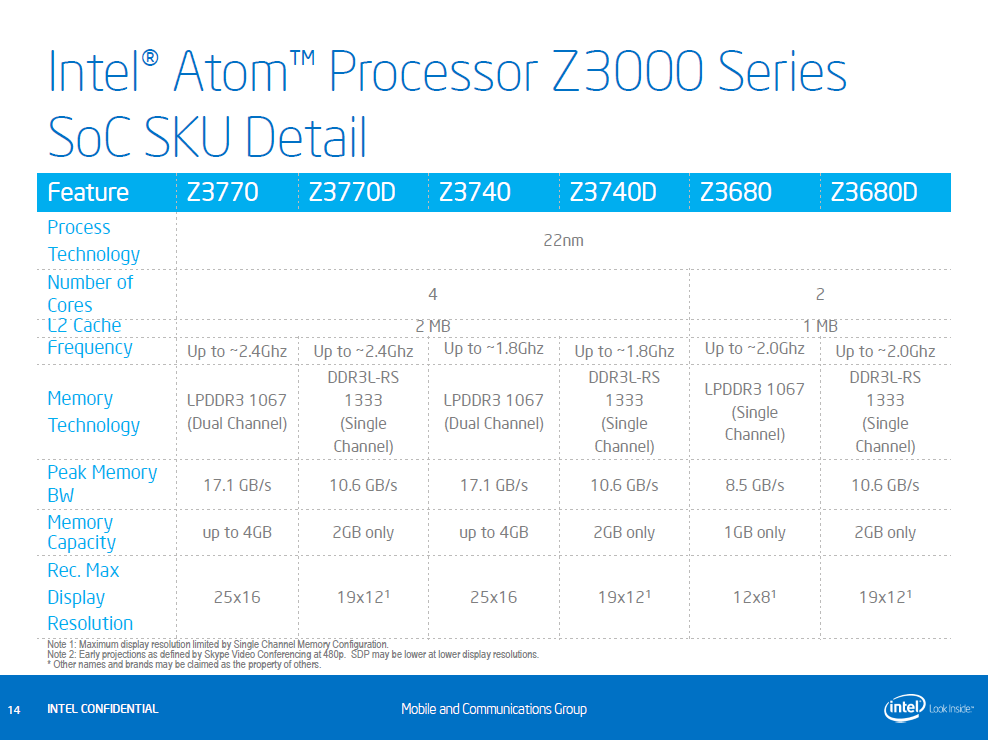
According to #5 slide of SPCS004 – Technology Insight: Intel® Platform for Tablets, Code Name Bay Trail-T by Shreekant (Ticky) Thakkar – Intel Fellow, Director, Platform Architecture, Mobile & Communications Group, Intel Corporation the 2-core Z3600 Series (Z3680, Z3680D) is targeting only the Android tablets:

4th Generation Intel® Atom™ Processor-Based Tablet Overview [Intel Developer Zone article, Sept 11, 2013]
Introducing the next generation Intel® Atom™ Processor
(Code named “Bay Trail”)Abstract
Intel has launched its latest Intel® Atom™ processor, code named “Bay Trail”. It is the first Intel Atom processor based on 22-nm technology. This article discusses the key features of the platform like extended battery life, Intel® Gen7 graphics architecture, advanced imaging and video, improved performance, security, and more.
Platform Overview
The new processor offers Intel level performance for apps, games, photos, videos, and web browsing in the new thinnest/lightest/coolest form factors. The Intel Atom processor is optimized for tablets and 2 in 1 devices. Tablets based on the new Intel Atom processor support multiple cameras with excellent camera quality and feature integrated image signal processing for both still and video image capture. The table below shows the “Bay Trail” improvements.
Comparison of Clover Trail vs Bay Trail features
Intel Atom processor feature highlights
First-ever 22-nm Intel Atom processor
The new first-ever, 22-nm Intel Atom processor is a quad-core system on chip (SOC) with 4 cores/4 threads. With the CPU, graphics, and memory in one package, this modular design provides the flexibility to package a high-performance processor and graphics solution for multiple form factors.
Enhanced battery life
The new processor offers active battery life of more than 10 hours and standby performance of approximately 30 days3.
Graphics and Media Performance
The latest Intel Atom processor includes a 7th generation Intel® GPU with burst technology to provide a stunning graphics and media experience. The new processor supports high resolution displays up to 2560X1600 @ 60HZ and supports Intel® Wireless (Intel® WiDi) technology through Miracast. Seamless video playback is supported by a high performance and low power hardware acceleration of media encode and decode. The table below compares the two processors’ graphics features.
Intel Burst Technology 2.0
Automatically allows processor cores to run faster than the base operating frequency if they’re operating below power, current, and temperature specification limits.
Graphics Feature ComparisonAdvanced Imaging and video
The new Intel Atom processor comes with an integrated image signal processor and supports excellent camera quality. It supports video capture at 1080p with full HD playback. Superior multi axis Document Image Solution (DIS) and image alignment extend High Dynamic Range (HDR) to moving devices hence removing the moving blur. Ghost removal is also extended from HDR to moving scenes.
Security Features
With people carrying their devices with them almost everywhere they go, they are more likely to lose their tablet or laptop. And even if they don’t lose them, devices are susceptible to the growing number of viruses and malware threats. Intel® Identity Protection Technology (Intel® IPT)4 can help businesses keep their critical information secure and protect against malware. Intel® IPT helps prevent unauthorized access to personal and business accounts by using hardware-based authentication.
New business-class tablets built with the Intel Atom processor Z3700 Series are specifically designed for the needs of business and the enterprise. Hardware-enhanced Intel® security technologies and support for software from McAfee offer robust security capabilities.
Intel® Wireless Display benefits on Intel Atom processor
Intel® WiDi enables content-protected HD streaming and interactive usages between tablets and TVs. It supports full 1080p video and low latency gaming, and is Miracast compliant Intel® WiDi can be used to link health indicators as well. A few of the capabilities of Miracast-enabled apps are:
– Share & Enjoy: use a big screen HDTV to enjoy and share media with family and friends
– Wireless: quickly and securely connect with standard Wi-Fi to a TV without cables
– Easy Set-up: simple user interface makes it easy to connect; no additional remote controls
– Portable: adapter is small and light, so solution can move with youResources for Developers
Below are links to some resources for programming on Windows 8 that can help you take advantage of the new Intel Atom processor features.
1: Optimize apps for touch: The latest devices with Intel Atom processors include touch screens. To learn more on how about UX/UI guidelines and how optimize app design for touch, see:
– Ultrabook™ Device and Tablet Windows* Touch Developer Guide
– Handling touch input in Windows* 8 Applications
2: Optimize apps with sensors: Intel Atom processor-based platforms come with several sensors: GPS, Compass, Gyroscope, Accelerometer, and Ambient Light. These sensor recommendations are aligned with the Microsoft standard for Windows 8. Use the Windows sensor APIs, and your code will run on all Ultrabook™ and tablet systems running Windows 8. For more information, see:
– Ultrabook™ and Tablet Windows* 8 Sensors Development Guide
– Detecting Ultrabook sensors on Windows 8
3: Optimize apps with Intel platform features: Take advantage of the security features such as Intel Anti-Theft Technology4 and Intel Identity Protection Technology with HD Graphics. Please refer to resources below for more information on each. For more information, see:
– Intel® Anti-Theft Technology
– Intel® Identity Protection Technology
4: Optimize for visible performance differentiation: Intel® Quick Sync Video encode and post-processing for media and visual intensive applications. For more information, see:
– Intel® Media SDK
– Intel® Advanced Vector Extensions
– Intel® 64 and IA-32 Architectures Software Developer Manuals
– Graphics Developers Guide
5: Optimize app performance with Intel® tools: Check out the Intel® Composer XE 2013 and Intel® VTune™ Amplifier XE 2013 for Windows. These suites provide compilers, Intel® Performance Primitives, and Intel® Threaded Building Blocks that help boost application performance. You can also optimize and future-proof media and graphics workloads on all IA platforms with the Intel® Graphics Performance Analyzers 2013 and Intel Media SDK. For more information, see:
– intel.com/software/products
– http://software.intel.com/en-us/windows-tool-suites/
– http://software.intel.com/en-us/vcsource/tools
1 Claims for Intel® Atom™ Processor Z3770 (up to 2.40GHz, 4T4C Silvermont, 2MB L2 Cache) are based on an internal Intel® Reference design tablet which is not available for purchase: 10” screen with 25×14 resolution, Intel Gen 7 HD Graphics, pre-production graphics driver, 2GB (2x1GB) LPDDR3-1067, 64GB eMMC solid state storage, 38.5 Whr battery. Based on TouchXPRT, WebXPRT and SYSmark* 2012 Lite compared to Intel Atom Processor Z2760. Individual results will vary. Commercial systems may be available after future Windows updates. Consult your system manufacturer for more details. Software and workloads used in performance tests may have been optimized for performance only on Intel microprocessors. You should consult other information and performance tests to assist you in fully evaluating your contemplated purchases, including the performance of that product when combined with other products. For more information go to http://www.intel.com/performance.
2 Claims for Intel® Atom™ Processor Z3770 (up to 2.40GHz, 4T4C Silvermont, 2MB L2 Cache) are based on an internal Intel® Reference design tablet which is not available for purchase: 10” screen with 25×14 resolution, Intel Gen 7 HD Graphics, pre-production graphics driver, 2GB (2x1GB) LPDDR3-1067, 64GB eMMC solid state storage, 38.5 Whr battery. Measured using 3DMark* Ice Storm—a 3D graphics benchmark that measures 3D gaming performance compared to Intel Atom Processor Z2760. Find out more at http://www.futuremark.com. Individual results will vary. Commercial systems may be available after future Windows updates. Consult your system manufacturer for more details. Software and workloads used in performance tests may have been optimized for performance only on Intel microprocessors. You should consult other information and performance tests to assist you in fully evaluating your contemplated purchases, including the performance of that product when combined with other products. For more information go tohttp://www.intel.com/performance.
3 Based on a 30W Hour battery on 19×10 resolution on 10.1” display. Higher resolution will require larger battery. Active use measured as 1080/30 fps local video playback. Battery life may differ based on SKU and SoC performance.
4 No computer system can provide absolute security. Requires an Intel® Identity Protection Technology-enabled system, including an enabled Intel® processor, enabled chipset, firmware, software, and Intel integrated graphics (in some cases) and participating website/service. Intel assumes no liability for lost or stolen data and/or systems or any resulting damages. For more information, visit http://ipt.intel.com/. Consult your system manufacturer and/or software vendor for more information.


Tablet Performance: Intel® Atom™ Processor Z3770 [Intel Infographic]

System Configurations – Performance
- Latest Generation: Intel® Atom™ Processor Z3770 (4T4C, up to 2.4 GHz, 2 MB L2 Cache) measured on Intel® Reference Design 1.4.1: Memory: 2 GB; OS: Microsoft* Windows* 8.1 RTM; Browser: Chrome* 29.0.1547.57; Graphics driver 10.18.10.3266; Display size: 10”; Display Resolution: 2560×1440; Battery size: 38.5 WHr; Storage: 64 GB
- Prior generation / existing tablet: Intel® Atom™ Processor Z2760 (4T2C, up to 1.8 GHz, 1 MB L2 Cache) measured on Acer* Iconia* W510: Memory: 2 GB; OS Microsoft* Windows* 8; Browser: Chrome* 29.0.1547.57; Graphics driver: 9.14.3.1082; Display size: 10.1”; Display Resolution: 1366×768; Battery size: 26.6 WHr; Storage: 64 GB
System Configurations – Battery life
- Intel® Atom™ Processor Z3770 (4T4C, up to 2.4 GHz, 2 MB L2 Cache) measured on Intel® Reference Design 1.4.1: Memory: 2 GB; OS: Microsoft* Windows* 8.1 RTM; Browser: Chrome* 29.0.1547.57; Graphics driver 10.18.10.3266; Display size: 10”; Display Resolution: 2560×1440; Battery size: 38.5 WHr; Storage: 64 GB
- Intel® Atom™ Processor Z3740 (4T4C, up to 1.86 GHz, 2 MB L2 Cache) measured on OEM pre-production system: Memory: 2 GB; OS: Microsoft* Windows* 8.1 RTM; Browser: Chrome* 29.0.1547.57; Graphics driver 10.18.10.3266; Display size: 10”; Display Resolution: 1366×768; Battery size: 31 WHr; Storage: 64 GB
Product and Performance Information
1. Based on TouchXPRT*, WebXPRT*, and SYSmark* 2012 Lite compared to Intel® Atom™ processor Z2560. Individual results will vary.
2. Measured by TouchXPRT* 2013 overall score and Convert video for sharing sub score. TouchXPRT 2013 is a benchmark for evaluating the capabilities of your Windows* 8 and Windows RT devices. TouchXPRT 2013 runs tests based on five user scenarios (beautify photo album, prepare photos for sharing, convert videos for sharing, export podcast to MP3, and create slideshow from photos) and produces results for each of the five test scenarios plus an overall score. Find out more at http://www.principledtechnologies.com/benchmarkxprt/touchxprt/.
3. Measured by WebXPRT* 2013. WebXPRT 2013 uses scenarios created to mirror the tasks you do every day to compare the performance of almost any Web-enabled device. It contains four HTML5- and JavaScript-based workloads: Photo Effects, Face Detect, Stocks Dashboard, and Offline Notes. Find out more at http://www.principledtechnologies.com/benchmarkxprt/webxprt/. File transfer workload measures time transferring a 423 MB playlist from a PC to a tablet.
4. Measured by SYSmark* 2012 Lite overall score and TabletMark*. SYSmark 2012 Lite is an application-based benchmark that reflects usage patterns of business users in the areas of office productivity, data/financial analysis, system management, and web development. SYSmark 2012 Lite features popular applications from each of their respective fields. Find out more at http://bapco.com/products/sysmark-2012-lite. TabletMark is targeted specifically for touch-enabled devices. With support for Windows* 8 and Windows 8 RT, TabletMark measures performance for two different usage scenarios: Web & Email and Photo & Video sharing. Find out more at http://bapco.com/products/tabletmark.
5. Measured using 3DMark* Ice Storm, a 3-D graphics benchmark that measures 3-D gaming performance. Find out more at http://www.futuremark.com.
6. Display resolution is an OEM feature selection. Consult your system manufacturer for more details.
7. Battery life is measured using a 1080p 10Mbps h.264 Elephants Dream video. Configuration: In the device settings, disable all radios except Wi-Fi. Disable Intel® Display Power Saving Technology (Intel® DPST), set up the system to ~200 nits screen brightness using a full screen white background, and re-enable Intel DPST. Turn OFF the adaptive brightness setting under Power Options in Control Panel. Set “Dim the display” to never on both battery and AC. Set “Put the computer to sleep” to never on both battery and AC. Wait 15 minutes after boot. Launch the default Windows* 8.1 Style UI video player, start the workload video in a loop, and disconnect the AC plug to start the test. Measure the time until battery is exhausted.
8. Requires an Intel® Wireless Display-enabled system, compatible adapter, and TV with 1080p and Blu-ray* or other protected content playback, a compatible adapter and media player supporting Intel® WiDi software, and graphics driver installed. Consult your tablet manufacturer. For more information, see http://www.intel.com/content/www/us/en/architecture-and-technology/intel-wireless-display.html.
9. Software and workloads used in performance tests may have been optimized for performance only on Intel microprocessors. Performance tests, such as SYSmark and MobileMark, are measured using specific computer systems, components, software, operations, and functions. Any change to any of those factors may cause the results to vary. You should consult other information and performance tests to assist you in fully evaluating your contemplated purchases, including the performance of that product when combined with other products. For more information, go to http://www.intel.com/performance.
ASUS Transformer Book T100 [the Official ASUS Facebook page, Sept 11, 2013]
The announcements just keep coming! Introducing the ASUS Transformer Book T100, the 2-in-1 Ultraportable laptop with a 10″ tablet powered by Intel’s latest Bay Trail-T quad-core processor. Available in the US starting October 18th from only $349.
ASUS Transformer Book T100 Press Event [ASUS North America YouTube channel, Sept 12, 2013]
In retrospective:
ASUS: We are the real transformers, not Microsoft [‘Experiencing the Cloud’, Oct 17, 2012]
Jerry Shen, CEO, ASUS (from IDF Day 2 Keynote Transcript):
The machine in my hand, T100, which features the incredible Bay Trail quad-core processor, and incredible 11 hours of battery life. With SD IPS display and stereo audios. And the detachable keyboard back features precisely keyboard and touchpad. It’s perfect for productivity. We are very proud of this machine, and very excited about the Bay Trail quad-core promise. It’s perfect, it’s a perfect two-in-one device in the market.
Dell shows off new Venue tablet during IDF 2013 Keynote [camwilmot YouTube channel, Sept 12, 2013]
Neil Hand, VP Product Marketing, Dell (from IDF Day 2 Keynote Transcript):
I am really excited to be here at the Bay Trail launch to talk about some of the new platforms that Dell can actually innovate from some of the Bay Trail technologies that Intel is bringing out.
And what I want to show you today is, firstly, one of our new Windows 8 eight-inch tablets we’ll be introducing very soon. This system is part of a new family that we’re introducing that are going to really innovate and drive new capabilities into very small new form factors.
The whole family will offer several key benefits.
Firstly, quality, quality Dell is renowned for, products that last a long time but have great performance on the screen and usability. Secondly, battery life. Anybody worry about range anxiety? Am I going to be able to turn it on and be able to use it? This really fixes that.
Security, making sure you’re connecting to a business, or you’re connecting to your home. That data is secure in transit and on the device.
And lastly, to make sure that there is connectivity, a range of 4G and LTE connectivity, so wherever you happen to be, you’ll be able to connect to the wells.
So great features in the products. But more importantly, we think, is actually being able to have fun and easy to-use products.
So with this introduction, I’m actually pleased to announce here at IDF that we’ll be branding our new family of tablets, Venue, the Dell Venue family. Venue means the place where things happen. And to us, this really is the place that things happen and becomes the center of the universe.
So you can actually carry your entire life with you, connect back, use Dell pocket clouds to be able to access content, be able to use your files and applications wherever you happen to be, really excited about them.
And October 2 in New York City, we’ll be announcing the entire range of products.
Intel’s biggest flop: at least 3-month delay in delivering the power management solution for its first tablet SoC
This is all despite the fact that Intel had already the following slides back in April on the IDF2012 in Beijing:


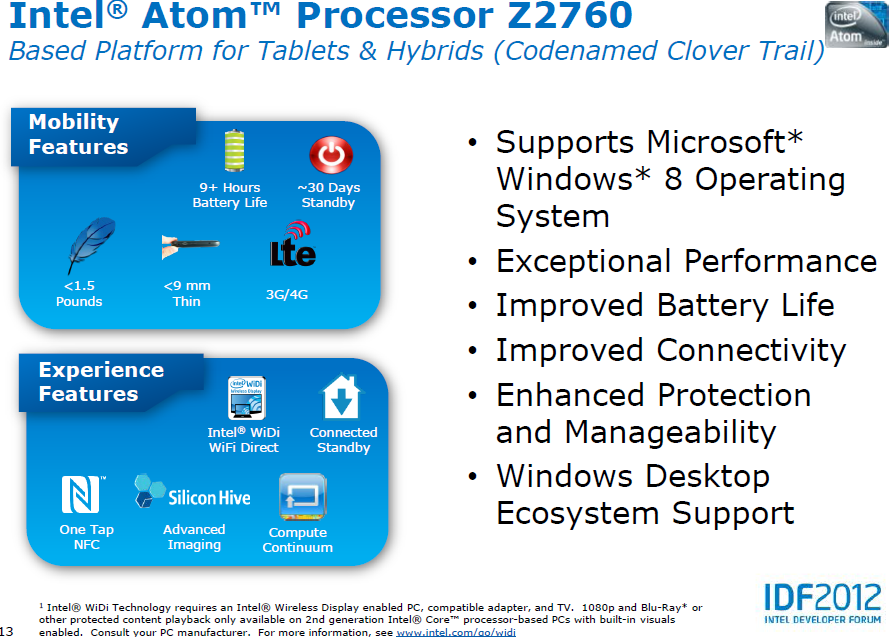
i.e. the slide on the left was explicitly stating these Mobility Features:
– 9+ Hours Battery Life
– ~30 Days Standby
as well as among the Experience Features:
– Connected Standby
The last two features are still (Dec 20) not met even for available Acer & Samsung devices!Source of the slides: Developing for Microsoft Windows 8 on Intel Architecture Based Tablets and Hybrids [Intel Developer Forum 2012 in Beijing, April 11, 2012]
In my Windows 8 gaining smartphone like “connected standby” capability [this same ‘Experiencing the Cloud’ blog, Nov 12, 2011] post I summarized the feature as:
New power state called “Connected Standby”
- Windows coalesces all the timer and network requests, turns the radio on periodically to satisfy them, then goes back to very low power consumption.
- But because app requests are getting satisfied they are up to date as soon as you press “ON”
Microsoft was clear as early as in 2011 in its Building a power-smart general-purpose Windows [Building Windows 8, Nov 9, 2011] post that:
For Windows 8, we’ve built a new device power framework that allows all devices to advertise their power management capabilities and integrate them with a special driver called the Power Engine Plug-in or PEP, designed for SoC systems. The PEP is provided by the silicon manufacturer and knows all of the SoC-specific power management requirements. This allows device drivers like our USB host controller or a keyboard driver to be built once, and still deliver optimal power management on all platforms from SoC-based PCs to datacenter servers.
We are hard at work with all of our ecosystem partners to deliver the low-power and long battery life technologies we all want in our Windows 8 PCs.
In Collaborating to deliver Windows RT PCs [Building Windows 8 blog, Aug 14, 2012] post Microsoft was even reporting that for ARM based Windows products:
The following chart shows some of the measurement ranges we are seeing as we test early production PCs for the connected standby and power scenarios.
The measurements are based on firmware still undergoing final optimizations, and the just released Windows RT RTM code, and will only improve as the PCs move towards manufacture. To provide context on the significance of the measurement, it is important to understand how the scenario was measured. In this case, the PC was playing back in full screen a local HD video at full resolution with a screen brightness of 200 nits. It was also configured for one email account using the Microsoft network. Finally, these numbers are also influenced by the different PC form factors themselves, which include both tablets and laptops, screen sizes that vary from 10.1” to 11.6”, and battery sizes spanning 25 Whr to 42 Whr.
Scenario
Early production range
HD Video Playback
8 hours to 13 hours of scenario run time
Connected Standby
320 hours to 409 hours of scenario run time
Then in NVIDIA Powers Amazing Windows 8 Experiences [NVIDIA press release, Oct 25, 2012] the number for connected standby on the Windows RT delivery was reported as:
Windows RT marks the first time that PCs have been able to take advantage of incredibly efficient ARM-based processors like Tegra 3, enabling two weeks of connected standby time. The majority of Windows RT devices at launch use NVIDIA Tegra 3, including the ASUS Vivo Tab RT, Lenovo IdeaPad Yoga 11 and Microsoft Surface RT.
Note: For Android tablets similar results are available, if any. The Chinese made V971 tablet from Onda with an AML8726-MX SoC (dual Cortex-A9 CPU cores at 1.5GHz and dual core Mali 400 GPU), for example, has a “longest standby time” (最长待机时) of 360 hours. So even relatively unknown SoC vendors, like in this case Amlogic, in cooperation with Google were able to meet similar kind of power efficiency results in connected standby terms as Microsoft was able to meet with its selected ARM SoC partners, NVIDIA, Qualcomm and Texas Instruments for the new Windows release.
Nevertheless almost a year later than the original public information about Windows 8 gaining smartphone like “connected standby” capability [this same ‘Experiencing the Cloud’ blog, Nov 12, 2011], in September 2012 Bloomberg reported that:
Intel Corp. (INTC) Chief Executive Officer Paul Otellini told employees in Taiwan that Microsoft Corp. (MSFT)’s Windows 8 operating system is being released before it’s fully ready, a person who attended the company event said.
Improvements still need to be made to the software, Otellini told employees at a company meeting in Taipei yesterday, said the person, who asked not to be identified because the meeting was private.
Then despite an Intel Statement in Response to Unsubstantiated News Reports [Sept 26, 2012] Bloomberg BusinessWeek soon reported that Intel Software Snag Said to Hamper Windows Apple Response [Oct 1, 2012]
Intel Corp. (INTC)’s delayed delivery of software that conserves computer battery life is holding up development of some tablets running the latest version of Microsoft Corp. (MSFT)’s Windows operating system, a person with knowledge of the matter said.
Microsoft hasn’t yet approved any tablets featuring an Intel processor code-named Clover Trail because the chipmaker hasn’t produced necessary power-management software, said the person, who asked not to be named since the process is private.
Clover Trail introduces two new power management states, called S0i1 and S0i3. S0i1 is described as an “active” sleep state that kicks in when the user stops using the device but hasn’t yet put it to sleep, while the S0i3 sleep state is called a “connected” sleep state [rather: Windows 8 connected standby] and this allows the device to enter a state where it consume microwatts of power but can still wake up in a matter of milliseconds.
These new sleep states mean that the standby battery life of Z2760-powered hardware can be as much as three weeks.
Here we are talking about the driver programming for two power management units, each with its own microcontroller, as shown on the Clover Trail block diagram below:

which is related to new ultra low power states introduced into this next-generation Atom SoC:

which look like under thermal imaging as follows: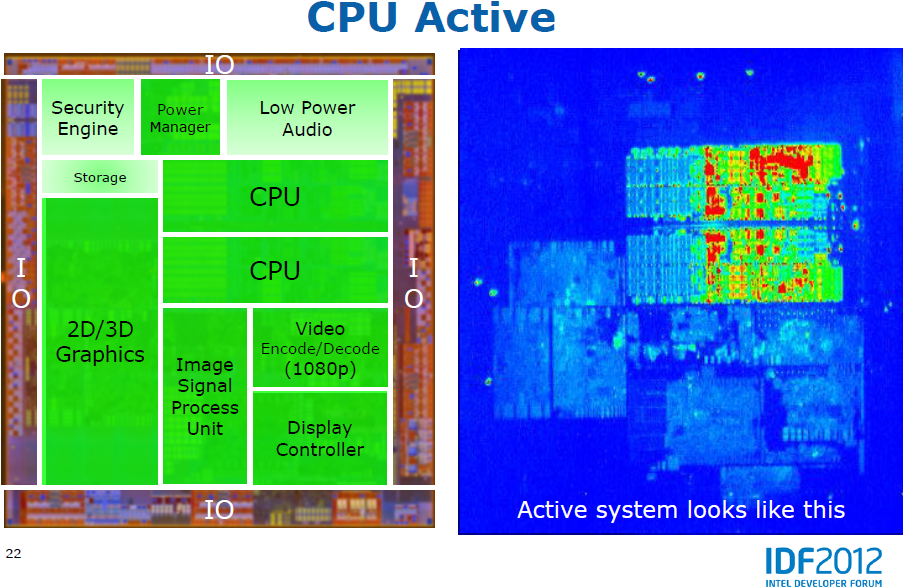


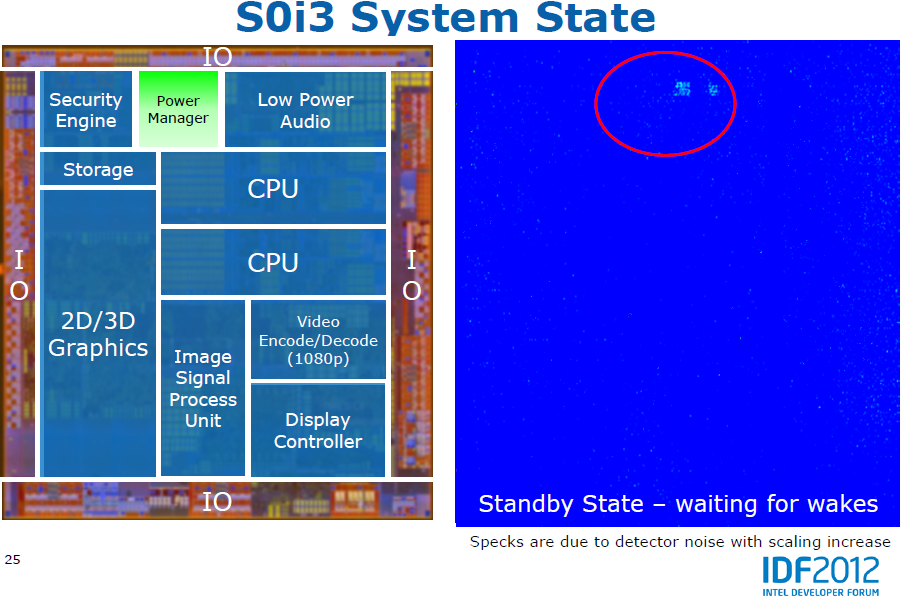
Source of the slides: Tablet Platforms with Next Generation Intel® Atom™ Processors and Microsoft* Windows* 8 [IDF2012 San Francisco, Sept 12, 2012] by Joseph Nielsen,Tablet Platform Marketing Engineer, Intel Corporation and Mark Ewert, Tablet SoC Si Architect, Intel Corporation.
From Microsoft point of view, in addition to the already referred post, there is a follow-up Improving power efficiency for applications [Building Windows 8, Feb 8, 2012] post as well which summarizes the Windows 8 SW part as:
Connected standby and sleep-capable machines
By the time Windows 8 is released, there will be a broader range of PCs available than ever before. Many of these will have similar power options to those running Windows 7 today. Besides turning off completely, they will be able to go into a “sleep” state, either on demand, or after a period of inactivity. During sleep, all system activity is completely suspended.
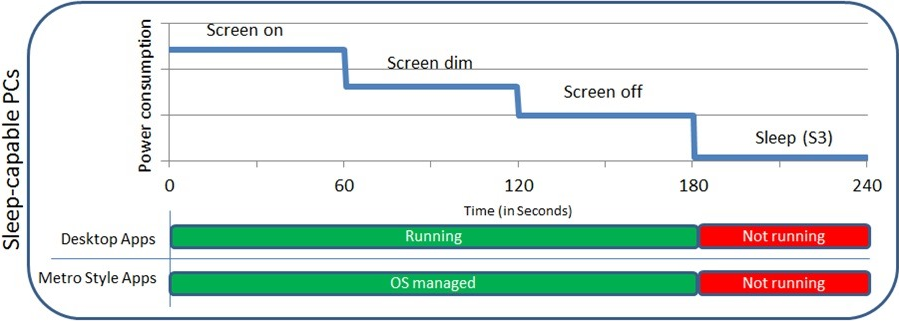
The chart above shows how, as the PC idles just prior to sleep, desktop apps continue to run in the same way as they have in prior versions of Windows, while Metro style apps run in the managed way I described earlier. When the PC goes to sleep, both desktop apps and Metro style apps are fully suspended. This is great for battery life—when the machine is asleep, it consumes very little power. It’s not as great for a data-freshness though, since when the machine is asleep, it isn’t getting live tile updates, downloading new mail, or getting ready to alert you with alarms or other notifications.
As Pat covered in his post [i.e. in Building a power-smart general-purpose Windows [Building Windows 8, Nov 9, 2011] referred earlier], we’ve enabled a new smartphone-like power state for a new class of PCs that rarely get turned off completely. Typically based on “System on Chip” (SoC) architectures, these PCs are interesting because instead of turning off during periods of inactivity they go into a very low power state while still running. This new state is referred to as “connected standby.” This enables some great connected scenarios, such as always having email up-to-date, and being able to receive instant messages or phone calls, while still delivering amazing battery life. The chart below shows behavior for both desktop and Metro style apps during connected standby. For this to really work effectively though, we had to consider both Metro style apps (which, as you saw earlier, we can very effectively ensure are conservative with system resources), as well as desktop applications, which presented a tougher challenge because they have been designed over the years to expect either full access to system resources (when running in the fore or background) or no access (when the PC is asleep.)

To this end, we have added a new component to Windows 8 called the “Desktop Activity Moderator,” which only runs on these new connected standby-capable platforms. This component is designed to help reduce the resource utilization of desktop apps when the device goes into connected standby. If we allowed apps to continue running unchecked in this low-power mode, the PC would run down the battery more quickly. Instead, we suspend desktop applications, stopping their resource use and maximizing battery life. From the applications’ perspective, it will appear as if the PC has simply been put to sleep. When the PC is woken from connected standby, the app will resume as if the PC had been woken from a sleep state.
However, there are actually several components on the system that are required for connected standby, which we cannot suspend. These include drivers, some inbox and 3rd party services, and of course, the Metro style apps that use the background features mentioned earlier. Many of these provide functionality such as responding to user input when you return to your device, or providing network functionality. We enable these to run in connected standby after careful evaluation to ensure they do not have a significant impact on battery life. In addition, there are a set of processes that need to run in response to activity on the system. These processes are throttled to only run for short periods of time until a background activity is initiated, at which point they are allowed to run unimpeded. A great example of this is an antivirus product, which is often scanning in response to activity on the system. When there is background activity occurring such as receiving an incoming email via the background affordances, antivirus can run unimpeded during this time. But during the majority of the time when incoming network activity is not occurring, there is very minimal activity and therefore these components will be throttled to minimize their impact on battery life.
More about that see:
– Windows 8: Connected Standby [Jerry Nixon, Microsoft Developer Evangelist, April 17, 2012]
– Introduction to Connected Standby [Microsoft whitepaper, Oct 5, 2012] from which it is worth to include here the following definition of the value as measured by Microsoft:
Systems that support Connected Standby must meet the Connected Standby Windows Hardware Certification Kit (HCK) requirement for battery life. This requirement specifies that all Connected Standby systems must drain less than 5% of system battery capacity over a 16-hour idle period in the default shipping configuration. A certification test for this can be found in the Windows Hardware Certification Kit (HCK).
which means a 320 hours connected standby time as a minimum to pass the certification test.
So Microsoft did its job as well demonstrated by ARM based Windows RT tablets, such the Microsoft Surface. This cannot be said about Intel even two months after the Windows 8 launch.
It is also notable for this whole story that the ultra low power consumption to be achieved by the above hardware+driver software solution was indicated as one of the most important feature of Intel® Atom™ Processor Z2760: Tablets that Move as Fast as We Do [channelintel YouTube channel, Sept 27, 2012], that is right, back in September when the Z2760 platform was officially announced by Intel:
Now we are close to Christmas and Dell and HP hit by Windows 8 tablet delays; Clover Trail could be the problem [Dec 19, 2012]
The first Intel Atom and Clover Trail Windows 8 tablets from Dell and HP were slated to launch in late 2012, but now look set to arrive as late as the end of January 2013.
News broke as Dell pushed back the shipping date of its Latitude 10 Windows 8 Pro tablet more than a month to January 22 with HP in turn now expecting its Envy x2 tablet to reach customers by December 21 at the latest.
Dell announced the delay by tweaking the availability date on its website but rumors had been flying around the availability beforehand, with a Dell customer telling InformationWeek that he had been informed the Latitude 10 was delayed.
HP, meanwhile, informed tech website CNET that its convertible Envy x2 Windows 8 Pro tablet, initially set to launch on November 14, will reach customers in time for Christmas.
“Customers can expect to receive an Envy x2 in January, if they order today,” said a customer representative, in an email to the source.
“Customers who ordered their units on Dec. 3 or prior are expected to receive their PC by Dec. 21 at the latest. HP expects additional units to ship in January.”
The exact cause of the problem is unclear, although the InformationWeek report suggests that PC makers are struggling to build Clover Trail drivers stable enough to pass Microsoft’s Windows Hardware Quality Labs testing (WHQL). Devices must pass this certification before being offered for sale.
Talking of Intel-powered Windows 8 tablets and the status of Lenovo’s own ThinkPad 2 also looks unclear.
The tablet has twice been delayed from its original launch date of October 26 but did pass FCC two weeks ago. The slate is listed on the Microsoft Store but its availability is not listed.
TabTimes has reached out to Lenovo for a comment on the matter but is yet to hear back from the Taiwanese PC maker.
Intel-based Windows 8 tablets see spotty availability [CNET, Dec 18, 2012]
Overall availability of Intel-based Windows 8 tablets and hybrids is spotty. While products based on the Intel Z2760 from Samsung (ATIV Smart PC 500T) and Acer (W510) are already available, others from Lenovo, Dell, and HP aren’t.
They are available indeed (note that those tablets corresponf to Intel’s refernce design):
http://www.provantage.com/acer-nt-l0kaa-001~AACEN1KA.htm
Acer Iconia W510-1422 vs. SamsungATIV Smart PC 500T [CE Arena, Nov 29, 2012]
The Acer Iconia W510-1422 and the Samsung ATIV Smart PC-500T are two of the more serious contenders of ASUS’s Transformer Pad series. They both feature the same processing unit, the brand new Intel® Atom™ Z2760, which is running on the Clover Trail platform – specially designed for mobile devices running Windows 8 on a 32-bit architecture. Thus, performance wise, there are literally no differences between the two tablets: same RAM size, same storage space, same graphics unit, etc. However, minor fault lines start to appear when we take into consideration screen size, battery life and portability. That’s all there is between the two gadgets. Also, they essentially cost the same: $750 at the time of this review.
http://www.excaliberpc.com/621516/samsung-ativ-smart-pc-500t.html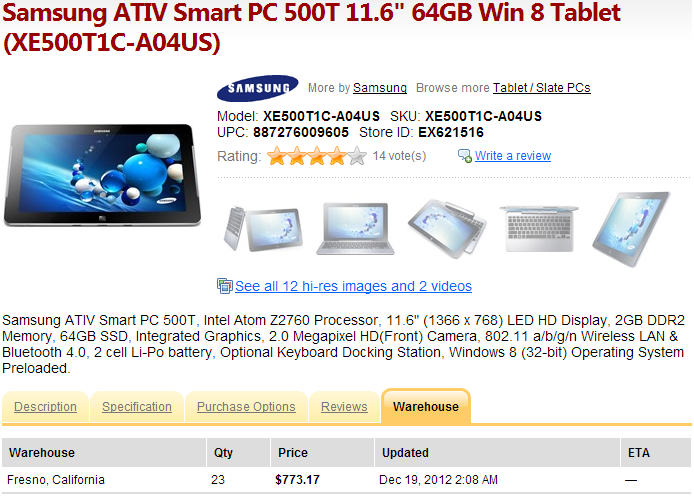
However, in terms of the mobility and experience features mentioned in the introduction even these devices are not ready for the market! Here are quotes supporting that statement for the Samsung device* (as this was under more scrutiny because of higher expectations):
* for the other available Z2760 based device see: Acer Iconia W510 Win 8 Tablet gets 7/10 and 16hrs in Full Test [UMPCPortal, Dec 6, 2012]
Battery Life
[from here, but a lot of other sites contain this initial specification from Samsung, curiously now removed from the Samsung site, but originally was there according to this 3d party webcache]
Browsing (8Hrs), Video Playback (11Hr), Charging Time (320Min), Standby Time (600min [i.e. 10 hours]) [vs. Intel’s target of ~30 Days Standby]
BATTERY
[From Microsoft Store, note that for Acer Iconia W510 there only “up to 9 hours”]
| 2-cell lithium-polymer (up to 14.5 hours)*Samsung Ativ Smart PC 500T: Don’t Expect Any Miracles [Gizmodo UK, Nov 15, 2012]
The battery performance varied. When using it strictly as an RT tablet, the 500T was pretty efficient, making it through a whole day. But when using a bunch of browser tabs and apps in desktop mode, it drained a lot faster.
Samsung ATIV Smart PC 500T [Review] [CNET, Dec 4, 2012]
Pros
Great battery life! 8-10 hours easily,
Full sized USB port, mini HDMI port, micro SD memory port
Great screen, S pen digitizer, stereo speaker placed well, and sounds great, Windows 8 very responsive, Very peppy dual core Atom processor, yes peppy!.Cons
Once in a while when coming out of sleep mode I have to refresh the wireless connection since it stalls with a limited connection. Windows network diagnostic handles that as well. Screens a finger print magnet, but aren’t all touch screens?
Hands-on Review: Samsung ATIV Smart PC 500T [Marketnews Canada, Dec 17, 2012]
Battery life is rated at 10 hours. In practice, it seemed very good. A single charge got me through most of my testing, and didn’t dissipate over many hours of idle ‘sleep’ time.
…
One other oddity: the 500T doesn’t come on instantly, like an Android or iOS tablet. Instead, there’s about a ten-second pause while Windows 8 resumes from Sleep [vs. the ms level latency from connected standby given in September by Intel, as could have seen above].
Customer Reviews for Samsung ATIV Smart PC 500T [Samsung US]
Nov 19, 2012 … Cons: Poor quality, Did not meet expectations, dock is unusable as it constantly disconnects, glitchy drivers = frozen pc = reboot often
Nov 29, 2012:
I was very excited to finally be able to buy this x86 Win8 tablet.
Unfortunately, the tablet has a WiFi problem that occurs after waking from sleep or a power on. Basically, it can’t connect to WiFi for about 2-3 minutes. Usually, you have to turn on/off AirPlane mode to get WiFi to work again.
For 2 weeks, I was installing every Samsung update but the issue was never fixed.
Other users have reported problems with the keyboard dock (I only had the tablet).
So, unless you want to go through a lot of frustration, wait for Samsung to resolve these issues before purchasing.
Dec 3, 2012 … Problems:
When I press the sleep button the tablet decides to automatically turn its self off completely. So basically I have to save everything before I turn the screen off expecting to have to turn it on from cold again. The only reason I’m not returning it because of this is how fast it boots up, but if its not fixed by the time my return date gets close it will go back.Samsung ATIV Smart PC 500T [Softpanorama, Dec 15, 2012]
The tablet is way too fresh and, unless you are a beta addict, it might be beneficial to wait a couple of months and give time to Samsung [rather Intel] to fix the bugs. So buying it in the second quarter of 2013 is better then in 2012. Currently if you want just the Samsung tablet, go for it. But avoid the tablet + keyboard combo till Q2 of 2013.
CONTINUED: Intel-based Windows 8 tablets see spotty availability [CNET, Dec 18, 2012]
Intel-based Windows 8 tablets and hybrids from the world’s two largest PC vendors, Lenovo and Hewlett-Packard, have been experiencing delays.
A tablet from Hewlett-Packard running the full version of Windows 8 is expected to finally ship to customers, though a full Win 8 tablet doesn’t appear to be imminent from Lenovo.
HP’s Envy x2 laptop-tablet hybrid “convertible” was originally slated for November 14 availability but is now expected to reach customers soon, HP said.
“Customers can expect to receive an Envy x2…in January, if they order today. Customers who ordered their units on Dec. 3 or prior are expected to receive their PC by Dec. 21 at the latest,” an HP representative told CNET via e-mail.
“HP expects additional units to ship in January,” the representative added.
The Envy x2 uses a new power-efficient dual-core “Clover Trail” Z2760 system-on-a-chip from Intel that can run the full 32-bit Windows 8. This sets it apart from Windows RT devices, such as Microsoft’s Surface RT tablet, that run a limited version of Windows 8 and are not compatible with older Windows 7 software.
Overall availability of Intel-based Windows 8 tablets and hybrids is spotty. While products based on the Intel Z2760 from Samsung (ATIV Smart PC 500T) and Acer (W510) are already available, others from Lenovo, Dell, and HP aren’t.
HP, for instance, is also prepping an ElitePad tablet using the Intel Z2760 and the full 32-bit Windows 8, but that won’t be available until late January.
And Lenovo’s ThinkPad 2 Tablet — also based on the Intel Z2760 — has been delayed since October.
A Lenovo representative told CNET in November that the ThinkPad 2 Tablet would ship to consumers during the first week of December. But that doesn’t appear to be happening. For instance, the Microsoft Store’s ThinkPad 2 Tablet page gives no indication of availability.
And calls to Microsoft Store representatives today yielded two responses. One rep said the unit wouldn’t ship until January 31 and another said there is no shipment date at all.
As of this afternoon PT, Lenovo had not responded to a request to clarify the shipment date for the ThinkPad 2 Tablet.
Dell’s Latitude 10, also built around the Intel Z2760, lists an “estimated ship date” of January 21.
Dell, HP Windows 8 ‘Atom’ Tablets Delayed Until 2013 [InformationWeek, Dec 19, 2012]
Dell Latitude 10 among Windows 8 systems not yet available, as tablet makers struggle with drivers for energy-efficient Intel Clover Trail chip.
Dell and other vendors have pushed back until January the launch of Windows 8 tablets that use a new, energy-efficient Intel chip that was supposed to put Windows devices on an even footing with the iPad and Android tablets in terms of performance and battery life, but which is apparently causing big headaches for system builders.
Dell’s Latitude 10, which runs Intel’s Atom Z2760, or “Clover Trail” chip, was, as of early Wednesday, not available for shipping until Jan. 22nd, according to the company’s Web site. Only a month ago, Dell had been advertising a pre-Christmas ship date of Dec. 12. The tablet starts at $649, features Windows 8 Pro, and is aimed at business users.
A Dell customer who contacted InformationWeek said company representatives told him last week that the Latitude 10 is delayed. The customer, who asked not to be identified, originally placed his order on Nov. 28, paid for two-day expedited shipping, and was given a mid-December delivery date. Now, Dell is telling him the system won’t be available until January.
“Dell Latitude 10 is not officially launched. As soon as it will be launched it will be sent to you,” a Dell rep told the customer via live chat on Dec. 11, according to a transcript of the session. Dell’s Web site is continuing to accept orders for the Latitude 10, and does not indicate it is available only as a preorder. A Dell spokesman did not respond to a request for comment.
Dell isn’t the only vendor having trouble with Windows 8 systems built around Intel’s Clover Trail chip. Hewlett-Packard’s site shows that its Envy x2 convertible is not available until Jan. 8. The company originally said it would ship in November, within weeks of Windows 8’s launch on Oct. 26.
ASUS and Lenovo have not announced specific launch dates for their Clover Trail systems, the VivoTab Smart and ThinkPad Tablet 2, respectively. Of the top 5 PC makers, only Acer’s W510 Clover Trail tablet is available for immediate purchase, but it can only be had in limited quantities from Amazon and Microsoft’s online store.
Intel designed Clover Trail to take full advantage of Windows 8’s capabilities, including a key feature called Connected Standby. Connected Standby is supposed to give tablet users a smartphone-like experience by ensuring that their devices are always up to date with new e-mails, messages and other data, even when their systems are powered down. Clover Trail also promises all-day battery life.
But PC makers are having trouble building Clover Trail drivers that are stable enough to pass Microsoft’s Windows Hardware Quality Labs (WHQL) testing, sources say. Under Microsoft’s licensing terms, Windows systems must receive WHQL certification before they can be offered for sale. Intel has not responded to repeated inquiries about the situation.
Cindy Shaw, an analyst with research firm DISCERN, said the delay could hurt PC makers that specialize in enterprise sales. “HP and Dell are conceding they’ve given up on the consumer, so missing the holiday season is not that big of a deal. They’re not missing that magical time of the year,” said Shaw. “But the longer it takes for businesses to get their hands on evaluation units, the longer it’s going to take to translate into enterprise sales.”
Most PC makers currently offer Windows 8 systems, such as the Dell XPS 12, that use Intel’s older Core architecture instead of Clover Trail. Microsoft’s Surface RT tablet also runs an Intel Core chip. Core packs more power than Clover Trail, but does not support Connected Standby and consumes batteries more quickly. A Microsoft spokesperson said the company could not immediately offer a comment.
Windows 8 gaining smartphone like “connected standby” capability
New power state called “Connected Standby”
- Windows coalesces all the timer and network requests, turns the radio on periodically to satisfy them, then goes back to very low power consumption.
- But because app requests are getting satisfied they are up to date as soon as you press “ON”
8 ways Windows 8 benefits the retail industry [MSDN Blogs, Oct 5, 2011]
…
7. Energy friendly – The tradeoff between instant-on for customer service and the constant consumption of power has been minimized. Now retail environments with any number of client machines can use the Windows 8 “Connected Standby” mode to ensure that devices are available for use instantly while using the least amount of power possible. This feature will even allow enterprise software updates to machines that are in a low power state.
…
Dr. Paul Jacobs, CEO of Qualcomm on the Wireless Future [Global Technology Leadership Conference at the University of California Berkeley’s College of Engineering, Nov 18, 2011]
[24:10] Up to this point – I would say – tablets predominantly have been an iPad story. The Android tablets are out there. They haven’t been quite as successfull. But I think that will change, not just with the Android but also with Microsoft working on having Windows. So they are porting big Windows onto mobile phone chips.
And the interesting thing about that is now your Windows computer will act much more like a smartphone. So Microsoft spent a lot of effort implementing a feature that’s called ‘Connected Standby’ which means that when your PC goes to sleep it will go to sleep like a smartphone – meaning that power consumption goes down to very low and every so often it will blip up, collect your e-mail and your Facebook notifications, and whatever else it is that needs to update, and it goes back to sleep at very, very low power. And when you touch the screen, boom it comes on right away.
And that is going to be interesting because now you have a tablet with a full computing environment, on a full web, all the stuff that you would expect. So I think that’s going to be a very, very interesting thing. I’ve seen the form factors. There are extremely, extremely aggressive form factors that are going to be coming out when these Windows 8 launches happen. [25:30]
Steven Sinofsky, Julie Larson-Green, Antoine Leblond, Michael Angiulo, and Chris Jones: BUILD Keynote – Day 1 [Microsoft transcript for the press, Sept 13, 2011]
…
MIKE ANGIULO: ARM and SOC hardware combined. This is a Qualcomm ARM reference design, this is the one we showed at Computex, this is an 8660 Snapdragon. It’s hooked up to this debugging system here that’s measuring power really accurately. And what’s going on on this monitor is you can actually see the amount of power being used. It’s very low. The system is not off, it’s in a new power state called “connected standby” which is a really low-power idle state. You can see these little spikes that show up here. What’s going on is Windows is coalescing all of the timer requests and all of the network requests, turning the radio on briefly, updating the apps, and then shutting the radio back down. So, when I turn the system on, it turns on with one click — or two depending on if you have demo gremlins.
The system is on. You can see the power jumps right up. It’s an instant-on type scenariobecause it was never off. I can interact with the system here and you can see the power kind of changes as we’re rendering and we’re drawing on the screen. And then when I go to turn it off, I click it, immediately the power drops down. What’s going on right there is the apps get a chance to pack up their data and then it’s shutting down and it immediately drops back to idle. That’s the kind of system — yeah. (Applause.)
STEVEN SINOFSKY: I mean, when we talk about fundamental performance, that’s what we’re talking about. We’re actually taking the things that you’d experience like in phones, and we’re bringing that to the PC architecture at the base kernel level.
MIKE ANGIULO: And it’s one of the things that all of these SOC systems will be able to do. If you’re good to the understanding connected standby session, you’ll see the same power demo running on the Nvidia Tegra 3, we showed — it was nine months ago at CES was the first time we showed ARM booting at all. And all it could do is just boot Windows 8 up to the desktop in one touch.
…
Understanding Connected Standby [Microsoft Channel 9 video, Sept 14, 2011]
Your PC in a year: how Windows 8 will change hardware [TechRadar, Nov 16, 2011]
…
Connected Standby
Microsoft uses words like ‘fresh’ and ‘alive’ to describe the future of the PC, especially when it’s talking about the Connected Standby mode that PCs using both ARM and low-power System On Chip (SoC) x86 processors will have. “It’s about the application experience,” says principal program manager Pat Stemen; “You want an app that’s fresh, that has connected content.
I don’t want to wait for it to download and I want it to show that fresh information when I turn on.” In fact the official name of PCs that support this is Always On Always Connected.
It’s also about consistent, consistently long battery life, he says; no more guessing how long the battery will last – you’ll know how much power the PC uses when it’s on and when it’s in Connected Standby, so you can accurately predict battery life.
Connected Standby is an “ultra-low power idle mode” implemented as a new level 5 ACPI modein the processor and it needs new hardware throughout the PC as well.
You need low-power memory (the kind of DRAM that’s been going into servers to save money because it doesn’t generate as much heat), low-power buses and devices and flash storagerather than a hard drive; that’s for speed as well as power saving, because the system can’t predict when the drive will be in use.
LIKE A PHONE:
Connected Standby stops using power much faster than today’s PCsThe Wi-Fi in Connected Standby PCs has to be much smarterbecause it’s on all the time, checking whether any of the network traffic matches the patterns of notifications that can wake the PC up – incoming VOIP calls or SMS and instant messages, for example.
That turns the whole PC back on so you can answer the call. Otherwise, the Wi-Fi connection periodically wakes itself up and collects data for the Metro apps that are on the Start screen.
That means putting a small processor in the Wi-Fi chipset and supporting NDIS 6.3, which lets the chipset do in hardware some of the network processing the PC would usually do in software; it also makes networking faster when the PC is on as well.
With Wi-Fi so important for Connected Standbyit has to get connected quickly; expect to get onto a hotspot or access point in about a second rather than the 12 seconds common now, even if you turn a PC off at work and turn it back on at home.
Tablets and a lot of notebooks will have built-in 3G next year. That’s going to use less power because new 3G connections will let Windows tell them when to turn off the transmitting radio because the PC is idle and just listen for incoming traffic, so the 3G card can go into ‘fast dormancy’ rather than keeping the radio on just in case (because turning the radio off saves power but turning it off and on again can use more power than leaving it on).
LOW-POWER 3G:
Knowing when to turn the radio off will stop 3G eating your batteryUSB 3 will be on all these PCs too, not just for the faster speeds but because “it works better at low power,” according to Dennis Flanagan, who runs the team implementing Connected Standby for Windows 8. “It uses much less steady-state power when there’s nothing being used on the bus.”
But the two main ways of connecting peripherals will be peer-to-peer Wi-Fi, using the Wi-Fi Direct standard which lets your notebook get online and connect to a Wi-Fi-enabled device at the same time, and the lower-power Bluetooth LE.
Flanagan calls that “low-power wireless connectivity for longer battery life and for a new class of low power devices that can last two or four years on a couple of batteries”. Having NFC that’s cheap enough to put into all PCs helps here as well, because you’ll be able to tap Wi-Fi and Bluetooth devices against your PC to pair them instead of following on-screen prompts.
Smarter than Smart Connect
Intel’s Smart Connect mode, coming in second-generation ultrabooks and netbooks with Cedar Trail Atom CPUs next year, also aims to keep new PCs up to date when they’re in standby but it’s not as sophisticated as Connected Standby– and doesn’t need as much new hardware to work. “It keeps your PC always updated,” Intel’s John Wallace told us.
“When the device is in a sleep state it wakes up and pings network so it can download email and update content. Windows 8 is push, this is pull; we’re waking up periodically and pulling content.” The problem with that is the PC will wake up and connect even if there’s no new content to download.
“We’ll have true connected standby on next generation hardware that gets push notifications and wakes up,” Wallace predicted; that could be the Haswell chip that will be used in third-generation ultrabooks, if it’s delivered as a SoC.
With ACPI 5 and Connected Standby, Wallace says Windows 8 PCs will have “weeks of battery life” in standby. In 16 hours in Connected Standby a Windows 8 PC will use up no more than 5% of battery life; if that sounds an odd amount of time to measure, it’s what you get if you put your PC into Connected Standby at 5pm and pick it up again at 9am next morning.
Initially Connected Standby and Smart Connection are only aimed at tablets and notebooks. “Over time, Connected Standby may also scale to all-in-on systems and desktop PCs as well, although we’re not really focused on that right now,” Stemen explained.
Rapid Start and fast boot
The improvements we’ll see in all PCs next year are include faster boot and better security. Again, the Microsoft approach to starting up faster is more aggressive than Intel’s Rapid Start, which aims at taking less than seven seconds to resume from hibernation; PCs with Connected Standby will wake in less than 300ms and all PCs with UEFI BIOS will boot in six seconds(and Windows 8 will actively warn you of any software you install that slows that down).
That includes checking that no malware has tampered with Windows and turning on your anti-virus software before you bootto avoid malware lurking on any USB sticks you have plugged in.
AV SOONER:
UEFI means PCs can start checking for viruses before they start Windows


Building a power-smart general-purpose Windows [Pat Stemen, program manager, Windows 8 Kernel team, MSDN Blogs: Building Windows 8, Nov 8, 2011]
…
Our goals
We have 3 goals in mind when engineering Windows 8 power management:
- Let the hardware shine. We built Windows 8 such that the power efficiency of the hardware platform shines through, regardless of whether the system is a SoC-based Windows tablet or an SLI-equipped gaming PC. We designed our power management interfaces in a consistent, standardized way across all platforms. This allows our hardware partners and application developers to focus on their unique innovations and experiences instead of the differences in platform hardware and power management.
- Continue to deliver great battery life. Windows 7 delivered a significant reduction in power consumption and increase in energy efficiency, particularly mobile PC battery life. (In fact, you can read how we thought about it in this e7 blog post.) In Windows 8, we want to maintain that same level of efficiency on existing PCs even as we re-imagine the rest of Windows.
- Enable the smartphone power model. One of the coolest things about the System-on-Chip (SoC) platforms you’ve seen us talk about at CES and //BUILD/ is their capability to quickly enter very low-power idle states. We want to leverage that ultra-low idle power to bring the constant connectivity and instant-on features of the smartphone power model to capable Windows 8 PCs.
…
How software influences power consumption
Software can influence power consumption by consuming resources—CPU, disk, memory, etc.–as each of those resources has a power cost associated. Software also influences power consumption through the OS and driver software responsible for managing hardware power states.
Windows 8 features 3 key innovationsto improve how software influences power consumption—the Metro style app model, idle hygiene, and a new runtime device power management framework. We will give you a brief overview of how these innovations improve power consumption in this blog post.
The Metro style application model
Most of us have experienced the influence of software on power consumption first-hand. It might be that you have an app on your phone that goes through battery quickly or you’ve heard the fan turn on in your laptop when playing a game or computing a spreadsheet. These are all examples of applications directly consuming CPU, GPU, network time, disk and/or memory.
One of the new power management innovations in Windows 8 isn’t a power management infrastructure feature; it is the Metro style application model itself. The Metro style application model is designed from the beginning to be power-friendly. The power management benefit is that the model makes it easy for developers to ensure their application is running only at the right time—applications in the background are suspended such that they do not consume resources and power when not in use.
Of course, we recognize that background activity is a critical component of apps that are always connected and responsive. The Metro style application model and the underlying WinRT support background activity through a new set of capabilities called background tasks. (See this Introduction to Background Tasks for more details.) Background tasks make it easy to perform background activity in a power-friendly fashion. They also enable developers to continue to deliver responsiveness and “freshness” in their applications, but the mechanisms are different than the existing Win32 model because of the desire for a fast-and-fluid interface and the other key attributes of Metro style apps (see 8 traits of great Metro style apps).
We’ve engineered background tasks and the overall Metro style application model to enable a new level of app responsiveness, while at the same time considering overall system attributes including power and memory consumption.
Task Manager showing suspended Metro style appsIdle hygiene
Software can have dramatic influence on power consumption even without consuming a lot of resources through intermittent idle activity. We refer to improvements to idle activity as idle hygiene.
Most PC platforms feature processor and chipset idle states that allow the hardware platform to stop the clock or completely turn off power to parts of the silicon when they are unused. These idle states are absolutely critical to enabling long battery life, but they require a minimal residency duration—that is, you have to be idle for long enough to make the transition in and out of the idle state worthwhile in terms of power used. This is because some power is consumed on the way into and out of the idle state. Software most effectively uses these idle states when there are as few exits from the idle state as possible, and the duration of the idle state is as long as possible.
We track the idle efficiency of Windows 8 using built-in ETW Tracing, some additions to the Windows Performance Analyzer, and a basic histogram. Below, you can see the difference in idle durations between Windows 7 and Windows 8. When the screen is on, we’ve already moved the bar significantly from a maximum idle duration of 15.6ms in Windows 7 to 35% of our durations longer than 100ms in Windows 8! With the screen off and during Connected Standby, our idle durations are even longer, currently in the tens of seconds.
Runtime device power management
PCs attain their longest battery life when all devices, including the processor, storage, and peripheral devices enter low-power modes. Almost every device in the modern PC has some kind of power management technology, and runtime device power managementdetermines how we use those technologies seamlessly without impact to the user experience. A really good example of runtime device power management is dimming the automatic display after a timeout in Windows 7.
Just to underscore how important device power management is, we have seen many systems where not enabling a single device’s power management features can easily reduce total battery life by up to 25%! (It’s worth noting here that disabling a device in Device Manager is almost equally bad—most devices are initialized by firmware at their highest power modes and require a device driver to get them to a more nominal power consumption.) You can diagnose some device power management problems using the built-in powercfg.exeutility in Windows 7 with the /ENERGY parameter. The output of /ENERGY is an HTML file that gives you a view of which devices and software are potentially running in a power-consuming state. Of course, using the factory image for your PC that came loaded with OEM and vendor-supplied drivers is almost always the best way to ensure the devices in your PC are well-behaved for power management.
Efficient power management of devices is performed by the driver for the device, in conjunction with the Windows kernel power manager and platform firmware. The power manager makes it easy for the drivers of these devices to implement their power management routines and coordinate any power state transitions with other devices on the platform.
For Windows 8, we’ve built a new device power framework that allows all devices to advertise their power management capabilities and integrate them with a special driver called the Power Engine Plug-in or PEP, designed for SoC systems. The PEP is provided by the silicon manufacturer and knows all of the SoC-specific power management requirements. This allows device drivers like our USB host controller or a keyboard driver to be built once, and still deliver optimal power management on all platforms from SoC-based PCs to datacenter servers.
We are hard at work with all of our ecosystem partners to deliver the low-power and long battery life technologies we all want in our Windows 8 PCs.


 Experiencing the Cloud
